If you’re here, there might be three reasons: You are tasked with bringing in more leads through your demand gen campaigns, but are unsure which tools to use.
- You have tried the free and expensive tools, but your pipeline still looks like a leaking faucet.
- You see your competitors revving up campaign after campaign, and you are still staring at your ICP spreadsheet from 2022.
Whichever the case, we’ve curated a list of the best demand generation tools to help you throughout the process of building, launching, and tracking demand generation campaigns.
Let’s get into it.
Building your demand generation toolstack: 23 must-have software
The best demand generation campaigns encapsulate your audience and showcase your brand’s value proposition. They focus on generating demand by getting the word out using various inbound marketing efforts, such as content creation, paid campaigns, SEO, email marketing, and ABM.
Let's look at the best demand generation tools to understand your audience's interests, analyze competitor’s demand generation campaigns, and optimize your website.
Lead generation and customer engagement tools
1. Supademo: For building interactive AI product demos
Supademo is an interactive product demo creation tool that helps you generate demand by showcasing your products' value proposition.
Try one of the interactive demos here. 👇🏼
Supademo’s standout features
- Create HTML and Sandbox demos: Supademo lets you create pixel-perfect HTML and CSS copies of your product where viewers can click through and interact with each element exactly like the real application.
- Multi-demo showcases: Supademo allows you to create collections for sharing related Supademos through one URL or embed, organizing demos by use cases for easier workflow and better collaboration across teams
- AI voiceovers: Add synthetic voices powered by AI models like OpenAI and ElevenLabs to create realistic, life-like voices across tones, accents, and 15+ languages.
- Dynamic variables: Quickly target specific audience segments with the viewer's name, email, or company name. You can add these variables to the demo's title, hotspots, and CTA buttons.
- Analytics: Use performance metrics like viewer counts, average engagement, and completion rates to gain in-depth insights into your demo's performance.
Pros Multi-language support and AI-powered translations broaden accessibility for global teams
- The platform enables users to produce professional-looking demos and standard operating procedures that maintain high visual standards
- Powerful interactive features such as custom hotspots, autoplay, chapter navigation, and AI voiceovers that enhance demo engagement
- Recognized by G2 as a leader in demo automation for growth and ease of use
- Excellent customer support and regular feature updates, with a strong reputation for being responsive and helpful
Cons The integration options are currently limited to major platforms (HubSpot, Salesforce, Marketo, Zapier, Google Analytics, Slack)
How to use Supademo for demand generation?
You can use Supademo for varying use cases, including: 1.
Capture website visitors: Embed feature-specific interactive demos across product pages to give visitors a preview of each feature’s capability.
2. Personalize user journey: Using conditional branching, Target accounts based on their interaction and behavioral data.
3. Content repurposing: You can repurpose interactive walkthroughs into videos or GIFs to share in social media posts, email campaigns, or 1:1 communication.
Supademo alternatives | |
If you want to focus on sales demo use cases and have a huge budget | |
If you want to build HTML-based demo along with no code ones | |
Also read: 7 Ways to Generate Marketing Qualified Leads Using Interactive Product Demos.
2. Leadpages: For building landing pages
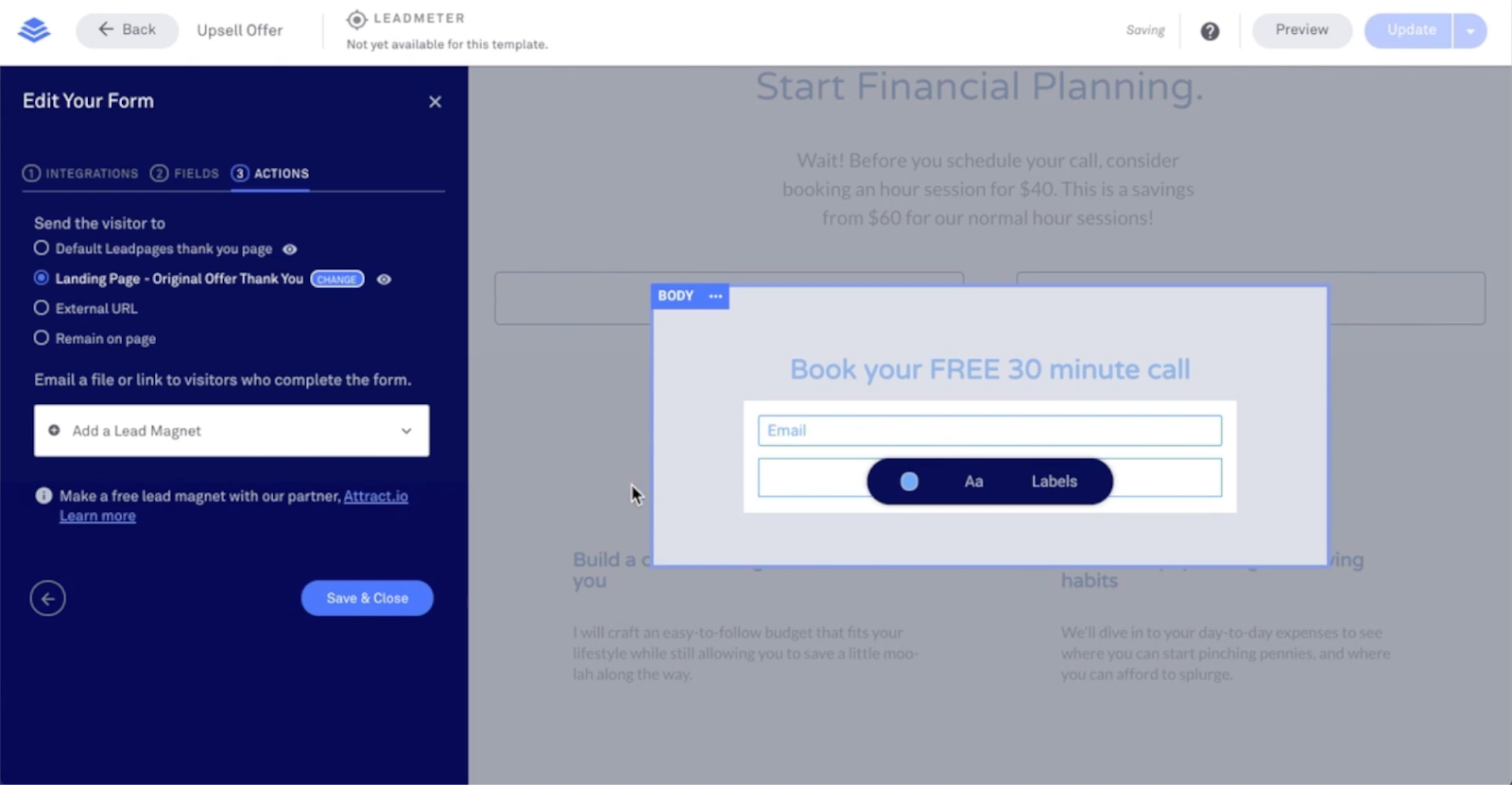
Leadpages helps you build compelling landing pages to host your brand assets like e-books, webinars, and product launches. The tool also lets you create forms and surveys that you can embed on landing pages for capturing potential lead data.
Leadpages standout features
- Landing pages: Drag-and-drop landing page builder to promote e-books, webinars, whitepapers, and other assets for demand generation.
- Team collaboration: Get feedback from your team with native commenting tools. You can invite teammates, contractors, and virtual assistants.
- Lead management: Collect, store, and manage leads from landing pages or signup forms.
Pros Unlimited landing pages on all plans with easy creation process
- Excellent educational resources and supportive company culture
- Easy integration with popular email marketing platforms
Cons Builder uses excessive RAM and requires frequent refreshing in Safari
- Missing essential features like collapsible sections and form drop-downs
- Unexpected billing escalations can reach hundreds of dollars
- Poor user interface for basic tasks like form creation
How to use Leadpages for demand generation?
Create a product launch landing page with a video showcase and a "Notify Me" button to gauge interest and build anticipation without explicitly collecting leads.
Leadpages alternatives | |
Instapage | If you want an advanced landing page builder with more customization and experimentation features |
Unbounce | If you want conversion optimization recommendations and a comprehensive AI copywriter |
Also read: The Essential Metrics for Effective Demand Generation.
3. Wisepops: For creating website pop-ups
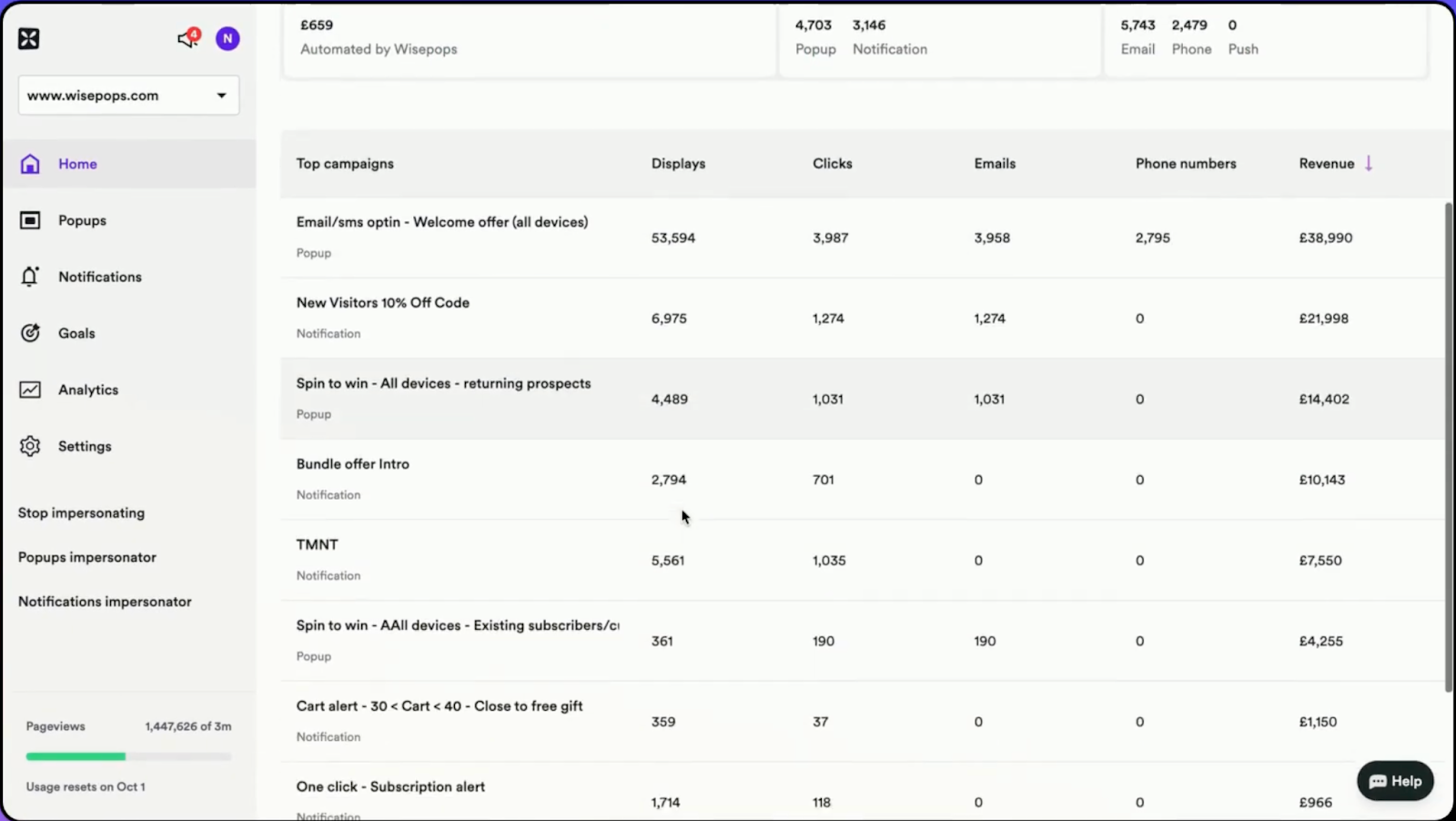
Wisepops is a pop-up building tool that lets you create interactive and engaging pop-ups, trigger push notifications, and launch surveys.
Wisepops’s standout features
- No-code pop-up builder: Build pop-ups, bars, and embeds based on targeted segmentation and embedding interactive elements like quizzes, spin the wheel, and videos.
- Analytics: Track onsite performance metrics, such as engagement rate throughout the funnel. You can generate reports based on visitors’ pop-up or push notification interactions.
- Onsite notifications: Trigger timely, relevant, personalized notifications to engage on-site visitors.
Pros User-friendly drag-and-drop interface requiring no technical expertise
- 60+ ready-to-use templates that are fully customizable for any design need
- Highly flexible platform with comprehensive targeting options and display conditions
Cons Expensive pricing for single-person small businesses with limited budget options
- Charges by page view instead of popup display which users find unfavorable
- Inconsistent performance with some browsers like Chrome OS for certain users
How to use Wisepops for demand generation?
Create a time-sensitive pop-up promoting a free webinar on industry trends, increasing brand visibility and thought leadership without directly collecting leads.
Wisepops alternatives | |
Poptin | If you want more flexibility while building pop-ups and a native autoresponder tool |
OptinMonster | If you want a wider selection of widgets for mobile-specific campaigns like countdown timers and spin the wheel |
4. Chili Piper: For tracking and managing inbound leads
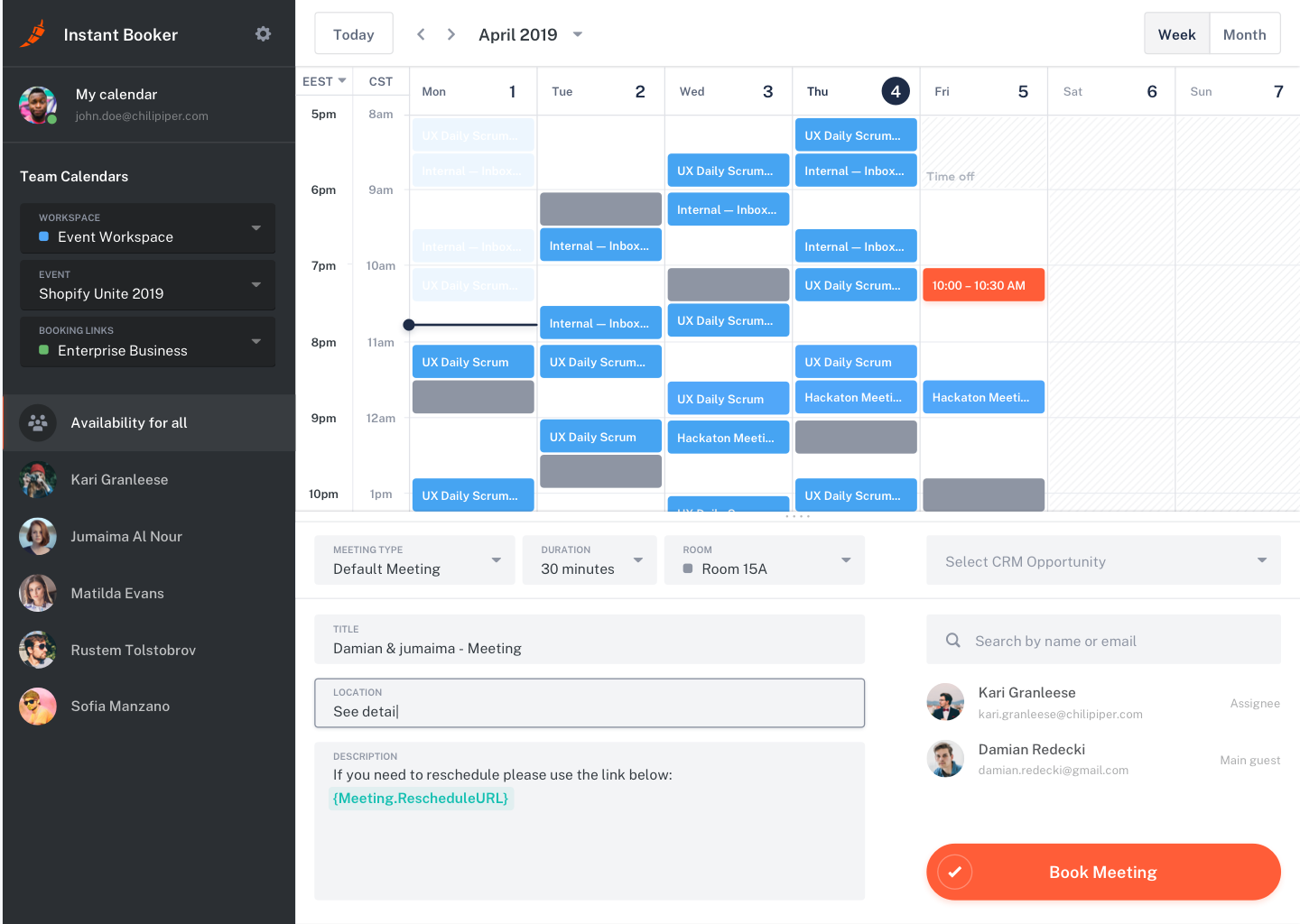
Chili Piper is a comprehensive demand generation and conversion platform that automates the process of connecting potential leads with sales teams.
Chili Piper’s standout features
- ChiliCal: Let potential leads book calls with you without much friction. The tool also helps with rescheduling, adjusting time zones, and fetching available schedules from your calendar.
- Chat: AI-powered chatbot to answer visitor’s queries in real-time by sharing the right resources, fetching demo booking links, and routing to the right sales rep.
- Lead routing: Automatically route leads to the right reps based on the data filled in the forms.
Pros Seamless integration with major platforms like Salesforce, HubSpot, Gmail, and Google Calendar
- One-click booking functionality from emails significantly improves prospect experience
- One-click booking functionality from emails significantly improves prospect experience
Cons Complex tool to set up and requires experience with sales automation
- Difficulty troubleshooting issues due to lack of simple error logs or centralized alerting
- Frequent bugs and technical issues, including incorrect routing and missing Zoom links
How can you use Chili Piper for demand generation?
Implement a "Book a Demo" button on high-traffic pages. This will allow interested visitors to instantly schedule product demonstrations, reducing friction in the buyer's journey.
Chili Piper’s alternatives | |
Revenue Hero | If you want accurate and automated lead scoring and routing features |
Calendly | If you want a standalone tool to schedule meetings |
Email marketing software
5. ZeroBounce: For monitoring email deliverability
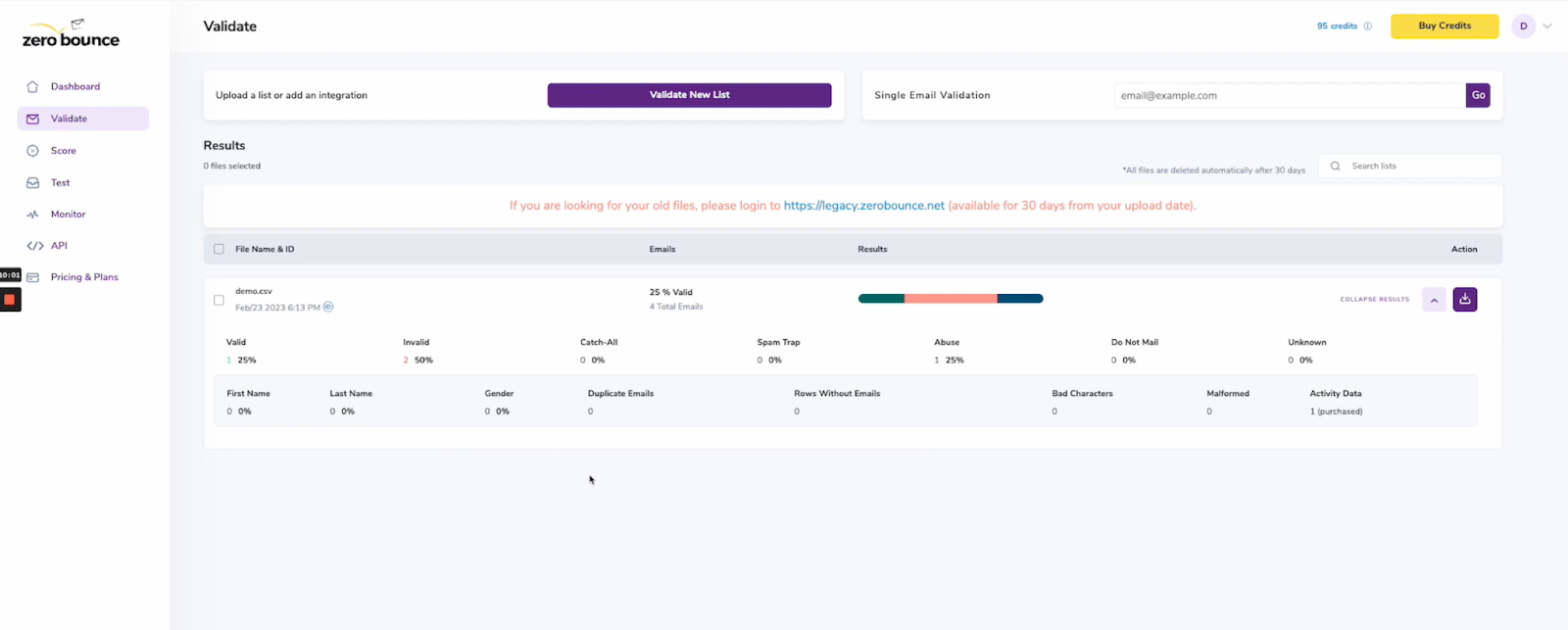
Maintaining a good email deliverability rate is paramount to ensure your emails are landing in your subscribers’ inboxes. And that’s what ZeroBounce helps you with. The tool helps you validate your email lists by flagging spam or incorrect addresses, running authentication checks, and warming up any new domain.
ZeroBounce’s standout features
ZerounBounce’s features build upon each other by giving you a complete solution. Here’s how: Email list validation: Upload your email list, and the tool will weed out bad subscribers—spam, incorrect, or bounced addresses.
- Activity data: Once you validate the list, you can enable this feature to see each subscriber’s interaction history—opens, clicks, and conversions.
- Automated email placement: Set up an automated workflow to warm up new domains or IP addresses and monitor the inbox or spam placement rate.
Pros Significantly reduces bounce rates and prevents account lockouts
- Great pricing structure with flexible credit consumption methodology
Cons Bulk email validation limit of only 100 emails at a time
- Accuracy concerns with some emails bouncing despite being marked as valid
- Missing ready-made widgets for faster non-technical integration
How do you use ZeroBounce for demand generation?
Segment unengaged subscribers from the engaged ones. Then, create targeted email campaigns to pique the interest of dormant subscribers to boost engagement and generate leads.
ZeroBounce alternatives | |
Mailgun Optimize | If you’re already using Sinch’s email marketing software |
Glockapps | If you want to keep an eye over email authentications—SPF, DKIM, and DMARC |
6. Mailerlite: For managing email marketing campaigns
Mailerlite is a demand generation tool that offers a complete email marketing solution that helps you build an audience and generate awareness about your brand and product. From campaign building to analyzing performance, you can do it all with Mailerlite.
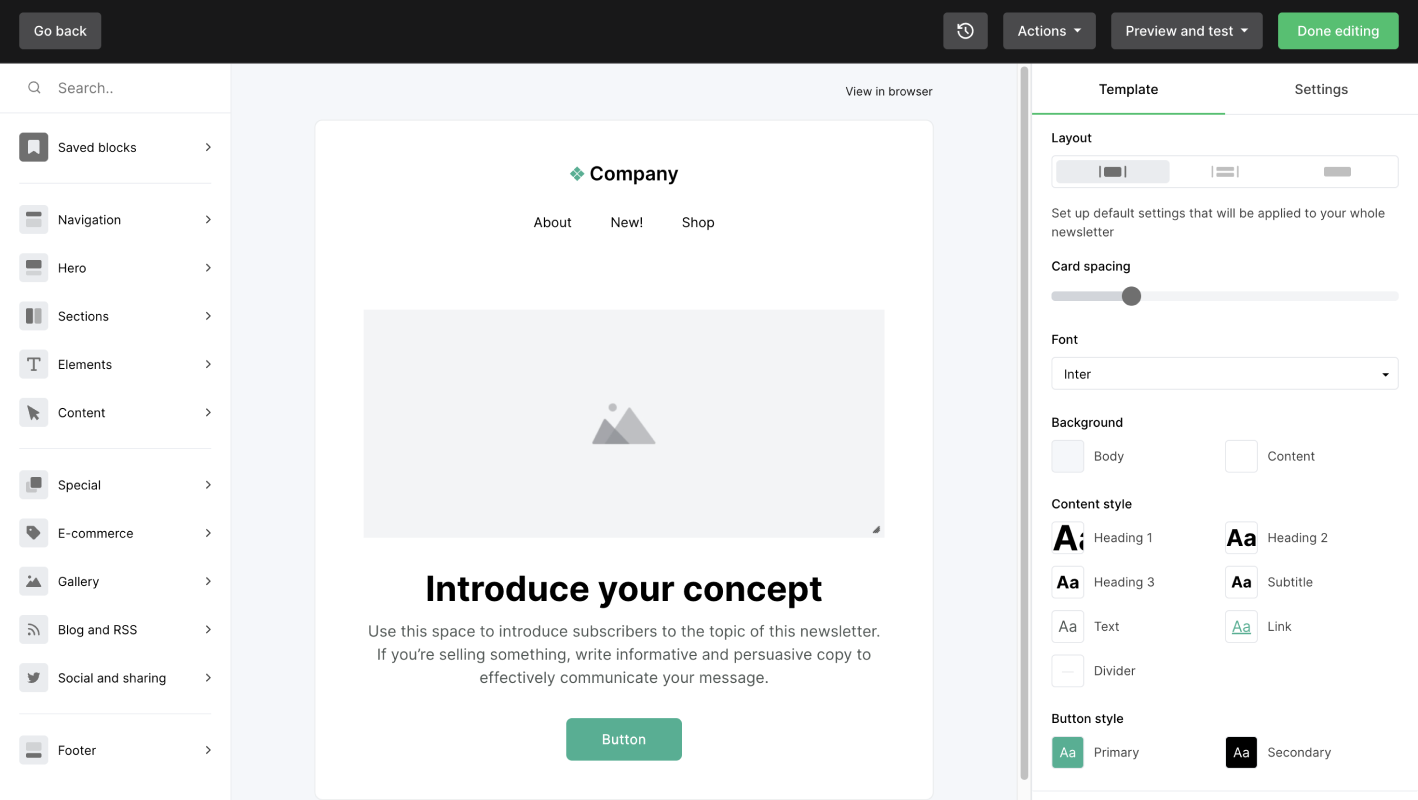
Mailerlite’s standout features
- Newsletter editor: With its drag-and-drop editor, you can write, design, and send newsletters to engage your subscribers by sharing relevant and engaging brand-building content.
- Email automation: Build multi-step automated sequences, from promotional campaigns to re-engagement campaigns, to send targeted messaging.
- Personalization: Create and manage audience segments based on your subscribers' past interactions, conversion rate, and engagement level.
Pros Includes landing pages at no additional cost, with an easy creation process
- Clean design and versatile templates for professional-looking emails
- Free plan for up to 1,000 subscribers with automation features included
Cons Email editor can be glitchy, requiring frequent saves and refreshes to fix errors
- Limited landing page templates are available compared to competitors
- Slow contact import process that often gets stuck, requiring support assistance
How to use Mailerlite for demand generation?
Run account-based marketing (ABM) campaign s by segmenting your subscribers to build personalized email campaigns addressing their pain points.
Mailerlite alternatives | |
ActiveCampaign | If you want to build powerful omnichannel automated workflows (with a stack of 900+ premade workflows) |
Brevo | If you want an integrated tool with SMS marketing and CRM capabilities |
Read more: ABM Examples: Winning Strategies from 5 of The Top B2B Brands
Content marketing tools
7. Ghost: For managing website’s content
Ghost is an open-source content publishing platform that lets you build custom web pages to showcase content to your audience.

Ghost’s standout features
- Rich media and dynamic cards: Add 20+ widgets within your content, such as video embeds, callouts, dropdowns, collapsible texts, quotes, and sign-up forms.
- Content preview: See how your content will look on mobile, desktop, tablet, and social platforms, and make necessary changes before you hit publish.
- Content management: Organize pages by assigning tags, authors, and publishing dates.
Pros Clean, safe, and intuitive blog platform with sleek back-end interface perfect for casual users
- Consistently fast load times powered by Node.js with built-in memberships and SEO
- Excellent balance between being easy for non-tech people and offering advanced capabilities for power users
Cons Limited templates and plugins available compared to other CMS platforms
- Limited customization options compared to WordPress, often requiring developer help for significant changes
How to use Ghost for your demand generation efforts?
Publishing and distributing long-form blog content optimized for SEO to drive organic traffic and capture leads through email newsletter signups.
Ghost alternatives | |
Webflow | If you want a more flexible and customizable content publishing tool |
WordPress | If you want to build a variety of website pages with plugins |
8. Descript: For editing videos and podcasts
Descript is one of the most intuitive video and podcast editing tools that offers AI-powered editing, transcription, and repurposing capabilities.
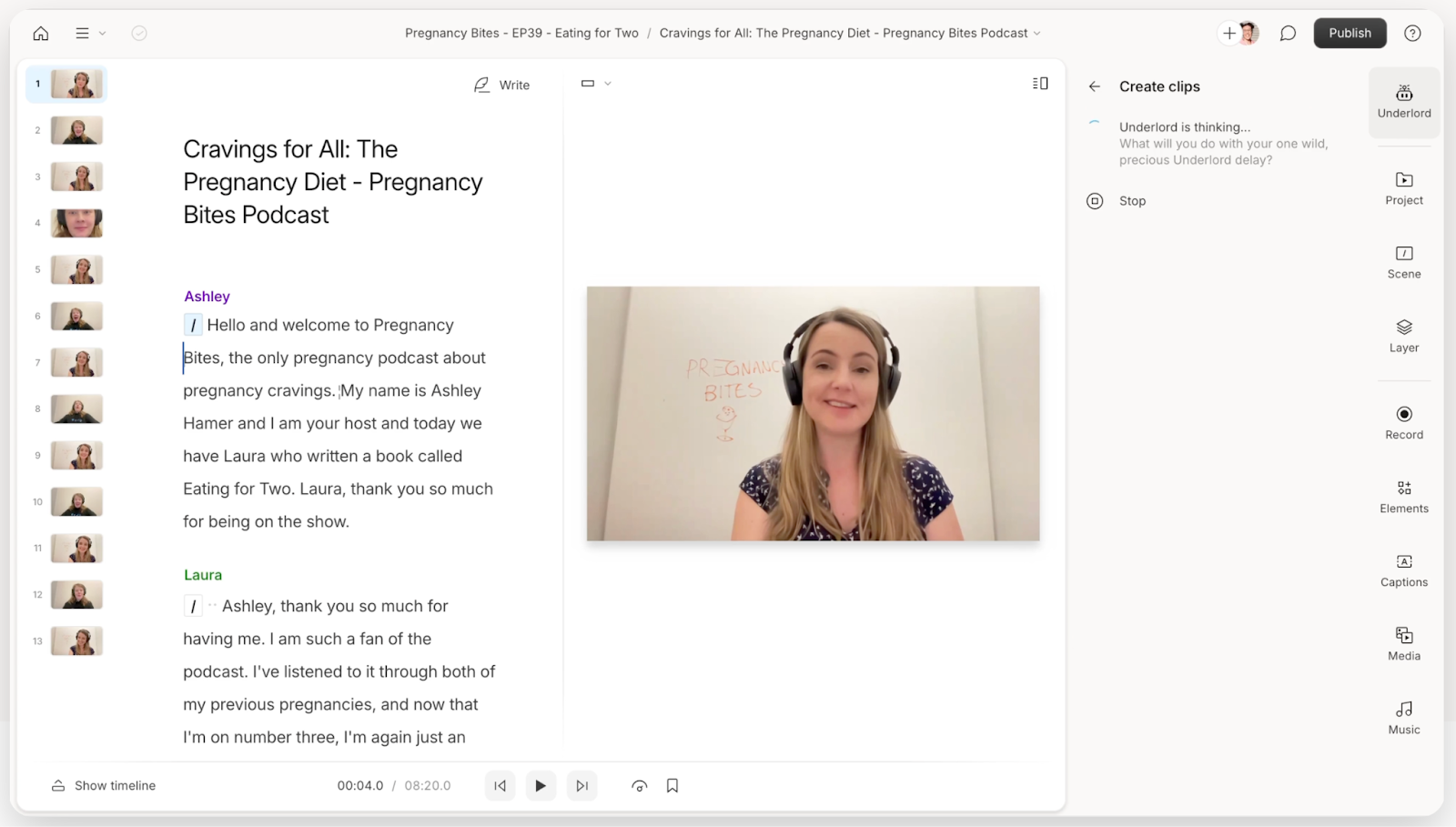
Descript’s standout features
- Video editing: Edit video transcript like you edit a document while previewing changes in real-time. AI-powered editing expedites this process by helping you remove awkward pauses and phrases.
- Clips: The tool picks clips from a long video with high engagement potential, which you can refine by adding transitions, changing aspect ratios, or adding sound effects.
- Transcription: Generates near-accurate transcripts from videos and podcasts in 20+ languages and assigns speaker labels.
Pros Excellent speech-to-text transcription functionality that syncs perfectly with video editing
- Auto-cleanup of vocal disfluencies and filler word removal creates professional-sounding results
- Intuitive collaborative features allow teams to work on projects simultaneously, increasing productivity
Cons Processing videos takes a long time and requires significant computational resources
- Cloud-based system requires constant internet access and can't be used offline
- Per-user pricing can get expensive for larger teams and has usage limits on transcription hours
How can you use Descript for demand generation?
Edit and repurpose podcast episodes or video content into short, shareable clips for social media to expand reach and attract new audiences.
Descript alternatives | |
Riverside | If you want an integrated tool for recording and editing and is also affordable |
Veed.io | If you want to create and edit new videos using AI |
9. Canva: For designing brand assets
Canva is an intuitive, creative platform for designing social media posts, ad campaigns, workflows, and web pages. The tool has thousands of templates, font styles, and design tools to help you create eye-catching, scroll-stopping designs.
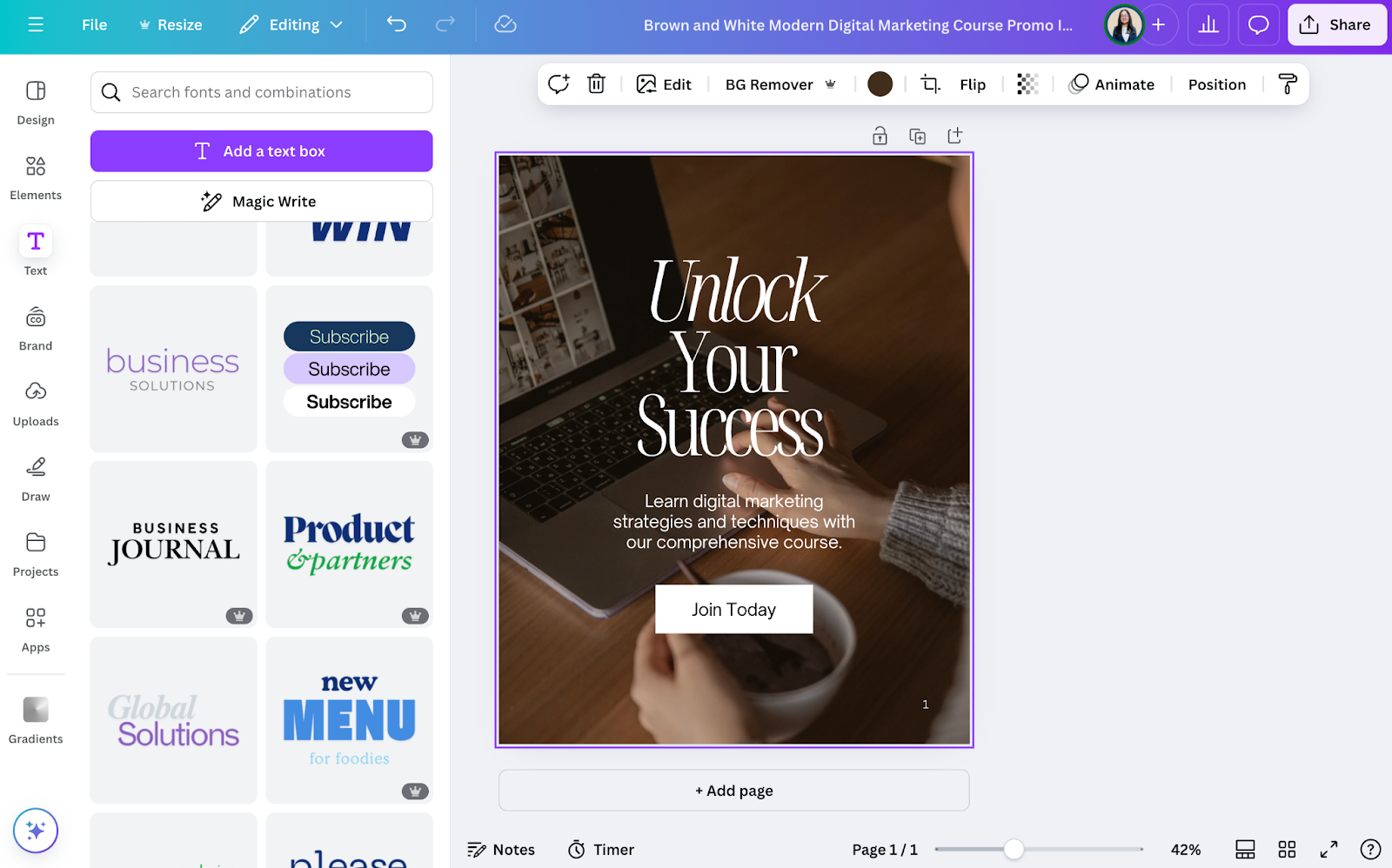
Canva’s standout features
- Brand kit: Create custom guidelines highlighting fonts, color palettes, logos, headings, templates, and more.
- Content planner: Plan your design assets posting schedules with built-in calendars.
- Team collaboration: Invite your team to get feedback via comments, offer edit access to make changes, and see design approvals by sharing the designs with stakeholders.
Pros Extremely user-friendly and accessible to anyone without design experience or knowledge
- Over 200+ templates for free and vast inventory of pictures and themes
- Works seamlessly on both mobile and desktop for creating and sharing content with ease
Cons Premium features are only supported for premium users, limiting capabilities on the free version
- Can sometimes be limited in what you can do, and would like more options around video creation/animation
- Customization options can be limited compared to professional design tools like Adobe Photoshop or Illustrator
How to use Canva for demand generation?
Design eye-catching infographics summarizing industry reports or trends, sharing them on social media to increase brand visibility and demonstrate expertise.
Canva alternatives | |
Figma | If you have a dedicated design team and want to build custom brand assets |
VistaCreate | If you want a cost-effective solution for designing engaging assets |
10. Visme: AI-Powered visual creation for faster & high-converting designs
Visme is an all-in-one visual creation platform powered by AI, helping you design 5x faster and double conversion rates. With a massive library of templates for social media graphics, logos, infographics, whitepapers, etc, Visme accelerates your design process seamlessly. Choose a template, or start your design project using customizable fonts, sizes, colors, etc.
Visme’s features Extensive Library of Templates: Visme has thousands of templates and millions of design assets to scale your brand awareness.
- Data Visualization Tools: Use Visme’s interactive graphs, charts and infographics to simplify complex data into interactive visuals.
- Brand Kit: Visme’s popular brand kit allows you to manage and store your brand assets for easy accessibility.
- Backed by AI: Tools like AI Designer, AI Writer, AI Image Generator, etc, make the design process faster.
- Collaborative Features: Create and share your design project with your marketing team for live collaboration and address feedback.
- Social Media Scheduler: Create visuals within Visme and schedule them for nearly all social media platforms, including LinkedIn, Facebook, Instagram, and even Slack using its social media scheduler.
Pros Extremely helpful support team with prompt responses and excellent customer service
- User-friendly interface that's very easy to use with great support videos
- Flexible presentation slides with top-notch navigation and the ability to design animations better than PowerPoint
Cons Cannot download multiple PDF presentations at once - must download them one at a time
- Pricing is much higher than comparable products and requires buying multiple licenses
- Difficult to manage resizing projects - AI resize option doesn't work properly and creates entirely new projects
How to use Visme for Demand Generation?
Create appealing visuals for engaging target audience, and improving brand awareness for demand generation.
Visme Alternatives
Canva | Canva is a great alternative to Visme that provides great templates for marketing materials. |
Venngage | Venngage is a design platform for non-designers with an intuitive interface, and thousands of templates. |
SEO tools
11. Ahrefs: For conducting keyword and competitor research
Ahrefs is a package of SEO tools for managing your website's overall authority and health. It makes this possible by helping you conduct in-depth keyword research, review your competitors, identify linking opportunities, and run site audits.
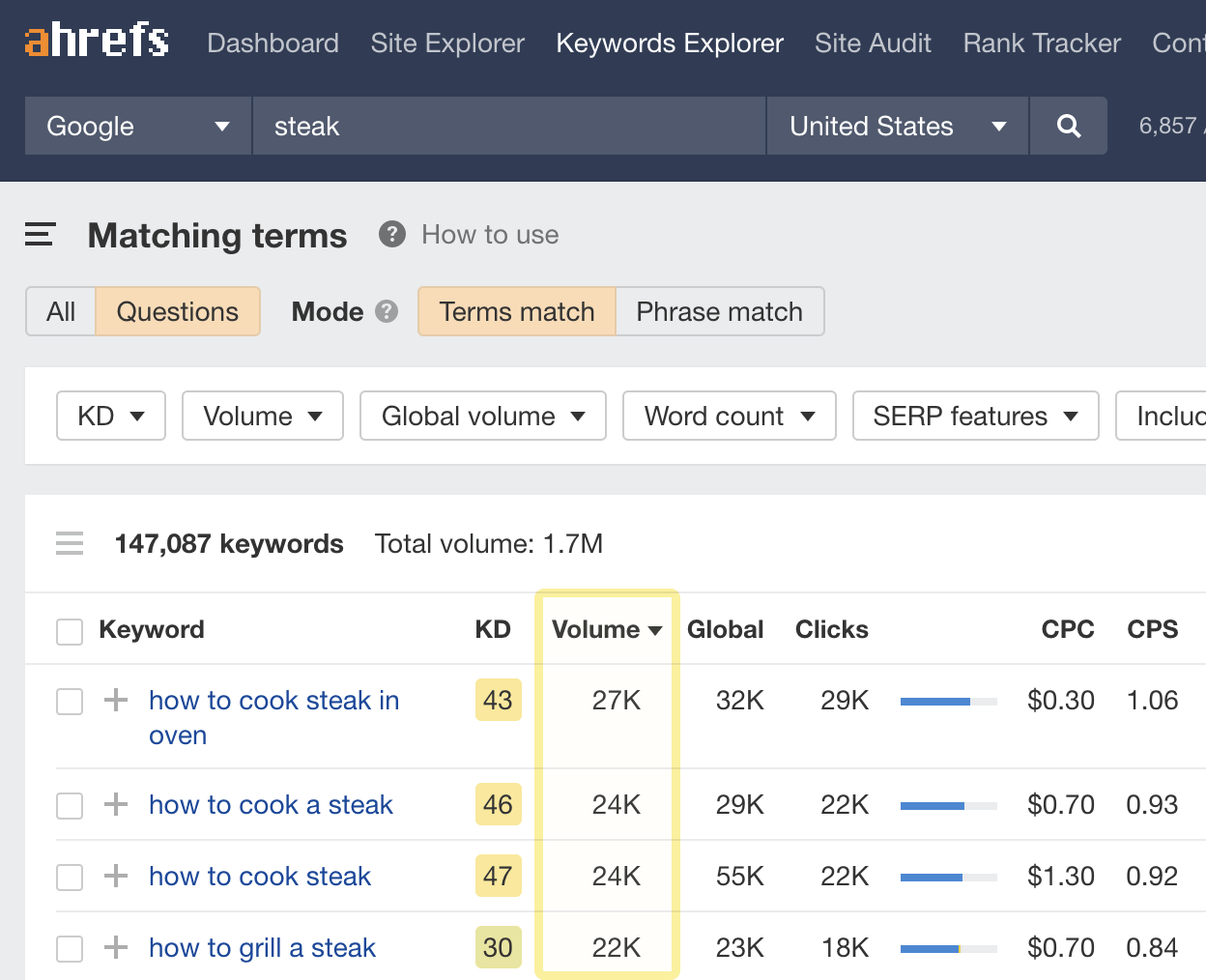
Ahrefs standout features
- Keyword explorer: Generate and analyze keywords, including traffic potential, volume, and ranking difficulty, and target them to bring traffic to your website and other marketing channels.
- Site audit: Run a complete analysis of your website to uncover technical and on-page SEO to boost your SEO health score and appear for more search queries.
- Rank tracker: Track the site’s pages' desktop and mobile rankings on Google over a selected time frame.
Pros Advanced backlink filtering capabilities that can sort by domain rating, referring domain traffic, anchor text, and date ranges
- Excellent educational resources including tutorials, guides, and high-quality blog content for learning SEO
Cons Credit system limitations where new features are locked out from existing subscribers at the same plan level
- Steep learning curve due to complex interface and extensive features that can overwhelm new users
How to use Ahrefs for demand generation?
Use ‘Keyword Explorer’ to identify topics related to free tool in your niche by using keyword modifier like checker, calculator, and generator.
Ahrefs alternatives | |
Semrush | If you want a detailed analysis of rank tracking and other suites of tools |
Buzzsumo | If you want a cost-effective solution for exploring content optic, volume, and social media insights |
12. Positional: For optimizing content pages
Positional is the new kid on the block that helps you with content optimization, keyword research, site audits, and content performance.
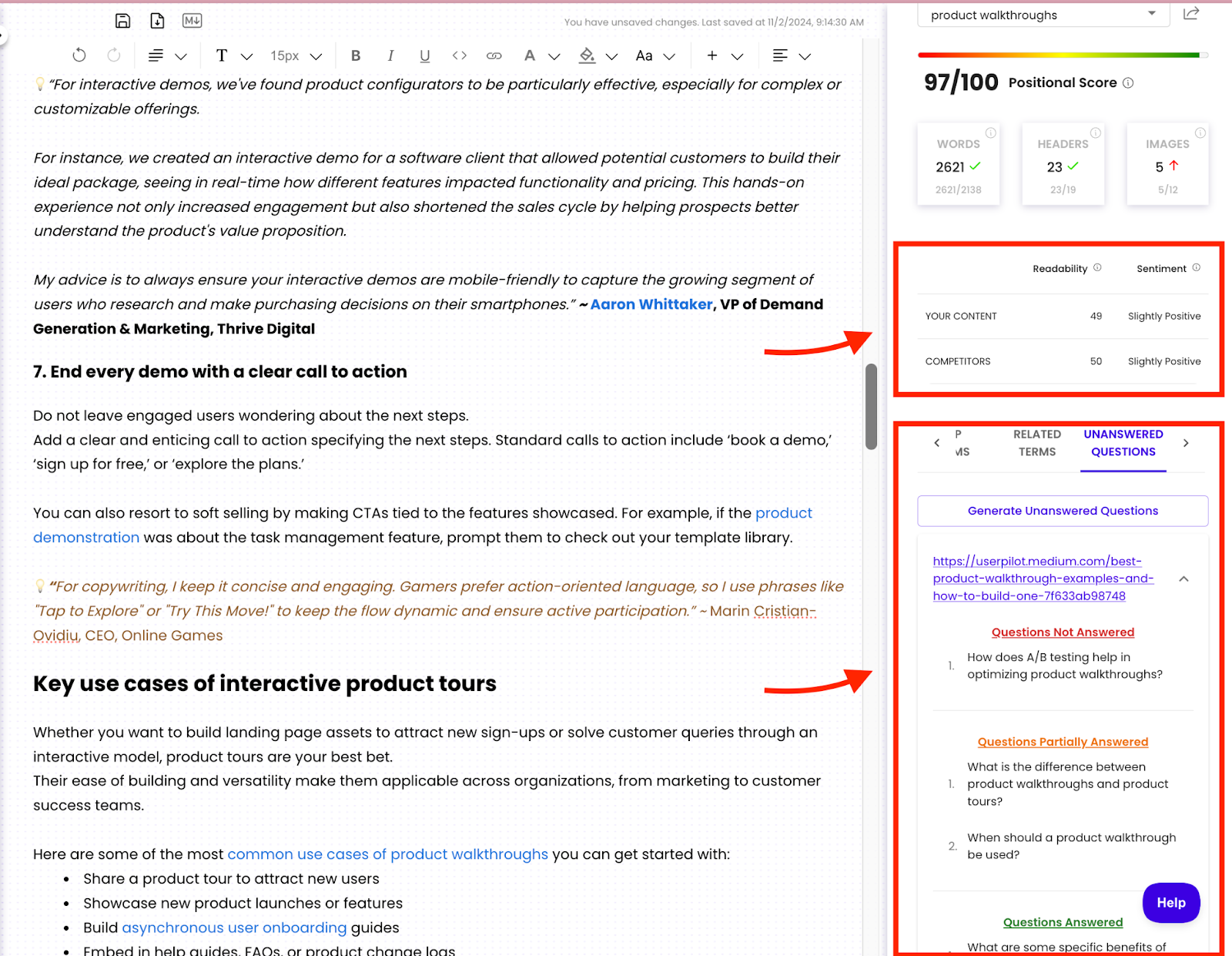
Positional’s standout features
- Optimize: Improve new and existing content pages with smart recommendations related to structure, topic coverage, information gaps, readability, and visual elements.
- Content analytics: Monitor and flag underperforming pages by understanding scroll depth, bounce rate, and on-page time with heat maps, click maps, and roadmaps.
- Editorial calendar: Store and manage all content pages by tracking their status and SEO score with the built-in calendar view.
Pros Intuitive user-interface for non-technical users
- Makes SEO accessible for beginners by streamlining the workflow from keyword research to content outlines without needing multiple tools
Cons May require supplementary tools for a complete SEO workflow, depending on specific business needs
- Since the tool is new in the market, it may lack advanced capabilities.
How to use Positional for demand generation?
Use the ‘Unanswered question’ tab to identify gaps in new and existing content pages to boost search visibility.
Positional’s alternatives | |
SurferSEO | If you need a standalone tool to generate content optimization reports |
Frase.io | If you want an affordable tool for content optimization |
13. Google Trends: For identifying trending content topics
Google Trends is a free tool that helps you search for popular terms in real-time. The tool fetches data from Google’s database and helps you evaluate a topic’s interest levels in a particular region, language, and over a specific time frame.
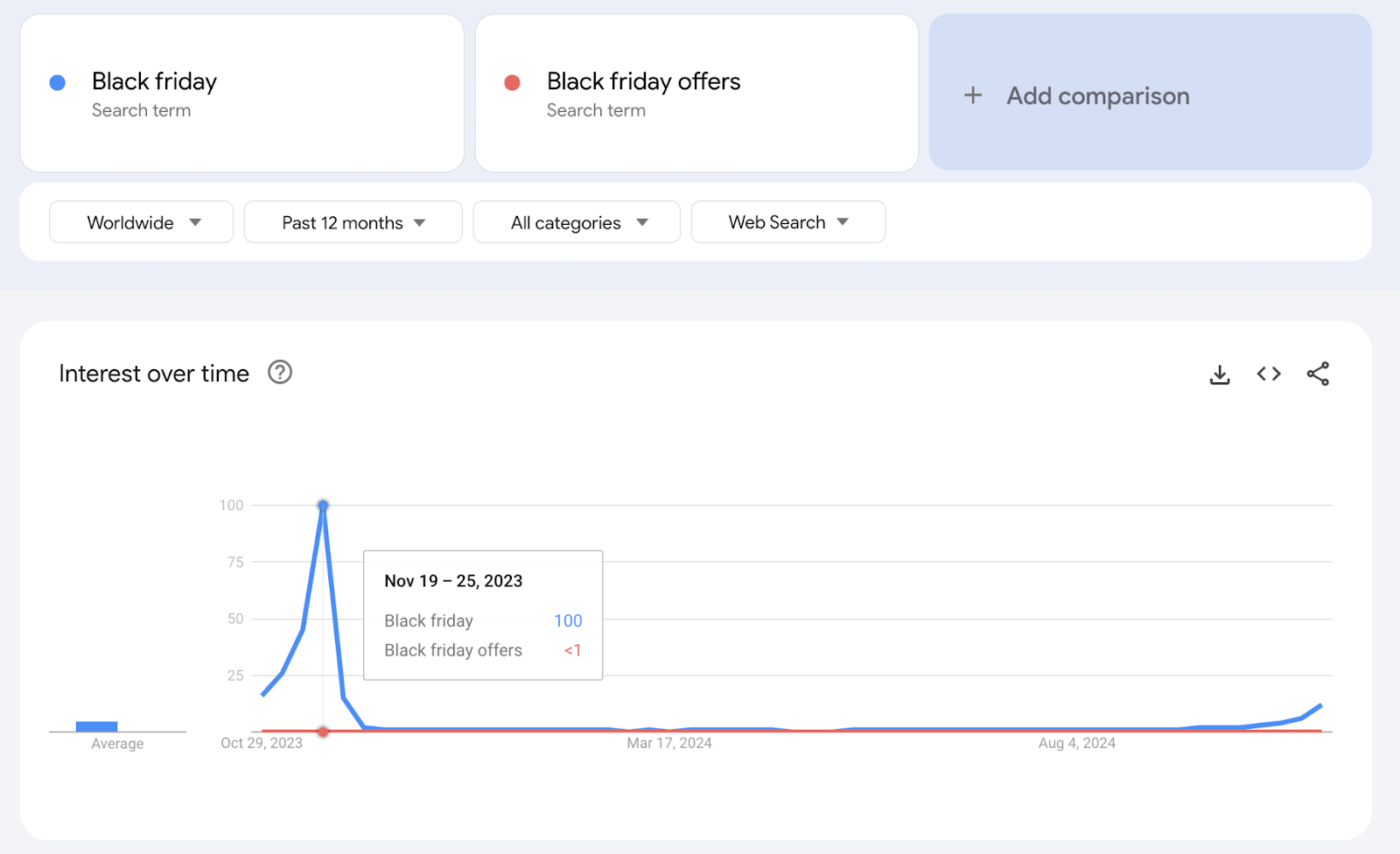
Google Trends standout features
- Group analysis: Analyze up to five terms simultaneously and compare their search volume to identify peak search duration and time.
- Advanced filtering: Monitor search popularity using location, time, category, and search type filters.
- Trending now: A separate section that shows terms getting traction in a particular region. You can customize the results by using filters.
Pros Completely free tool with no cost barriers for any size business or individual user
- Simple and intuitive interface with excellent visual presentation that's easy to navigate
- Shows seasonal trends effectively for planning PPC campaigns and content strategies
Cons Limited to just 5 keywords for comparison charts which restricts comprehensive analysis
- Related topic suggestions are often irrelevant and don't match the current search context
How to use Google Trends for demand generation?
Analyze seasonal search patterns for key products or topics related to your business. Identify peak periods of interest and use this insight to plan your content calendar.
Google Trends alternatives | |
Treendly | If you also want to understand the reason behind a term’s popularity |
Exploding topics | If you want to forecast the next 12 months' trend volume of the popular terms |
Paid marketing campaign tools
14. Adroll: For running cross-channel ad campaigns
Adroll is an all-in-one digital advertising platform that helps you create, run, and advertise across channels, including Display, native, video, social media ads (Facebook, Instagram, Pinterest, TikTok), and email marketing.
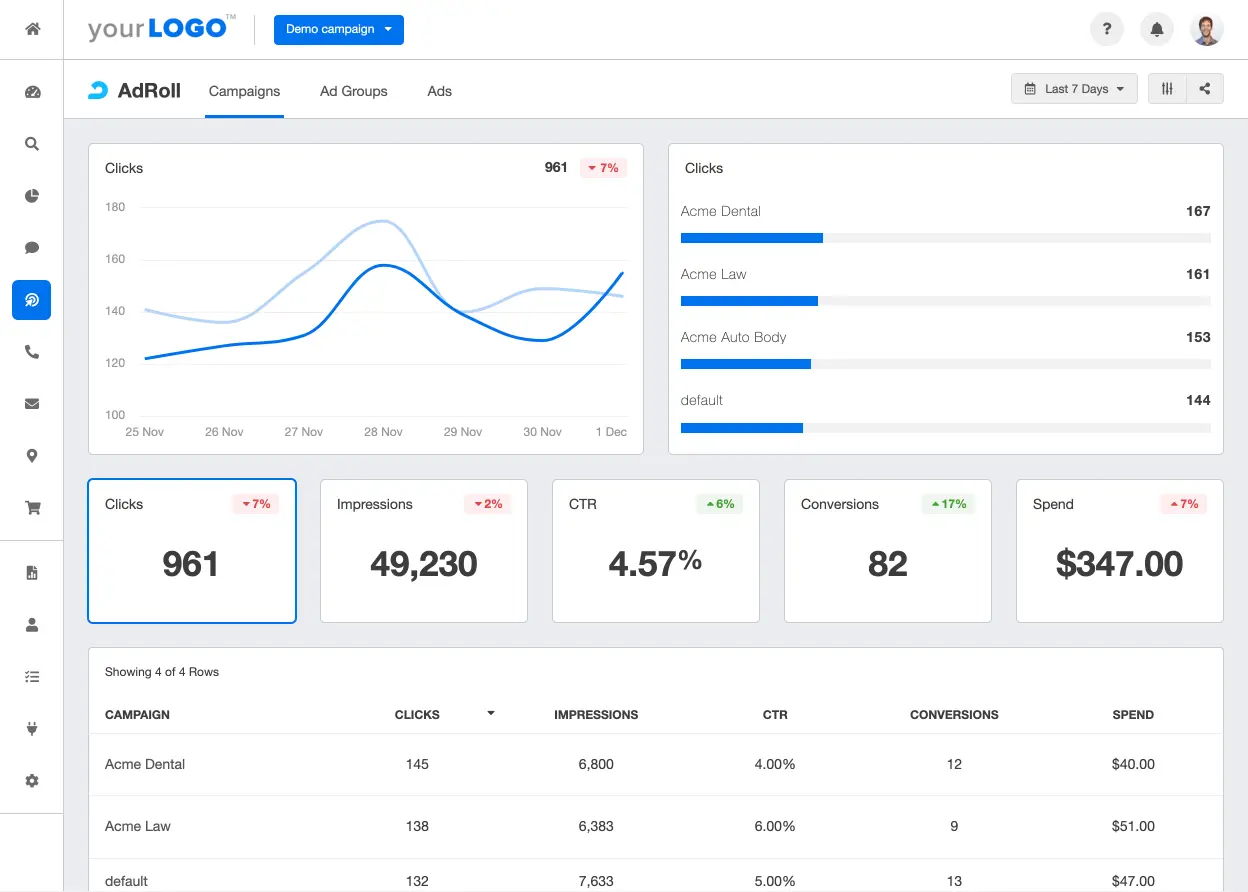
Adroll’s standout features
- Retargeting: Optimize retargeting ads (display, native, and/or video) bidding amount and timings ads with BidIQ, a machine learning-powered bidding system.
- Analytics: Track and monitor your ads' performance across channels, campaigns, and journeys, and build custom reports that showcase key metrics.
- Automation: Build cross-channel automated sequences to trigger ads to the right viewer at the right time.
Pros Bulk uploading feature streamlines campaign creation across multiple platforms simultaneously
- Good integration capabilities with marketing automation platforms and CRMs
Cons Users state that the interface can be confusing for viewing specific audience reporting and switching between campaign editing and metrics
- Users express difficulty in API integration and issues with credit card processing rejections for no apparent reason.
How to use Adroll for demand generation?
Create a brand awareness campaign targeting audience interested in specific product features and introduce them to your unique value proposition through display ads.
Adroll’s alternatives | |
Google Ads | If you want flexible ad formats such as text and app promotion ads |
Criteo | If you want fantastic ad inventory at a relatively lower cost |
15. Google Ads Transparency Center: For understanding competitor’s advertising strategies
Google Ads Transparency Center offers a comprehensive database of ads on Google across channels, formats, and regions. The tool lets you analyze and understand competitors’ advertising strategies to feed your demand generation strategies.
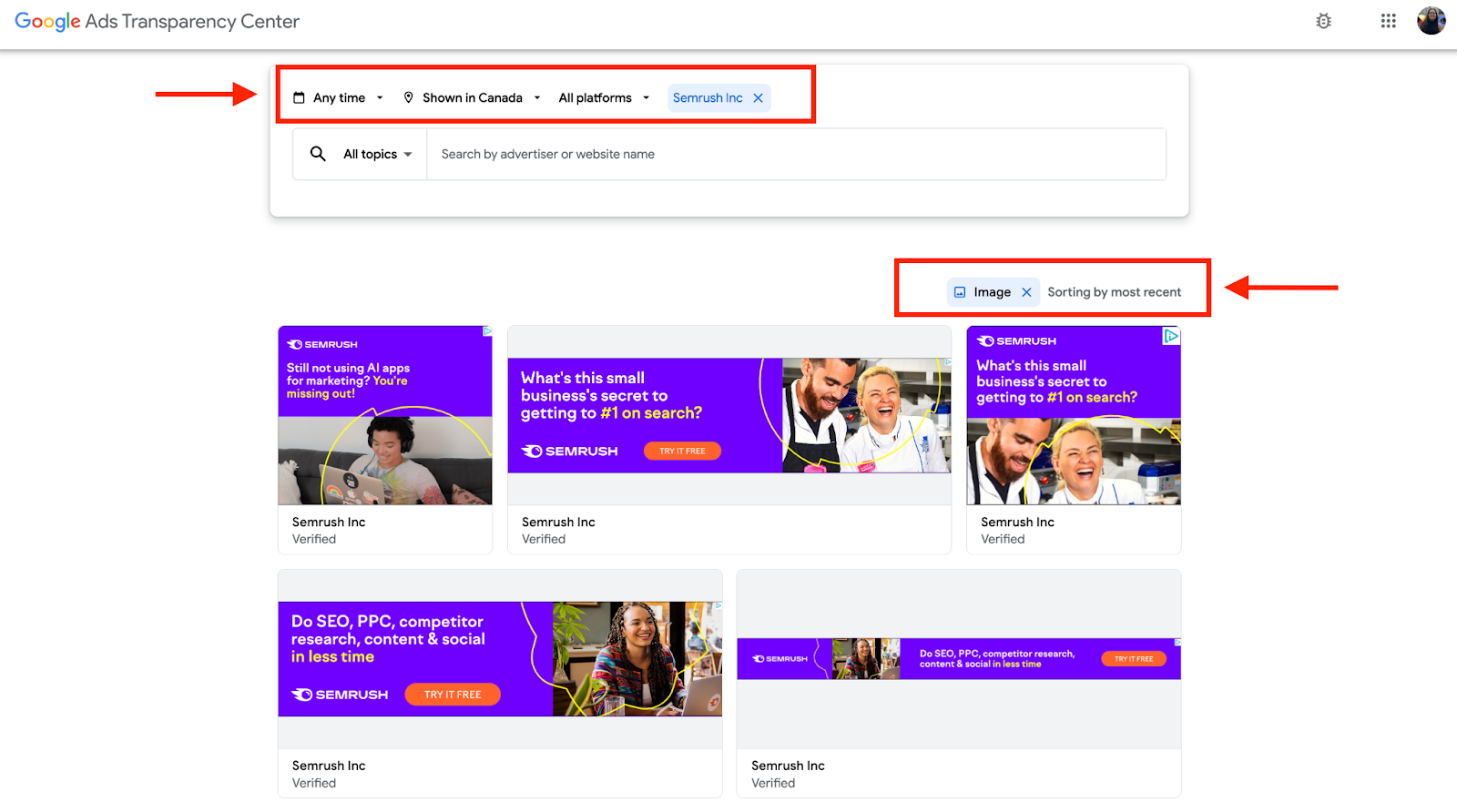
Google Ads Transparency Center’s standout features
- Ad format selection: The tool gives access to ads in three formats—images, texts, and video—based on Google searches, YouTube, Maps, Play, and Shopping.
- Region and time-based filters: Check ads that ran during a specific time frame and in a specific region.
- URL-specific ad research: Enter your competitor’s URL and get access to all their ads across Google platforms.
Pros Powerful targeting options allow businesses to reach specific audiences effectively
- Detailed analytics and reporting tools provide valuable insights into campaign performance
- Integration with other Google products (like Google Analytics) streamlines marketing efforts
Cons Steep learning curve for new users and small businesses
- Costs can escalate quickly if campaigns are not carefully managed
- Customer support can be slow or unhelpful at times
How to use Google Ads Transparency Center for demand generation?
Enter competitor URLs and analyze their ad campaigns during a specific period, e.g., the holiday season. Understand the type of copy they write, visuals used, or techniques used to capture visitor’s attention.
Google Ads Transparency Center alternatives | |
Facebook Ads Library | To get access to all the ads your competitors run on Facebook |
LinkedIn's Ad Library | To get access to all the ads your competitors run on LinkedIn |
Also read: Stay Ahead of the Competition with These 5 Pipeline Generation Strategies
Social media tools
16. Hootsuite: For managing social media posts
Hootsuite is a complete social media management package. It allows you to generate social posts, schedule them, and view performance data to build better social strategies.
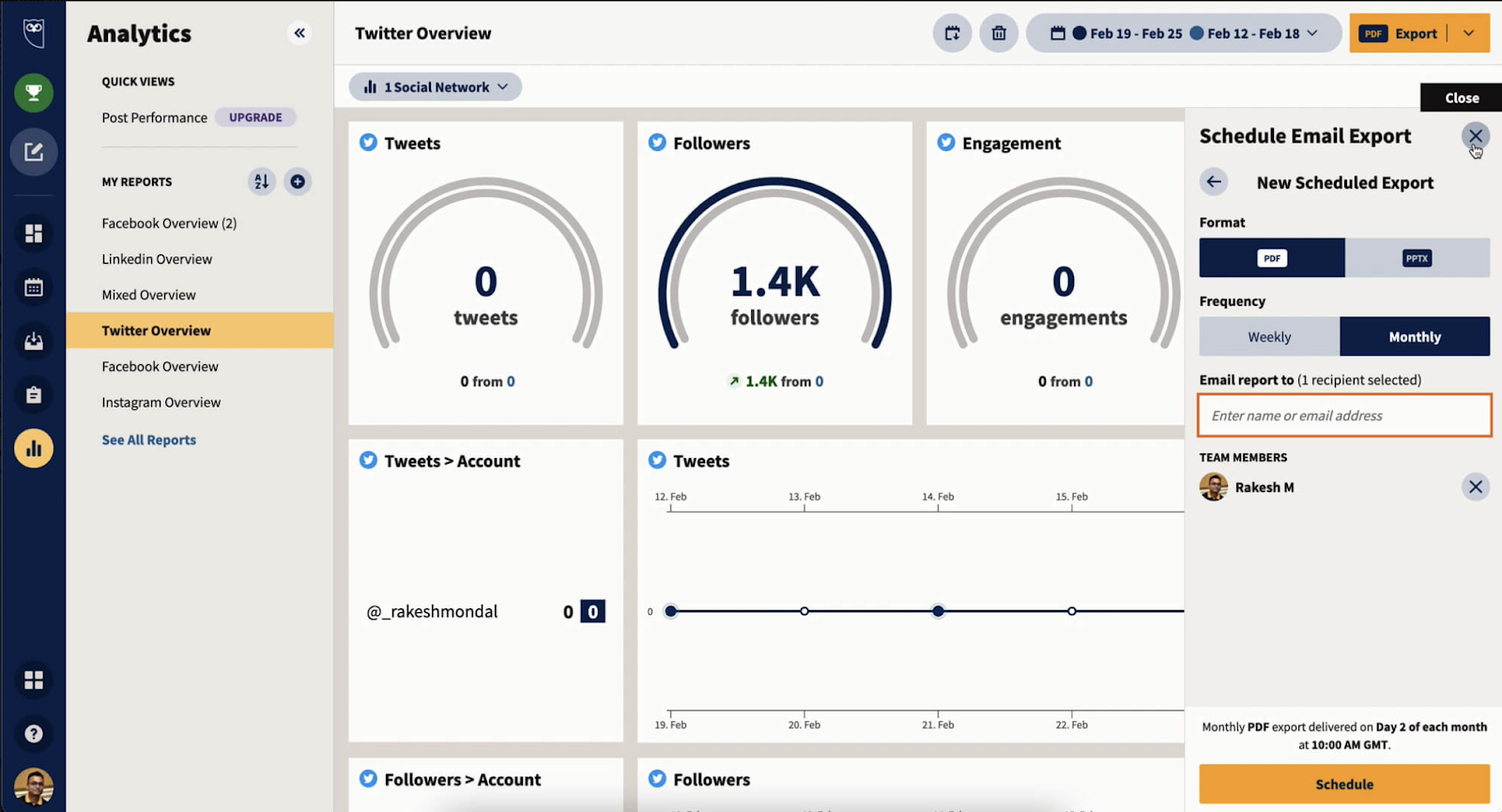
Hootsuite’s standout features
- Social media analytics: Monitor your social posts’s performance with detailed metrics like engagement, impressions, and shares. The tool also recommends the best time to post based on historical data.
- OwlyWriter: AI-powered tool that helps you generate content ideas, captions, hashtags, and edit social copy.
- Inbox and messaging: Manage and respond to comments, messages, and queries across social channels in a single place.
Pros Centralized dashboard for managing multiple social media accounts saves time and effort.
- Scheduling and automation features increase efficiency for social media teams.
- Comprehensive analytics help track engagement and campaign success.
Cons The user interface can feel cluttered and overwhelming for beginners.
- Some features require higher-tier (more expensive) plans.
- Occasional bugs or glitches occur when connecting to certain social platforms.
How to use Hootsuite for demand generation?
Create a coordinated social media campaign across multiple platforms to promote a new product feature, increasing brand visibility and engagement without direct lead capture.
Hootsuite alternatives | |
Sprout socials | If you want advanced social media analytics capabilities |
Buffer | If you need an affordable solution to build and manage a social content calendar |
17. Brandwatch: For keeping an eye over brand mention
Brandwatch is a social listening tool for tracking brand mentions, upcoming trends, and influencers in your niche.
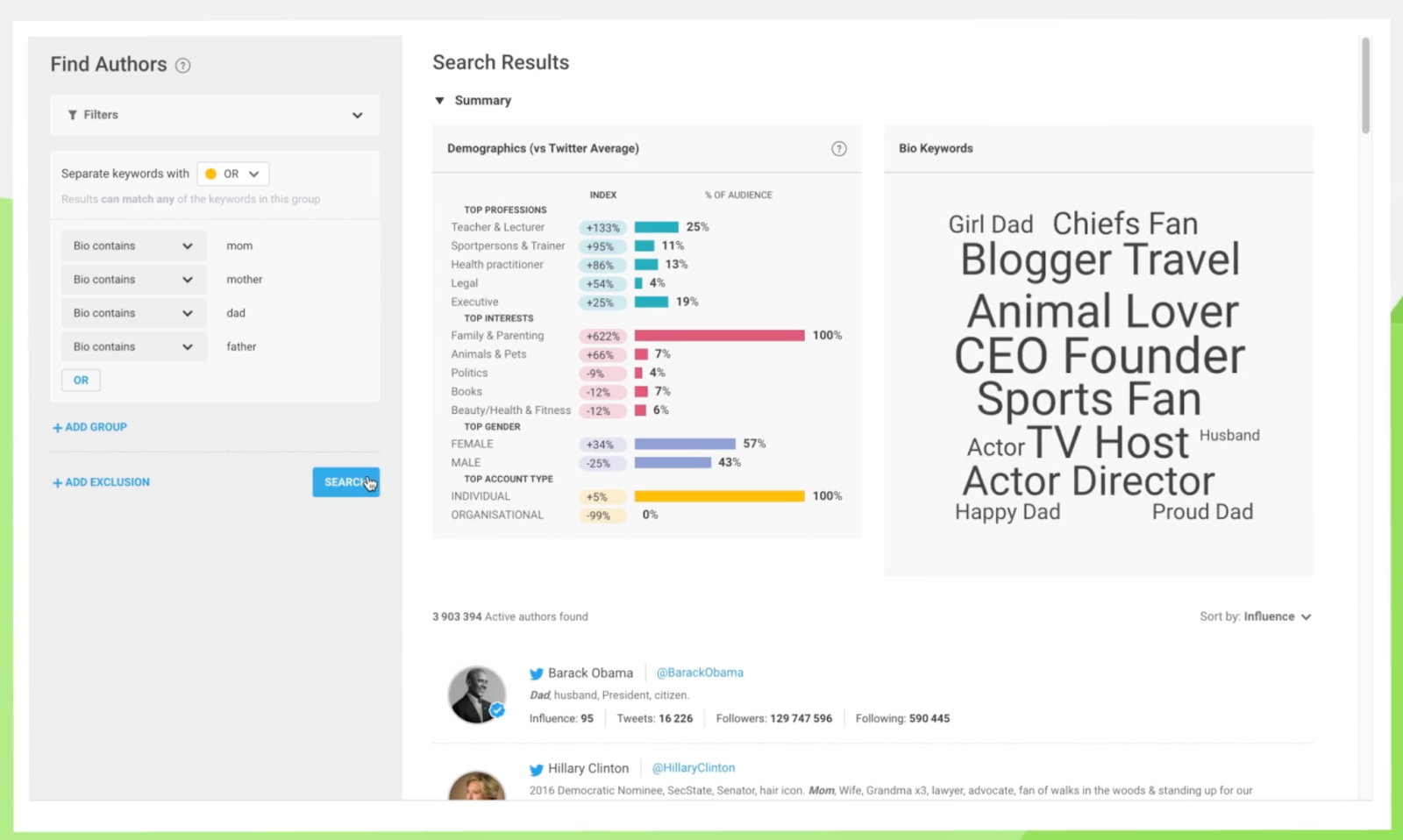
Brandwatch’s standout features
- Consumer Intelligence: Monitor what people talk about on social platforms and generate detailed reports on trends and related topics.
- Influencer marketing: Discover influencers from a database of 24m+ global creators, initiate conversations and manage partnerships with them.
Pros Customizable dashboards, interactive visuals, and tailored reporting make data presentation clear and actionable.
- Efficient workflow and integration with multiple social media channels for campaign management, scheduling, and monitoring.
Cons Users note the lack of robust community management tools, such as posting to multiple platforms simultaneously or managing comments directly within Brandwatch
- Users state platform speed issues and dashboard lag, especially with large datasets or during outages.
How to use Brandwatch for demand generation?
Monitor industry conversations and trending topics to create timely, relevant content that positions your brand as a thought leader and increases organic reach.
Brandwatch alternatives | |
Meltwater | If you want a border suite of tools like media relations, media intelligence, and sales intelligence |
Sprinklr | If you want an AI-powered research tool that offers highly accurate insights, excelling in sentiment analysis, emotion detection, and text classification with near-zero error rates |
Analytics and tracking tools
18. Google Analytics: For tracking website traffic
Google Analytics is indispensable for overseeing your site’s traffic, assessing engagement levels, and monitoring conversions.
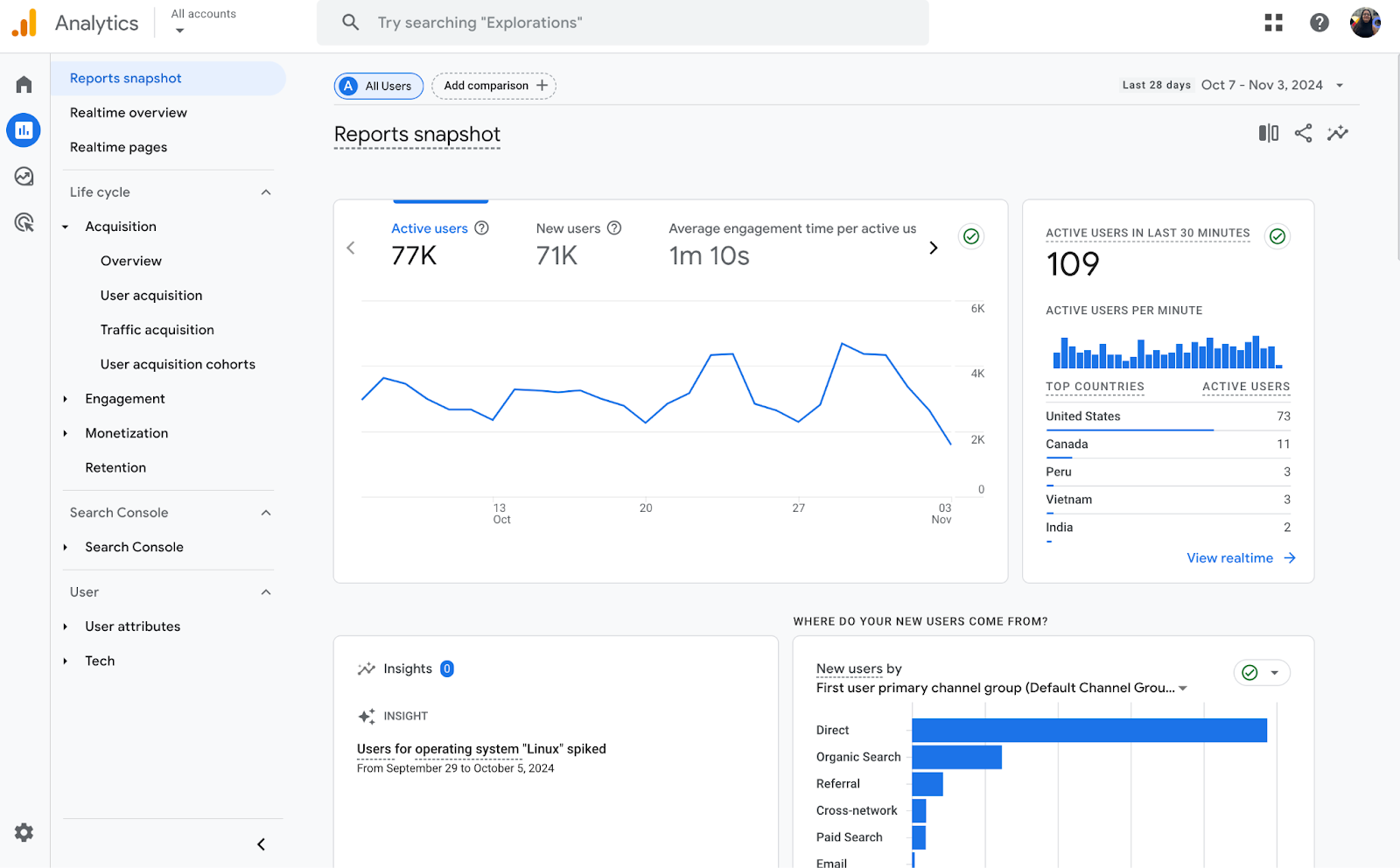
Google Analytics standout features
- Real-time performance dashboard: Track performance and incoming traffic as it happens. The tool also offers personalized insights based on historical and real-time data on the same dashboard.
- Custom reports: Besides pre-built reports (engagement, acquisition, and user journey reports), you can build custom reports by configuring the data sources and other variables.
- Integrations: GA4 integrates across the Google suite (Google Search Console, Google Ads, Google Cloud, etc.) and almost with all the tools mentioned in this article.
Pros Integration with other Google products enhances marketing and analysis workflows
- Free version available, making it accessible for businesses of all sizes
Cons Interface and advanced features can be overwhelming for beginners
- Data delays (up to 48 hours) and occasional data overload
How to use Google Analytics for demand generation?
Analyze user engagement patterns to identify high-performing content topics and formats, informing your content strategy to create more materials that resonate with potential customers.
Google Analytics alternatives | |
Mixpanel | If you want to gather deep product insights and user interaction with your product with custom funnel building |
Heap | If you want an easy-to-use and implemented analytics tool, it automatically captures all user interactions |
19. Hotjar: For understanding on-page user behavior
Hotjar is a heat mapping tool that allows you to track a visitor's journey and understand their on-site behavior. Based on real-time visitor behavior analysis, the tool helps you identify optimization opportunities.
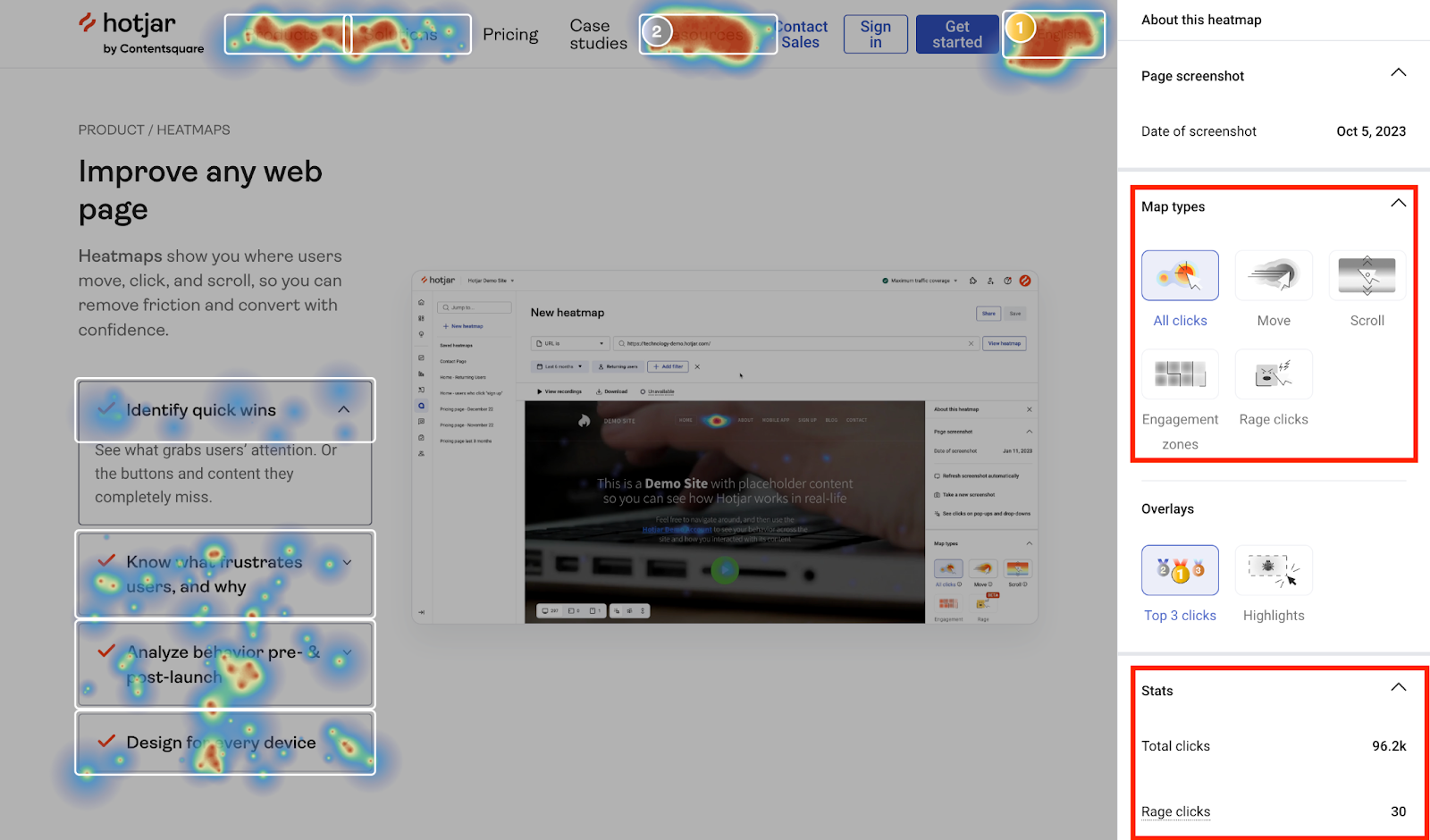
Hotjar standout features
- Heatmaps: Understand how users interact with your website through detailed analytics into scroll-depth, clicks, and drop-off points.
- Recordings: Gives a detailed capture of the journey from each scroll to keyboard strokes.
- Funnels: Track user’s behavior with custom funnel reports to understand how visitors move from one step to another.
Pros Useful for identifying website UX issues and optimizing conversion paths
- Powerful heatmaps, session recordings, and feedback tools provide valuable insights into user behavior
Cons Users report that the platform can increase website load times
- Occasional issues with session recording relevance, especially on the free plan
How to use Hotjar for demand generation?
Use heatmaps to optimize the placement of key product information and calls to action on your website. This will enhance the user experience and increase engagement with your brand message.
Hotjar alternatives | |
Mouseflow | If you want an advanced heat mapping and website issue tracking tool with comprehensive data capture capability |
Usertesting | If your focus is on collecting detailed feedback |
20. VWO: For running A/B test campaigns
VWO is a complete website optimization software that analyzes user behavior and helps you run A/B testing across web pages.
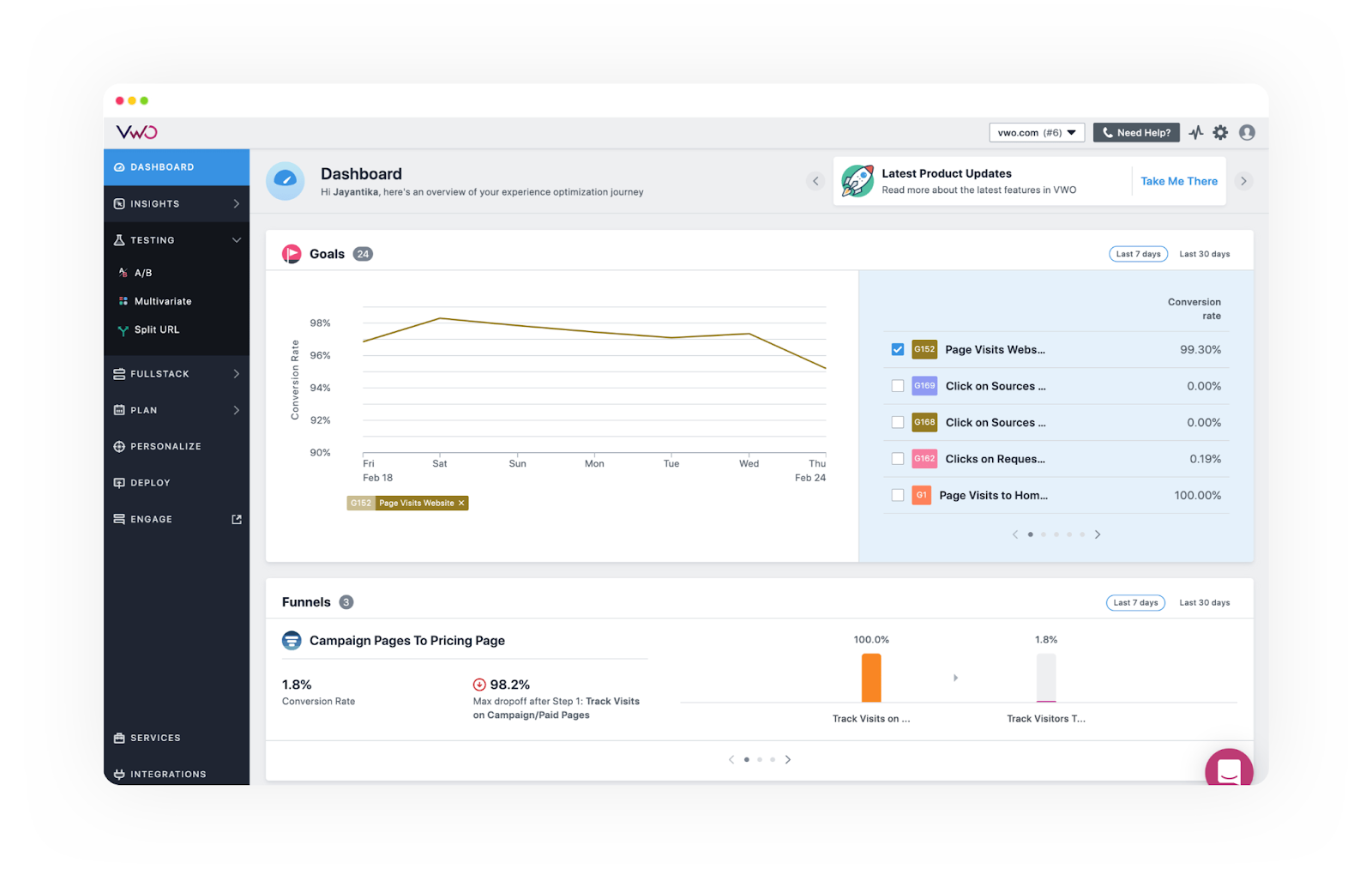
VWO’s standout features
- Web and mobile testing: Track and test every aspect of your website—UI elements, search results, web copy, and algorithms—no matter the device.
- Advanced audience segmentation: Create segments based on 1000+ variables, including traffic source, device type, visitor type, operating system, browser, behavioral data, custom user events, and even data from third-party sources such as Tag Manager, Segment, and Marketo.
- On-page surveys: Create and embed surveys across website pages based on visitor interaction.
Pros No coding required for basic experiments, with flexibility for advanced tests
- Visual editor and session recordings are highly praised for ease of use
Cons Funnel tracking and some integrations (e.g., Shopify) can be complex or require extra effort to set up
- Occasional bugs or slow loading times with the visual editor on dynamic pages
How can you use VWO for demand generation?
Test different value propositions on your homepage to identify messaging that resonates best with your target audience, improving overall brand perception and engagement
VWO alternatives | |
Optimizely | If you want a comprehensive web testing platform with AI-based recommendations and analysis |
Kameleoon | If you want an enterprise-level A/B testing tool that works fast without impacting the page speed |
Marketing automation platforms
21. Ortto: For creating multi-channel automation
Ortto is a comprehensive marketing automation and customer data platform that offers omnichannel workflow management.
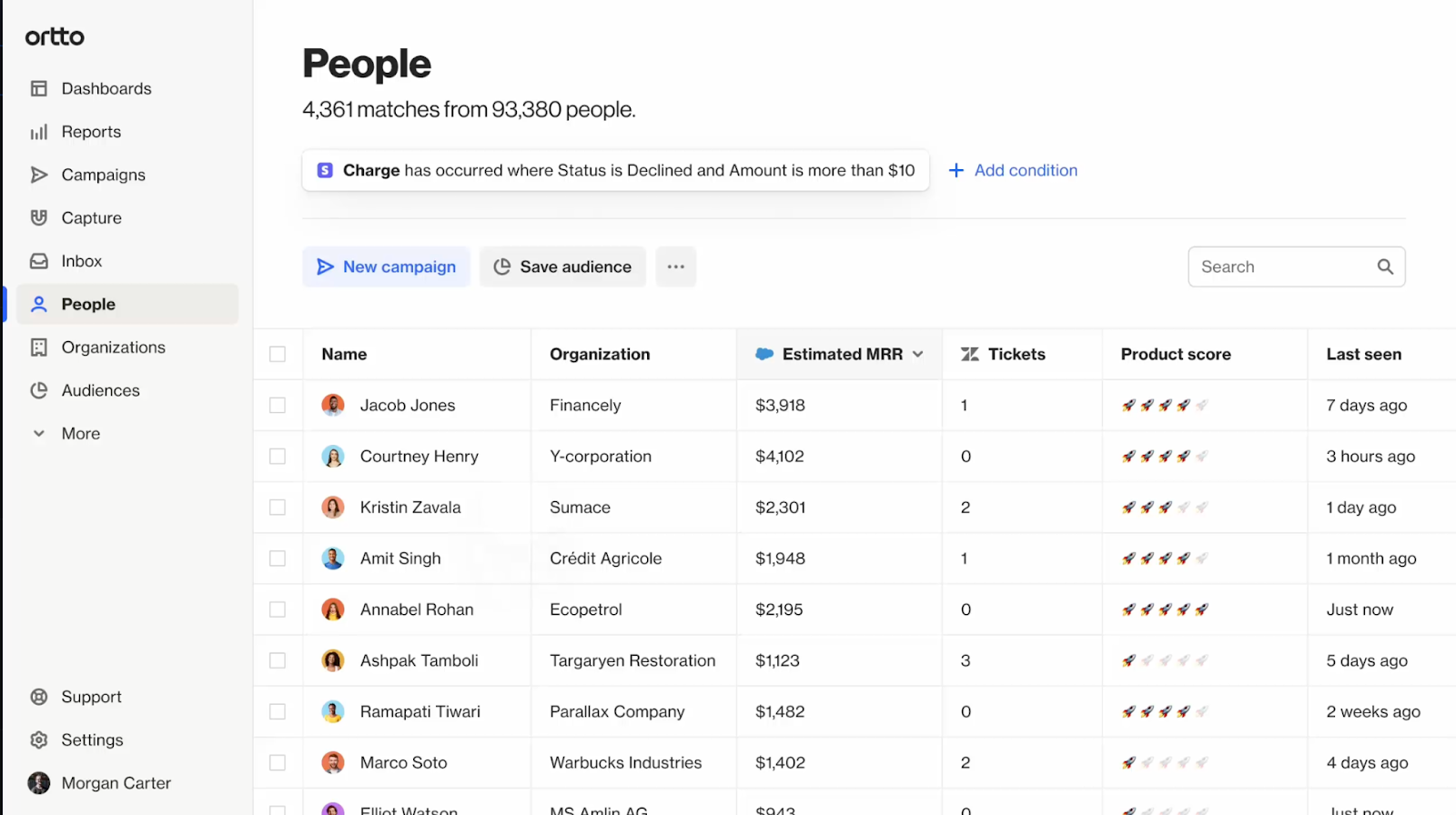
Ortto’s standout features
- Journeys: Build automated sequences based on customer data to trigger the right message across channels, such as emails, SMS, and push notifications.
- Checkmate tracking: Ortto’s proprietary tracking script that collects first-party data and isn’t blocked by ad servers, email servers, and browsers.
- Lead scoring: Build custom scores based on demographic, firmographic, and behavioral data to set up scores.
Pros Enables multi-channel marketing automation and real-time campaign tracking
- Clean, intuitive UI simplifies campaign building and marketing automation
Cons Self-serve help articles are less comprehensive, leading to reliance on live support
- Users say feporting features and data analysis tools could be more flexible
How to use Ortto for demand generation?
Create a multi-touch brand awareness campaign across email, social media, and display ads, tailoring content based on user interactions to nurture interest without explicit lead capture.
Ortto alternatives | |
Activecampaign | If you want an advanced email marketing automation platform |
Userlist | If you want a Saas dedicated automation platform |
22. Zapier: For automating repetitive tasks across platforms
Zapier is one of the easiest automation tools to automate repetitive and time-consuming tasks, such as data entry or status updates. It's blank canvas allows you to build any imaginable workflow, from basics to advanced.
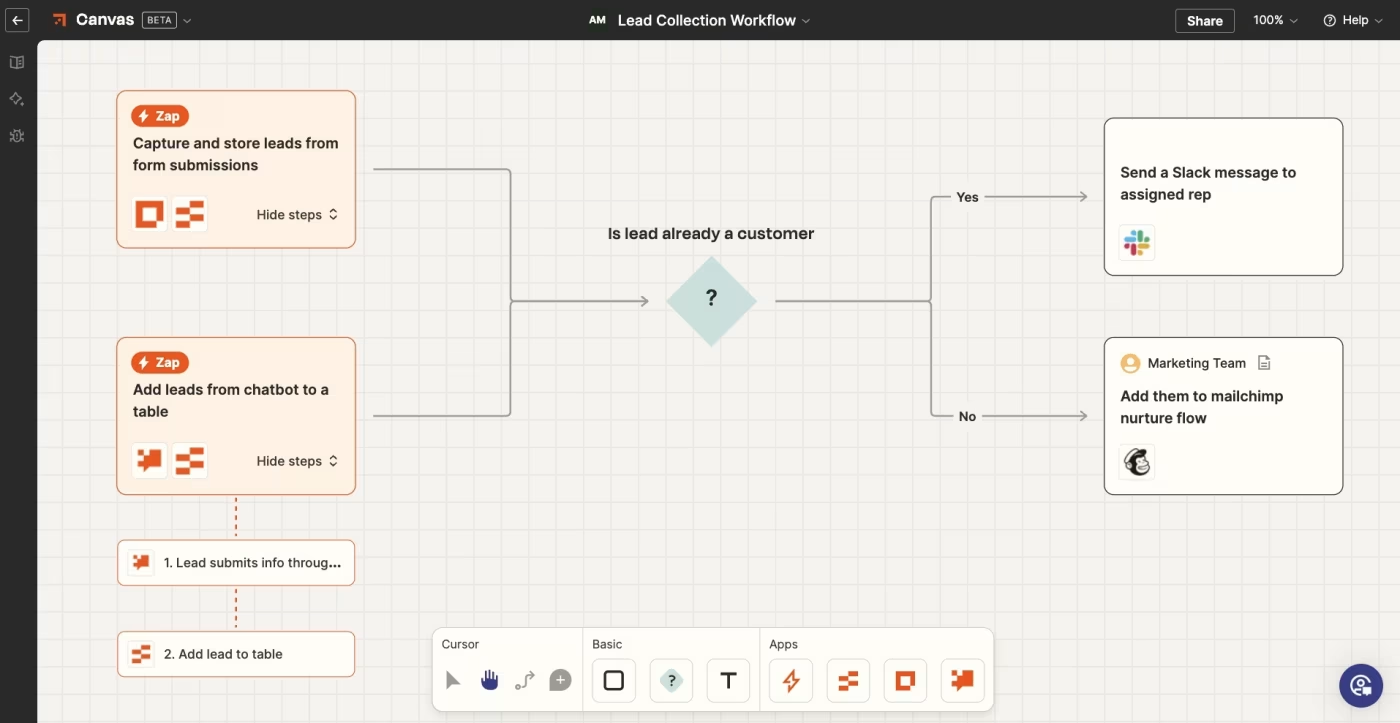
Zapier’s standout features
- Zaps: Drag-and-drop workflow builder to create and publish automated sequences.
- Integrations: Connects with over 7,000 apps, letting you trigger actions from your existing toolstack.
- Tables: Store contact database in built-in table view and trigger actions based on this database.
Pros Supports complex automations without coding, but also allows advanced customizations
- Excellent documentation and support resources
Cons Some advanced use cases require technical workarounds or custom webhooks
- Pricing can be high, especially for premium features or higher usage tiers
How to use Zapier for demand generation?
Automate the process of sharing new blog posts across multiple platforms, increasing content reach and brand visibility without manual effort.
Zapier alternatives | |
Workato | If you want advanced automation software with conditional logic, loops, and branching |
Integrately | If you want an affordable automation software |
Account-based marketing (ABM) tools
23. Demandbase: For tracking customer journey
Demandbase is an account-based GTM platform that unifies marketing and sales campaigns. It uses AI and advanced targeting capabilities to identify high-value accounts, engage decision-makers with personalized content, and accelerate pipeline velocity, driving more conversation and revenue growth.
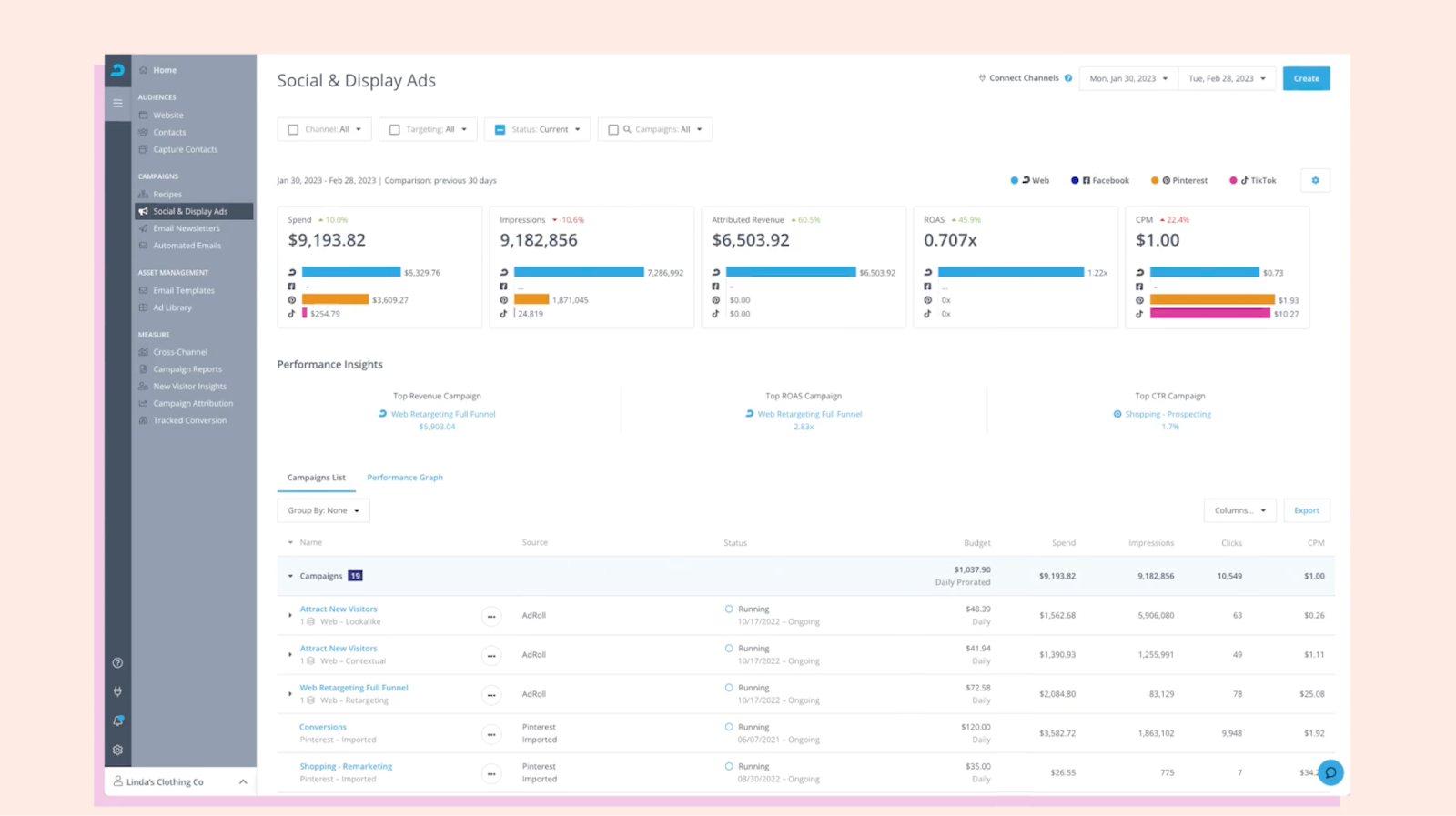
Demandbase’s standout features
- Data enrichment and cleaning: It fills gaps in existing data, enriches accounts and leads, and appends data to make it holistic. It integrates with Salesforce, Microsoft Dynamic 365, Hubspot, Marketo, etc.
- Account identification and scoring: Identifies and scores accounts that match your Ideal Customer Profile (ICP).
- Analytics: Collect and analyze vast amounts of intent data from various sources, including B2B content consumption, public business registries, and visitor engagement on your website.
Pros Powerful, customizable platform for account targeting, orchestration, and analytics
- Integrates well with sales and marketing data to drive measurable results
Cons Some users mention a need for more streamlined workflows and easier setup for advanced features
- Pricing may be a barrier for smaller businesses or teams
How to use Demandbase for demand generation?
Identify accounts visiting money pages frequently, such as pricing pages for your CRM tool. Based on this, you can develop targeted ad campaigns and alert the right rep to engage with them
Demandbase alternatives | |
6sense | If you want advanced AI-based analysis and recommendations |
Clearbit (By Hubspot) | If you want an affordable ABM tool |
Start building your demand generation toolkit
The tools we've covered can be invaluable for marketing and sales teams aiming to develop or expand their demand generation strategy.
Below, we have summarized all the tools and free and paid pricing plans. From website performance optimization to lead generation, start picking your demand gen tools.
Category | Demand generation tool | Free plan | Free trial | Starting price (based on monthly billing) |
Customer engagement tools | Supademo | ✅, 5 Supademo included | ✅ 14-day trial | $36/user/month |
Leadpages | ❌ | ✅ 14-day trial | $49/month | |
Wisepops | ❌ | ✅ 14-day trial | $149/month | |
Chili Piper | ✅ | ❌ | $22.5user/month | |
Email deliverability tools | ZeroBounce | ✅ | ✅ | $49/month |
Mailerlite | ✅ | ✅ 30-day trial | $10/month | |
Content marketing tools | Ghost | ❌ | ✅ 7-day trial | $11/user/month |
Descript | ✅ | ❌ | $19/user/month | |
Canva | ✅ | ✅ 30-day trial | $13/user/month | |
SEO tools | Ahrefs | ✅ | ❌ | $129/month |
Positional | ✅ | ✅ 7-day trial | $49/month | |
Google Trends | ✅ | N/A | Free | |
Paid ad campaign tools | Adroll | ❌ | ❌ | Custom Price |
Google Ads Transparency Center | ✅ | N/A | Free | |
Social media tools | Hootsuite | ❌ | ✅ 30-day trial | $99/month (billed annually) |
Brandwatch | ❌ | ❌ | Custom Price | |
Analytics and tracking tools | Google Analytics | ✅ | N/A | Free |
Hotjar | ✅ | ✅ 15-day trial | $39/month | |
Marketing automation tools | VWO | ✅ | $191/month (Billed annually) | |
Ortto | ❌ | ✅ 14-day trial | $599/month | |
Zapier | ✅ | ✅ 14-day trial | $29.99/month | |
ABM tools | Demandbase | ❌ | ❌ | Custom Price |
FAQs
Commonly asked questions about this topic.
What is a demand generation tool?
Which are the best free demand generation tools?
How do demand gen tools help with building an effective demand generation strategy?
How lead generation is different from demand generation?
What are the best lead generation tools?

Co-Founder & CEO
Joseph is the CEO and co-founder of Supademo, building AI-driven interactive demo tooling used by 200,000+ founders, marketers, and operators to accelerate product understanding and sales. He’s a two-time startup founder passionate about zero-to-one product building and remote-first company culture.