Onboarding & Activation Bible
28 proven tactics to increase activation rates, organized by implementation effort
Introduction
Hey – I'm Joseph, founder of Supademo. We're a demo automation platform that helps companies create ultra-effective, ultra-profitable, interactive product demos.
We helped:
- Beehiiv increase conversions 50%
- Easy Software close $100k deals without sales calls
- Spare accelerate $1M in deals with demos
Our average customer boosts user engagement 250%. Today, there have been >100,000 Supademos created using our software.
We know onboarding & user activation. And user activation is arguably one of the most important metrics for software companies.
Let me paint a picture of what's at stake. If your SaaS company has 5,000 signups per month and converts 20% to paid users at $100/month, you're generating $100,000 in new MRR. Now imagine increasing your activation rate by just 5 percentage points - that's an additional $25,000 in new MRR every month, or $300,000 annually, without spending an extra dollar on acquisition.
But here's the brutal reality of user activation: up to 80% of your signups will never return after day one.
What's worse, most activation advice is frustratingly vague. "Improve your onboarding." "Reduce friction." "Show value faster." But what does that actually mean? What specific changes should you make first?
That's why we created this tactical playbook. No fluff, no theory - just proven tactics organized by implementation effort, backed by real data.
Inside, you'll find 28 specific tactics across four levels of effort, drawn from our experience helping hundreds of SaaS companies improve their activation rates.
We've included step-by-step instructions for each tactic and a case study showing how we increased activation by >50% at Supademo.
Quick Wins
Low-effort, high-impact tactics that can typically be implemented in just a few hours. These tactics focus on removing obvious friction points and adding proven conversion elements to your existing flows.
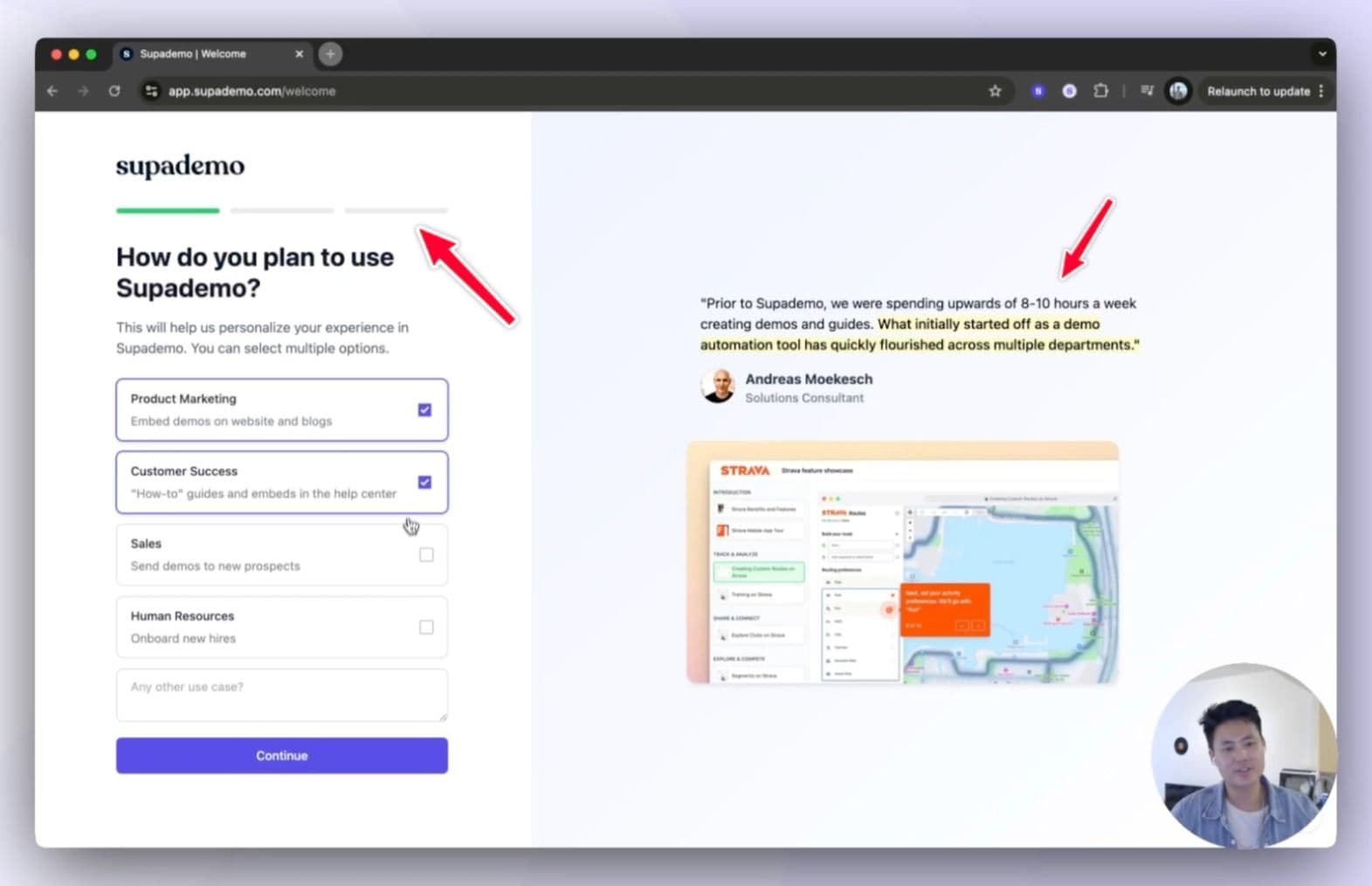
1. Add progress bars within onboarding to increase completion
Estimated impact: Small, ~5-10% increase in completion via better progress visualization
Progress bars and indicators provide visual momentum during onboarding, showing users exactly how far they've come and what's left to do. They tap into the psychological principle of completion and make the onboarding process feel more manageable and actionable.
How to do it:
- Add a simple, persistent progress bar at the top of your onboarding flow
- Animate the progress bar to make completion more satisfying
- If possible, include both percentage and X/Y step indicators (e.g., "Step 3 of 5")
- Save progress in localStorage so users don't lose momentum if they leave
- Add micro-celebrations (like confetti) at 100% completion
2. Add estimated time labels to reduce abandonment during key steps
Estimated impact: Small, can reduce abandonment by 5-10% by setting clear expectations
Time labels set clear expectations and reduce uncertainty during the onboarding process. When users know the time investment required, they're more likely to commit to completing tasks rather than abandoning them mid-way.
How to do it:
- Audit your onboarding flow with real users to get accurate time estimates
- Add time estimates next to each major step (e.g., "~2 minutes")
- Round up slightly to ensure users finish faster than expected
- Use ranges for variable-length tasks (e.g., "3-5 minutes")
- Place time estimates in a consistent, visible location
- Consider adding a total time remaining indicator
- Track actual completion times to refine your estimates
3. Allow skipping & "you can change this later" messaging
Estimated impact: Small, often increases form completion by 5-10% by reducing decision anxiety
Decision paralysis often prevents users from completing onboarding. By explicitly stating that choices aren't permanent (i.e. name, branding), you reduce the mental overhead of decision-making and keep users moving forward.
Bonus: Allow users to defer non-critical steps while ensuring they'll be reminded later. This maintains momentum while still capturing important setup items as they activate.
How to do it:
- Identify high-friction decisions in your onboarding flow
- Add subtle "Change anytime" or "Update later" messages near these decisions
- Use light gray text to avoid distracting from the main task
- Consider adding an "undo" option for immediate reversions
- Track which settings users commonly change later to improve defaults
- Surface these options later (in-app, email) as helpful reminders upon activation
4. Insert customer testimonials at relevant onboarding steps
Estimated impact: Medium, can increase conversion by 15-25% at key decision points
Highlight specific testimonials that directly relate to the current step. This builds credibility by showing real-world value at the exact moment it's most relevant.
Bonus: Leverage third-party validation through recognizable review site badges to build trust during critical early moments of product adoption.
How to do it:
- Collect testimonials specifically about each major onboarding step
- Keep testimonials brief and focused on specific outcomes
- Include the customer's logo, role, headshot, and company size if B2B
- Match testimonial content to page or user context (i.e. role-specific testimonials if splitting onboarding by use case)
- Consider adding key metrics from reviews (e.g., "4.8/5 for Ease of Use", "G2's Momentum Leader")
- A/B test which testimonials correlate with higher completion rates
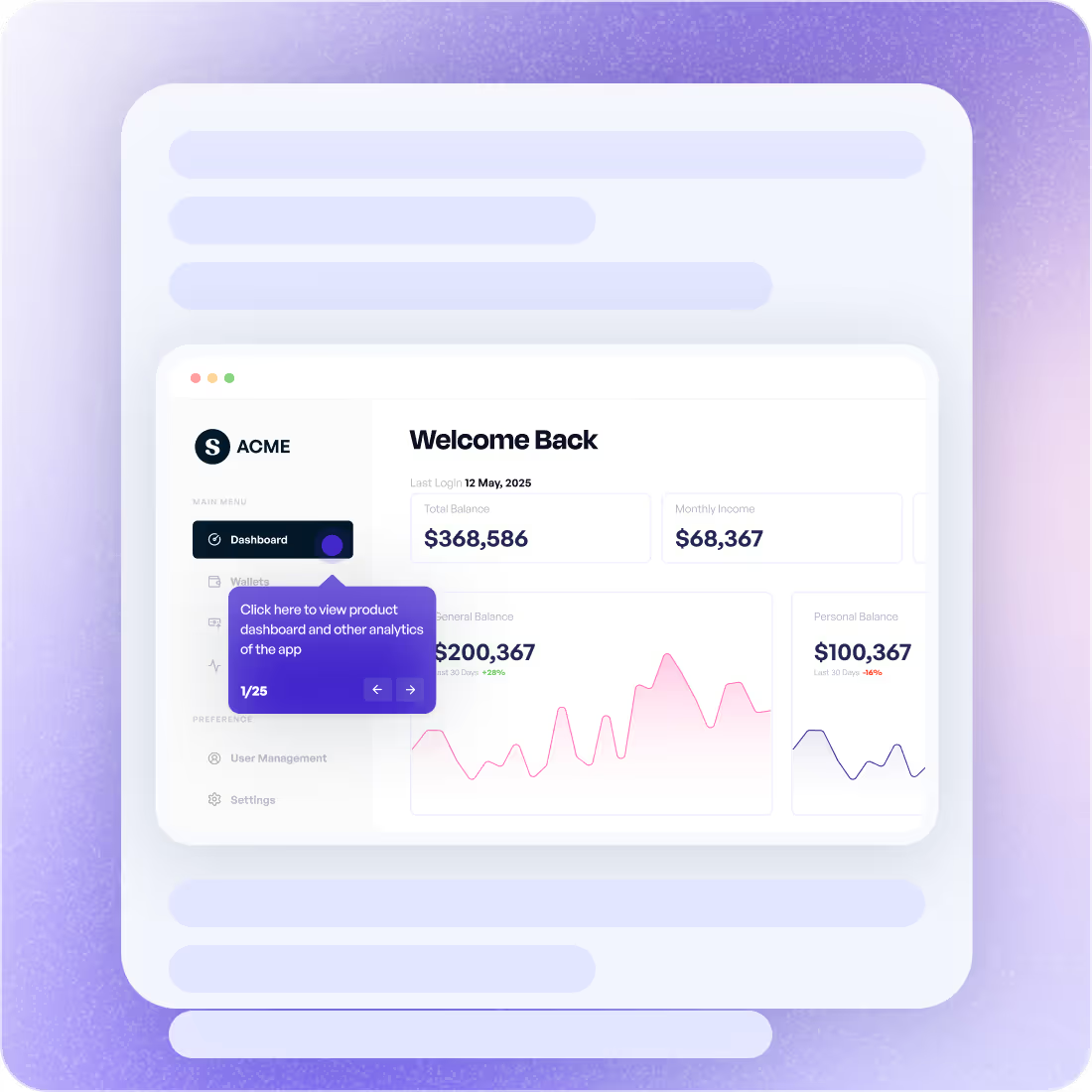
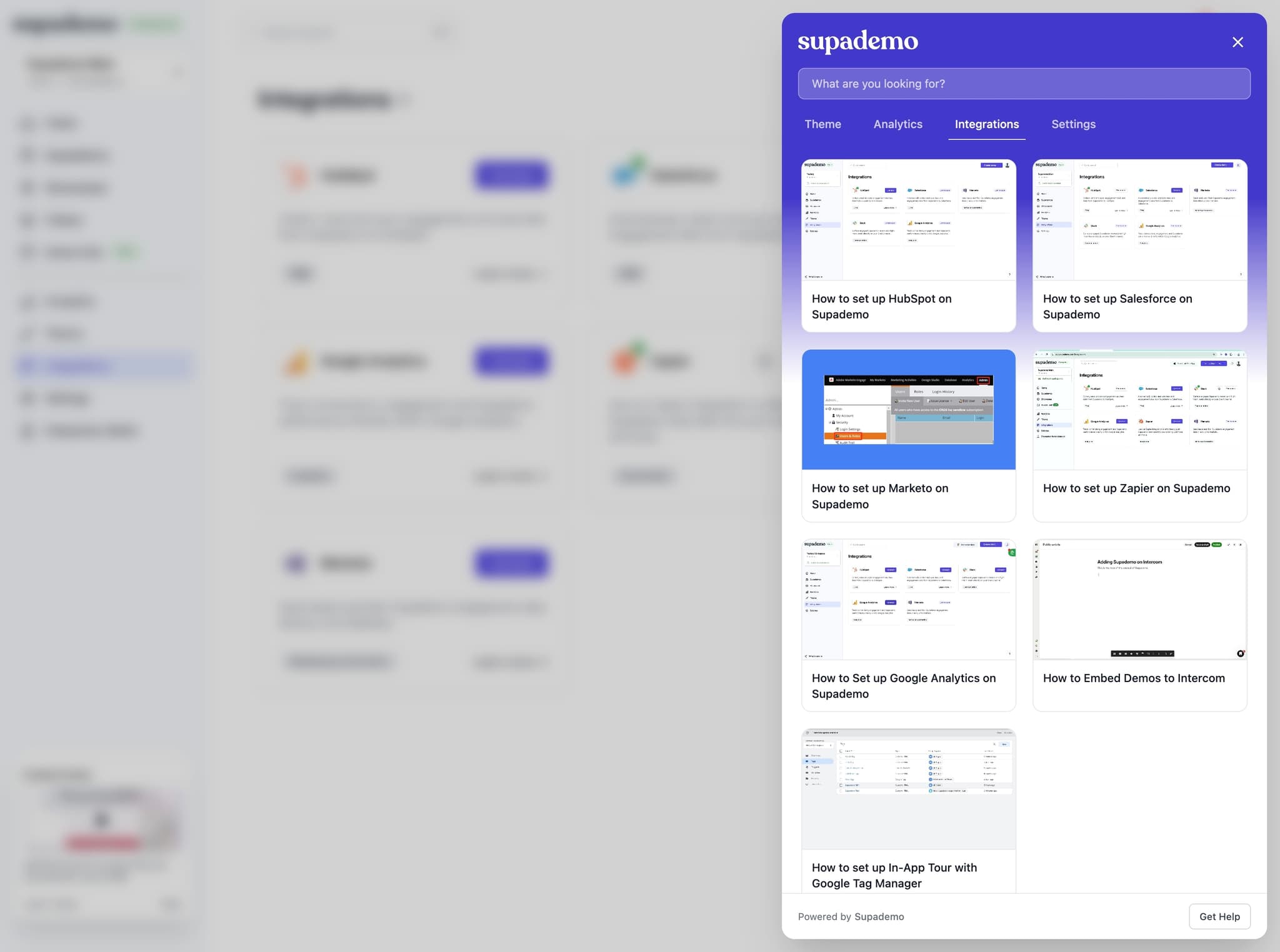
5. Add interactive product tours to quickly highlight use cases
Estimated impact: Medium, converts 1.5x vs. video, faster to create, update, and consume
Complex features often require more than text or static images to communicate value. Short, tactical, and engaging product tours reduce time-to-understanding while demonstrating real-world applications of your product's capabilities.
Use these interactive tours as empty states or as onboarding checklists upon signup to quickly highlight use cases, benefits, and key features.
Best of all – these are fully trackable, helping you assess exactly which users have completed and engaged with your tours.
How to do it:
- Keep onboarding-focused demos to under 10 steps
- Create separate content for different use cases
- Place tours contextually within the product, docs, onboarding, or emails – increasing surface area for discoverability
- Track completion rates by user
6. Leverage empty states, sample data, default views
Estimated impact: Medium, can increase feature exploration by 15-20% by demonstrating possibilities
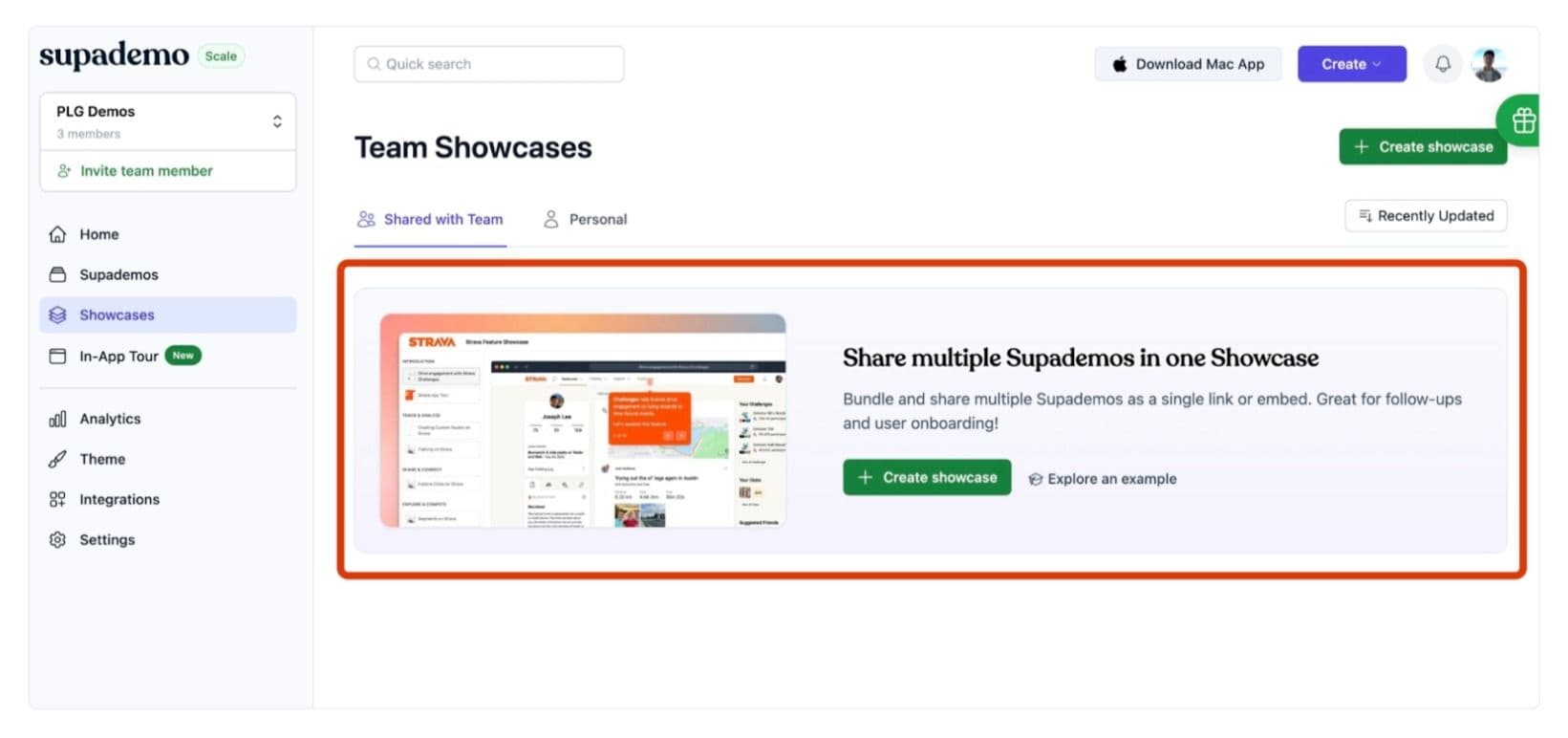
Empty screens (especially for new users) can create cognitive friction - users struggle to envision how they'll use your product when faced with blank dashboards or zero data. Instead, add strategic sample data to demonstrate a live example, or use an educational banner to highlight best practices at a glance.
How to do it:
- Create realistic, relevant sample data for your target personas
- Add clear labels indicating what's sample data
- Make it easy to remove or replace sample data
- If using banners, have a clear CTA (i.e. "Try feature") with a secondary resource pointing to docs/tutorials
- Hide/remove sample data and empty states if the user activates for the feature
Medium Effort Tactics
Tactics that can take a few days to a full week to implement. These tactics go beyond surface-level optimizations to create more sophisticated user experiences.
1. Auto-brand workspaces with "done-for-you" personalization
Estimated impact: Medium, can increase completion by 15-25% via 'wow' factor and IKEA effect
By leveraging known data (via the users' email), you can easily personalize their workspace for them – with their own theme, logo, colors, CTAs, and more. This dynamic theme accelerates the "wow" moment and helps them envision what the final product output would look like.
How to do it:
- Use the signup email to fetch enriched data (i.e. via Clearbit, BrandFetch)
- Personalize their workspace with their background, logo, theme, etc
- Preview the enriched, personalized content throughout onboarding for the 'wow' effect
- Encourage them to create their first demo/product/output to showcase the full personalized content
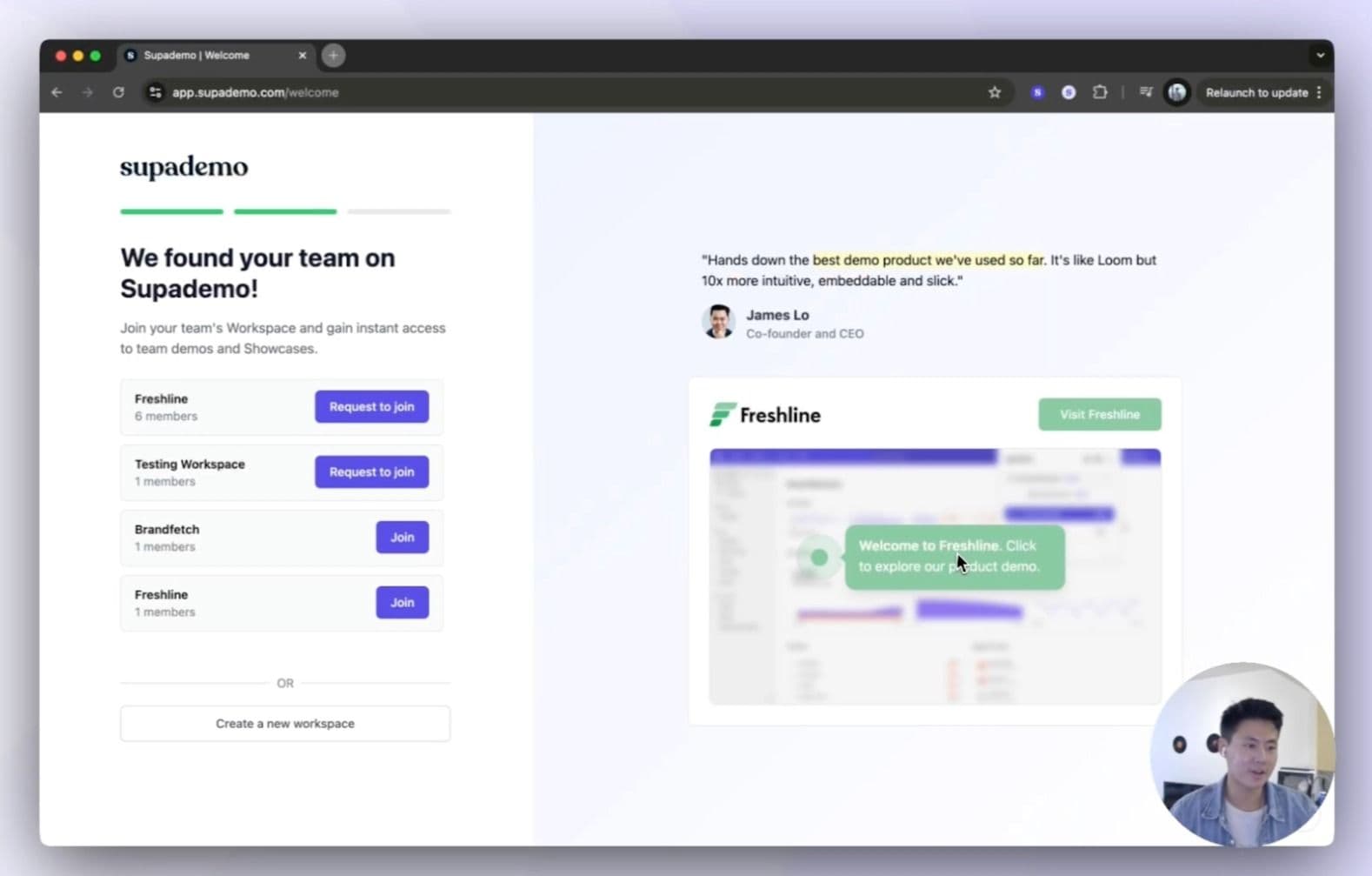
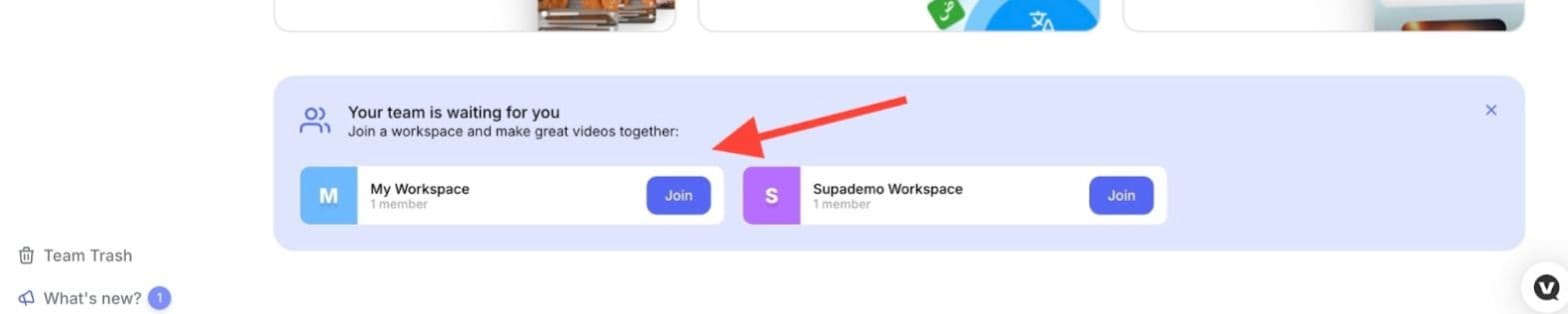
2. Auto-match and suggest team workspaces
Estimated impact: Medium, often increases team adoption by 25-40%
Collaboration tools often suffer from fragmented workspaces and siloed teams. Automated workspace matching helps users find and join existing company workspaces, increasing collaboration, reducing duplicate setups, and increasing stickiness.
How to do it:
- Create domain-based workspace detection
- Suggest workspaces to same-domains with an option to request access
- Build a one-click access request and admin approval workflow
- Create workspace migration tools
- Track workspace consolidation metrics
- Build cross-workspace discovery features within the dashboard itself
3. Split onboarding into multiple sessions to prevent fatigue
Estimated impact: High, multiple short sessions can increase completion rates by 20-40% compared to long, linear flows
Long, monolithic onboarding flows can overwhelm users and increase cognitive load. By breaking the experience into focused micro-sessions, you maintain user attention while creating natural pause points. This is particularly effective for complex products or those requiring significant user input.
How to do it:
- Map your current onboarding flow and identify logical break points
- Create clear session boundaries based on task type or complexity
- Defer as many non-essential onboarding procedures to after initial onboarding
- Send reminder emails and in-app notifications with direct links to next steps based on activation
- Track drop-off points to optimize session breaks
- Consider adding estimated time remaining for each session
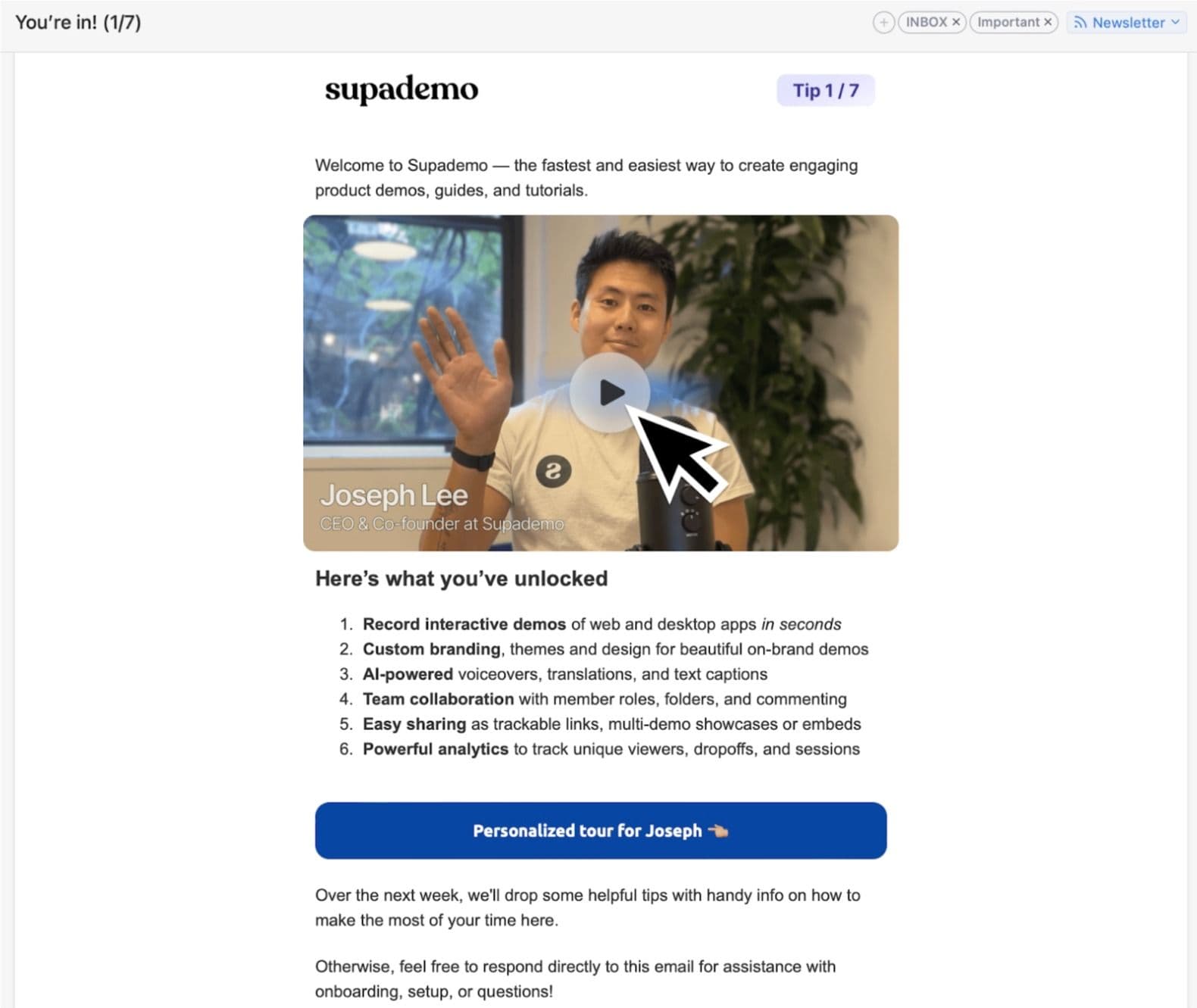
4. Create a weekly tips email sequence to maintain engagement
Estimated impact: Medium, can increase feature adoption by 15-25% through consistent education
Continuous education through micro-interactions keeps users engaged beyond initial onboarding. Weekly tips create structured touchpoints for feature discovery while maintaining a presence in users' minds without overwhelming them.
By strategically dripping tips over a long period of time, you increase the surface area for catching users at the right moment.
How to do it:
- Map out 8-12 weeks of feature-focused content
- Keep each tip focused on one specific action
- Start with simple features/tips and progress to advanced features over time
- Include clear CTAs that deep-link to features
- Track which tips drive the most feature adoption
- A/B test subject lines and timing
Significant Builds
Substantial product investments, typically requiring 2-4 weeks (or more) and dedicated engineering resources. These projects create fundamental improvements to your activation infrastructure, enabling more personalized and sophisticated user experiences.
1. Implement reverse trials to showcase premium features up-front
Estimated impact: High, can increase conversion rates by 25-40% through immediate value delivery
Traditional free trials limit user exposure to your product's full potential. Reverse trials flip this model by giving users immediate access to premium features, allowing them to discover value organically before making buying decisions. This is particularly effective for products with feature-dependent value propositions.
How to do it:
- Identify which premium features provide immediate value
- Create usage limits during the trial if access is expensive
- Create urgency with email reminders and persistent in-app messaging reminding them of trial
- Implement clear upgrade paths when limits and/or time are reached
- Track which premium features drive conversions and put those front and center
- Set up monitoring for potential abuse cases
- Gracefully downgrade users post-trial and remind them what they'll be losing
2. Create semi-mandatory feature adoption flows
Estimated impact: Medium-High, often increases feature adoption by 25-40%
Your main objective during onboarding and activation is to get the user to the "aha moment". Hence, allowing users to skip key features can often leads to incomplete activation (even if it's less friction). Semi-mandatory flows create forced pressure to try core features while maintaining escape hatches for users who truly need to skip.
How to do it:
- Identify critical features for activation
- Encourage users to try the simplest rendition of that feature during onboarding
- Add discreet 'skip' functionality for users that truly want to skip
- Build re-engagement prompts for those that skip
- Track, measure, and iterate on where in the flow you want to place this forced activation step
3. Create a library of templates as best practices
Estimated impact: High, Usually increases initial engagement by 10-30% through reduced setup friction
Visualizating success becomes easier when users start with a recommended set of templates that match their needs and use cases. Templates remove setup friction while subtly teaching best practices through example – especially if you utilize UGC from other customers.
How to do it:
- Create examples and templates for each major use case
- Programmatically display relevant templates based on user behavior and use case indicated during sign up
- Present a mix of vendor-created and user-generated content from other customers
- Make templates easily duplicatable for customization
- Track which templates get most usage
- Allow users to save their own templates to help others
4. Add action-triggered sequences (email, in-app)
Estimated impact: High, can increase engagement by 10-20% through timely communication
Generic, time-based email sequences often miss critical opportunities in the user journey. Action-triggered emails respond to specific user behaviors, delivering relevant content exactly when users are most engaged.
How to do it:
- Map key user actions to trigger points
- Build event tracking infrastructure
- Create dynamic email content system
- Implement engagement scoring
- Design adaptive timing logic
- Create A/B testing framework
- Build email preference management
What we did
You don't need to implement every tactic in this playbook. In fact, trying to do everything at once often leads to poor execution and muddled results. Instead, choose tactics that align with your specific activation challenges and available resources!
Implement reverse trials for immediate value
Why we chose this:
Our product's value becomes most apparent when users can access premium features like dynamic variables and conditional branching. Rather than gate these behind a paywall, we wanted users to experience our full capability set immediately.
- Gave all users immediate access to our Scale plan features
- Removed upfront commitment requirements
- Let users naturally discover which features matter most
- Used actual product features instead of marketing language
Result: Significant contributor to our >50% activation rate
Add strategic social proof throughout the journey
Why we chose this:
We noticed users were more likely to complete onboarding steps when they understood how other companies were benefiting from similar features. We added contextual social proof at key decision points.
- Matched testimonials to specific onboarding steps
- Added G2 badges for credibility
- Included case studies in triggered emails
- Highlighted ROI metrics from similar users
Result: Helped drive 50%+ increase in onboarding completion
Force users to experience core value
Why we chose this:
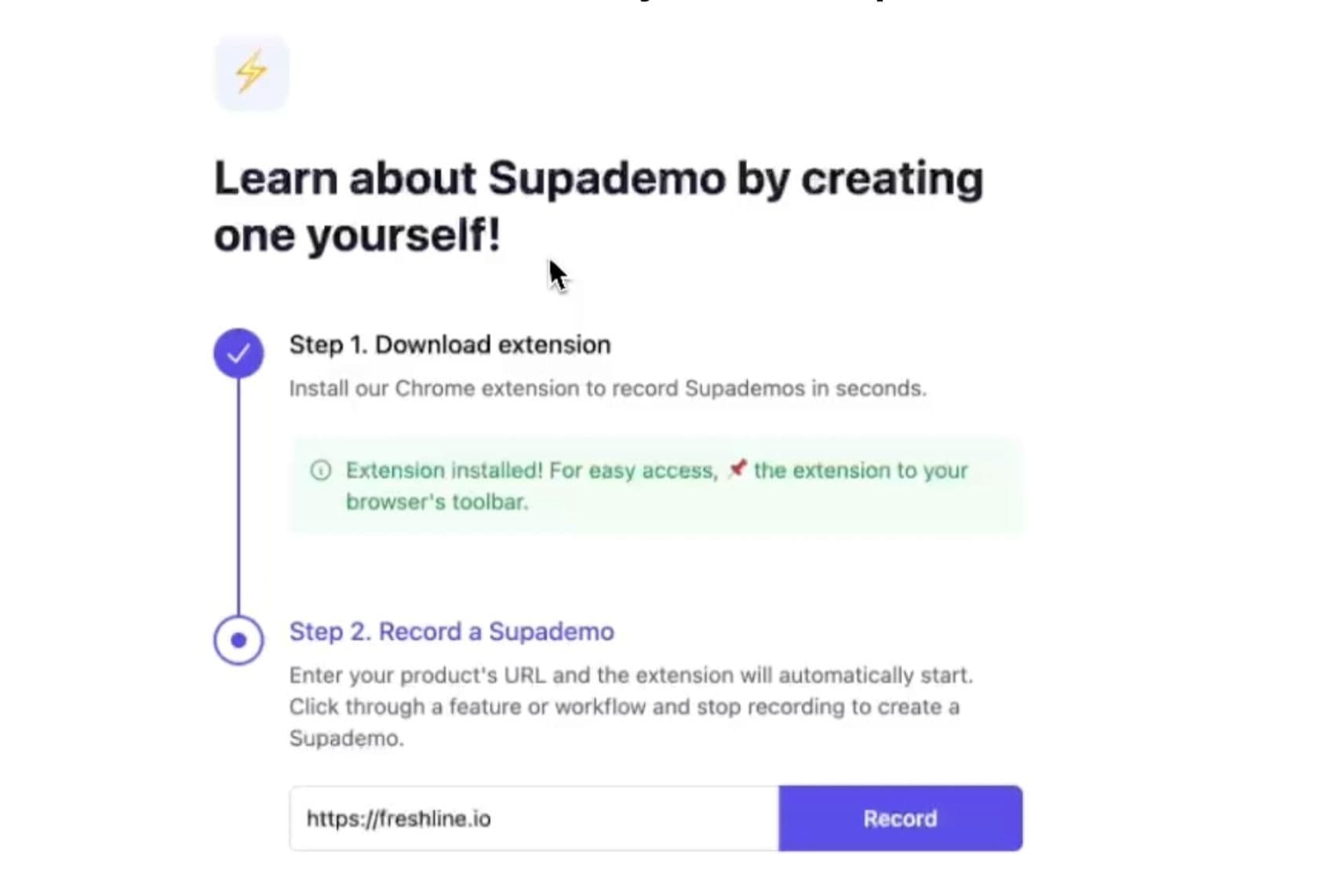
Creating a first demo was our key activation moment, but many users were skipping it. We made demo creation semi-mandatory and simplified the process.
- Added mandatory "Try Recording a Supademo" step
- Created simplified canned demo environment
- Enabled premium features by default
- Added templates and examples throughout
Result: Contributed to 39% decrease in time-to-value
Push for team collaboration
Why we chose this:
We noticed that team-based accounts had higher retention. We prioritized getting more users from the same organization involved early.
- Built automated workspace matching
- Added one-click approvals
- Enabled domain-based auto-join
- Showed matching workspaces automatically
Result: Significant increase in users per workspace
Implement personalized action-triggered emails
Why we chose this:
Generic drip emails weren't engaging users at the right moments. We created a dynamic system that responded to user behavior.
- Created personalized demo tours in welcome emails
- Added founder emails at key moments
- Implemented success milestone notifications
- Created weekly feature education series
Result: Contributed to overall 80%+ onboarding completion rate
The impact
After implementing these five tactics over a two-month period, we saw significant improvements across our key metrics:
Onboarding completion rates
Improvement in activation rate (reaching >50%)
Decrease in time-to-value (under 5 hours)
Increase in demos per user
These improvements also drove meaningful business outcomes, including:
- 25% month-over-month growth in demos created
- 47% growth in multi-demo showcases
- 590% ARR growth in 2024
Supademo is FREE to try
We created Supademo to make it dead easy to solve user activation challenges. It's by far the easiest, simplest way to boost engagement.
If you want to give it a shot, it's 100% free to try. Just go to supademo.com & play around. You can be up and running in literally 15 seconds.
If you want more help: email me at joseph@supademo.com – I love chatting about this stuff, and I'd love to look at your stuff with you.