Onboarding Snapshot
Activation Event
First meaningful AI response received to a user prompt
Time-to-Value
~3 minutes, 5–6 steps
Primary Strength
Pre-written first prompt eliminates blank-input hesitation
Primary Risk
Pricing and desktop app steps delay first interaction
Overview
The pre-written first prompt is the best thing about this onboarding flow. It's a simple, high-leverage decision that removes the single most common failure point in AI tool onboarding — the blank input box — and it's made more effective by the personalization layer that generates it.
What Should You Steal?
Swipe through actionable takeaways from this onboarding flow.
How Claude Personalizes Onboarding by Job-to-Be-Done
Three-question personalization before first interaction shapes the output.
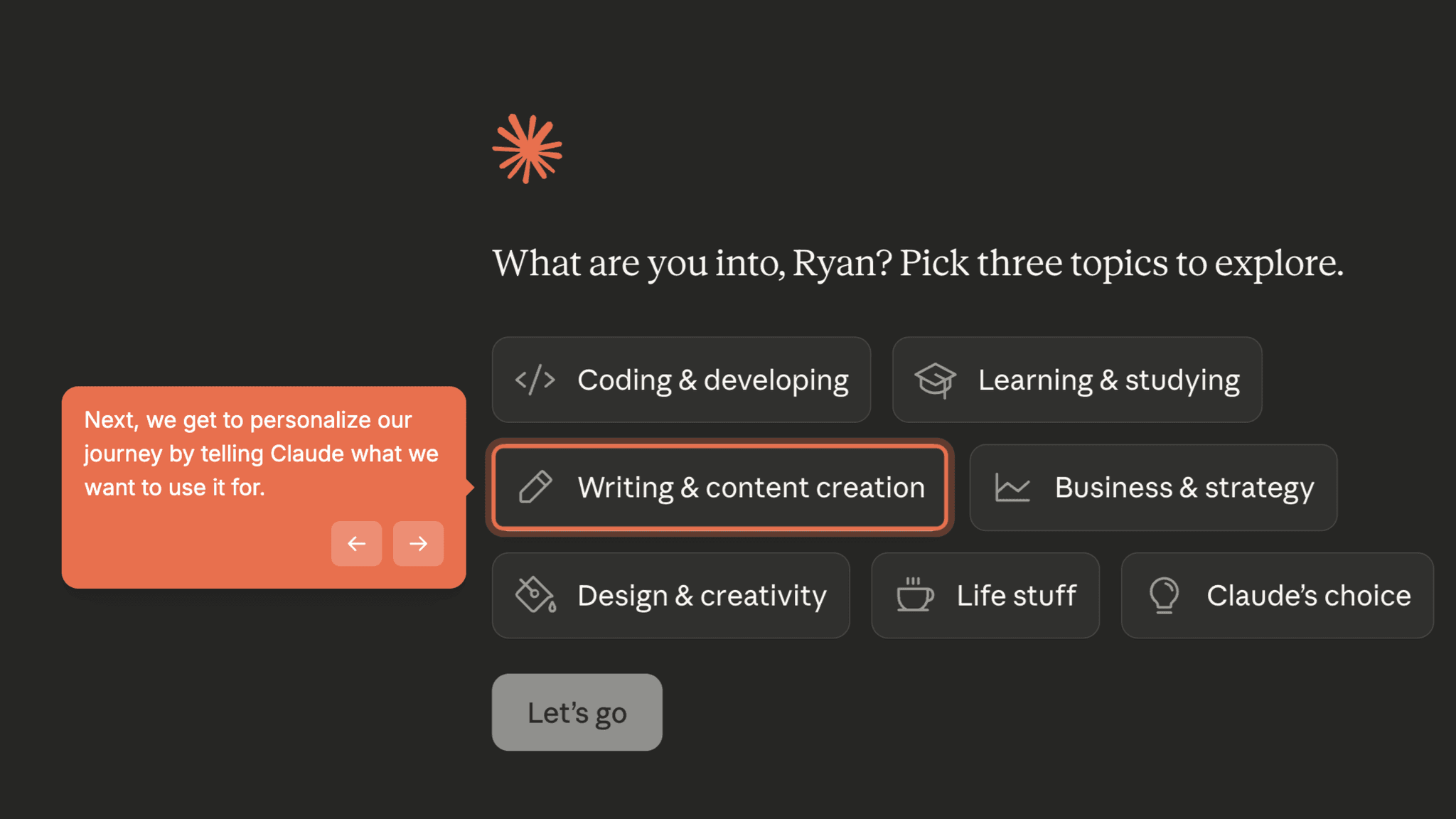
Claude asks for a name, areas of interest, and preferred task type before the chat opens. These aren't cosmetic questions. The answers directly influence what first prompt gets pre-written. A user who selects "writing" gets a different starting point than someone who selects "coding." The personalization is functional, not decorative.
How Claude Personalizes Onboarding by Job-to-Be-Done
Personalization creates buy-in before value arrives.
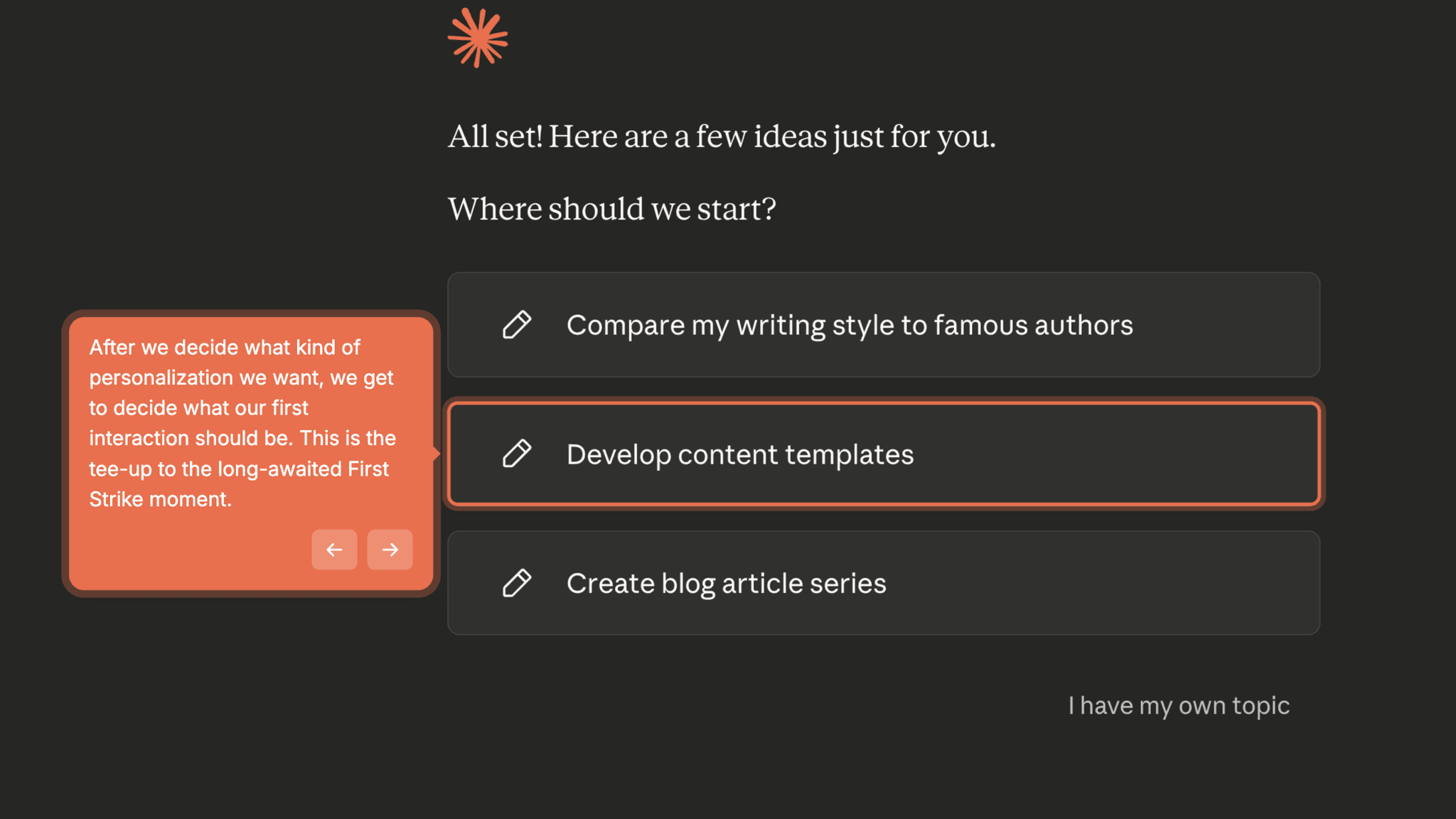
Because users supply information that visibly shapes their experience, they arrive at the chat interface already invested. They've done something and that small effort creates commitment. It's a low-friction version of the IKEA effect applied to onboarding.
How Claude Reduces Decisions Early
The pre-written first prompt removes blank-input anxiety entirely.
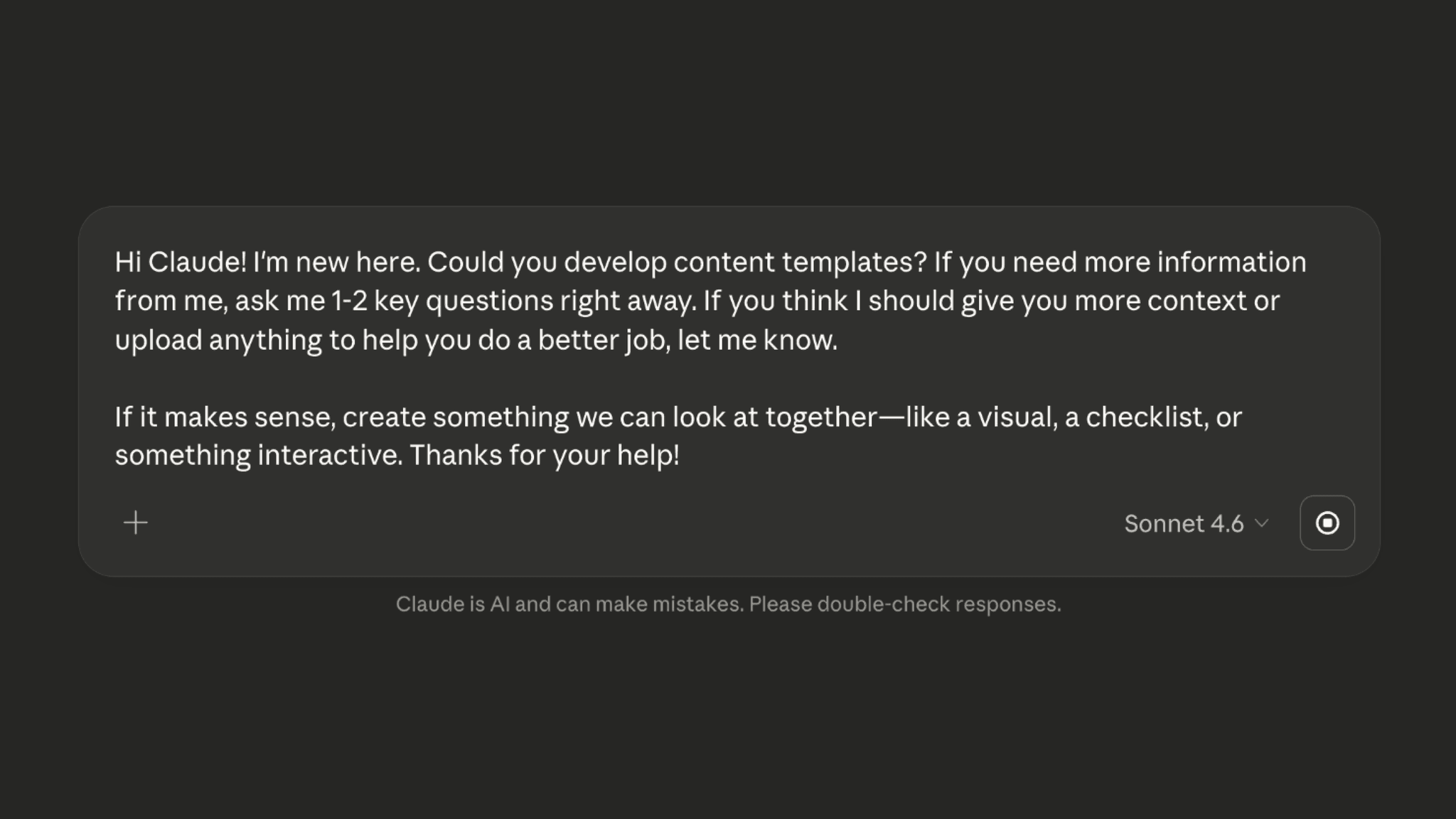
When I open the chat interface, a prompt is already waiting — generated from my personalization answers. I don't face an empty input box wondering what to type. I can send the pre-written prompt, edit it, or ignore it. All three options move me forward. This is the standout pattern in the flow.
How Claude Reduces Decisions Early
Trust-building consent step embeds agreement inside explanation.
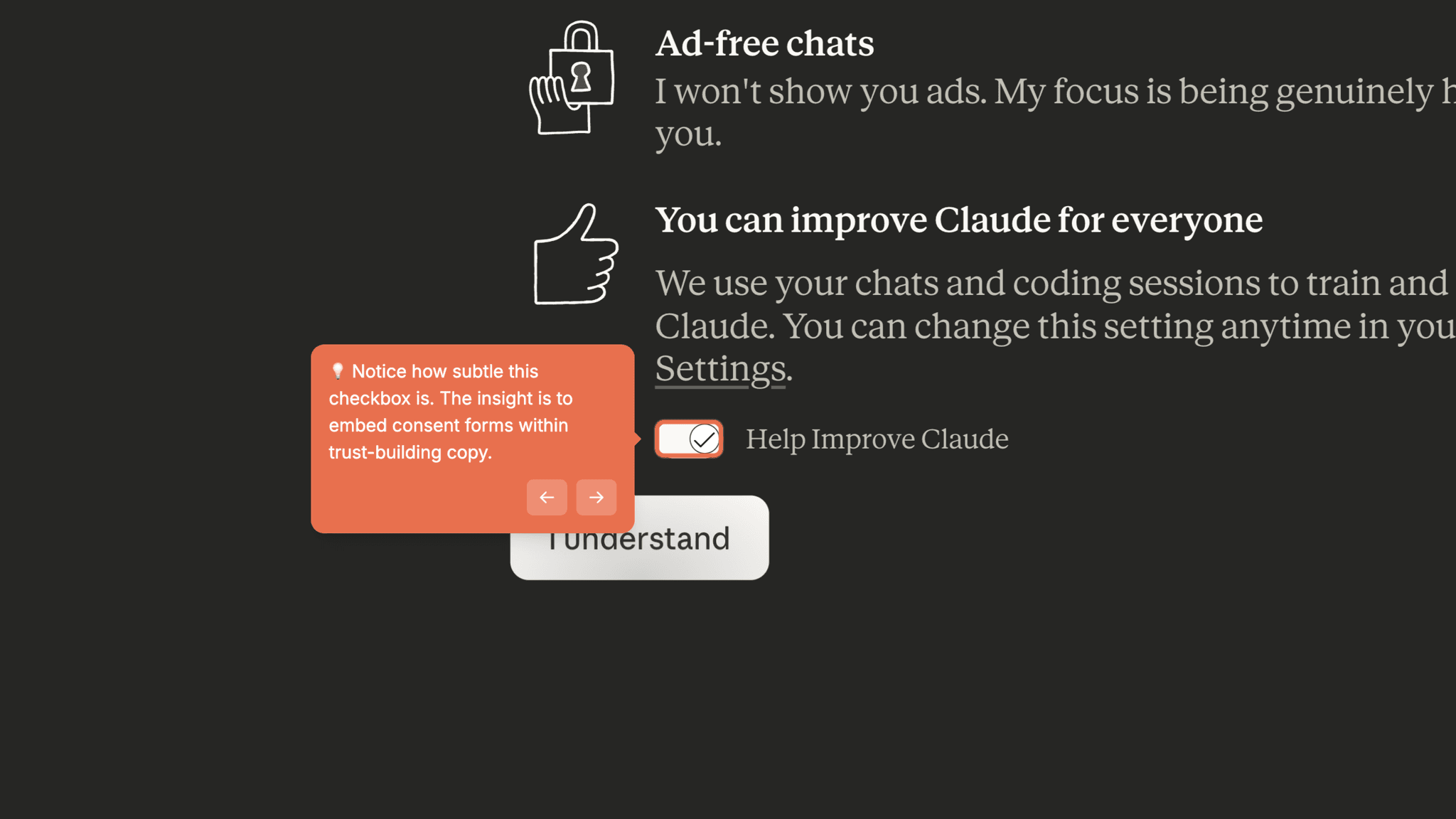
Rather than a standalone checkbox asking me to agree to data training, Claude wraps the "Help Improve Claude" toggle inside copy that explains how the AI works. The consent feels contextual, not extractive. It's a small design choice that reduces the friction of the step without hiding the ask.
Onboarding Tactics That Work
Pre-written first prompt generated from personalization answers — chat box is never empty
Consent step wrapped in trust-building copy — feels contextual, not transactional
Three-question personalization creates investment before the first response arrives
Where There's Friction
Pricing plan selection (Free vs Pro, monthly vs yearly) required before first interaction
Desktop app download prompted before user has experienced any value
Plan comparison screen shifts users into evaluation mode at a critical momentum point
When Is the In-App Activation Moment?
The Activation Event is the moment a user receives their first meaningful AI-generated response — typically within 3 minutes of starting the signup flow.
The essential steps are:
That path is clean and well-designed. What inflates the step count are two interruptions that appear between personalization and the chat interface: a pricing plan selection screen and a desktop app download prompt.
Neither is guided by a progress indicator. There's no checklist or step counter telling me how close I am to the chat interface. The flow just moves through screens, and I follow.
What happens after the first response lands depends entirely on the output quality. The product trusts the response to generate its own momentum. For a capable AI assistant, that's usually enough. But users who get a weak first response have nothing to anchor them to a second attempt.
The Bottom Line on Claude's Onboarding
The pre-written first prompt is the best thing about this onboarding flow. It's a simple, high-leverage decision that removes the single most common failure point in AI tool onboarding — the blank input box — and it's made more effective by the personalization layer that generates it.
The honest critique is the pricing screen. Asking users to choose a plan and billing cycle before they've seen a single response puts evaluation pressure at exactly the wrong moment. Whether that converts well is a commercial question, but from an activation standpoint, it's friction that delays the first output.
Steal the pre-written prompt. Let the user's setup choices generate their first interaction rather than leaving them to figure out what to ask.
FAQs
Common questions about Claude's onboarding flow and what makes it effective.
How does Claude onboard new users?
Claude's onboarding starts with account creation followed by a three-question personalization flow covering name, interests, and preferred task type. Those answers generate a pre-written first prompt that's waiting when users open the chat interface. The Activation Event — receiving a meaningful AI response — typically happens within 3 minutes, though a pricing plan selection step appears before the chat interface opens.
What makes Claude's onboarding experience stand out?
The pre-written first prompt is the defining feature — it's the only AI assistant onboarding I've seen that proactively removes blank-input hesitation by generating the first message for you. The personalization-to-prompt pipeline is also unusually functional: the questions asked during setup visibly shape what gets pre-written, which gives the personalization step a clear purpose.
How long does it take to reach value in Claude?
From account creation to first response takes approximately 3 minutes across 5–6 steps. The core personalization and chat steps are fast; the pricing and desktop app screens add time without contributing to activation. The path is still faster than most AI tools that drop users into a blank interface with no scaffolding.
How does Claude's onboarding compare to other SaaS tools?
Claude's personalization-to-prompt pipeline is more sophisticated than Lovable's onboarding, which also removes blank-canvas friction but does so through suggested example prompts rather than personalized generation. Compared to HeyReach's onboarding, Claude's flow is tightly guided — every screen has a clear next action, which is the opposite of HeyReach's empty dashboard problem.