Onboarding Snapshot
Activation Event
First enrichment run completed on a live prospect table
Time-to-Value
Moderate — email verification and segmentation precede first workbook
Primary Strength
AI uses business context to suggest first search before user types anything
Primary Risk
Email verification required before any product experience begins
Overview
Clay has one of the most considered onboarding flows in the gallery for a product of its complexity. Most data enrichment tools drop users into a configuration screen and expect them to figure out what to enrich first. Clay skips that — signup answers become a specific starting point before the user has asked for one.
What Should You Steal?
Swipe through actionable takeaways from this onboarding flow.
How Clay Personalizes Onboarding by Job-to-Be-Done
The final signup question routes users directly into a relevant workbook, skipping the dashboard entirely.
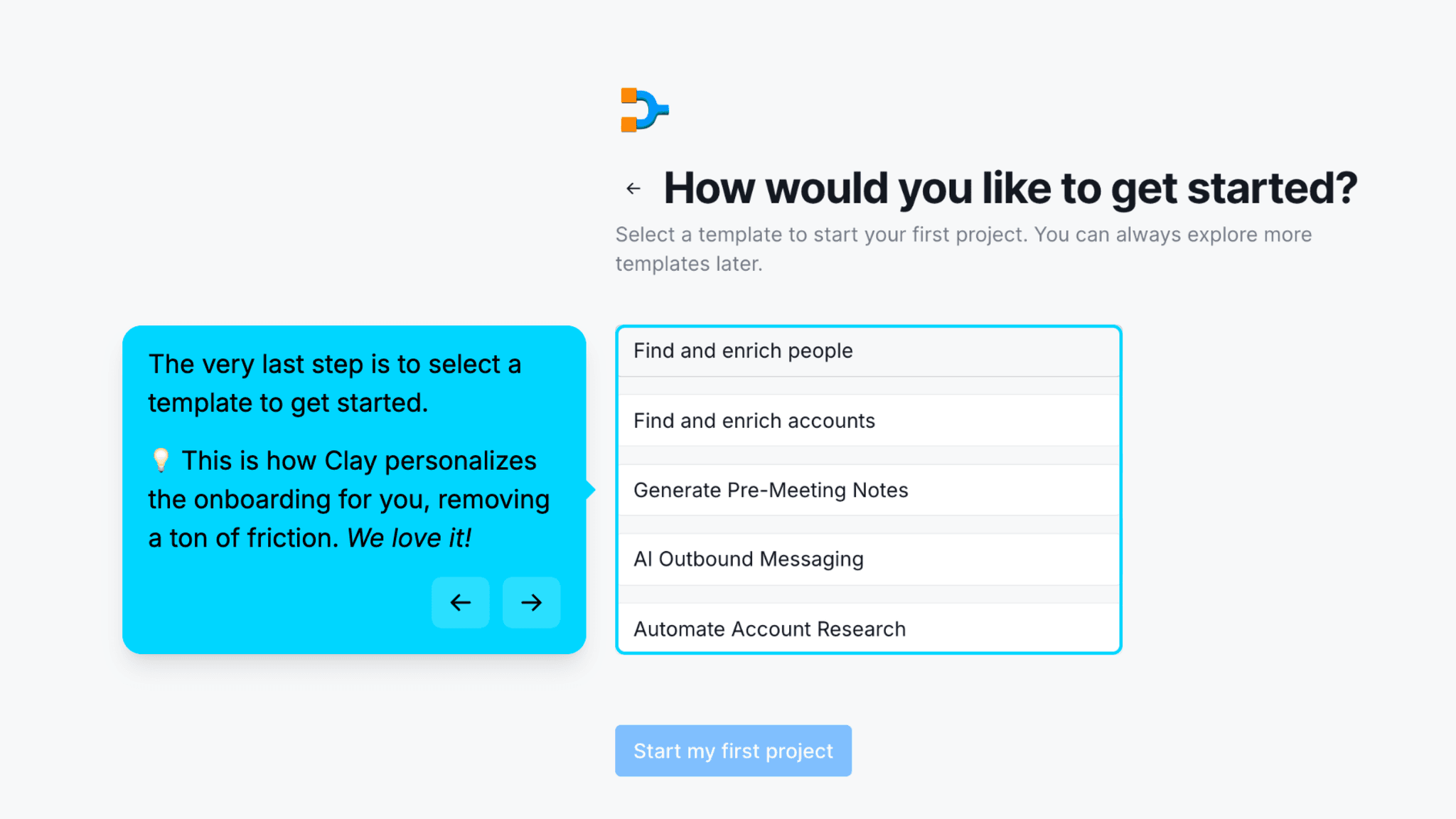
After the segmentation questions, Clay asks: "How would you like to get started?" The options map directly to the jobs Clay is hired for — find and enrich people, find and enrich accounts, generate pre-meeting notes, AI outbound messaging, automate account research. Selecting one opens a live workbook for that use case. No dashboard. No blank starting point.
How Clay Personalizes Onboarding by Job-to-Be-Done
Sculptor surfaces three context-aware search suggestions before the user has typed anything.
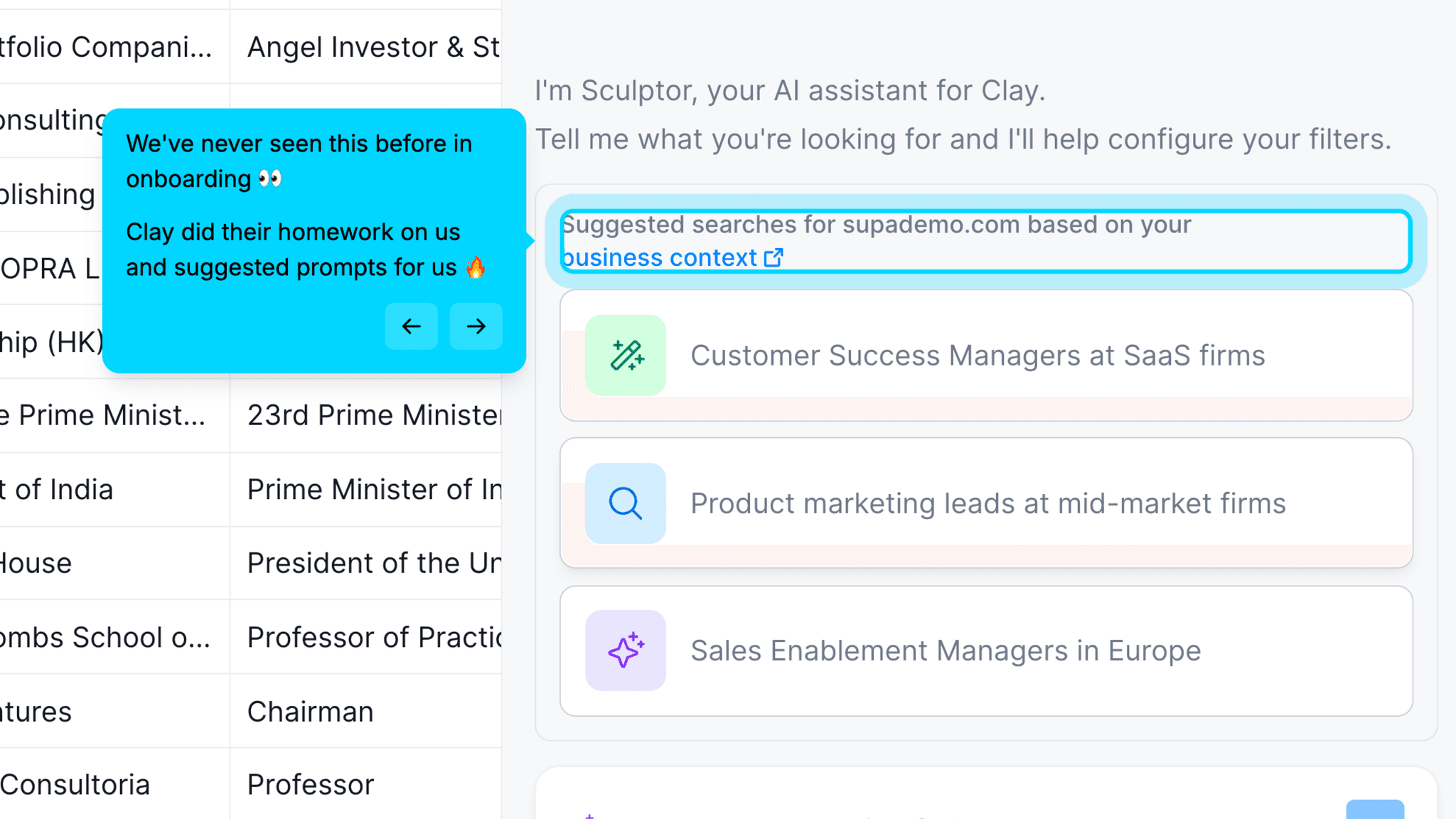
Inside the workbook, Clay's AI uses the business context collected during signup to generate specific suggestions — "product marketing leads at mid-market tech companies," not generic category prompts. The business context is hyperlinked so users can see exactly what data Clay used. Clay has done work in the background; the suggestions reflect it.
How Clay Uses Product Bumpers
Suggested enrichments appear highlighted in the table after the first run completes.
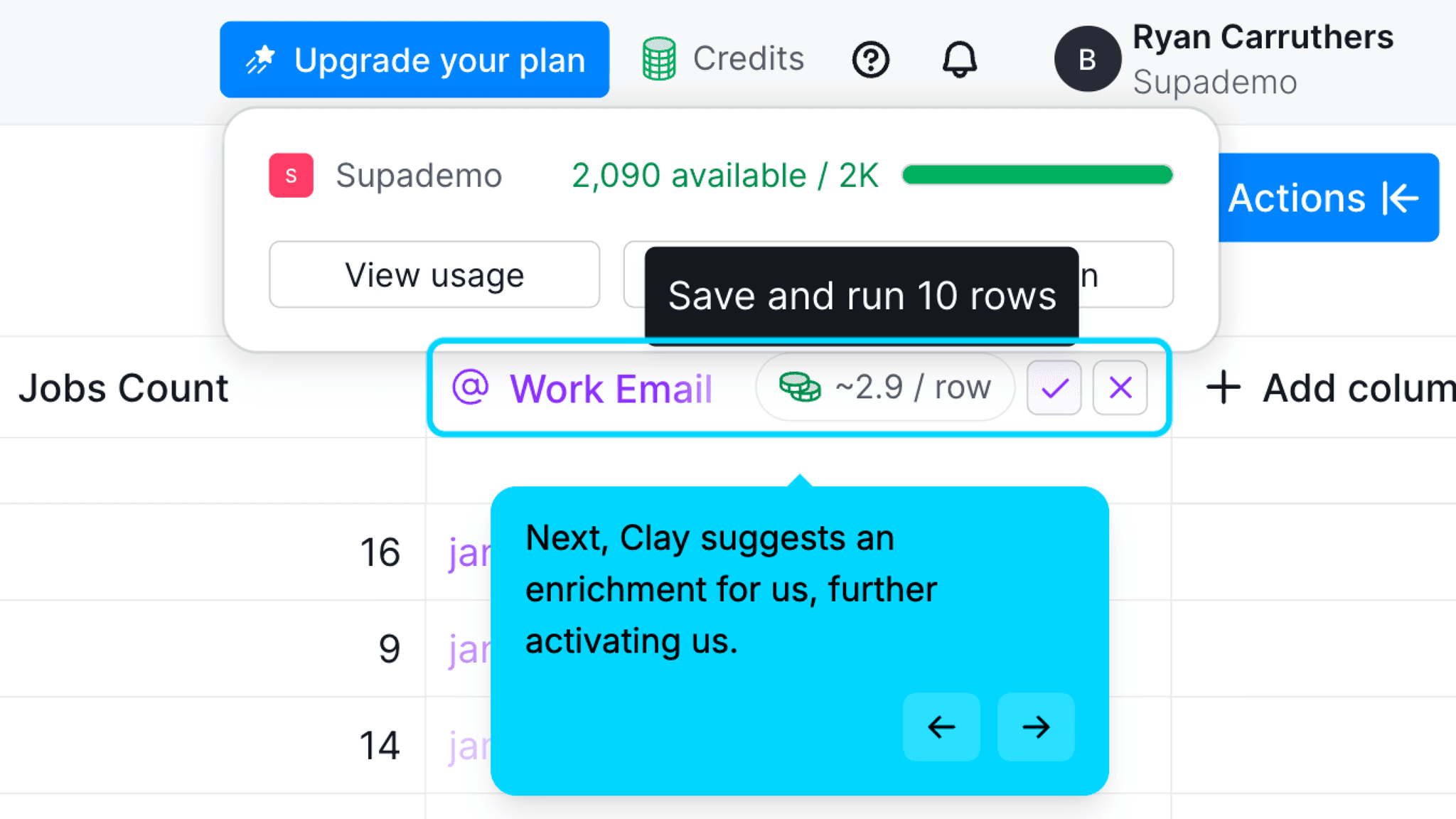
Once the initial enrichment finishes, Clay surfaces a next step — a work email enrichment flow — highlighted in a different colour directly in the table. One click approves it; another dismisses it. The suggested action is contextually relevant to what just happened, not a generic checklist item pulled from a sidebar.
How Clay Uses Product Bumpers
Credit rewards appear immediately after each activation milestone, and they're not cosmetic.
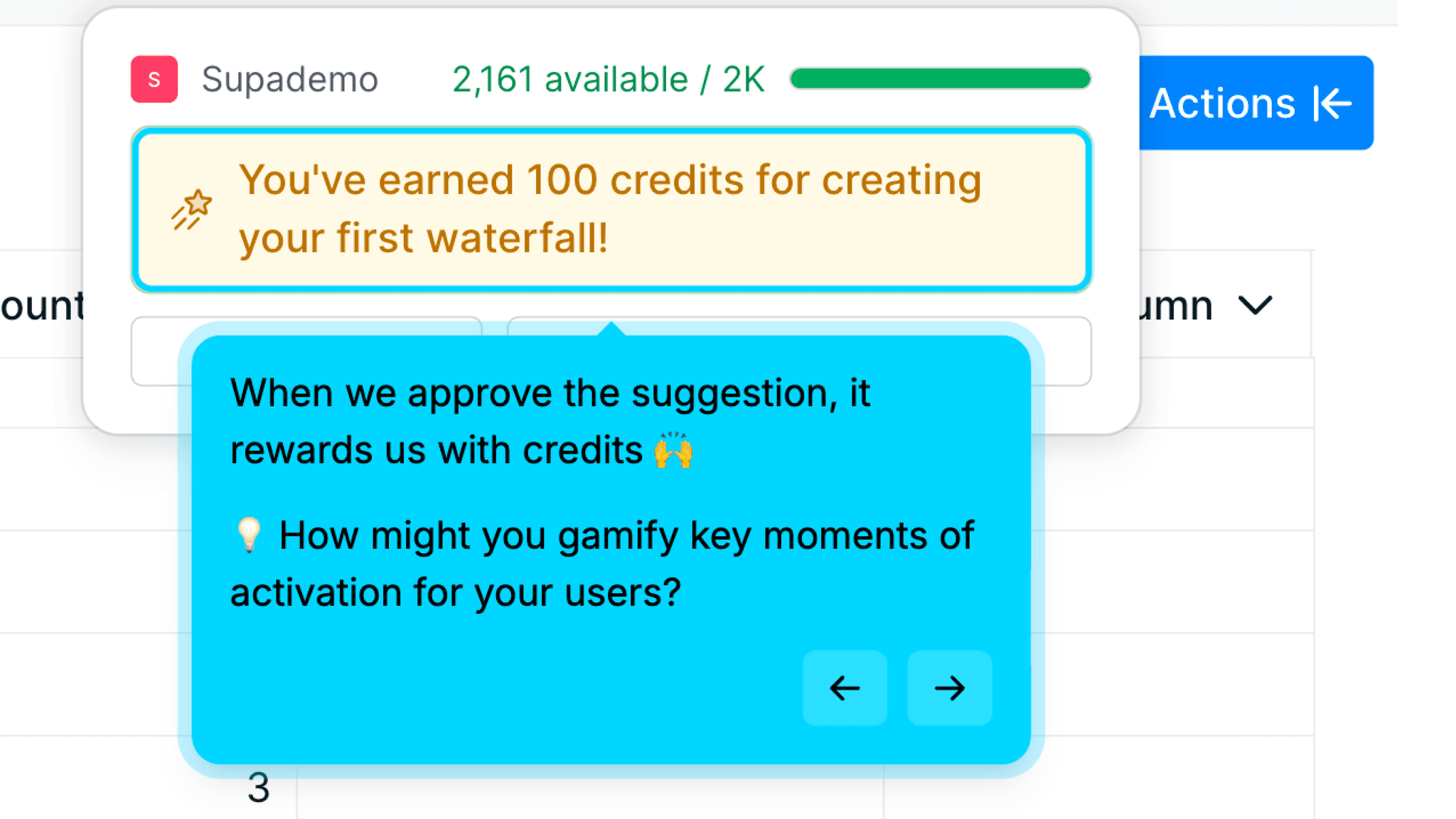
Running the first enrichment triggers a "you've earned 100 credits" notification. Completing the first waterfall triggers another. Credits are the core resource in Clay — everything costs them. Awarding them during the activation events Clay needs users to complete is a tight alignment between incentive and behavior. Users aren't earning badges. They're building the thing that makes the product work.
How Clay Reduces Decisions Early
The progress bar across the signup segmentation keeps setup moving through substantial data collection.
Clay asks for workspace name, team type, CRM, tools used, and attribution — more than most signup flows. Each question uses click-to-select tiles rather than free-text fields. The bar makes the sequence feel bounded. The tile format keeps each answer low-friction. Together they carry users through what is actually a thorough segmentation without it feeling like a form.
Onboarding Tactics That Work
Final signup question routes users into a live workbook, skipping the dashboard entirely
AI uses business context from signup to generate tailored search suggestions immediately
Suggested enrichments highlighted in table keep activation moving post-first-run
Credit rewards tied to enrichment milestones gamify the activation events that matter
Where There's Friction
Email verification required before any product experience
Loading state after saving workbook has no progress indicator — just a spinner
Attribution field uses open text box — the only high-friction input in the signup flow
When Is the In-App Activation Moment?
The Activation Event in Clay is completing the first enrichment run on a live prospect table — the moment a list of names becomes a list with verified work emails attached.
Getting there is faster than the product's complexity would suggest. The path moves through: email signup and verification, segmentation questions (workspace name, team, CRM, tools, attribution), use case selection — routes directly into workbook, not a dashboard. The workbook opens with Sculptor AI active, which surfaces three context-aware search suggestions based on signup data.
The user selects a suggestion — filters generate automatically, table populates. The user confirms the search and saves to a new workbook. Enrichment selection follows — choose data fields, see credit cost per row. Run enrichment on 10 rows. First "100 credits earned" pop-up appears. Suggested next enrichment (work email flow) appears highlighted in table. Run second enrichment on 10 rows. Second "100 credits earned" pop-up appears.
The key design call is that users never return to a dashboard during this sequence. From use case selection to second enrichment completion, everything happens inside a single workbook. Sculptor retains context from the initial conversation — when the next suggestion appears, users don't have to re-explain what they're building.
After the second enrichment, the table has real data the user actually produced: contact names, companies, work emails. That's the activation loop closed.
The Bottom Line on Clay's Onboarding
Clay has one of the most considered onboarding flows in the gallery for a product of its complexity. Most data enrichment tools drop users into a configuration screen and expect them to figure out what to enrich first. Clay skips that — signup answers become a specific starting point before the user has asked for one.
The credit-reward mechanic deserves attention on its own. Credits aren't cosmetic gamification. They're the actual resource that makes Clay work, and awarding them during the activation events Clay needs users to complete is one of the tightest incentive-behavior alignments in the gallery. The reward doesn't feel like a gold star. It feels like progress.
Email verification is the one honest gap. It's a real friction point before the user has seen anything — and for a product this focused on getting to first value fast, it's an early stumble.
Steal the context-aware AI suggestion. Use signup data to generate a specific first action rather than a generic template. "Here's a search built from what you told us" converts at a different rate than "here are some templates."
FAQs
Common questions about Clay's onboarding flow and what makes it effective.
How does Clay onboard new users?
Clay's onboarding begins with email signup and verification, then segmentation questions covering workspace name, team type, CRM, tools, and attribution. The final question asks users to select a use case, which routes them directly into a live workbook. From there, Sculptor generates context-aware search suggestions, the user selects one, and the first enrichment runs — earning credits and surfacing the next suggested action. The Activation Event, completing the first enrichment on a live prospect table, happens within the onboarding session.
What makes Clay's onboarding experience stand out?
Two decisions. The use-case selector at the end of signup routes users into a live workbook rather than a dashboard — users never face a blank starting point. And Sculptor generates search suggestions from the business context collected during signup, specific enough to feel tailored rather than templated.
How long does it take to reach value in Clay?
Moderate. Email verification and the segmentation questions add steps before the product opens. Once inside the workbook, the path to first enrichment is fast — Sculptor handles the search setup, the enrichment runs on 10 rows, and the first credit reward appears within a single session. The end-to-end flow takes longer than simpler tools but is well-structured for the complexity underneath.
How does Clay's onboarding compare to other SaaS tools?
Clay's context-aware AI suggestion pattern is the most developed version of AI-assisted first action in the gallery — closest to Airtable's onboarding, which also uses signup data to generate a personalized workspace, but more specific because the suggestions name actual prospect profiles rather than generic workspace types. The credit-reward mechanic is unique in the gallery — no other tool ties gamification directly to the resource that powers the product's core workflow. The use-case routing at signup mirrors Loom's onboarding and Intercom's onboarding, both of which use role or intent data to narrow the experience before the workspace loads.