Onboarding Snapshot
Activation Event
First support channel configured and workspace launched
Time-to-Value
Moderate — 6-step pre-launch questionnaire before dashboard access
Primary Strength
Progressive disclosure builds momentum through deep segmentation
Primary Risk
Trial starts before any product experience is demonstrated
Overview
Intercom is a genuinely complex product, and its onboarding takes that seriously. The one-question-at-a-time structure is the right call for a platform where the configuration range is wide. The blurred dashboard is a sharp framing device — setup feels like an unlock, not a delay.
What Should You Steal?
Swipe through actionable takeaways from this onboarding flow.
How Intercom Personalizes Onboarding by Job-to-Be-Done
The six-step questionnaire collects role, priorities, channels, and team structure before the dashboard unlocks.
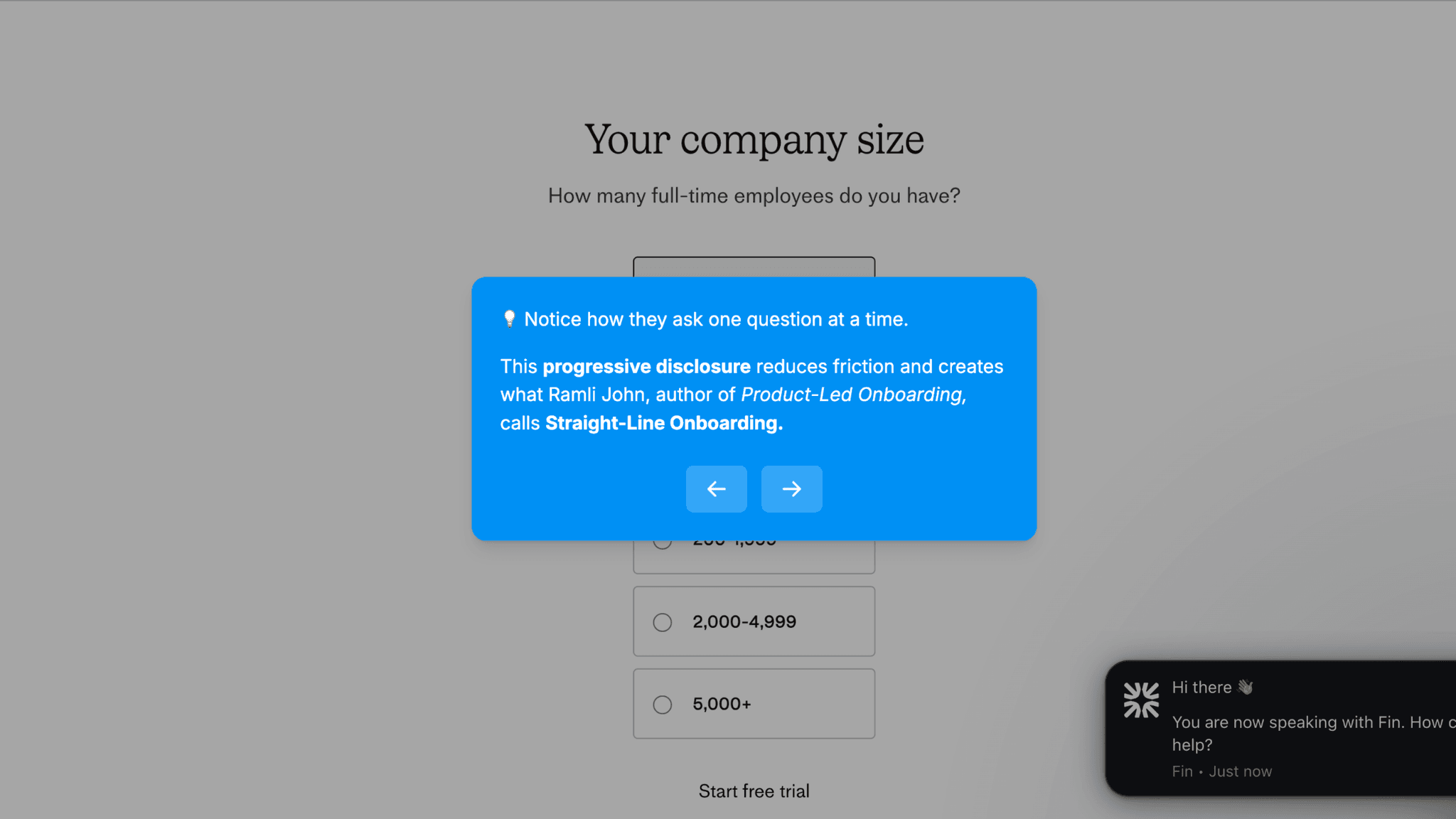
Questions cover what matters most to the team, current tooling, preferred channels, and who owns support. Each gets its own screen — one at a time — which keeps each step light even as the total data collected is substantial. By the time the workspace launches, Intercom knows enough to configure what the user sees first.
How Intercom Personalizes Onboarding by Job-to-Be-Done
The blurred dashboard backdrop frames setup as an unlock rather than a gate.

When I first land after the trial confirmation, the workspace is visible behind a welcome pop-up — but blurred. The product is right there, just not accessible yet. Completing the questionnaire is positioned as launching Intercom, not finishing a form. The blur lifts when setup is done, and that framing changes how the questions feel.
How Intercom Uses Product Bumpers
The progress bar prevents the questionnaire from feeling open-ended.
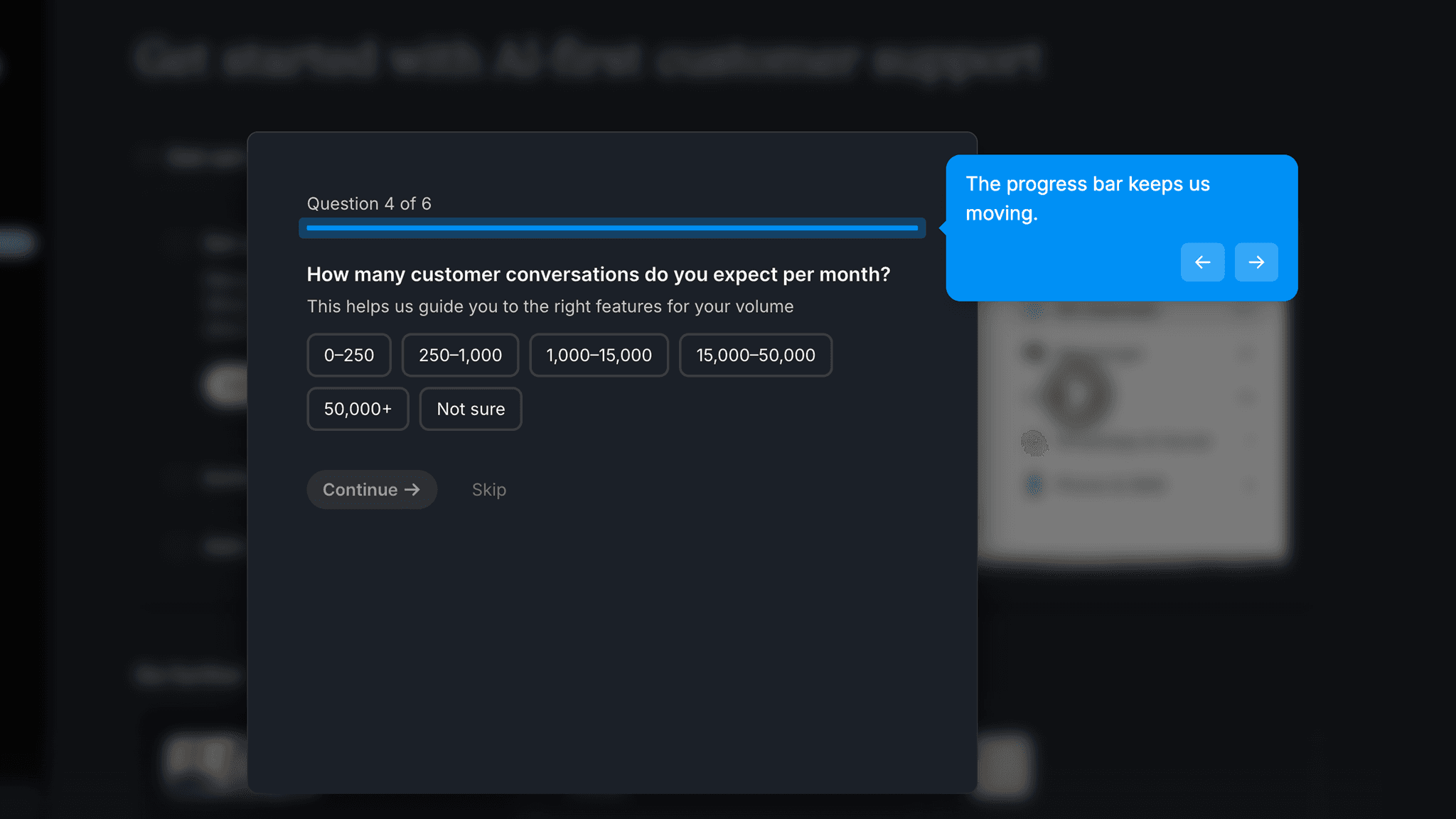
"Step 1 of 6" tells me exactly where I am and how much is left. The bar moves with each answer, and skippable questions are clearly marked. I can move forward without knowing every answer, which keeps the pace up rather than stalling anyone who doesn't have an immediate answer.
How Intercom Uses Product Bumpers
The post-launch four-step setup checklist takes over once the workspace appears.
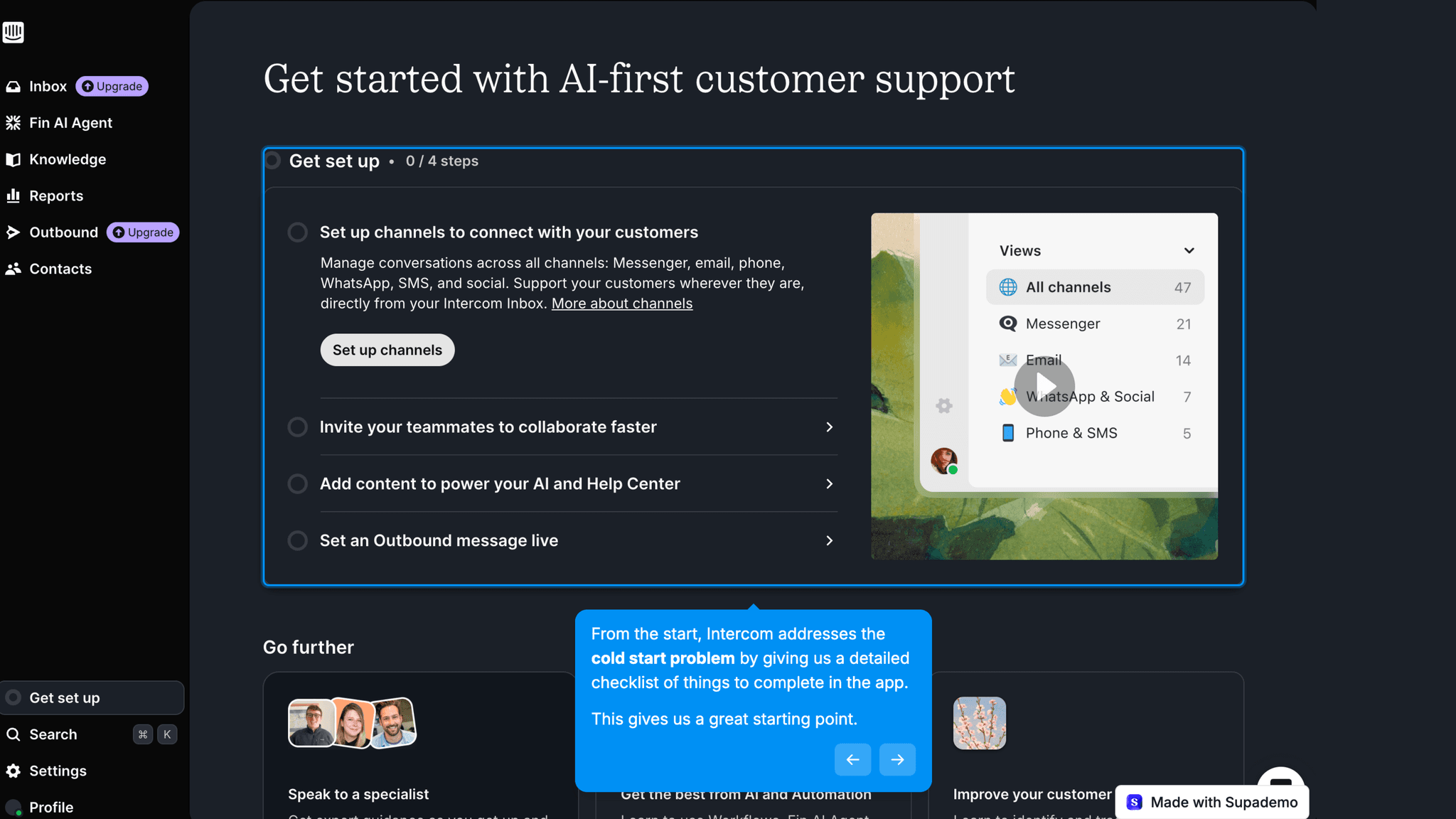
Each task links directly to the relevant settings page rather than asking users to go find it. Once inside a task, the checklist collapses to the bottom-left corner and stays visible — present without blocking the page.
Onboarding Tactics That Work
One-question-at-a-time format keeps each step light despite substantial total data collection
Blurred dashboard backdrop frames setup as an unlock rather than a gate
Progress bar on questionnaire signals bounded completion and maintains momentum
Post-launch checklist collapses to corner while working — visible but not blocking
Where There's Friction
Six questions before dashboard entry is a long pre-launch commitment
Trial starts before any product experience — users commit without seeing the product
Checklist tasks link to settings pages but don't explain why each step matters
When Is the In-App Activation Moment?
The Activation Event in Intercom is configuring the first support channel — the moment the workspace stops being empty and can actually receive a message.
Getting there involves more pre-launch setup than most tools ask for. The path moves through:
The questionnaire is the longest stretch. Six questions isn't excessive for a product this complex, but without a clear sense of what the answers are building toward, it starts to feel like overhead. The progress bar helps — it tells you completion is finite — but the framing of what the answers actually unlock could be sharper.
Once the workspace launches, the checklist takes over. Each task links directly to the relevant page, which removes the discovery problem of finding settings in an unfamiliar product. The first channel setup is the moment the product stops being a dashboard and becomes a tool.
The Bottom Line on Intercom's Onboarding
Intercom is a genuinely complex product, and its onboarding takes that seriously. The one-question-at-a-time structure is the right call for a platform where the configuration range is wide. The blurred dashboard is a sharp framing device — setup feels like an unlock, not a delay.
The honest critique is the trial timing. Six pre-launch questions is a real ask before the user has seen the product work. The trial starts before any product experience, which means users are making a decision based on a description rather than a demonstration. Moving even one value moment earlier would change that calculus.
Steal the one-question-at-a-time format for complex products. If your tool has a wide configuration space, progressive disclosure during onboarding keeps users from being confronted with the full feature surface before they've said what they need.
FAQs
Common questions about Intercom's onboarding flow and what makes it effective.
How does Intercom onboard new users?
Intercom's onboarding begins with Google sign-in, workspace naming, and a company size question before the user starts a 14-day free trial. A blurred dashboard with a welcome pop-up leads into a six-step questionnaire covering team priorities, current tooling, preferred channels, and support team structure. Once complete, the workspace launches and a four-step setup checklist guides users to configure their first channel. The Activation Event, configuring the first support channel, happens within the onboarding session.
What makes Intercom's onboarding experience stand out?
Two decisions. The one-question-at-a-time questionnaire collects substantial firmographic and intent data without feeling like a form — each screen presents exactly one decision, which keeps the pace moving. And the blurred dashboard positions setup as unlocking the product rather than delaying access to it, which changes the psychological weight of the questions.
How long does it take to reach value in Intercom?
Moderate. The six-question pre-launch questionnaire is the longest stretch, and the trial starts before users have seen the product in action. Once past it and into the workspace, the four-step checklist moves quickly — each task links directly to the relevant settings page. First channel configuration happens within the onboarding session.
How does Intercom's onboarding compare to other SaaS tools?
Intercom's one-question-at-a-time format is the same progressive disclosure pattern seen in Instantly's onboarding, which also sequences setup questions to reduce perceived friction before platform entry. The blurred dashboard mechanic is closest to Synthesia's onboarding, where the workspace is visible but inaccessible during the segmentation modal. The post-launch setup checklist mirrors Linear's onboarding, where a task-driven model guides users to first value without a formal product tour.