How to create a dashboard in Jira

Nithil Shanmugam
Nithil Shanmugam·
Featured image for How to create a dashboard in Jira

Overview:

Streamline your project management in Jira with our guide on creating a dashboard. Optimize your workflow by organizing and visualizing key project metrics. Improve user experience with customized dashboards, facilitating easy monitoring and enhancing overall efficiency. This step-by-step guide empowers you to effortlessly create and utilize dashboards, providing clarity and effectiveness in project tracking within the Jira platform.

Interactive demo powered by Supademo

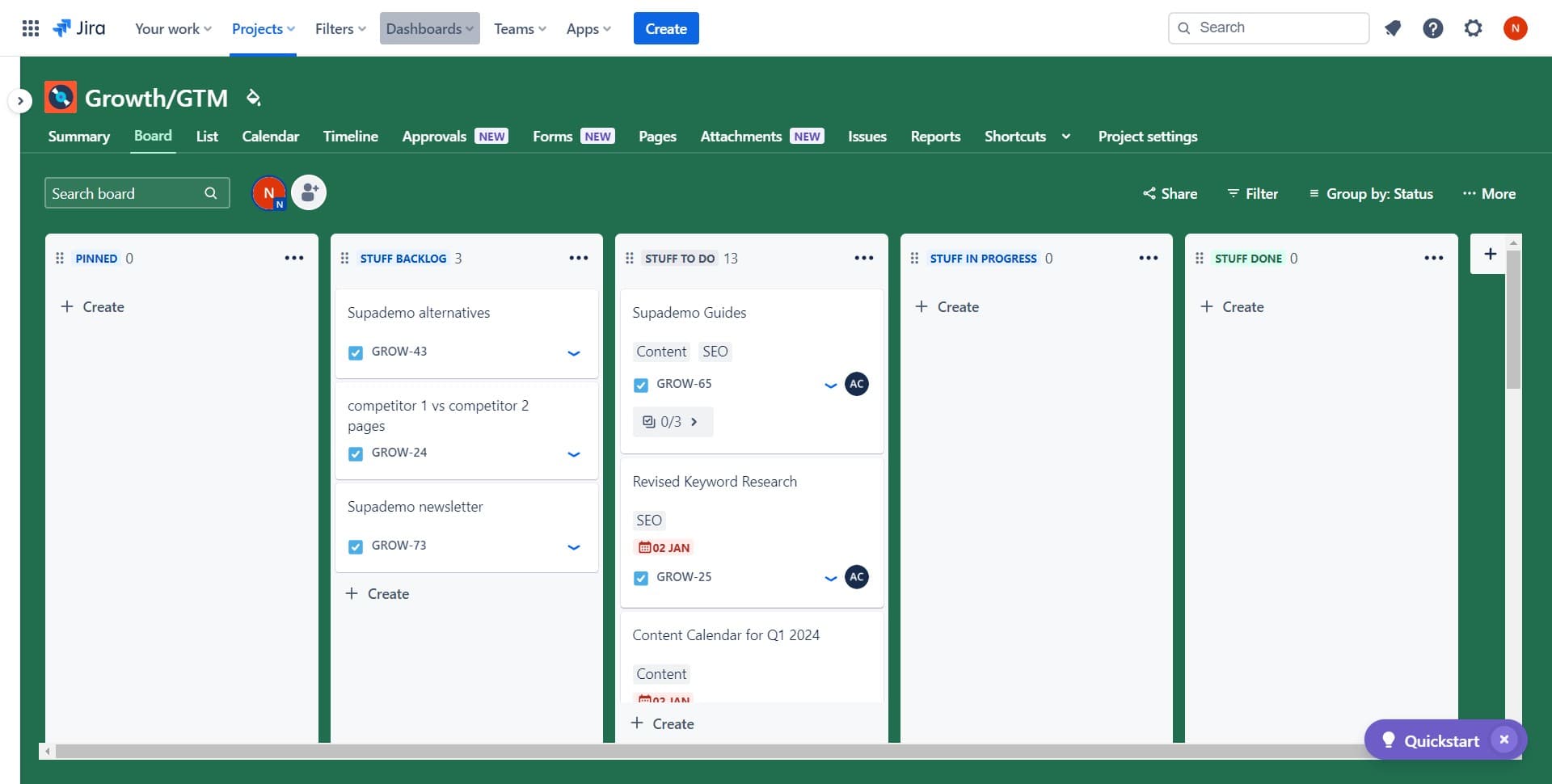
1. Start by selecting 'Dashboards' from the menu.

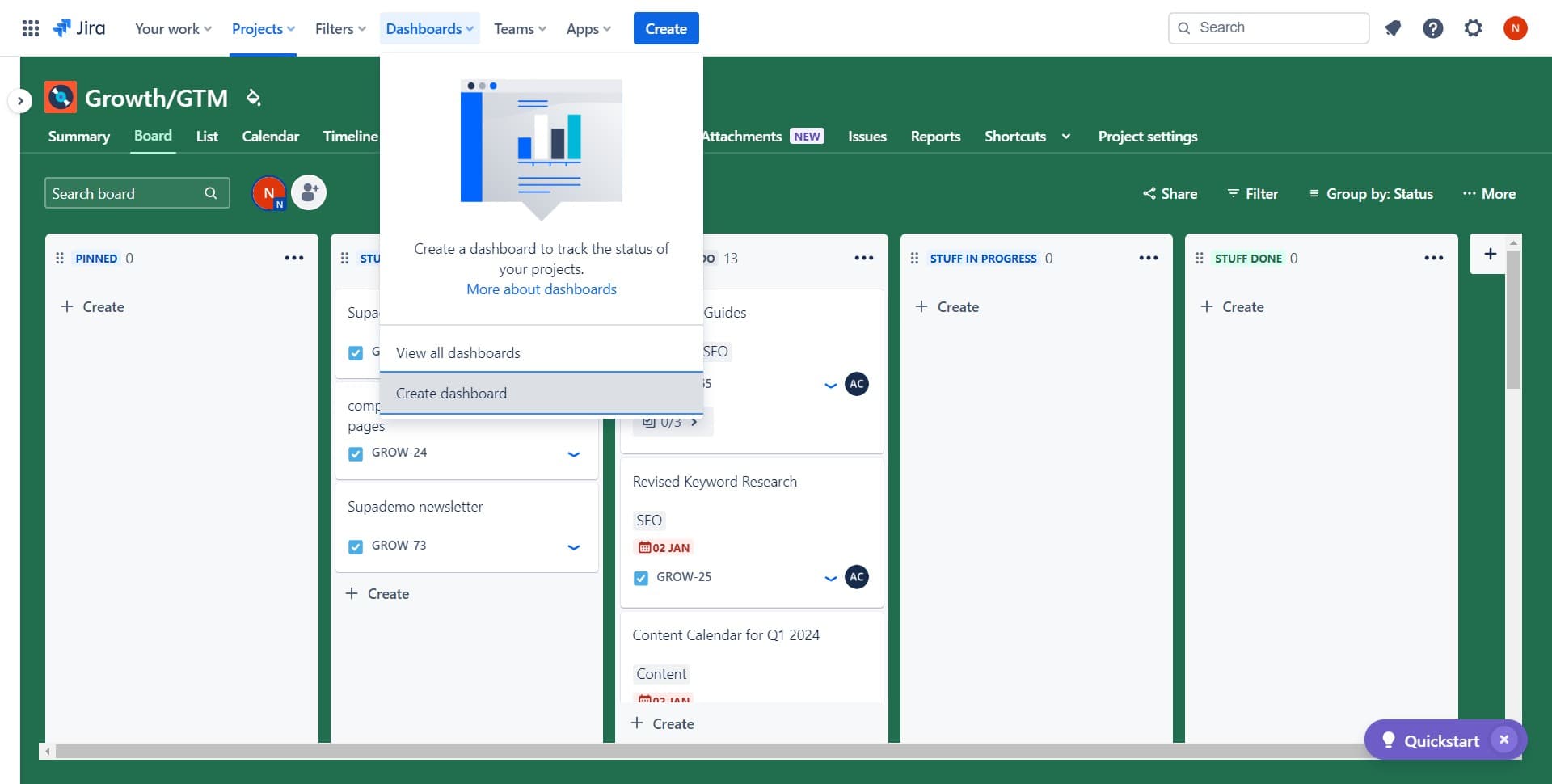
2. Next, select the 'Create dashboard' option.

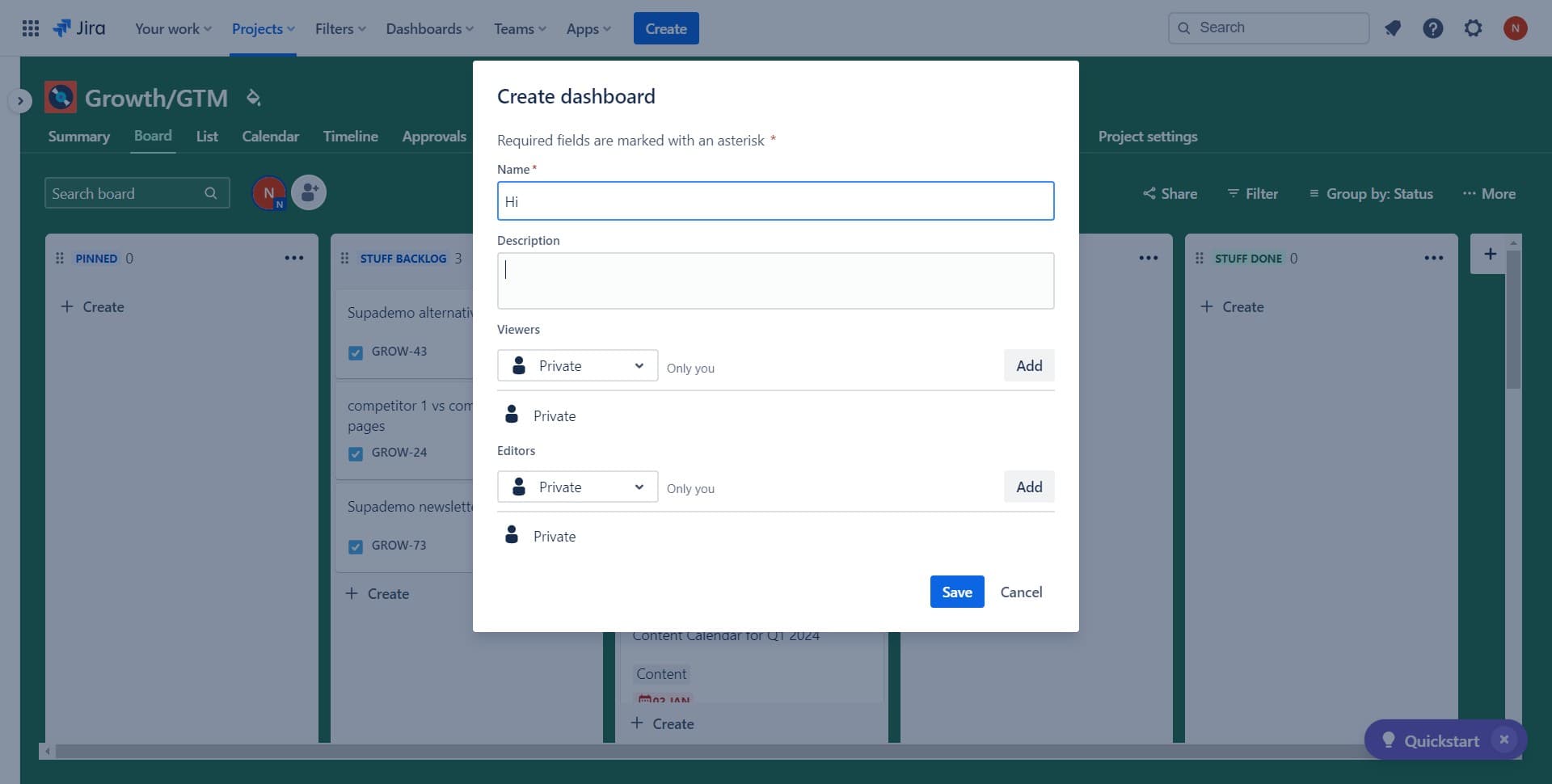
3. Now, fill in the necessary information in the provided text field.

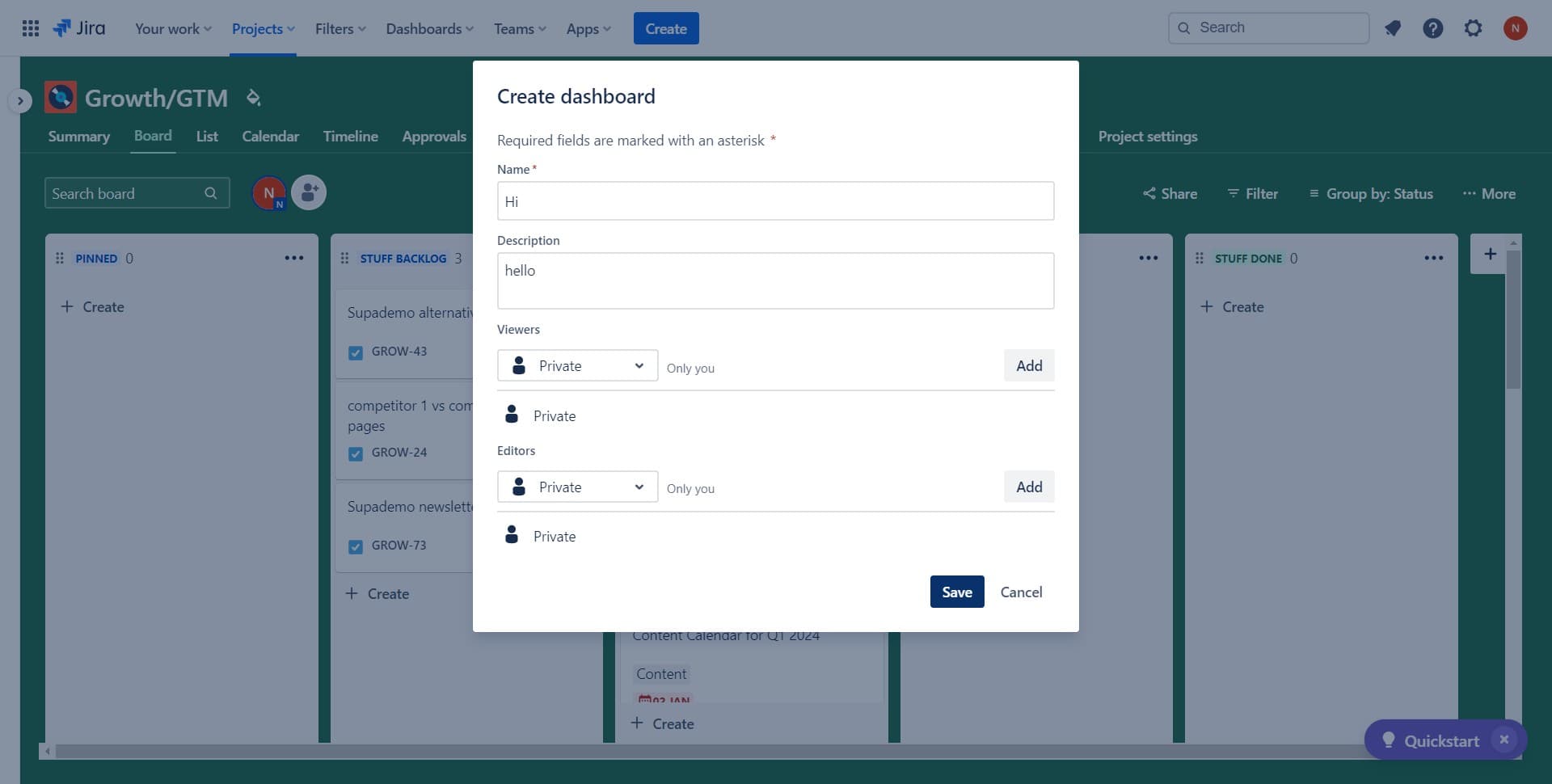
4. Once completed, click on 'Save' to secure your changes.

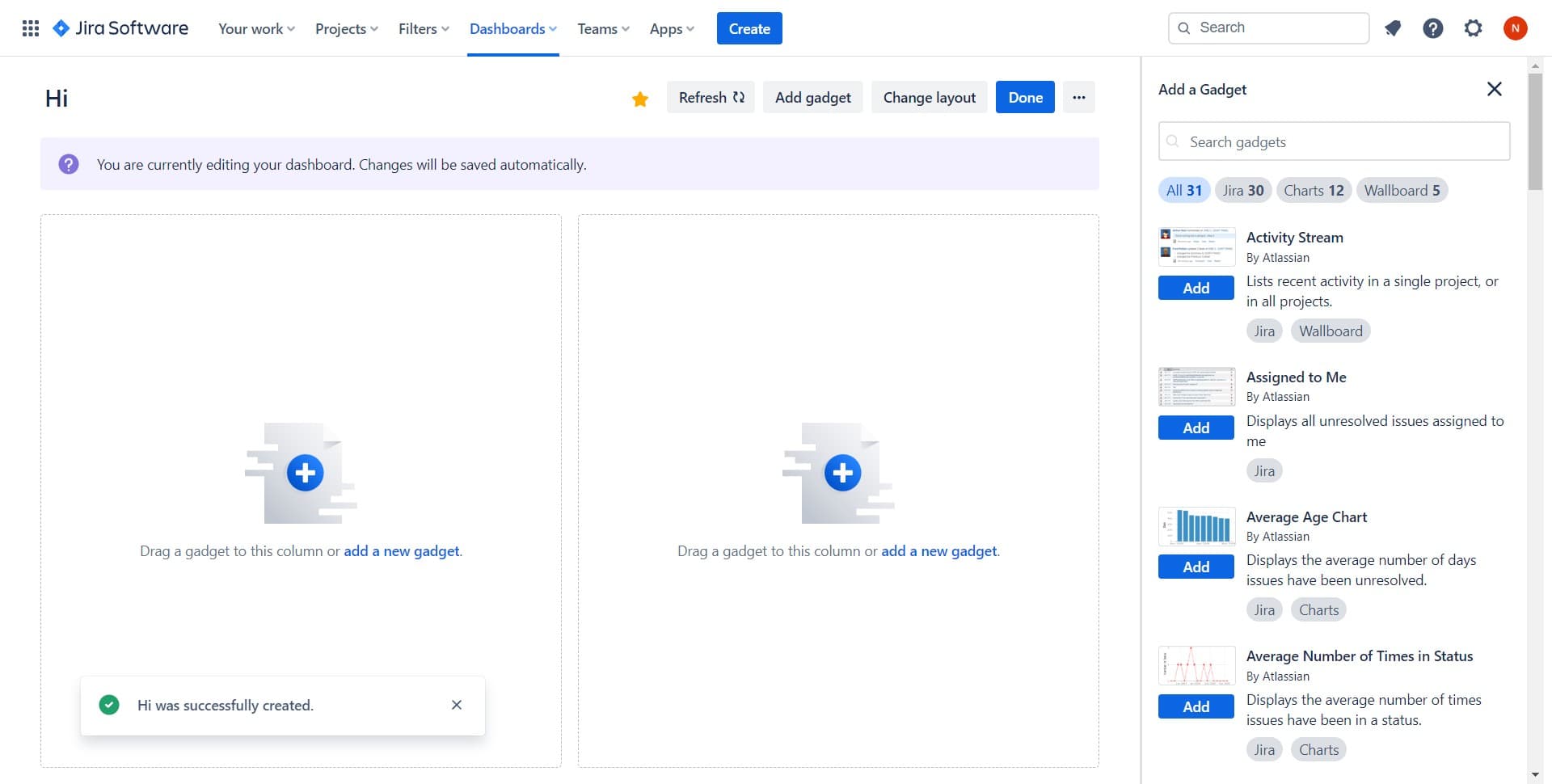
5. Finally, drag a gadget or add a new one to customize your dashboard.


Create your own interactive demo

Scale up your training and product adoption with beautiful AI-powered interactive demos and guides. Create your first Supademo in seconds for free.

Create a Supademo in seconds

Frequently Asked Questions about how to create a dashboard in jira

Commonly asked questions about this topic.

How do I share and collaborate on Jira dashboards with team members?

Jira supports real-time collaboration where multiple team members can view and edit simultaneously. Features like commenting, @mentions, and activity logs help keep communication in context. Set clear editing permissions — having too many editors without structure leads to version conflicts and confusion. This is backed by data — the State of Interactive Demos 2026 report found top-performing demos average 10-12 steps with 15-18 word hotspots and achieve 80%+ completion rates.

What are the key steps for setting up a Jira dashboard from scratch?

The most effective guides combine brief written instructions with visual walkthroughs showing each click. Screen recording tools and interactive demo platforms can capture your exact workflow in Jira, creating guides that viewers navigate at their own pace. This approach reduces follow-up questions compared to static screenshots or long text documents. To illustrate, Easy Storage Solutions closed over $100k in contracts using interactive demos in their sales process. Supademo was named the #5 fastest-growing software product on G2 in 2025.

Does Jira provide pre-built dashboard templates?

Most modern platforms like Jira include starter templates for common use cases-vs-supademo), including dashboard. Templates save setup time but should be customized to match your team's specific needs — default configurations rarely fit every workflow. Check Jira's template gallery or community library for options relevant to your industry. Teams that update demos weekly or monthly see ~18% higher impact scores.

Can enterprises scale Jira dashboards across large organizations?

For enterprise teams, evaluate Jira's admin controls, SSO support, permission granularity, and audit logging capabilities. Scalability depends on your specific dashboard complexity — what works for a 10-person team may need structural changes at 500+. Most platforms offer enterprise plans with dedicated support and custom SLAs. Teams save an average of 85% of the time previously spent on demo creation.

What widgets and components should I add to my Jira dashboard?

A strong dashboard includes clear labels, defined owners, status indicators, and relevant dates or milestones. Avoid including information that belongs elsewhere — keep each element focused on its core purpose. The right level of detail depends on your audience: executives need summaries while team leads need actionable specifics. Learn more about Supademo's features. Rev.io now creates training materials in hours instead of weeks, with a 50% smaller team.

Which Jira dashboard tasks can be automated?

Many project management and productivity tools, including Jira, support workflow automation for repetitive tasks. Common automations include status updates, notifications, recurring task creation, and approval flows. Start with simple automations and expand gradually — over-automating early can create maintenance headaches. This is backed by data — the State of Interactive Demos 2026 report found 78% of teams now use interactive demos in 2 or more use cases.

What Jira subscription level unlocks all dashboard features?

Free tiers on platforms like Jira often include basic dashboard functionality, while advanced features like automation, custom fields, and timeline views typically require paid plans. Compare your must-have features against each tier's offering — paying for features you don't use wastes budget, but outgrowing a free plan mid-project is disruptive. 54% of top-completing demos use AI voiceover to improve the guided experience.
Nithil Shanmugam

Nithil Shanmugam

Nithil is a startup-obsessed operator focused on growth, sales and marketing. He's passionate about wearing different hats across startups to deliver real value.

More from the blog

How to Remove 'Powered by Shopify'

How to Remove 'Powered by Shopify'

Learn how to easily remove the 'Powered by Shopify' text from your online store with step-by-step instructions and tips to customize your Shopify storefront.

Vimal Kumar
Vimal KumarJan 3, 2026
How to Add Products to Shopify

How to Add Products to Shopify

Learn step-by-step how to add products to your Shopify store effortlessly, including tips on product details, images, pricing, and inventory management to boost your online sales.

Vimal Kumar
Vimal KumarDec 17, 2025
How to Deactivate Your Shopify Store

How to Deactivate Your Shopify Store

Learn step-by-step how to deactivate your Shopify store easily, including important considerations and tips to pause or close your shop without losing data.

Vimal Kumar
Vimal KumarDec 17, 2025
How to Remove 'Powered by Shopify'

How to Remove 'Powered by Shopify'

Learn how to easily remove the 'Powered by Shopify' text from your online store with step-by-step instructions and tips to customize your Shopify storefront.

Vimal Kumar
Vimal KumarDec 17, 2025
How to Create a Shopify Account

How to Create a Shopify Account

Learn step-by-step how to create a Shopify account quickly and easily, set up your online store, and start selling your products in no time.

Vimal Kumar
Vimal KumarDec 17, 2025
How to Create a Stripe Account

How to Create a Stripe Account

Learn how to create a Stripe account quickly and easily with our step-by-step guide, perfect for beginners looking to start accepting online payments.

Vimal Kumar
Vimal KumarDec 17, 2025