How to Remove Someone from Slack

Vimal Kumar
Vimal Kumar·
How to Remove Someone from Slack
Interactive demo powered by Supademo

1. Start by opening Slack using your credentials.

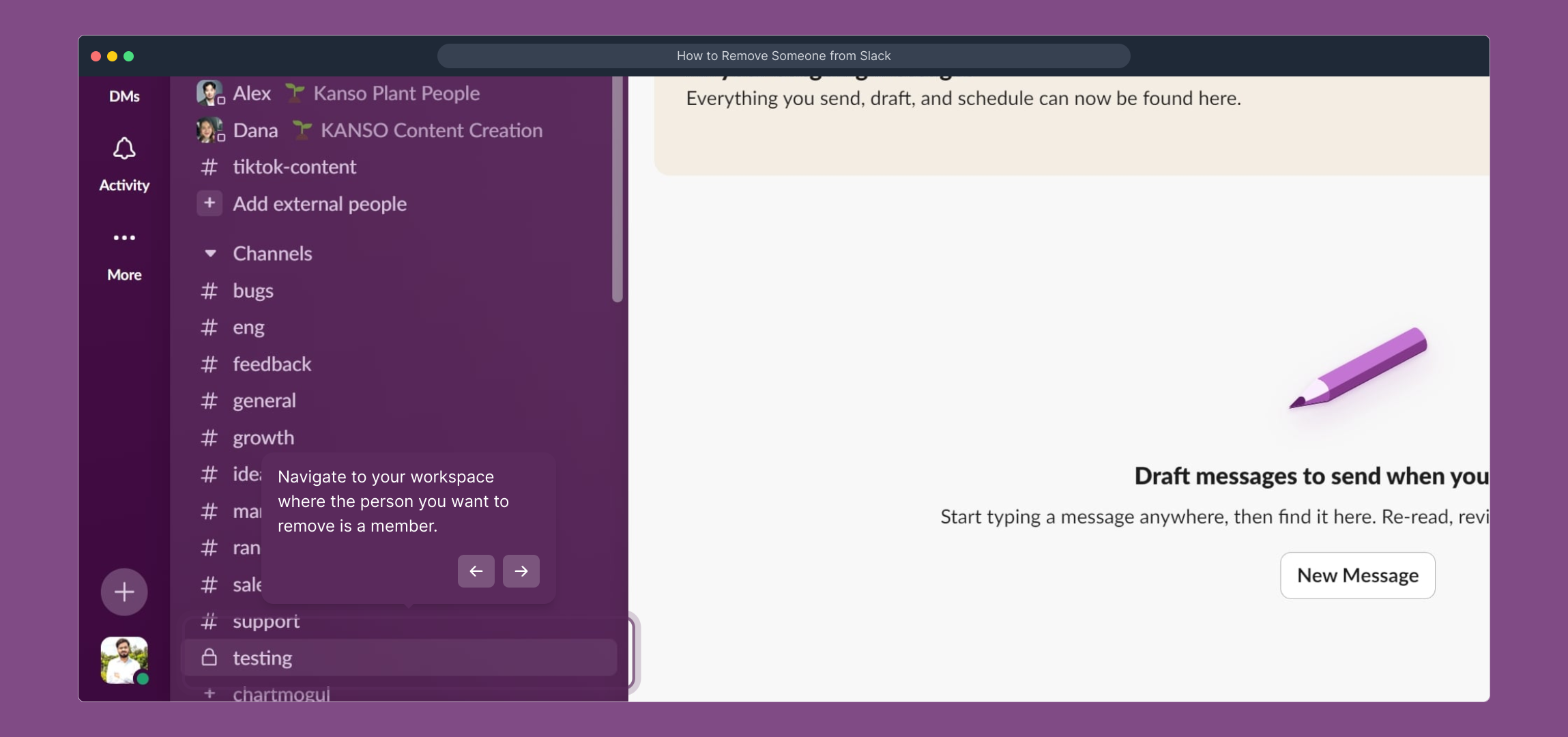
2. Navigate to your workspace where the person you want to remove is a member.

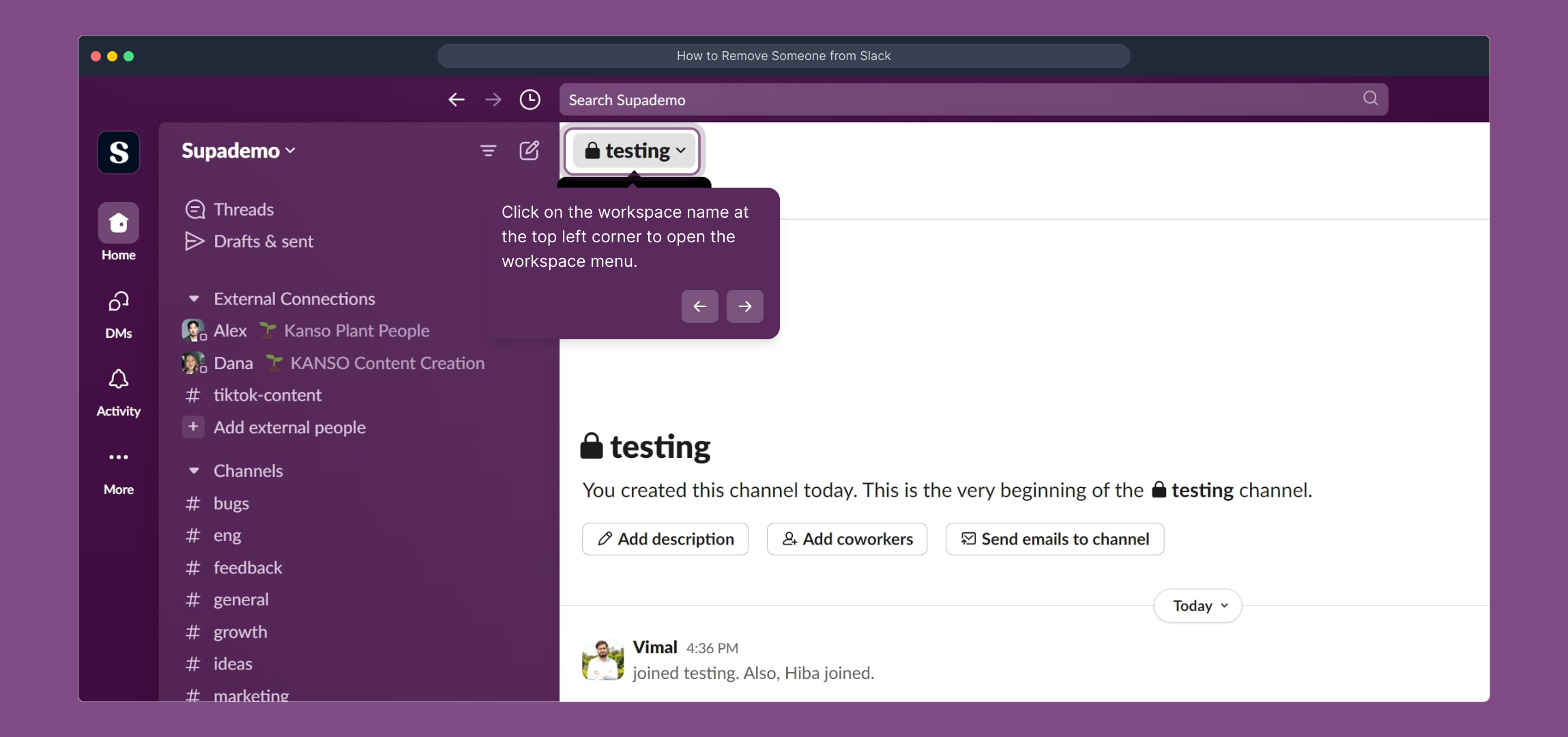
3. Click on the workspace name at the top left corner to open the workspace menu.

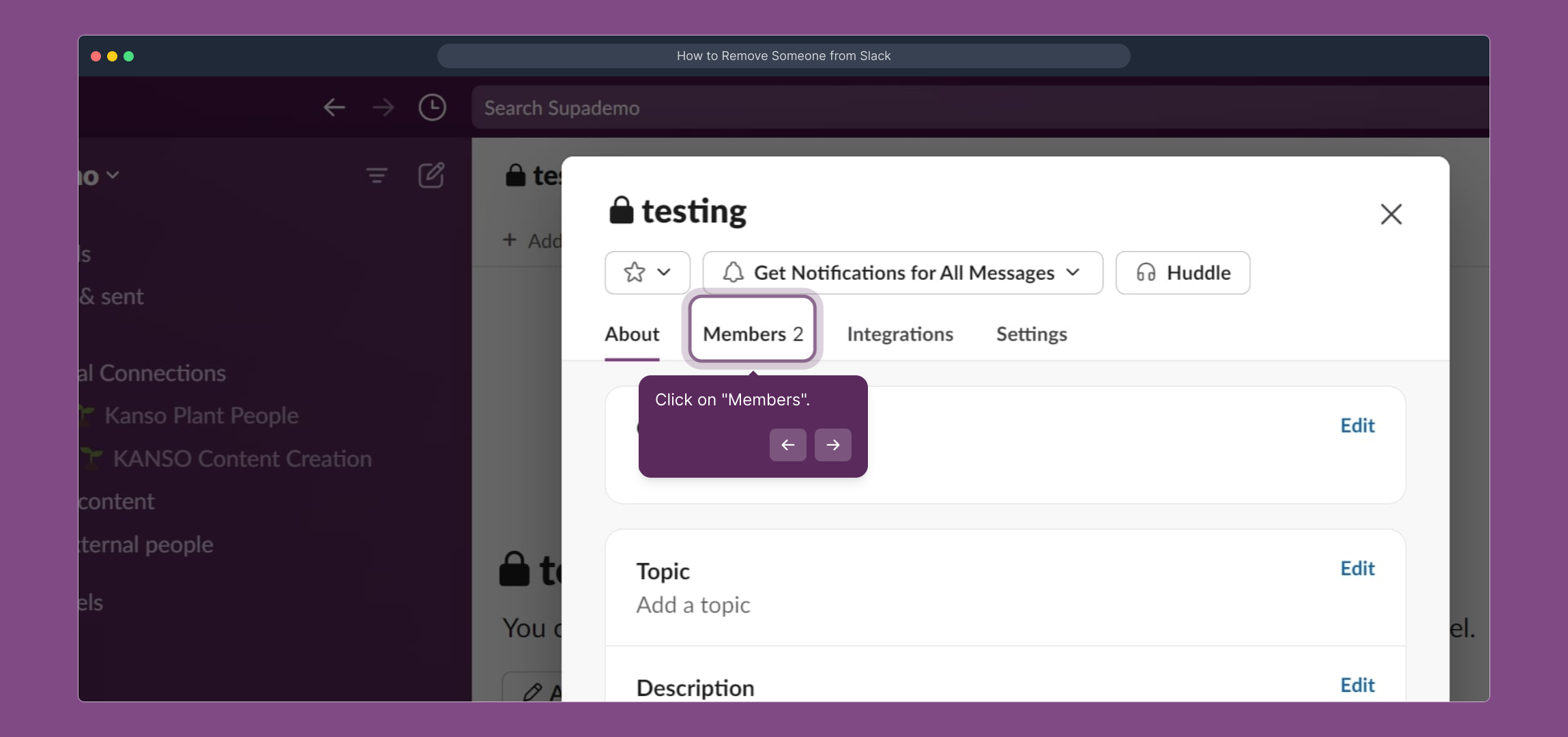
4. Click on "Members".

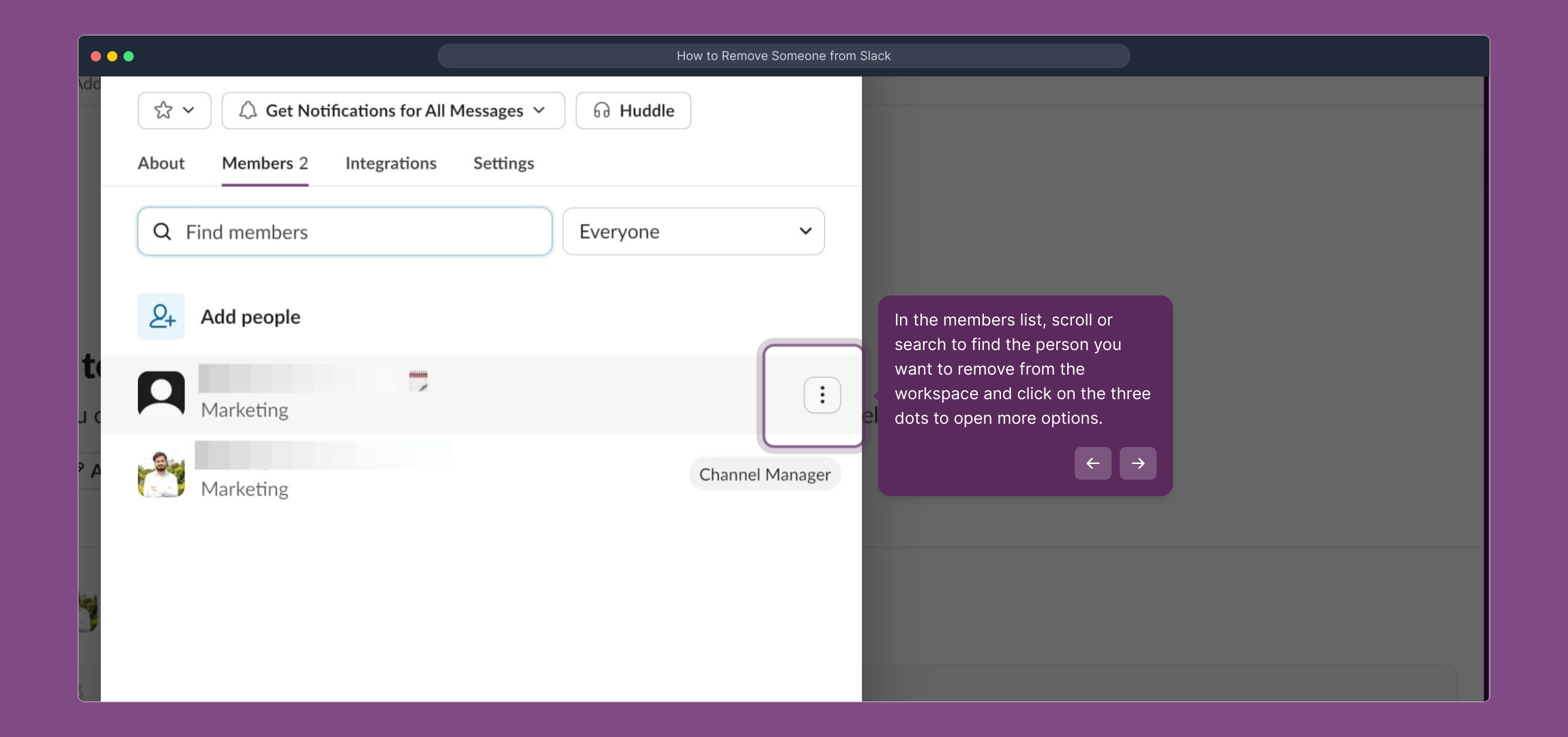
5. In the members list, scroll or search to find the person you want to remove from the workspace and click on the three dots to open more options.

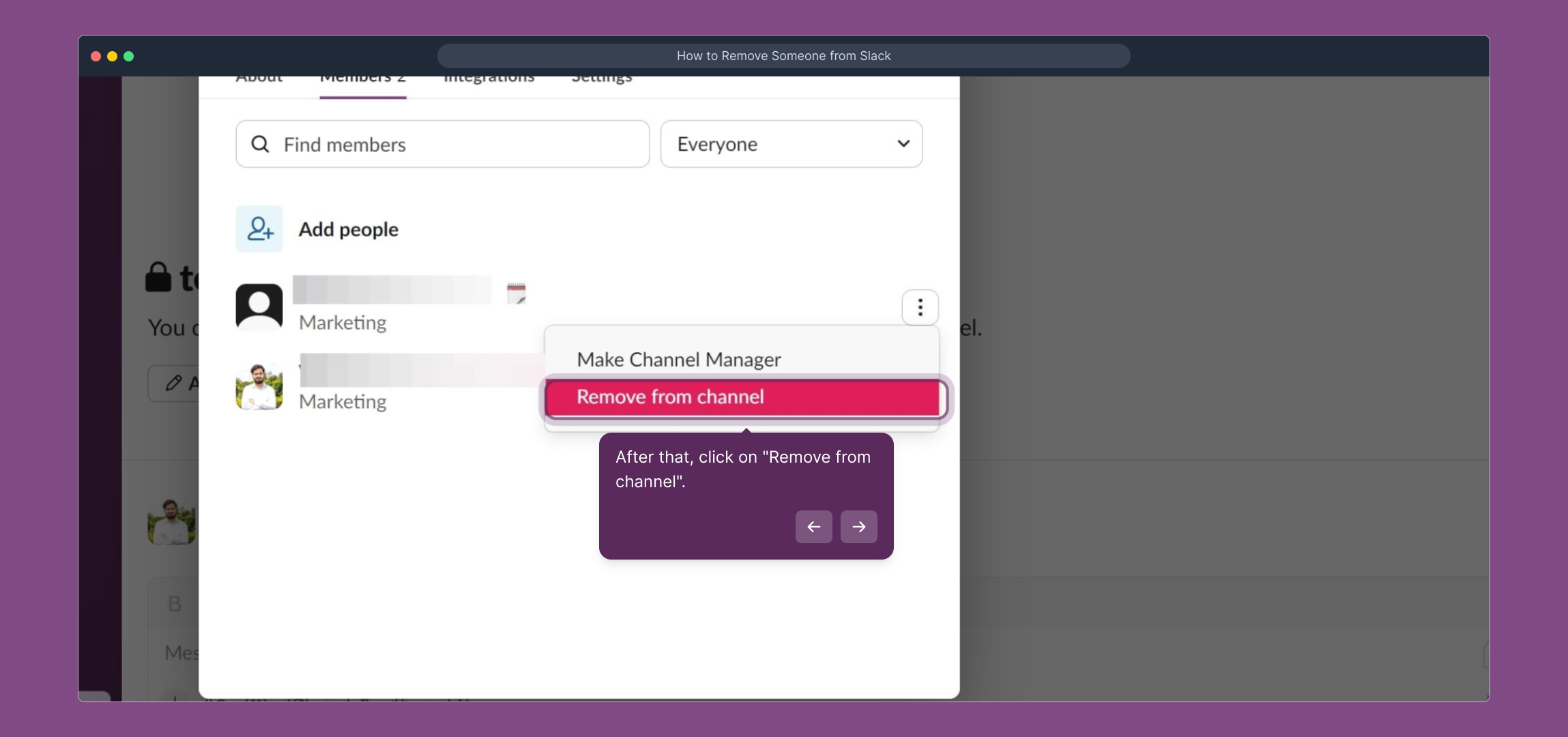
6. After that, click on "Remove from channel".

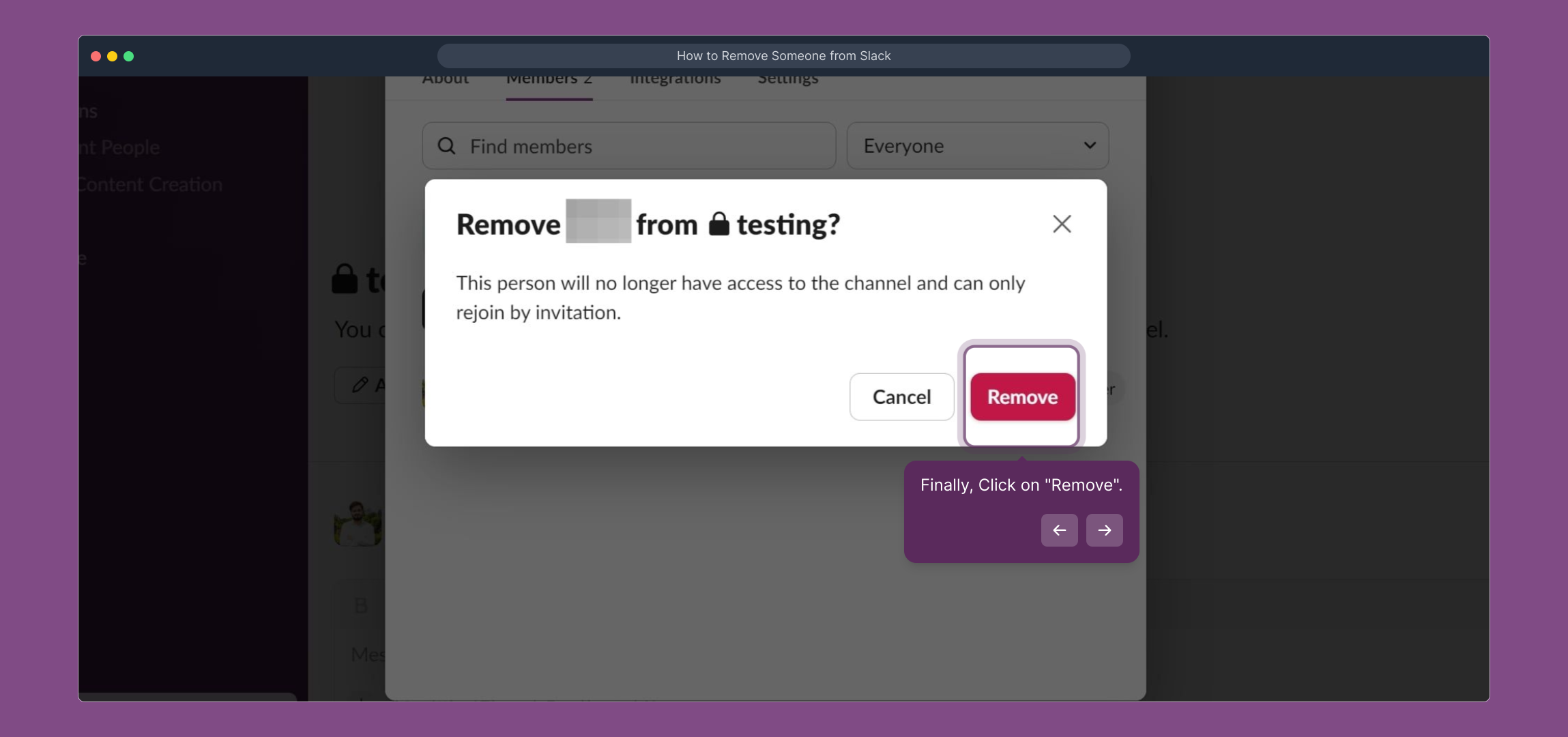
7. Finally, Click on "Remove".

8. Congratulations!
You have successfully removed a member from your workspace.

9. Create a Supademo in seconds

This interactive demo/guided walkthrough on How to Remove Someone from Slack was created using Supademo.


How to Remove Someone from Slack : Step-by-Step Guide

Begin by launching Slack and signing in with your account details. This will take you to your main dashboard where all your workspaces are accessible.

1

Once logged in, find and select the specific workspace that includes the member you need to remove. This ensures you're managing the right group.
2

At the top left corner of Slack, click on the workspace name. This action opens a menu where you can access various settings related to your workspace.
3

From the workspace menu, choose the "Members" option. This section lists everyone currently involved in your workspace.
4

Browse or search through the member list to locate the individual you want to remove. When you find them, click the three dots next to their name to reveal additional management options.
5

In the pop-up menu, select "Remove from channel." This command lets you take the user out of the current workspace channel safely and efficiently.
6

A confirmation prompt will appear. Click the "Remove" button to finalize the process and successfully take the member out of your workspace.
7

Well done! You’ve completed the removal. The member is no longer part of your workspace, helping keep your team organized and focused.

8

Ready to create your own demo? With Supademo, you can set up professional demos quickly and effortlessly to showcase your workflows or onboarding processes.
9

Create your own interactive demos in < 5 mins with Supademo

You can create your own interactive product demo in minutes using Supademo. Drive growth, scale enablement, and supercharge product-led onboarding with Supademo.
Sign up for free here with no credit card required.


FAQs

Commonly asked questions about this topic.

How do I remove someone from my Slack workspace?

To remove someone from your Slack workspace, go to your workspace menu, select "Members," find the member you want to remove, click the three dots next to their name, choose "Remove from channel," and confirm by clicking "Remove".

Who can remove members from a Slack workspace?

Only workspace owners and admins have the authority to remove members from a Slack workspace. Regular members do not have permission to remove others.

What happens when I remove someone from Slack?

Once removed, the person loses access to the workspace’s channels and messages. They can no longer participate until re-invited or re-added by an admin or owner.

Can I remove someone from a specific channel only?

Yes, Slack allows you to remove members from individual channels without removing them from the entire workspace. Simply choose "Remove from channel" for that specific channel.

Is there a way to remove a guest user differently?

Guest users are removed in the same way as regular members, but some guests have limited access by design. Removing them will revoke whatever workspace or channel rights they have.

Can removed members rejoin the workspace later?

Yes, removed members can be invited back by an admin or owner if needed. They will regain access once they accept the invitation and join again.

Do removed members keep access to private messages?

No, once removed, members lose access to the workspace entirely, including private and direct messages within that workspace.

What if the remove option is not visible for a member?

If you don’t see the option to remove a member, you might lack the required permissions, or the person is an admin/owner. In that case, speak to someone with higher privileges to manage removal.

Does removing someone affect shared files or messages?

Removing someone from Slack does not delete their past messages or files. These remain in the workspace unless manually deleted by admins.

How can I ensure a smooth offboarding when removing someone from Slack?

Notify the team about the removal, archive relevant channels if needed, and make sure any data or files the user managed are transferred appropriately before removal for continuity.

Vimal Kumar

Vimal Kumar

Product Operations Associate

Vimal Kumar helps build and grow Supademo’s team and GTM efforts, with a focus on figuring out growth levers and improving product traction.

More from the blog

How to Add Products to Shopify

How to Add Products to Shopify

Learn step-by-step how to add products to your Shopify store effortlessly, including tips on product details, images, pricing, and inventory management to boost your online sales.

Vimal Kumar
Vimal KumarDec 17, 2025
How to Deactivate Your Shopify Store

How to Deactivate Your Shopify Store

Learn step-by-step how to deactivate your Shopify store easily, including important considerations and tips to pause or close your shop without losing data.

Vimal Kumar
Vimal KumarDec 17, 2025
How to Remove 'Powered by Shopify'

How to Remove 'Powered by Shopify'

Learn how to easily remove the 'Powered by Shopify' text from your online store with step-by-step instructions and tips to customize your Shopify storefront.

Vimal Kumar
Vimal KumarDec 17, 2025
How to Create a Shopify Account

How to Create a Shopify Account

Learn step-by-step how to create a Shopify account quickly and easily, set up your online store, and start selling your products in no time.

Vimal Kumar
Vimal KumarDec 17, 2025
How to Create a Stripe Account

How to Create a Stripe Account

Learn how to create a Stripe account quickly and easily with our step-by-step guide, perfect for beginners looking to start accepting online payments.

Vimal Kumar
Vimal KumarDec 17, 2025
How to Contact Stripe Support

How to Contact Stripe Support

Learn the easiest ways to contact Stripe support for quick assistance with your payment processing, account issues, and technical questions.

Vimal Kumar
Vimal KumarDec 16, 2025