Onboarding Snapshot
Activation Event
First meeting recorded and summary delivered
Time-to-Value
Deferred — activation happens at next scheduled meeting
Primary Strength
Sentence-completion setup configures the product and seeds a growth loop simultaneously
Primary Risk
Zoom connection and desktop app download create a two-step friction wall before first use
Overview
Fathom's onboarding is solving a harder problem than most tools in this space.
What Should You Steal?
Swipe through actionable takeaways from this onboarding flow.
How Fathom Personalizes Onboarding by Job-to-Be-Done
The sentence-completion setup screen is the best onboarding screen in this analysis.
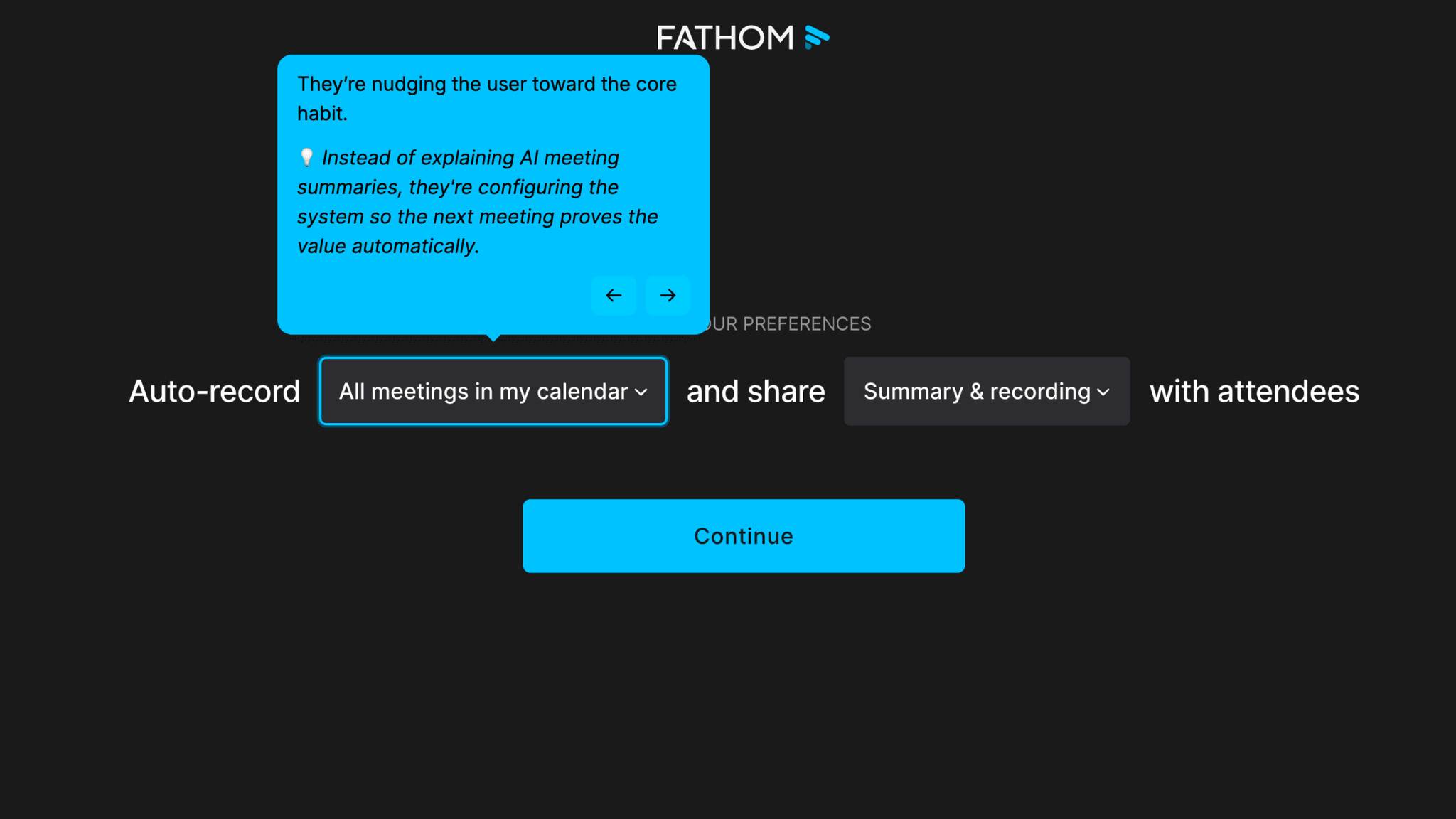
Immediately after Google sign-in, Fathom presents a sentence with dropdown parts: "Auto record all meetings in my calendar and share the summary and recording with attendees." I can change "all meetings" to a subset, or change "summary and recording" to something more selective. What looks like a configuration step is actually an activation setup. Fathom is arranging the product so my next meeting proves its value automatically, without me needing to remember to turn anything on. The default setting also seeds a referral loop: by sharing recordings with attendees, it introduces Fathom to every person in my next meeting without me doing anything.
How Fathom Personalizes Onboarding by Job-to-Be-Done
Progressive disclosure in the segmentation section keeps the question count from feeling heavy.
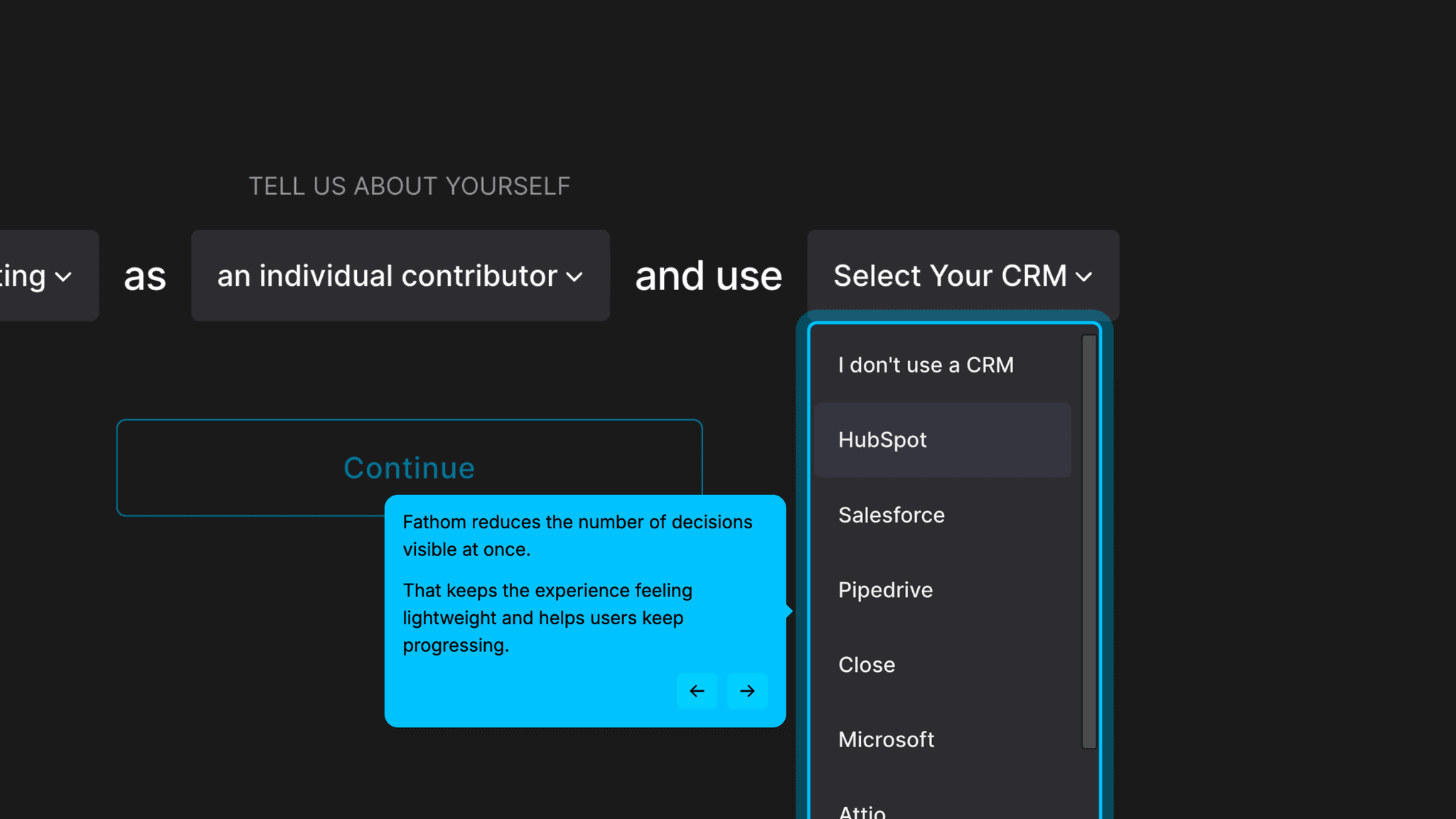
The "tell us about yourself" section uses inline sentence dropdowns: "I work in [department] as [role] ." Selecting the first two reveals a third: "I use this CRM." Each answer unlocks the next question rather than presenting all of them at once. The demographic data collected here is genuinely useful to Fathom. The format makes it feel like a two-second task.
How Fathom Reduces Decisions Early
Making high-friction steps optional is the right call, even when those steps are necessary.
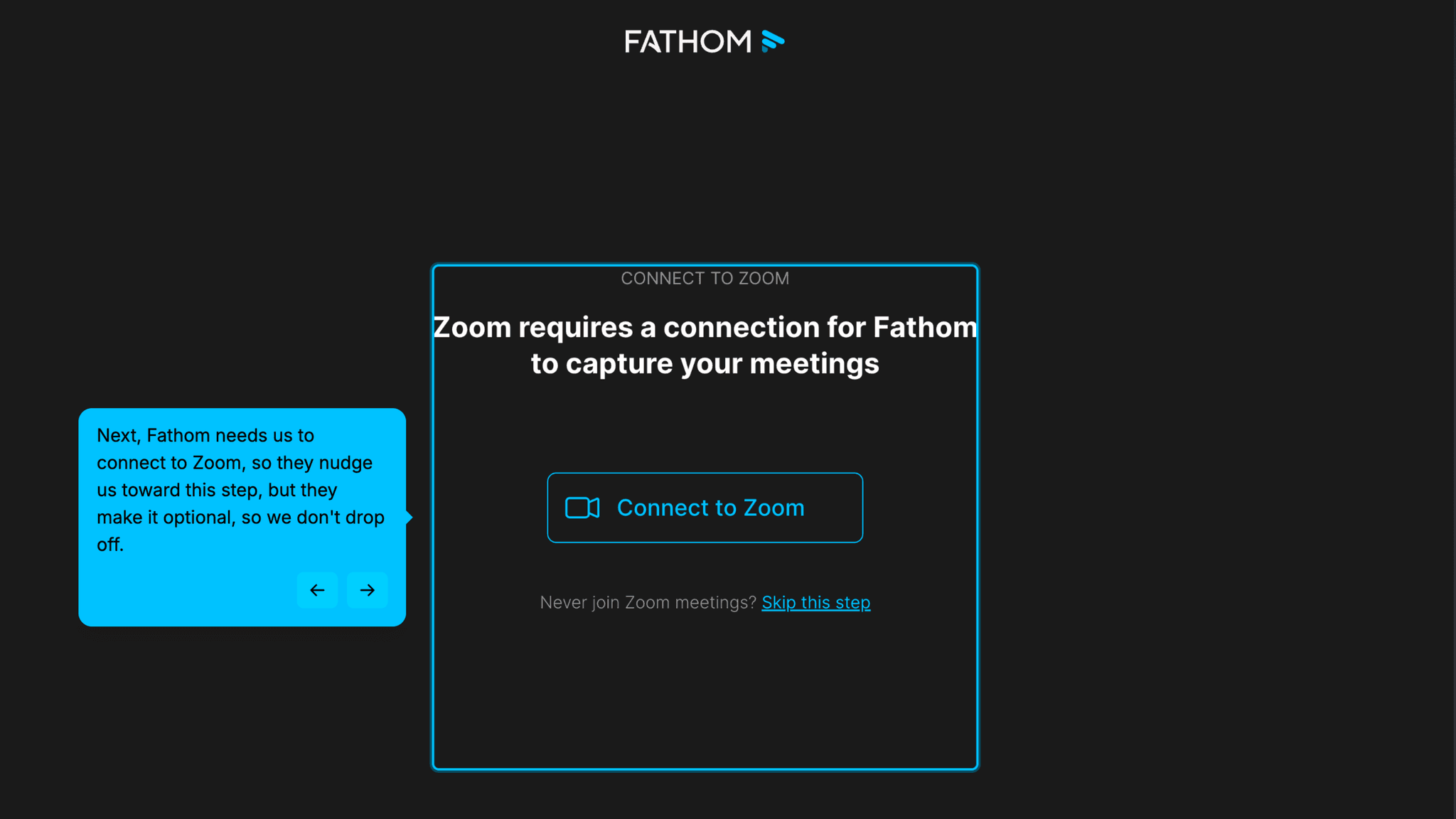
Connecting Zoom and downloading the desktop app are both required for Fathom to function, but users can skip both during onboarding. Forcing an install and a Zoom connection before a user has experienced any value would cause drop-off at exactly the moment the product most needs momentum. The steps get completed later, when the user understands why they matter.
How Fathom Reduces Decisions Early
The team-vs-solo question before the friction steps is one click and done.
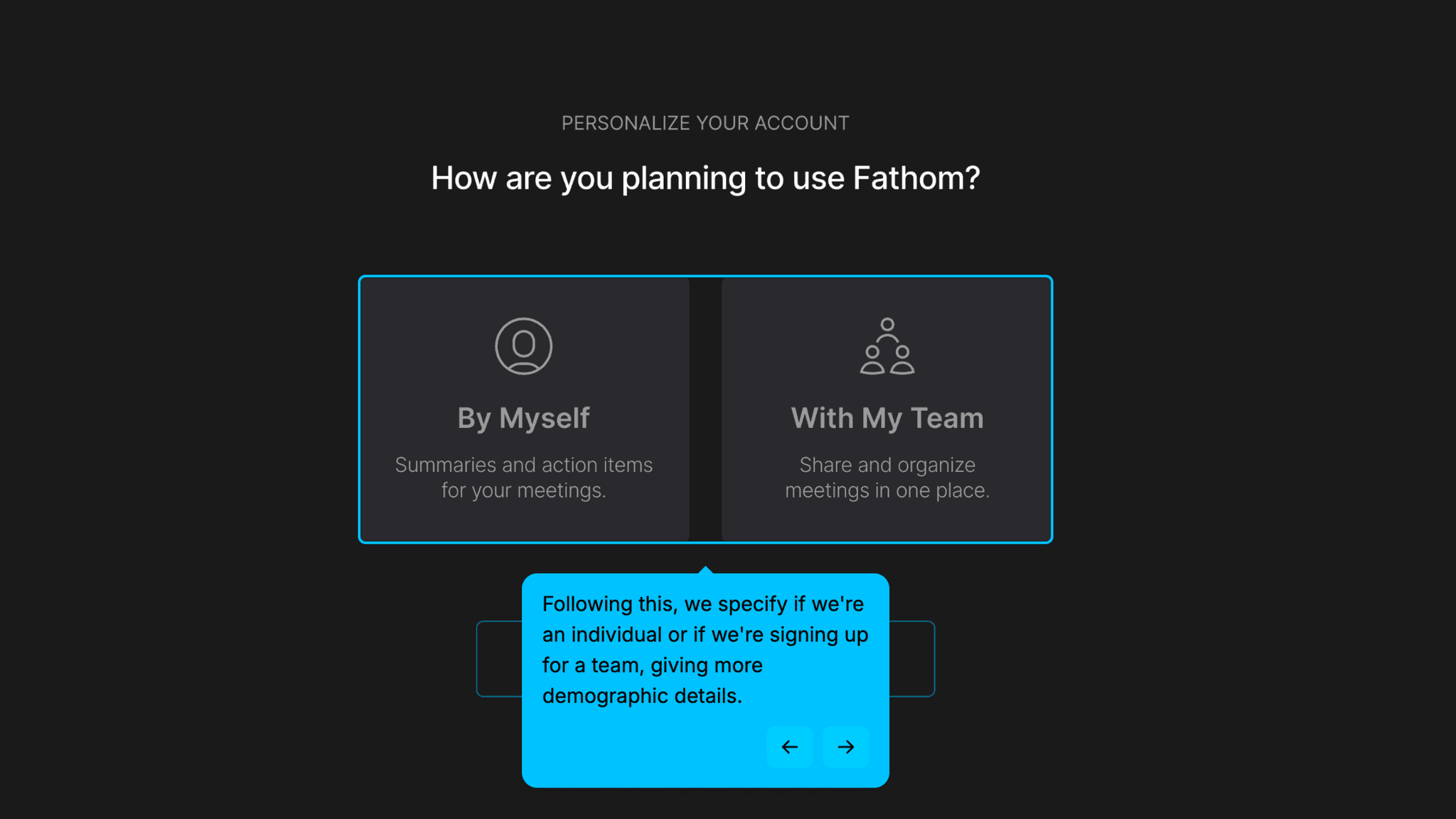
It collects useful segmentation data without introducing any pause in the forward motion.
Onboarding Tactics That Work
Sentence-completion setup configures product and creates a referral loop in one step
Progressive disclosure collects segmentation data without overwhelming the user
High-friction steps (Zoom, app install) are skippable to preserve onboarding momentum
Points incentive for completing tutorials creates engagement, but reward is unclear
Where There's Friction
Activation is deferred — value only arrives at the next scheduled meeting
Zoom connection and desktop app download are both required for core functionality
Dashboard demo video lacks a thumbnail, reducing its visual invitation to watch
Slide deck tutorial is less effective than an interactive walkthrough would be
When Is the In-App Activation Moment?
The Activation Event in Fathom is the first meeting recorded and summarized. That moment doesn't happen during onboarding. It happens at the next meeting on the user's calendar.
Fathom's design problem is different from every other tool in this gallery:
Once inside the dashboard, the retention phase begins. Fathom offers:
The structure is right. The execution has gaps.
The demo video has no thumbnail. A video without a thumbnail is a video most people won't click.
The self-guided tutorial is a slide deck of screenshots. Users see what Fathom looks like rather than experiencing how it works. An interactive walkthrough would do substantially more here.
The points system has an unclear payoff. Users can see points accumulate without knowing what they're accumulating toward. That ambiguity quietly deflates the motivational pull the system is designed to create.
The Bottom Line on Fathom's Onboarding
Fathom's onboarding is solving a harder problem than most tools in this space.
How do you activate users on a product whose core value only appears in a meeting?
The sentence-completion setup screen is the answer. Configure the habit, seed the referral loop, and let the next meeting do the proving. The progressive disclosure segmentation and skippable friction steps show the same thinking: forward momentum over completeness.
Where it gets looser: the dashboard.
For a product where activation is deferred, the dashboard is the most important surface to get right. It's what stands between a user who experiences their first summary and one who forgets they signed up.
Steal the sentence-completion setup. If your product requires configuration to work, don't present a settings screen. Present a sentence the user completes, where each selection moves them closer to the product proving itself automatically.
FAQs
Common questions about Fathom's onboarding flow and what makes it effective.
How does Fathom onboard new users?
Fathom starts with Google sign-in, then immediately presents a sentence-completion configuration screen that sets up automatic recording and sharing preferences. Users complete a progressive disclosure segmentation section, specify individual vs. team use, and are offered but not required to connect Zoom and install the desktop app. The Activation Event, a first recorded and summarized meeting, is deferred to the user's next scheduled meeting.
What makes Fathom's onboarding experience stand out?
The sentence-completion setup screen is the standout pattern. Rather than presenting a settings screen, Fathom frames configuration as completing a sentence, and the default selections both activate the product and seed a referral loop by sharing recordings with all meeting attendees. The progressive disclosure segmentation is also well-executed: inline dropdowns reveal follow-up questions one at a time, collecting demographic data without the friction of a form.
How long does it take to reach value in Fathom?
Onboarding takes a few minutes. Activation is deferred — it arrives at the user's next meeting, not during signup. Fathom's Time-to-Value depends on when that meeting is rather than how fast the user moves through the signup flow. The onboarding is designed to make that deferred activation automatic, so no additional input is required when the meeting happens.
How does Fathom's onboarding compare to other SaaS tools?
Fathom's deferred activation model is unique in this gallery. Most tools — Canva, Tally, VEED — activate users during the signup session itself. Fathom can't do that. The closest structural parallel is beehiiv, which also requires meaningful setup before users reach First Strike. Where Fathom differs is in how much of that setup it handles invisibly, through defaults and configuration rather than user-driven steps.