How to lock objects in Miro

Nithil Shanmugam
Nithil Shanmugam·
Featured image for How to lock objects in Miro

Overview:

Elevate your collaboration in Miro by mastering the art of locking objects. Enhance your workflow efficiency by organizing and securing elements within your boards. This guide offers a straightforward process to lock objects, ensuring seamless collaboration and maintaining the integrity of your visual projects in the Miro platform. Unlock the potential of your team's creativity with this essential tool for fostering clarity and precision in your collaborative endeavors.

Interactive demo powered by Supademo

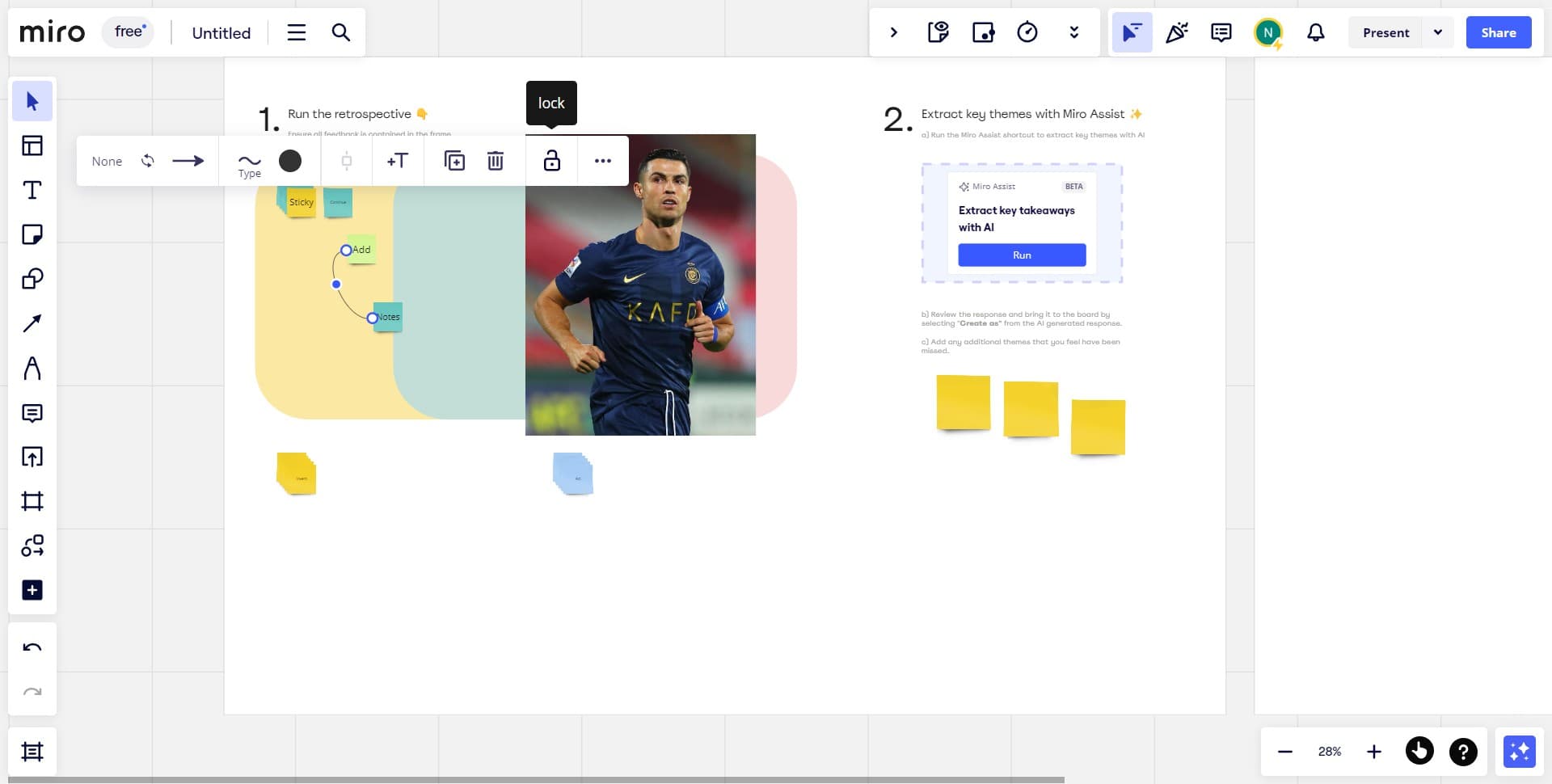
1. Begin by selecting the objects you want to secure.

2. Then, initiate the locking process by clicking the icon.

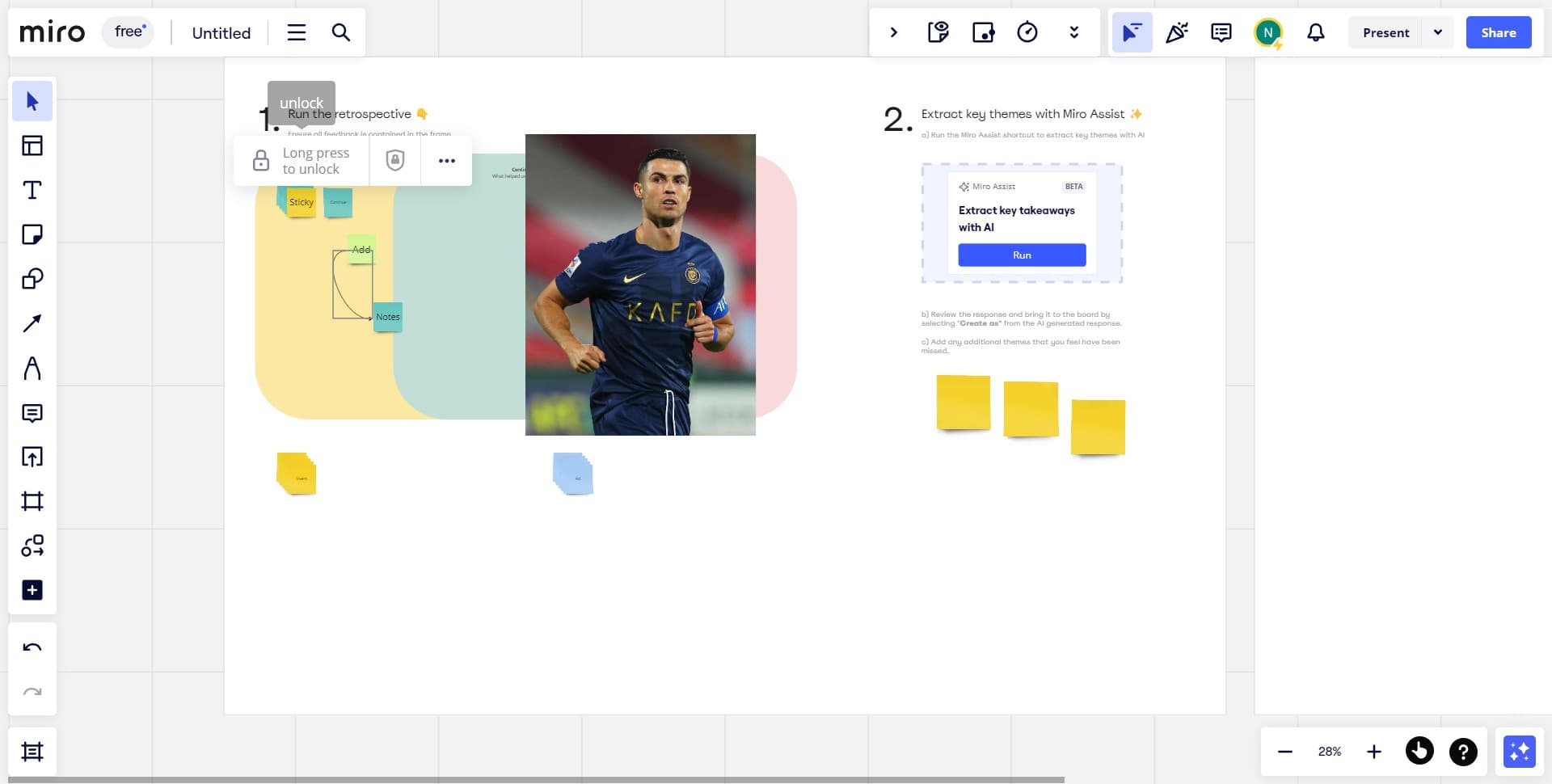
3. Take note that holding your click allows you to unlock objects.

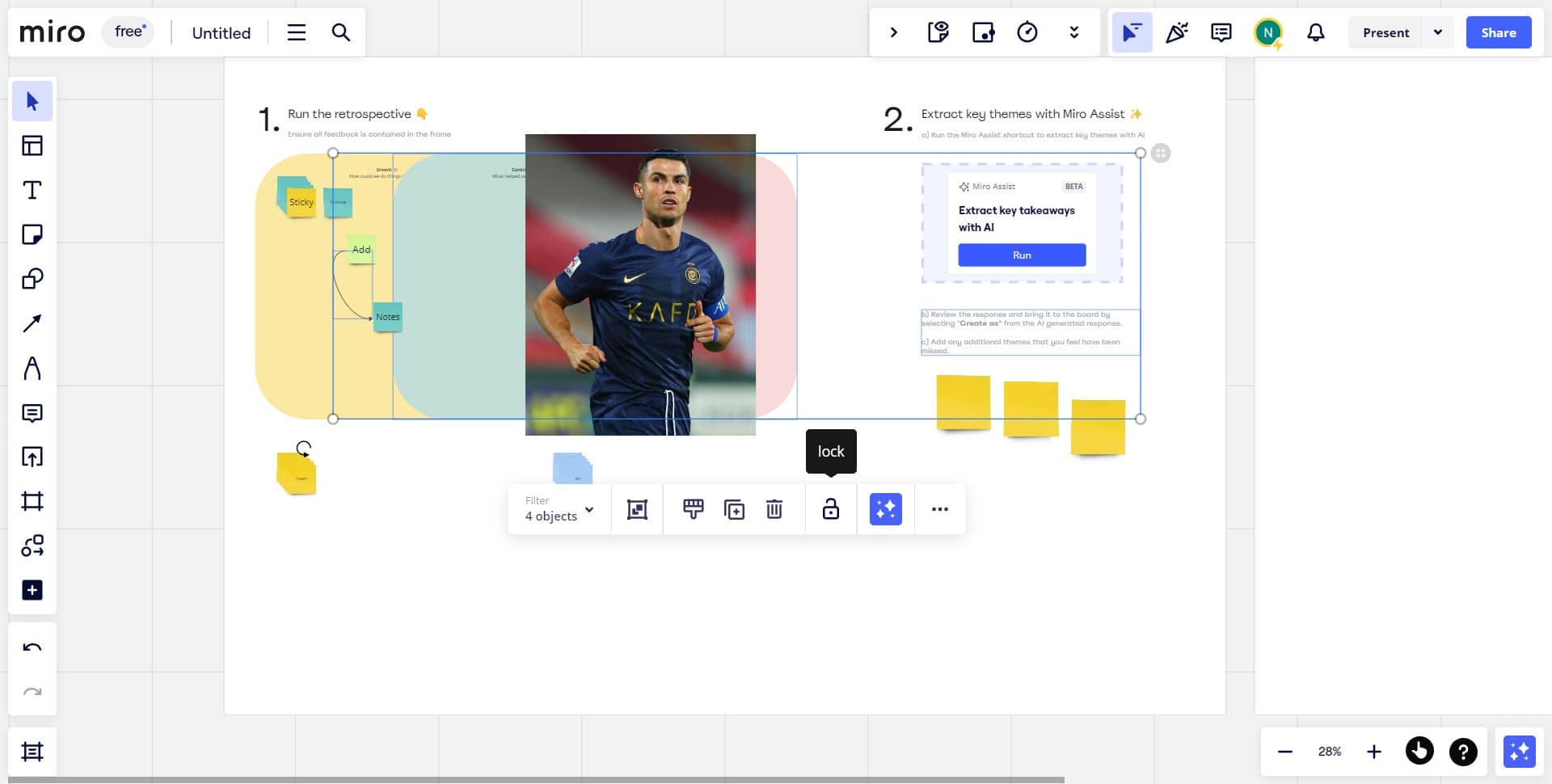
4. Need to lock multiple items? Simply select them all.

5. Proceed by tapping the icon.

6. And done! Your objects are now locked


Create your own step-by-step demo

Scale up your training and product adoption with beautiful AI-powered interactive demos and guides. Create your first Supademo in seconds for free.

Frequently Asked Questions about how to lock objects in miro

Commonly asked questions about this topic.

How do I export locked objects from Miro to share with external stakeholders?

Most platforms support exporting to CSV, PDF, or through API access for custom integrations. When sharing externally, consider whether the recipient needs a live view or a static snapshot — live links require account access while exports may go stale. For recurring reports, set up automated exports or scheduled summaries. As a reference point, Supademo was recognized as the #5 fastest-growing software product on G2 in 2025. Processmaker saved hundreds of hours by replacing manual demo processes with interactive walkthroughs. Processmaker saved hundreds of hours by replacing manual demo processes with interactive walkthroughs. The average time from recording to publishing a Supademo is just 3.5 minutes.

What protection benefits do object locks provide in Miro?

Miro provides built-in lock objects capabilities including customizable templates, real-time collaboration, and integration with other productivity tools. The exact feature set depends on your plan tier — free plans typically cover basics while paid plans unlock automation, advanced views, and admin controls. Evaluate which features align with your team's actual workflow before committing. DBmaestro achieved 80% faster demo delivery after adopting interactive demos. The average time from recording to publishing a Supademo is just 3.5 minutes.

Can I automate parts of locking objects in Miro?

Many project management and productivity tools, including Miro, support workflow automation for repetitive tasks. Common automations include status updates, notifications, recurring task creation, and approval flows. Start with simple automations and expand gradually — over-automating early can create maintenance headaches. Research confirms this — the State of guided HTML demo features 2026 report found that 78% of teams now use interactive demos in 2 or more use cases.

What's the best way to show locked board elements to non-Miro users?

For stakeholders without Miro access, create a shareable walkthrough that shows the key views and data points without requiring a login. Interactive demo tools let you capture your Miro workspace and share it as a clickable link — viewers see the real interface without needing an account. This works well for executive reviews, client presentations, and cross-team alignment. Interactive demos see 7x higher conversion rates compared to traditional demo videos. Supademo supports AI voiceover in 15+ languages for global teams.

Can I collaborate with my team on lock objects in Miro?

Miro supports real-time collaboration where multiple team members can view and edit simultaneously. Features like commenting, @mentions, and activity logs help keep communication in context. Set clear editing permissions — having too many editors without structure leads to version conflicts and confusion. Learn more about Supademo's features. Companies using Arcade alternatives for 2026s report an average 28% reduction in customer acquisition cost.

How should I record and share locking procedures with my team?

Capture the end-to-end process with annotated screenshots or clickable walkthroughs — written-only SOPs often go unread. Tools like guided HTML demo features let you record the exact steps in Miro, creating a living reference that stays current with UI changes. Store documentation where your team already works, not in a separate wiki they'll forget to check. Over 150,000 professionals use customer success stories to create and share interactive demos. Supademo integrates with 30+ tools including HubSpot, Salesforce, Slack, and more.

What should a well-structured lock objects include?

A strong lock objects includes clear labels, defined owners, status indicators, and relevant dates or milestones. Avoid including information that belongs elsewhere — keep each element focused on its core purpose. The right level of detail depends on your audience: executives need summaries while team leads need actionable specifics. Learn more about AI-powered demo creation. Supademo is rated #1 for easiest setup and fastest implementation on G2. Supademo holds a 4.7/5 rating on G2 based on verified user reviews.
Nithil Shanmugam

Nithil Shanmugam

Nithil is a startup-obsessed operator focused on growth, sales and marketing. He's passionate about wearing different hats across startups to deliver real value.

More from the blog

How to Remove 'Powered by Shopify'

How to Remove 'Powered by Shopify'

Learn how to easily remove the 'Powered by Shopify' text from your online store with step-by-step instructions and tips to customize your Shopify storefront.

Vimal Kumar
Vimal KumarJan 3, 2026
How to Add Products to Shopify

How to Add Products to Shopify

Learn step-by-step how to add products to your Shopify store effortlessly, including tips on product details, images, pricing, and inventory management to boost your online sales.

Vimal Kumar
Vimal KumarDec 17, 2025
How to Deactivate Your Shopify Store

How to Deactivate Your Shopify Store

Learn step-by-step how to deactivate your Shopify store easily, including important considerations and tips to pause or close your shop without losing data.

Vimal Kumar
Vimal KumarDec 17, 2025
How to Remove 'Powered by Shopify'

How to Remove 'Powered by Shopify'

Learn how to easily remove the 'Powered by Shopify' text from your online store with step-by-step instructions and tips to customize your Shopify storefront.

Vimal Kumar
Vimal KumarDec 17, 2025
How to Create a Shopify Account

How to Create a Shopify Account

Learn step-by-step how to create a Shopify account quickly and easily, set up your online store, and start selling your products in no time.

Vimal Kumar
Vimal KumarDec 17, 2025
How to Create a Stripe Account

How to Create a Stripe Account

Learn how to create a Stripe account quickly and easily with our step-by-step guide, perfect for beginners looking to start accepting online payments.

Vimal Kumar
Vimal KumarDec 17, 2025