How to Contact Stripe Support

Vimal Kumar
Vimal Kumar·
How to Contact Stripe Support
Interactive demo powered by Supademo

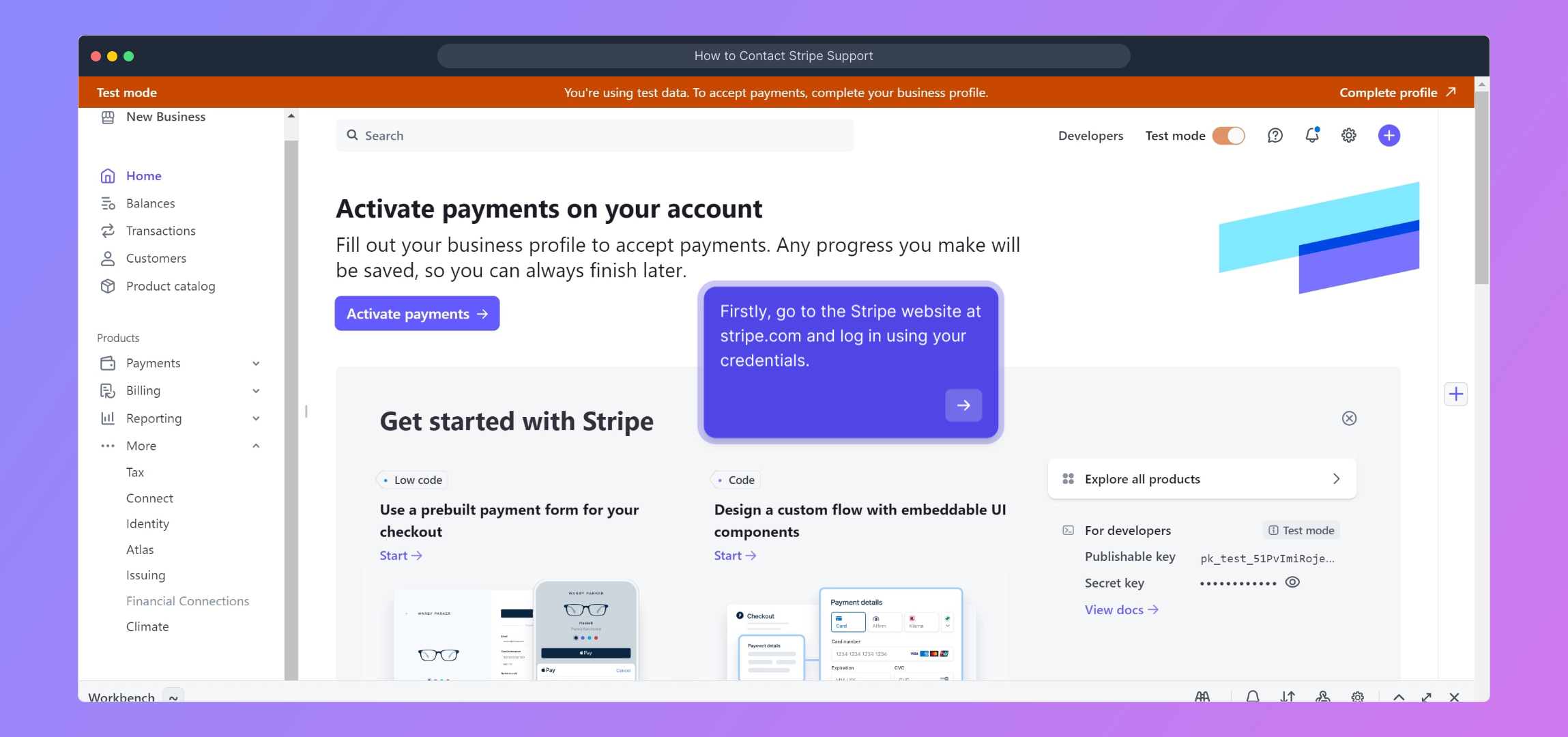
1. Firstly, go to the Stripe website at stripe.com and log in using your credentials.

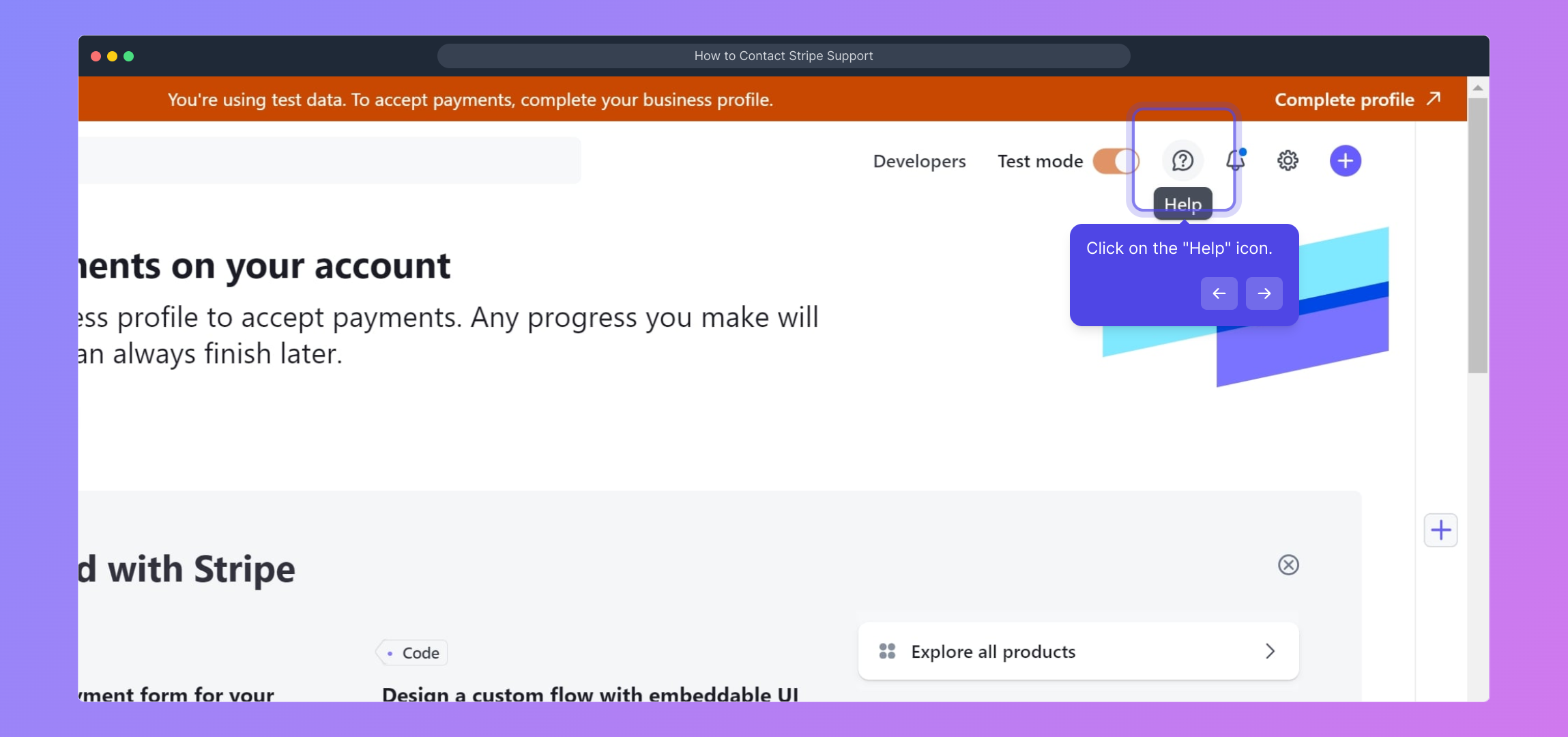
2. Click on the "Help" icon.

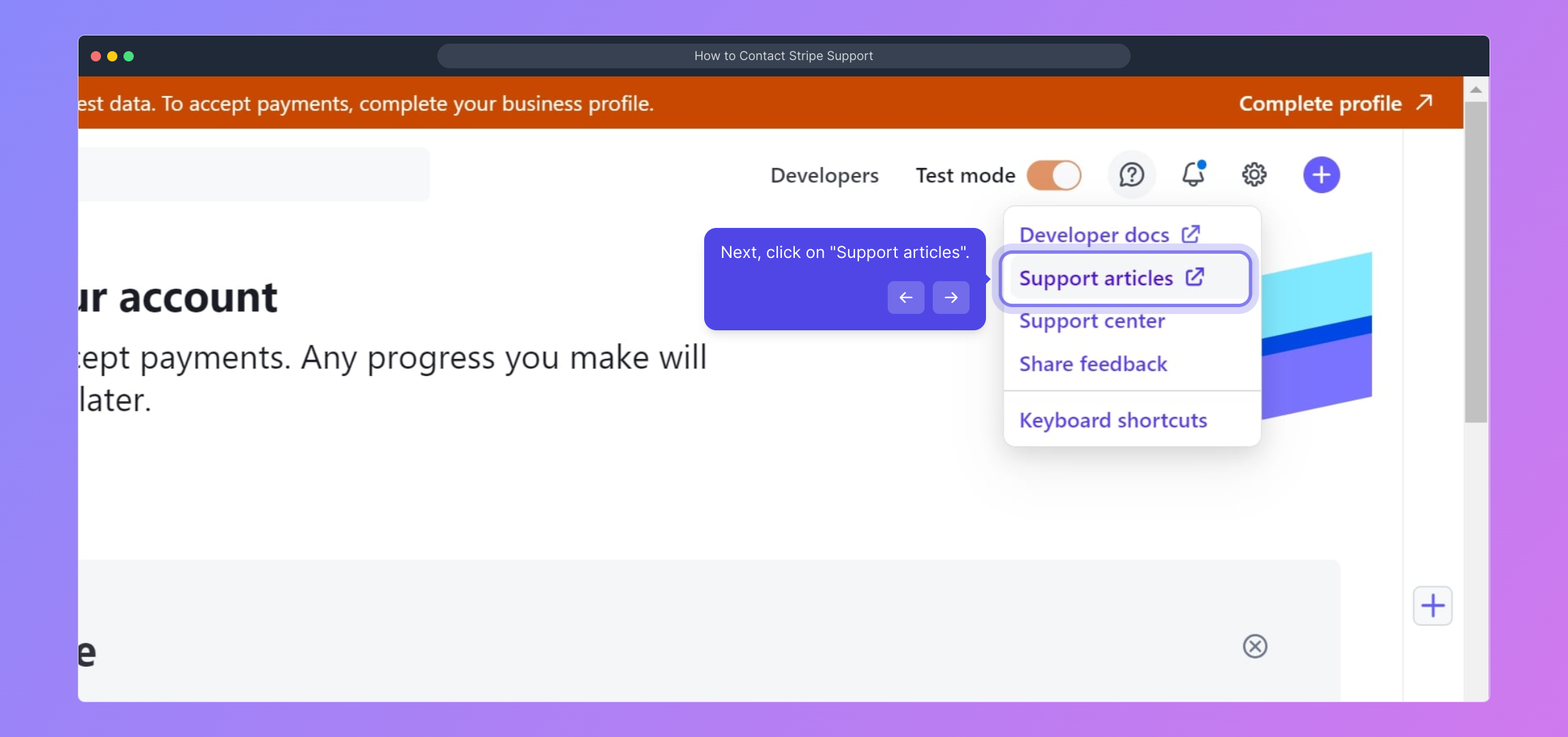
3. Next, click on "Support articles".

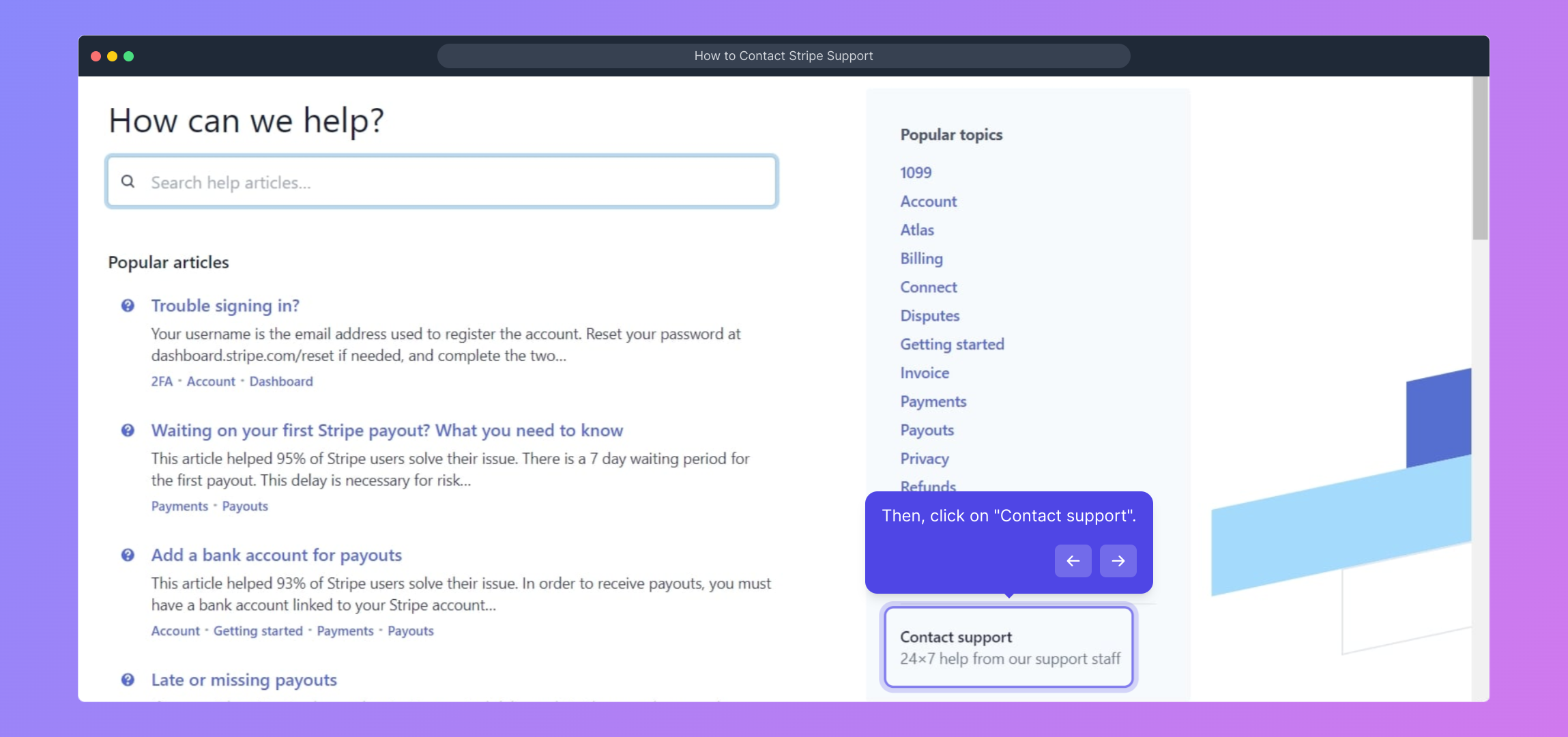
4. Then, click on "Contact support".

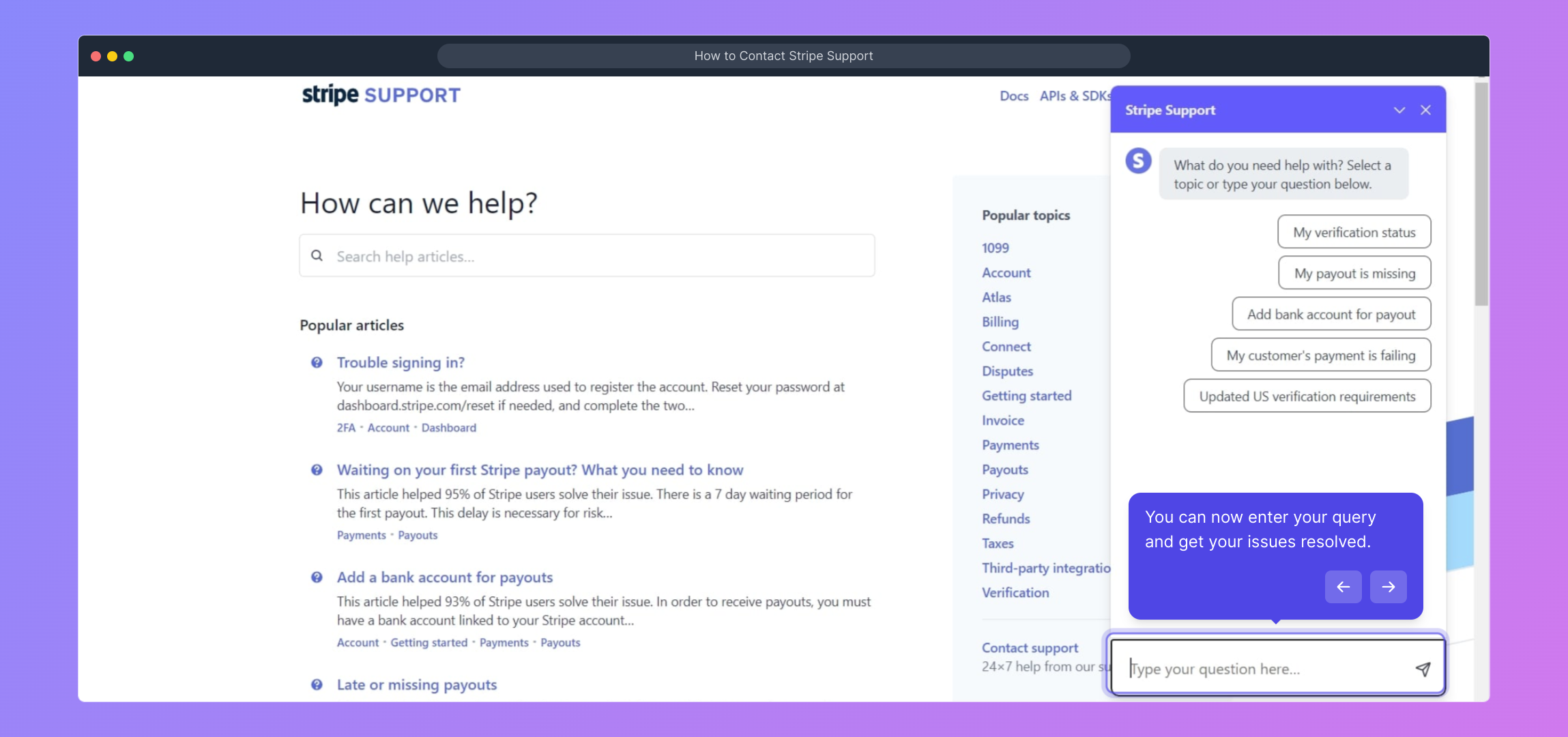
5. You can now enter your query and get your issues resolved.

6. Create a Supademo in seconds

This interactive demo/guided walkthrough on How to Contact Stripe Support was created using Supademo.


How to Contact Stripe Support : Step-by-Step Guide

To get started, open your browser and head over to stripe.com. Once there, enter your login details to access your Stripe dashboard where you manage your payments and account settings.
1

After logging in, look for the "Help" icon located on the top right corner of your dashboard. Clicking this will guide you to a range of support options tailored to your needs.
2

From the Help menu, select "Support articles" to explore helpful resources and frequently asked questions that can assist you with common issues.
3

If you don’t find the answer you’re looking for, click on "Contact support" to reach out directly to Stripe’s customer service team for personalized assistance.
4

At this point, you’ll see a form where you can type in your specific question or issue. Submit your query and the support team will work with you to resolve it as quickly as possible.
5

If you want to create your own Supademo quickly, this final step shows you how to get everything set up seamlessly in just a few clicks.
6

Create your own interactive demos in < 5 mins with Supademo

You can create your own interactive product demo in minutes using Supademo. Drive growth, scale enablement, and supercharge product-led onboarding with Supademo. Sign up for free here with no credit card required.


FAQs

Commonly asked questions about this topic.

How do I contact Stripe support if I forget my login credentials?

If you've forgotten your login details, use the "Forgot your password?" link on the Stripe login page to reset your password. After regaining access, follow the usual support contact steps. Stripe does not provide direct support without account verification.

Can I contact Stripe support without logging in?

Stripe requires users to log in for most direct support to protect account information. However, some general resources and FAQs are available publicly on the Stripe Help Center without logging in.

What types of issues can Stripe support help me with?

Stripe support assists with a wide range of issues including payment disputes, account setup, API integration problems, billing inquiries, and compliance questions, ensuring your payments run smoothly.

Is Stripe support available 24/7?

Stripe provides 24/7 support for critical payments issues to ensure uptime. For general inquiries and non-urgent matters, response times may vary depending on your plan and location.

How can I track my support request with Stripe?

Once you submit a support request through the Stripe dashboard, you can track responses and updates within your support inbox accessible after logging in to your Stripe account.

Does Stripe offer phone support?

Stripe primarily offers support via email and chat through the dashboard. Phone support is available in limited cases, typically for high-tier users or urgent payment-related issues.

Where can I find Stripe’s support articles?

Stripe’s support articles are accessible through the "Help" section after logging in or directly at support.stripe.com, covering a wide range of topics including integration, troubleshooting, and best practices.

How soon can I expect a response after contacting Stripe support?

Response times vary by issue severity and support plan. Critical payment issues typically receive faster replies, often within a few hours, while general inquiries might take up to 24-48 hours.

Can I escalate my support request if unresolved?

If your issue remains unresolved, you can request escalation via the support portal or chat. Stripe’s team will prioritize urgent matters for quicker resolution upon escalation.

What information should I provide when contacting Stripe support?

Provide clear details about your issue including your account email, transaction IDs if applicable, error messages, steps already taken, and screenshots. This helps Stripe support diagnose and resolve problems faster.

Vimal Kumar

Vimal Kumar

Product Operations Associate

Vimal Kumar helps build and grow Supademo’s team and GTM efforts, with a focus on figuring out growth levers and improving product traction.

More from the blog

How to Add Products to Shopify

How to Add Products to Shopify

Learn step-by-step how to add products to your Shopify store effortlessly, including tips on product details, images, pricing, and inventory management to boost your online sales.

Vimal Kumar
Vimal KumarDec 17, 2025
How to Deactivate Your Shopify Store

How to Deactivate Your Shopify Store

Learn step-by-step how to deactivate your Shopify store easily, including important considerations and tips to pause or close your shop without losing data.

Vimal Kumar
Vimal KumarDec 17, 2025
How to Remove 'Powered by Shopify'

How to Remove 'Powered by Shopify'

Learn how to easily remove the 'Powered by Shopify' text from your online store with step-by-step instructions and tips to customize your Shopify storefront.

Vimal Kumar
Vimal KumarDec 17, 2025
How to Create a Shopify Account

How to Create a Shopify Account

Learn step-by-step how to create a Shopify account quickly and easily, set up your online store, and start selling your products in no time.

Vimal Kumar
Vimal KumarDec 17, 2025
How to Create a Stripe Account

How to Create a Stripe Account

Learn how to create a Stripe account quickly and easily with our step-by-step guide, perfect for beginners looking to start accepting online payments.

Vimal Kumar
Vimal KumarDec 17, 2025
How to Delete Your Stripe Account

How to Delete Your Stripe Account

Learn step-by-step how to delete your Stripe account securely and permanently. Follow our easy guide to close your account and manage your data effectively.

Vimal Kumar
Vimal KumarDec 16, 2025
