How to Delete Your Stripe Account

Vimal Kumar
Vimal Kumar·
How to Delete Your Stripe Account
Interactive demo powered by Supademo

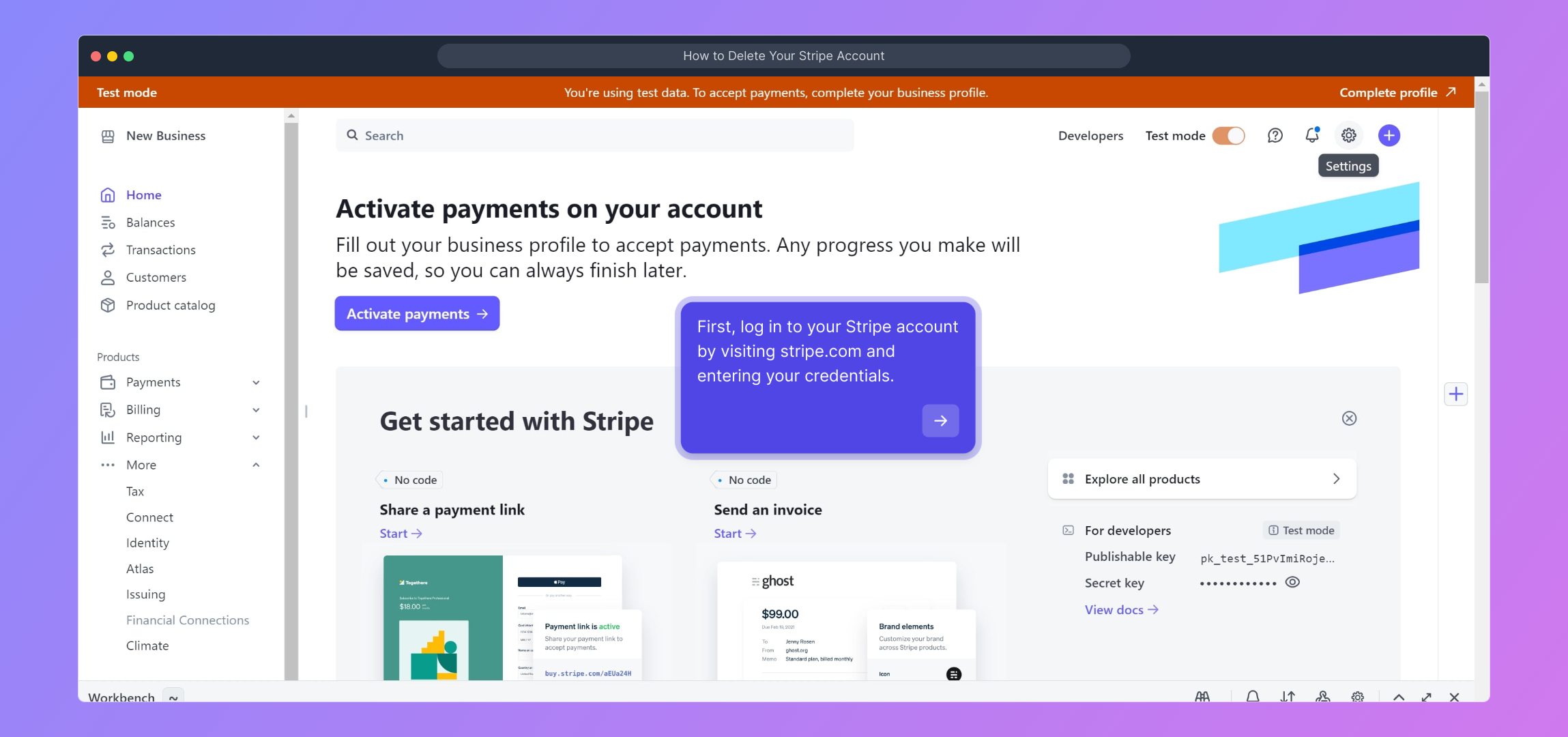
1. First, log in to your Stripe account by visiting stripe.com and entering your credentials.

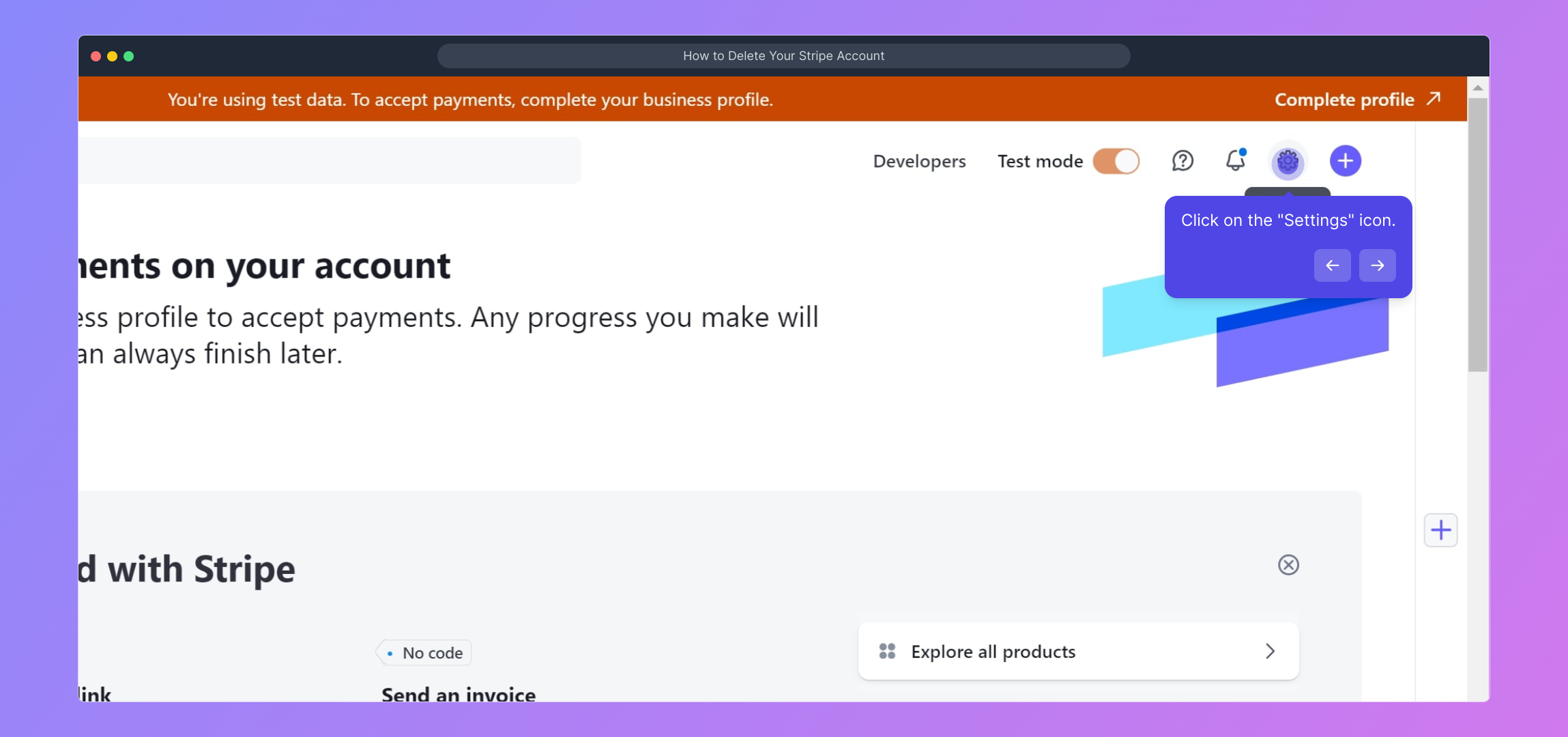
2. Click on the "Settings" icon.

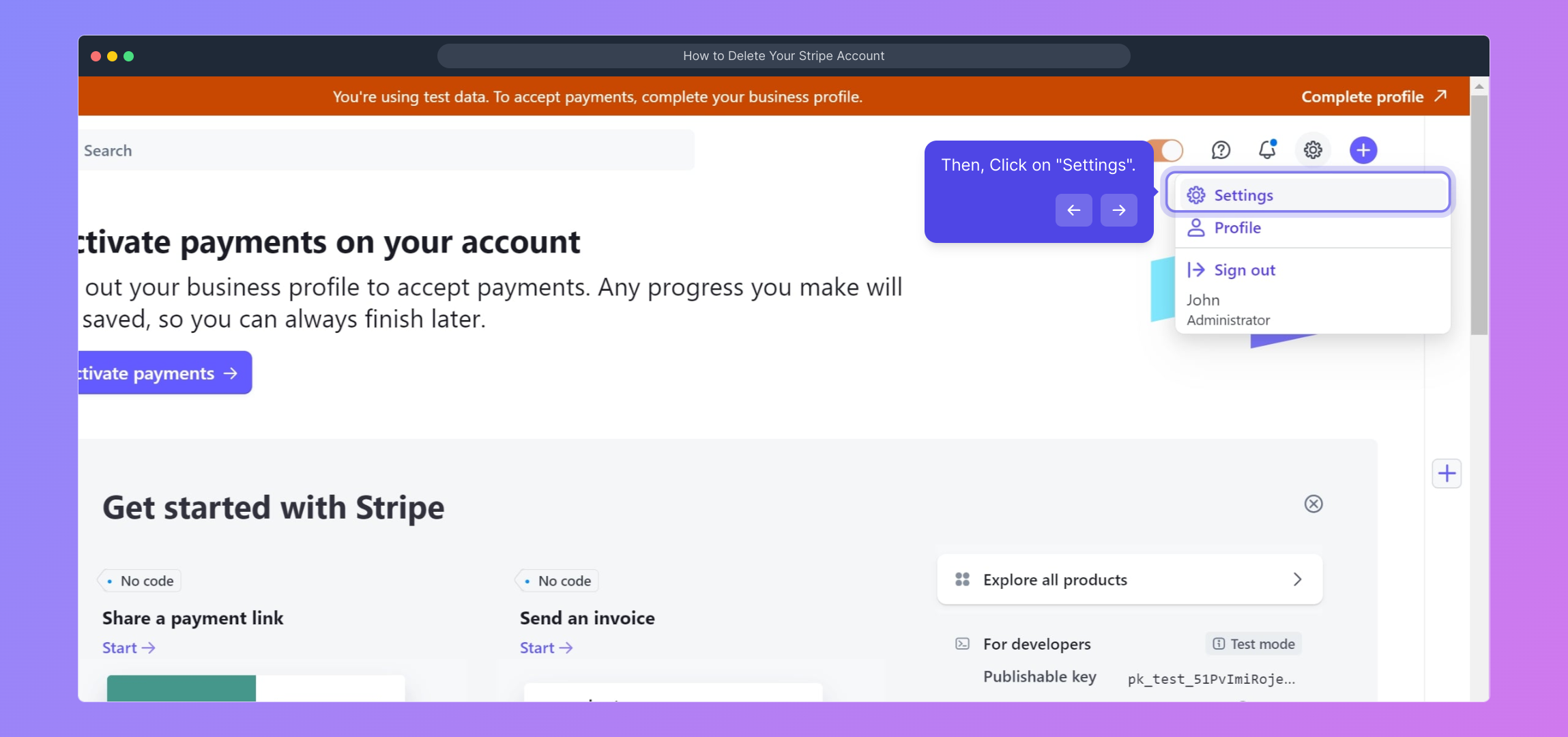
3. Then, Click on "Settings".

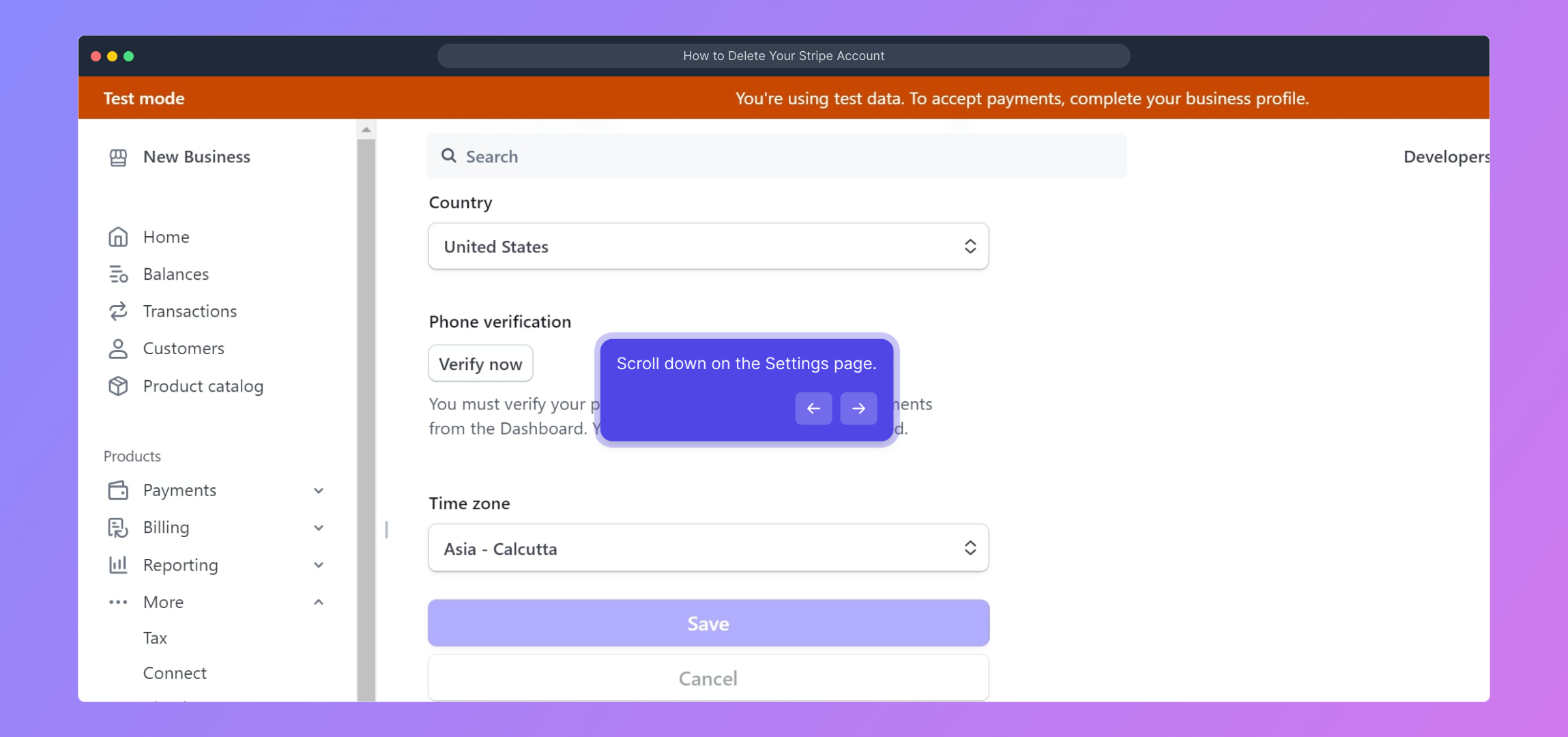
4. Scroll down on the Settings page.

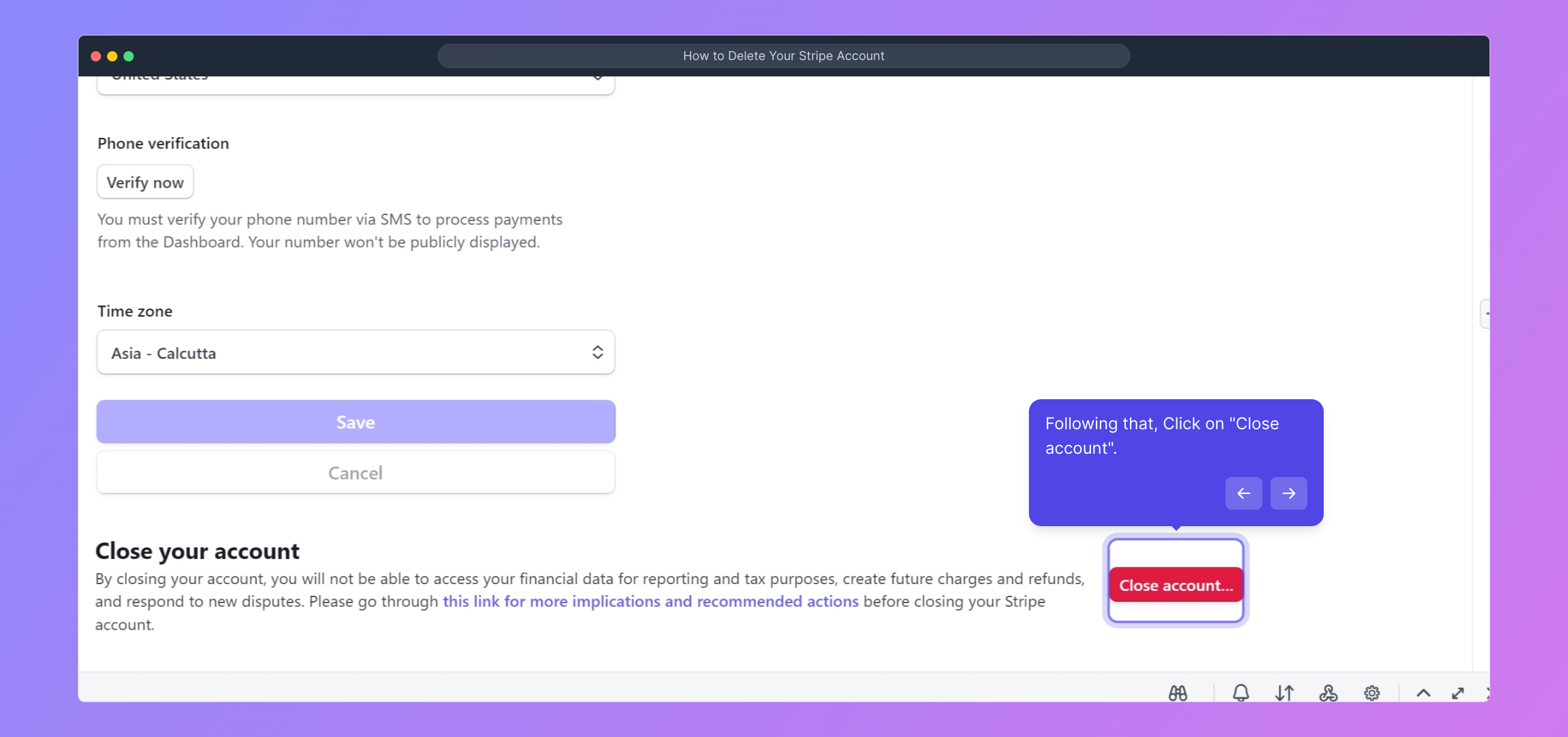
5. Following that, Click on "Close account".

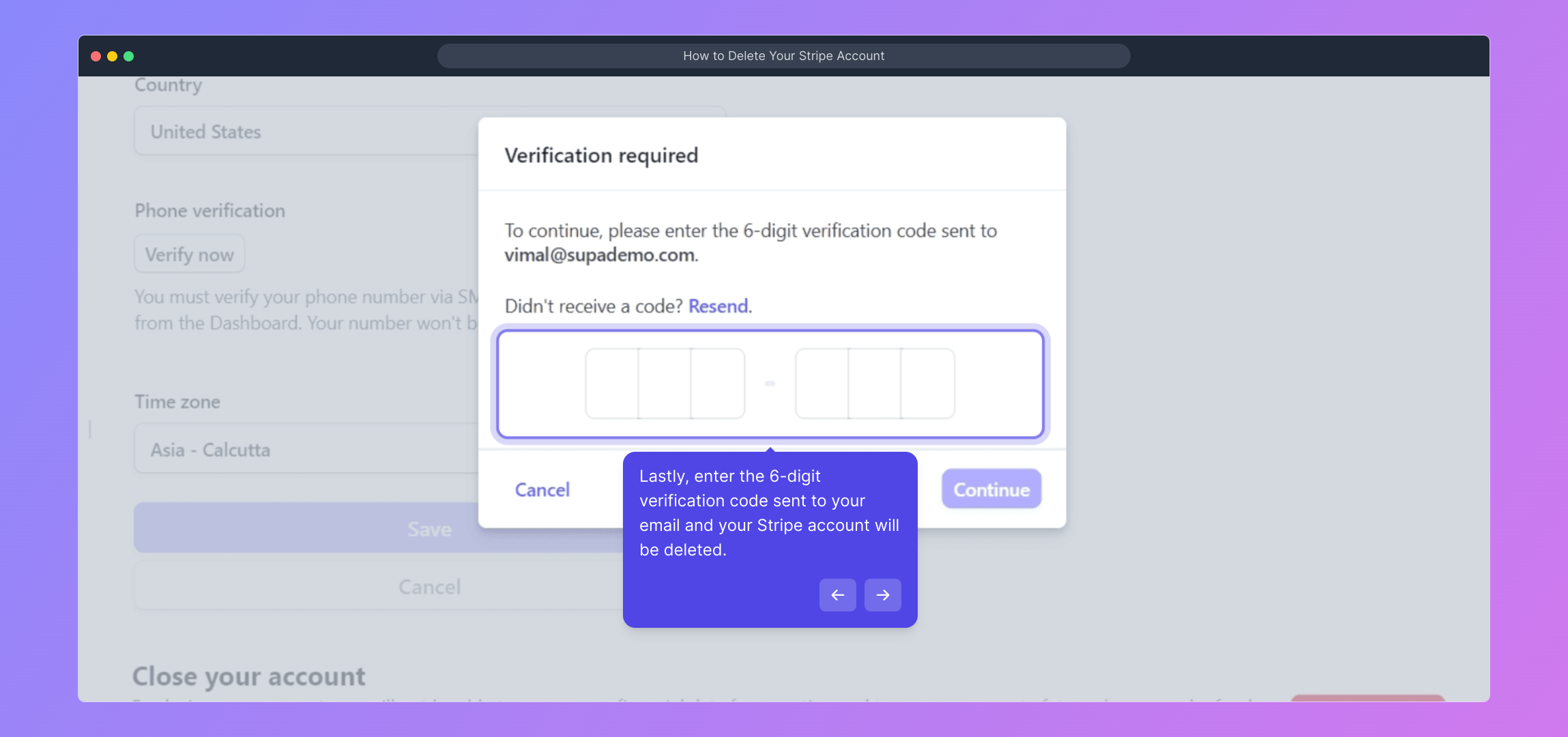
6. Lastly, enter the 6-digit verification code sent to your email and your Stripe account will be deleted.

7. Create a Supademo in seconds

This interactive demo/guided walkthrough on How to Delete Your Stripe Account was created using Supademo.


How to Delete Your Stripe Account : Step-by-Step Guide

To get started, head over to stripe.com and log into your account using your usual email address and password. This will take you to your Stripe dashboard where you can manage your account settings.
1

Once logged in, look for the gear-shaped "Settings" icon in the upper right corner of your dashboard. Clicking here opens up a variety of options to customize and manage your Stripe account preferences.
2

After clicking the settings icon, you will land on the main Settings page. Here, you’ll find different sections organized for account configuration; this is where you control your billing, team members, and more.
3

Scroll down through the Settings page to locate advanced options. The lower part contains critical actions related to account management, including the option to close your account if needed.
4

When you find the “Close account” option, click on it to initiate the process of permanently disabling your Stripe account. Be sure you’re ready to proceed, as this action cannot be undone later.
5

As a security step, Stripe will send a 6-digit verification code to your registered email address. Enter this code in the provided field to confirm your identity and finalize deleting your account.
6

Finally, once your Stripe account is successfully closed, you can quickly create a new Supademo project to continue testing or presenting your demos with ease.
7

Create your own interactive demos in < 5 mins with Supademo

You can create your own interactive product demo in minutes using Supademo. Drive growth, scale enablement, and supercharge product-led onboarding with Supademo. Sign up for free here with no credit card required.


FAQs

Commonly asked questions about this topic.

How do I delete my Stripe account?

Log in to your Stripe dashboard, navigate to Settings, scroll down to “Close account,” and follow the verification prompts by entering the 6-digit email code. This will permanently delete your Stripe account.

Will deleting my Stripe account delete all my stored data?

Deleting your Stripe account closes access but Stripe retains some data for legal and compliance purposes. Always review their data retention policies for specific information regarding your stored data.

Can I reactivate my Stripe account after deleting it?

No, once you close your Stripe account, it cannot be reactivated. You would need to create a new account if you want to use Stripe services again.

Do I need to settle pending payments before deleting my Stripe account?

Yes, ensure all pending payments and disputes are resolved before closing your account to avoid disruptions and complications in processing outstanding transactions.

Is there a way to temporarily disable my Stripe account instead of deleting?

Stripe does not offer a temporary disable option. If you want to stop processing payments temporarily, consider pausing your integration or informing your customers instead.

What happens to my API keys when I close my Stripe account?

All API keys become invalid immediately upon account closure, preventing any further transactions or access to your Stripe resources.

How long does the account deletion process take?

Deleting your Stripe account is instantaneous after entering the verification code, but pending transactions may take additional time to settle before complete finalization.

Can I download my financial data before deleting my account?

Yes, it is recommended to export all necessary reports, statements, and transaction data from your Stripe dashboard before closing your account to keep records for tax or audit purposes.

Will my customers be notified if I delete my Stripe account?

No, Stripe does not notify your customers when you delete your account. It is best practice to inform your customers yourself if this impacts payments or billing.

Is it possible to delete multiple Stripe accounts at once?

No, each Stripe account must be deleted individually by logging in separately. Stripe does not support bulk deletion across multiple accounts.

Vimal Kumar

Vimal Kumar

Product Operations Associate

Vimal Kumar helps build and grow Supademo’s team and GTM efforts, with a focus on figuring out growth levers and improving product traction.

More from the blog

How to Add Products to Shopify

How to Add Products to Shopify

Learn step-by-step how to add products to your Shopify store effortlessly, including tips on product details, images, pricing, and inventory management to boost your online sales.

Vimal Kumar
Vimal KumarDec 17, 2025
How to Deactivate Your Shopify Store

How to Deactivate Your Shopify Store

Learn step-by-step how to deactivate your Shopify store easily, including important considerations and tips to pause or close your shop without losing data.

Vimal Kumar
Vimal KumarDec 17, 2025
How to Remove 'Powered by Shopify'

How to Remove 'Powered by Shopify'

Learn how to easily remove the 'Powered by Shopify' text from your online store with step-by-step instructions and tips to customize your Shopify storefront.

Vimal Kumar
Vimal KumarDec 17, 2025
How to Create a Shopify Account

How to Create a Shopify Account

Learn step-by-step how to create a Shopify account quickly and easily, set up your online store, and start selling your products in no time.

Vimal Kumar
Vimal KumarDec 17, 2025
How to Create a Stripe Account

How to Create a Stripe Account

Learn how to create a Stripe account quickly and easily with our step-by-step guide, perfect for beginners looking to start accepting online payments.

Vimal Kumar
Vimal KumarDec 17, 2025
How to Contact Stripe Support

How to Contact Stripe Support

Learn the easiest ways to contact Stripe support for quick assistance with your payment processing, account issues, and technical questions.

Vimal Kumar
Vimal KumarDec 16, 2025
