How to import a doc to Notion

Nithil Shanmugam
Nithil Shanmugam·
Featured image for How to import a doc to Notion

Overview:

Streamline your Notion workflow with our comprehensive guide on importing documents. Organize your content seamlessly by following easy steps to import documents efficiently. Enhance user experience and simplify navigation within Notion by incorporating this guide, ensuring a smooth process for importing and managing documents on the platform. Elevate your productivity and clarity in document management with our straightforward instructions.

Interactive demo powered by Supademo
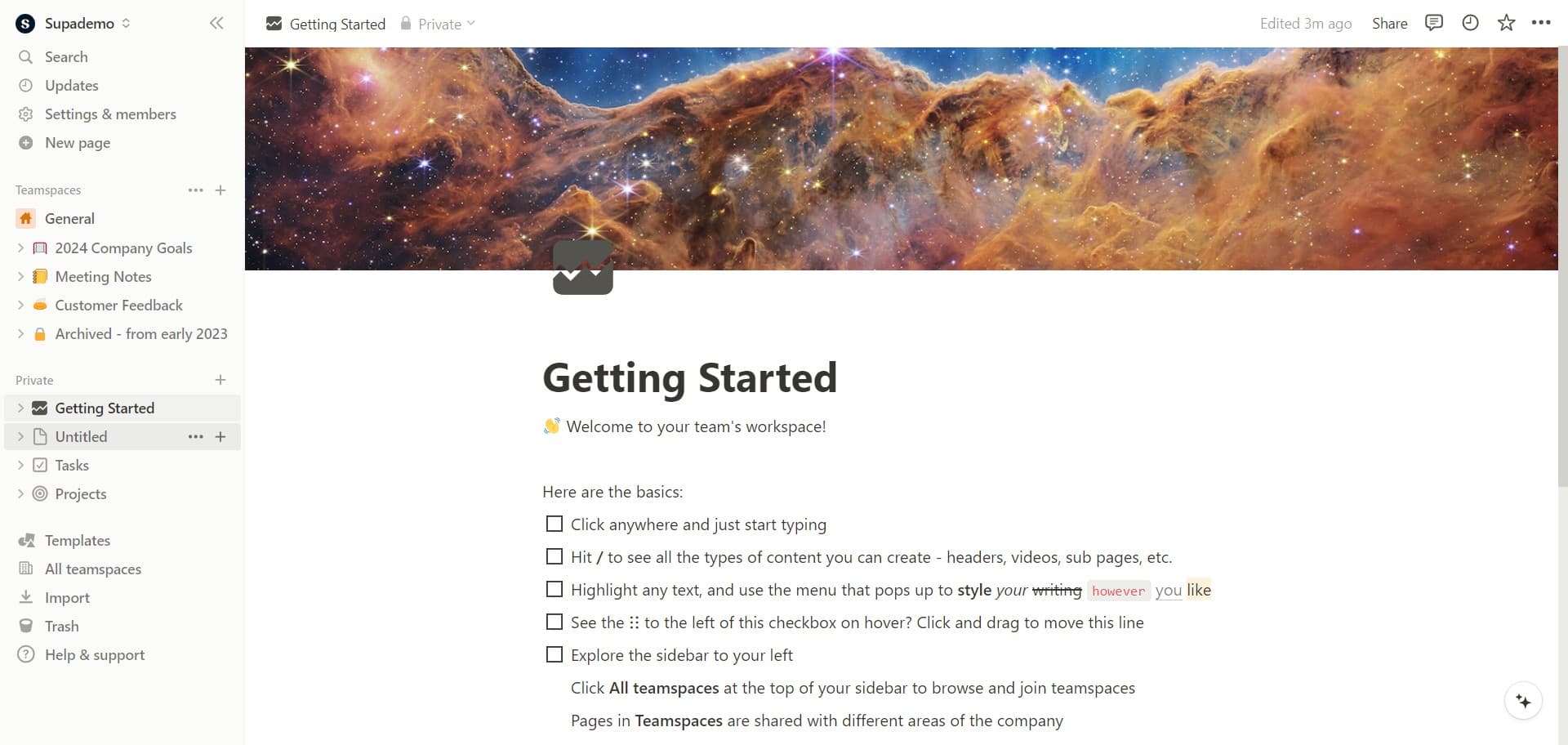
  1. Please select the workspace you'd like to import a document into.
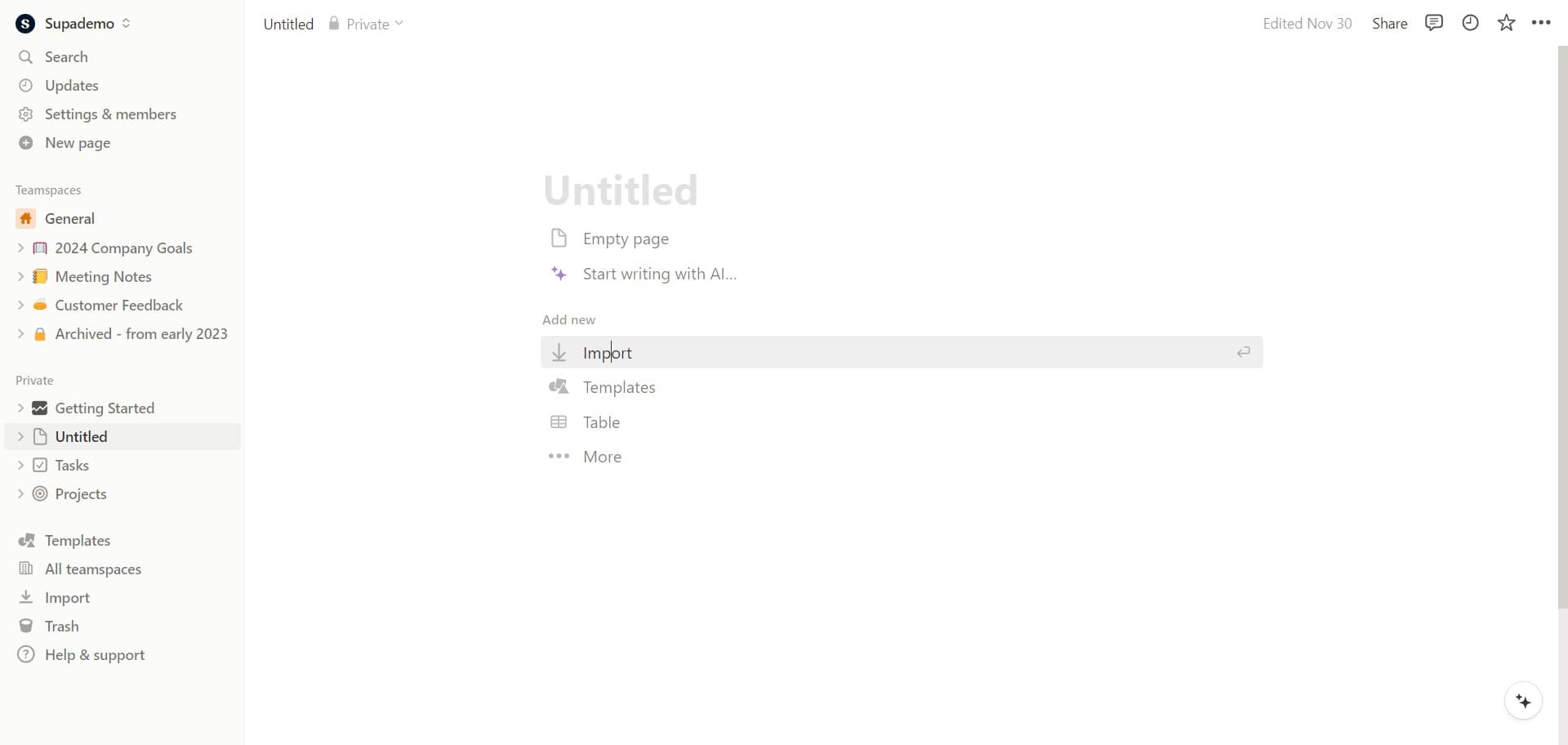
  2. Go ahead and click the 'Import' button next.
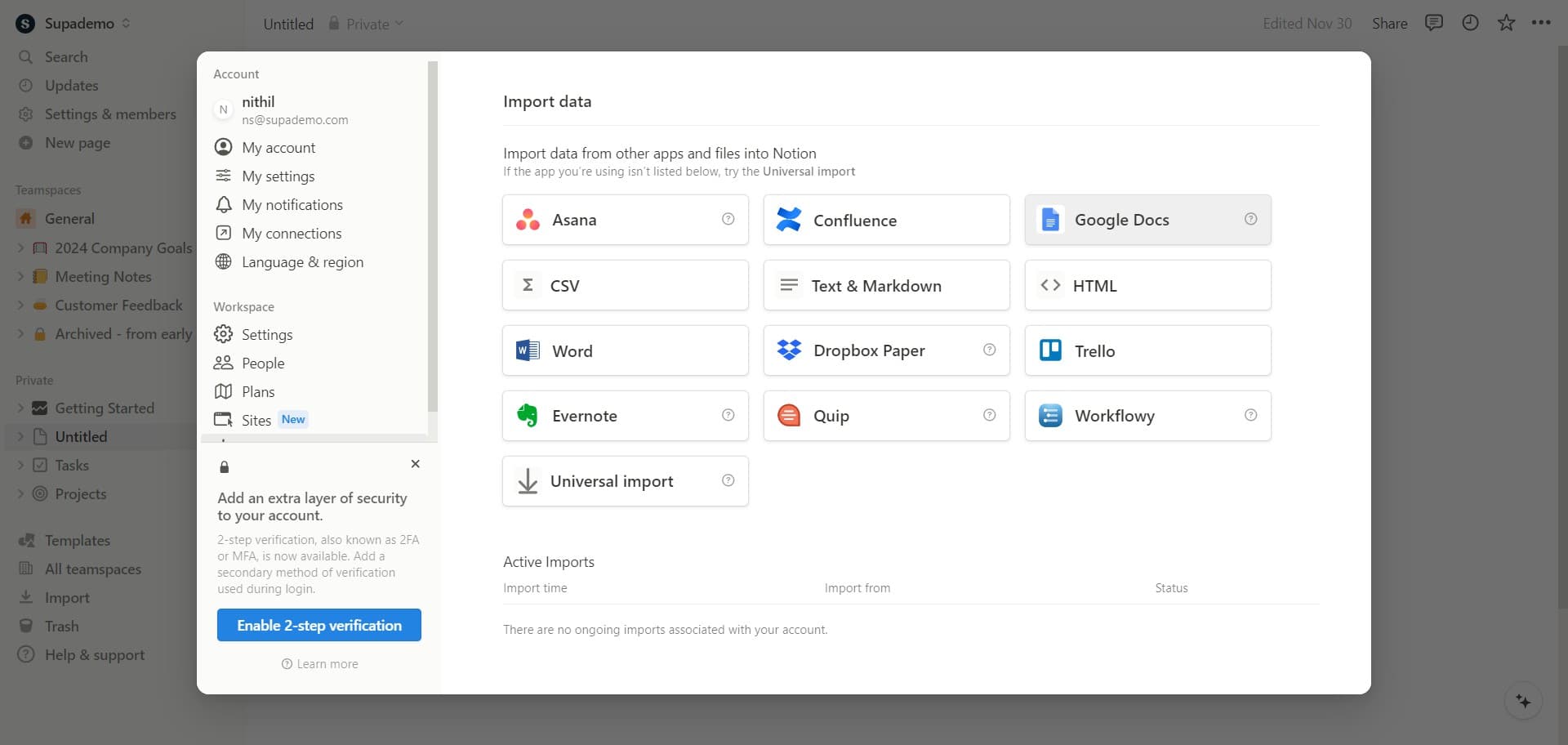
  3. Now choose 'Google Docs' as your import platform and select the desired document.
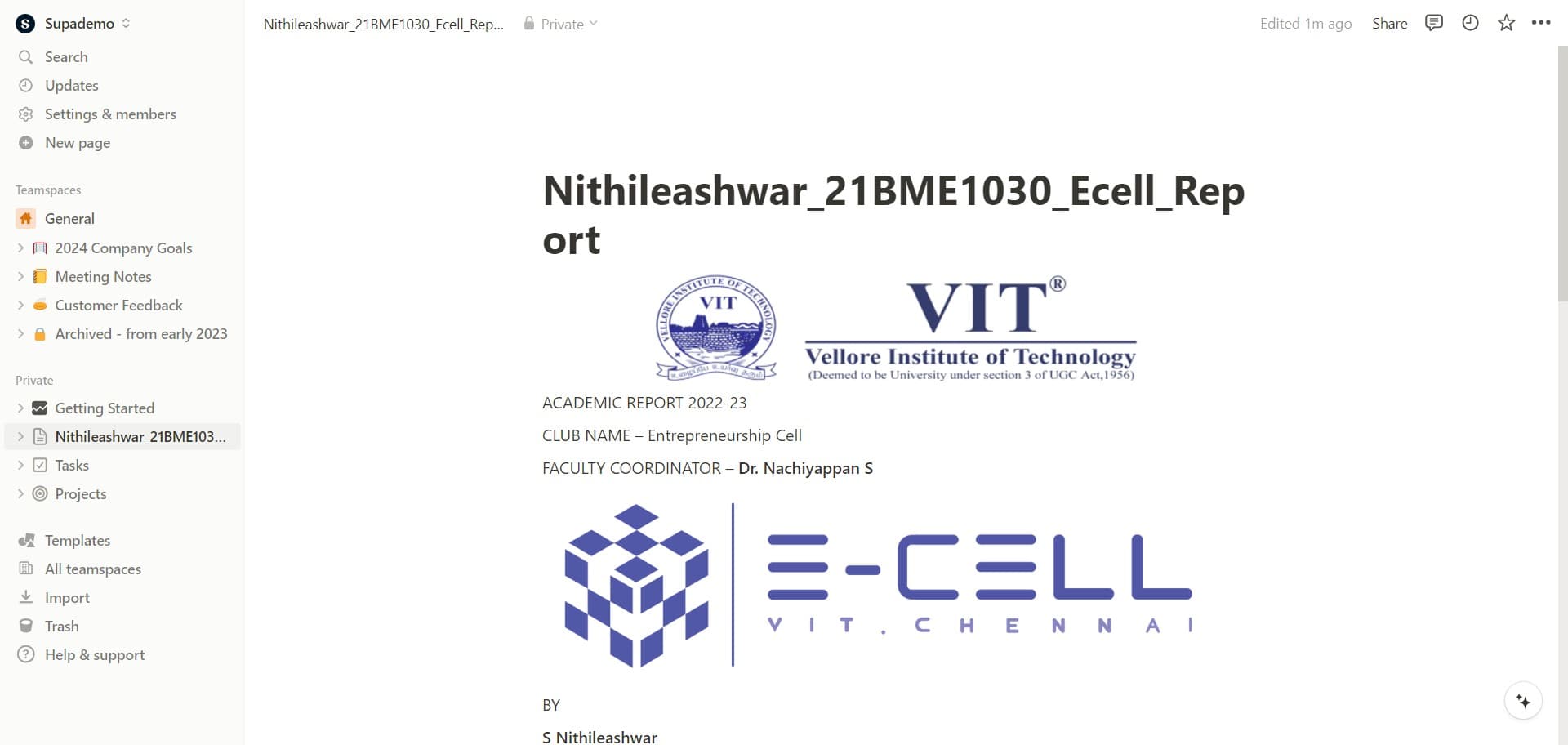
  4. Next, you'll be prompted to choose a doc file. Once selected, your doc will be imported automatically.

Create your own step-by-step demo

Scale up your training and product adoption with beautiful AI-powered interactive demos and guides. Create your first Supademo in seconds for free.

Frequently Asked Questions about how to import a doc to notion

Commonly asked questions about this topic.

How can I create a step-by-step guide for importing a doc to Notion?

The most effective guides combine brief written instructions with visual walkthroughs showing each click. Screen recording tools and interactive demo platforms can capture your exact workflow in Notion, creating guides that viewers navigate at their own pace. This approach reduces follow-up questions compared to static screenshots or long text documents. This is backed by data — the State of Interactive Demos 2026 report found teams that update demos weekly or monthly see ~18% higher impact than those updating only for major releases.

What elements make a document ready for importing into Notion?

A strong doc to Notion includes clear labels, defined owners, status indicators, and relevant dates or milestones. Avoid including information that belongs elsewhere — keep each element focused on its core purpose. The right level of detail depends on your audience: executives need summaries while team leads need actionable specifics. Learn more about AI-powered demo generation. For example, VRIFY reduced enablement content production time by 75% using Supademo.

How do I maintain access control when moving documents to Notion?

Most platforms offer role-based permissions that control who can view, edit, or admin your doc to Notion. Notion typically supports workspace-level, project-level, and item-level permissions. Review your sharing) settings before collaborating with external stakeholders — default permissions may expose more data than intended. Companies using interactive demos report an average 28% reduction in customer acquisition cost.

What's the best way to organize content before importing into Notion?

Use a consistent layout with clear headings, logical groupings, and visual hierarchy. Keep individual items concise — if a doc to Notion element needs a paragraph of explanation, it probably should be broken into smaller pieces. Color-coding or tagging by category helps teams scan quickly without reading every detail. As a reference point, Supademo was recognized as the #5 fastest-growing software product on G2 in 2025. Teams using top Arcade alternatives for 2026s across 3-5 use cases report up to 29% higher impact scores.

Can I collaborate with my team on doc to Notion?

Notion supports real-time collaboration where multiple team members can view and edit simultaneously. Features like commenting, @mentions, and activity logs help keep communication in context. Set clear editing permissions — having too many editors without structure leads to version conflicts and confusion. Learn more about Supademo's features. Bullhorn achieved 2x faster production and a 20% increase in demo engagement with Supademo.

What integrations does Notion support for importing a doc to Notion?

Notion typically integrates with popular tools like Slack, Google Workspace, Microsoft 365, and Zapier for cross-platform automation. These integrations help connect importing a doc to Notion workflows with your existing tech stack. Check Notion's integration marketplace for specific connectors relevant to your use case. beehiiv saw 50% better conversion rates after implementing interactive product demos. Supademo was named the #5 fastest-growing software product on G2 in 2025.

What are the key features of Notion for doc to Notion?

Notion provides built-in doc to Notion capabilities including customizable templates, real-time collaboration, and integration with other productivity tools. The exact feature set depends on your plan tier — free plans typically cover basics while paid plans unlock automation, advanced views, and admin controls. Evaluate which features align with your team's actual workflow before committing. Worth noting: over 150,000 professionals use Supademo to create interactive demos. VRIFY saved over $100k by switching to interactive demos for enablement.
Nithil Shanmugam
Nithil Shanmugam

Content Marketer

Nithil is a startup-obsessed operator focused on growth, sales and marketing. He's passionate about wearing different hats across startups to deliver real value.

More from the blog

How to Remove 'Powered by Shopify'

How to Remove 'Powered by Shopify'

Learn how to easily remove the 'Powered by Shopify' text from your online store with step-by-step instructions and tips to customize your Shopify storefront.

Vimal Kumar
Vimal KumarJan 3, 2026
How to Add Products to Shopify

How to Add Products to Shopify

Learn step-by-step how to add products to your Shopify store effortlessly, including tips on product details, images, pricing, and inventory management to boost your online sales.

Vimal Kumar
Vimal KumarDec 17, 2025
How to Deactivate Your Shopify Store

How to Deactivate Your Shopify Store

Learn step-by-step how to deactivate your Shopify store easily, including important considerations and tips to pause or close your shop without losing data.

Vimal Kumar
Vimal KumarDec 17, 2025
How to Remove 'Powered by Shopify'

How to Remove 'Powered by Shopify'

Learn how to easily remove the 'Powered by Shopify' text from your online store with step-by-step instructions and tips to customize your Shopify storefront.

Vimal Kumar
Vimal KumarDec 17, 2025
How to Create a Shopify Account

How to Create a Shopify Account

Learn step-by-step how to create a Shopify account quickly and easily, set up your online store, and start selling your products in no time.

Vimal Kumar
Vimal KumarDec 17, 2025
How to Create a Stripe Account

How to Create a Stripe Account

Learn how to create a Stripe account quickly and easily with our step-by-step guide, perfect for beginners looking to start accepting online payments.

Vimal Kumar
Vimal KumarDec 17, 2025