
How to import subscribers in MailerLite

Nithil Shanmugam
Nithil Shanmugam·
Featured image for How to import subscribers in MailerLite

Overview:

Streamline your subscriber management in MailerLite by leveraging this comprehensive guide on importing subscribers. Enhance your email marketing workflow by efficiently organizing and categorizing your subscriber list. Improve user experience and simplify navigation with step-by-step instructions for importing subscribers seamlessly. This guide empowers you to optimize your email campaign strategies, ensuring efficiency and clarity within the MailerLite platform.

Interactive demo powered by Supademo

1. First, navigate to the Subscribers tab.
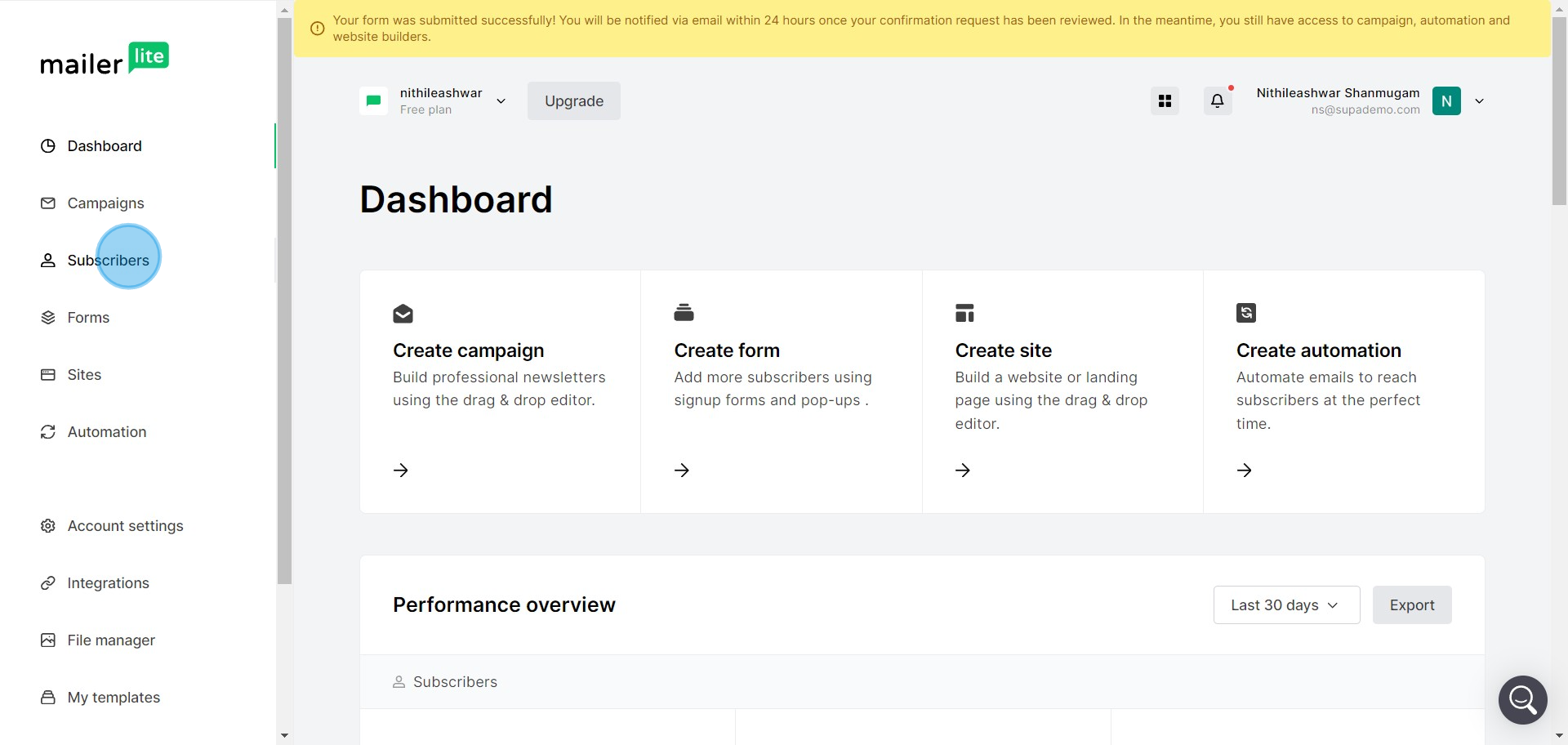
1 Click on "Subscribers"

2. Next, find and select the Add Subscribers option.
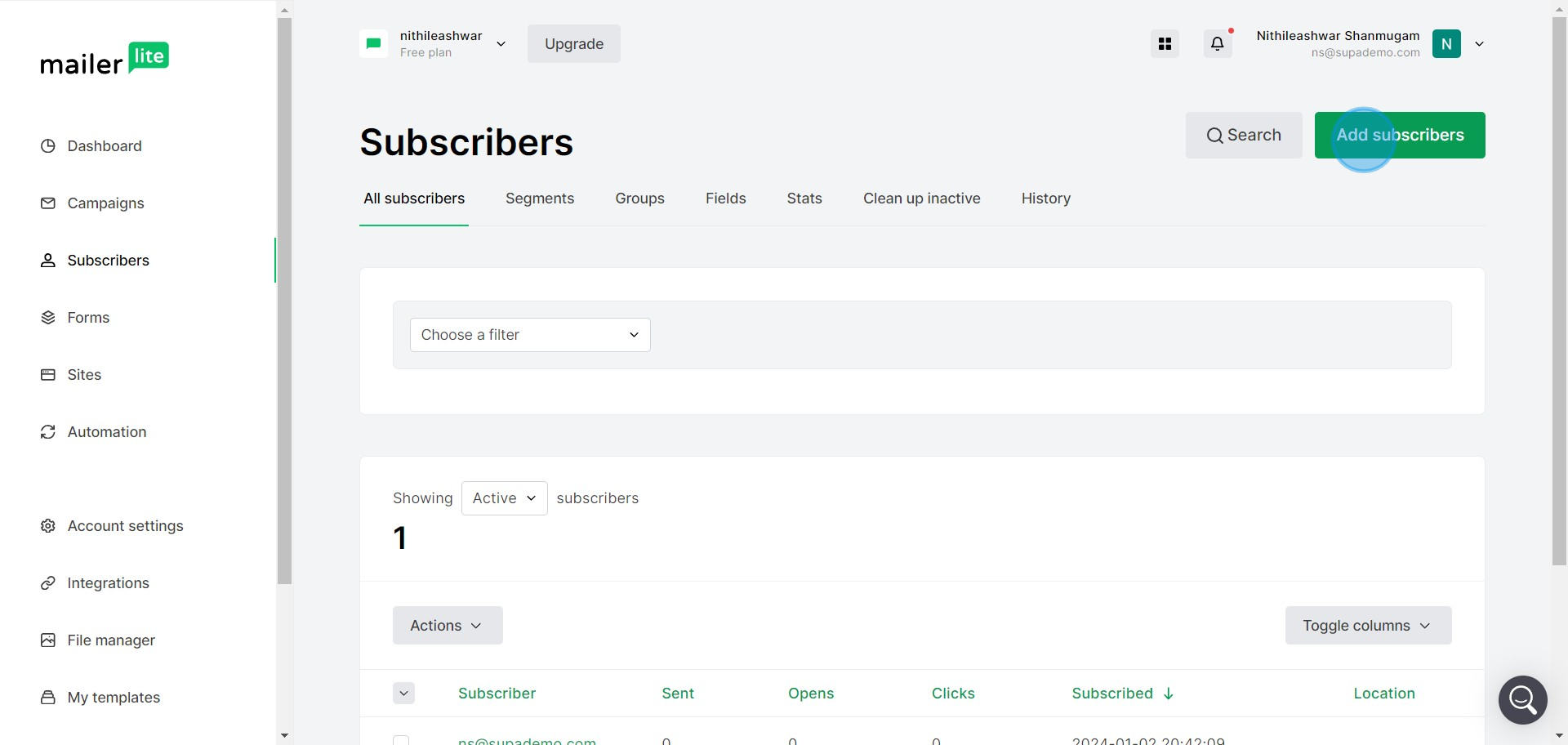
2 Click on "Add subscribers"

3. Choose the method: Import from a CSV or TXT file.
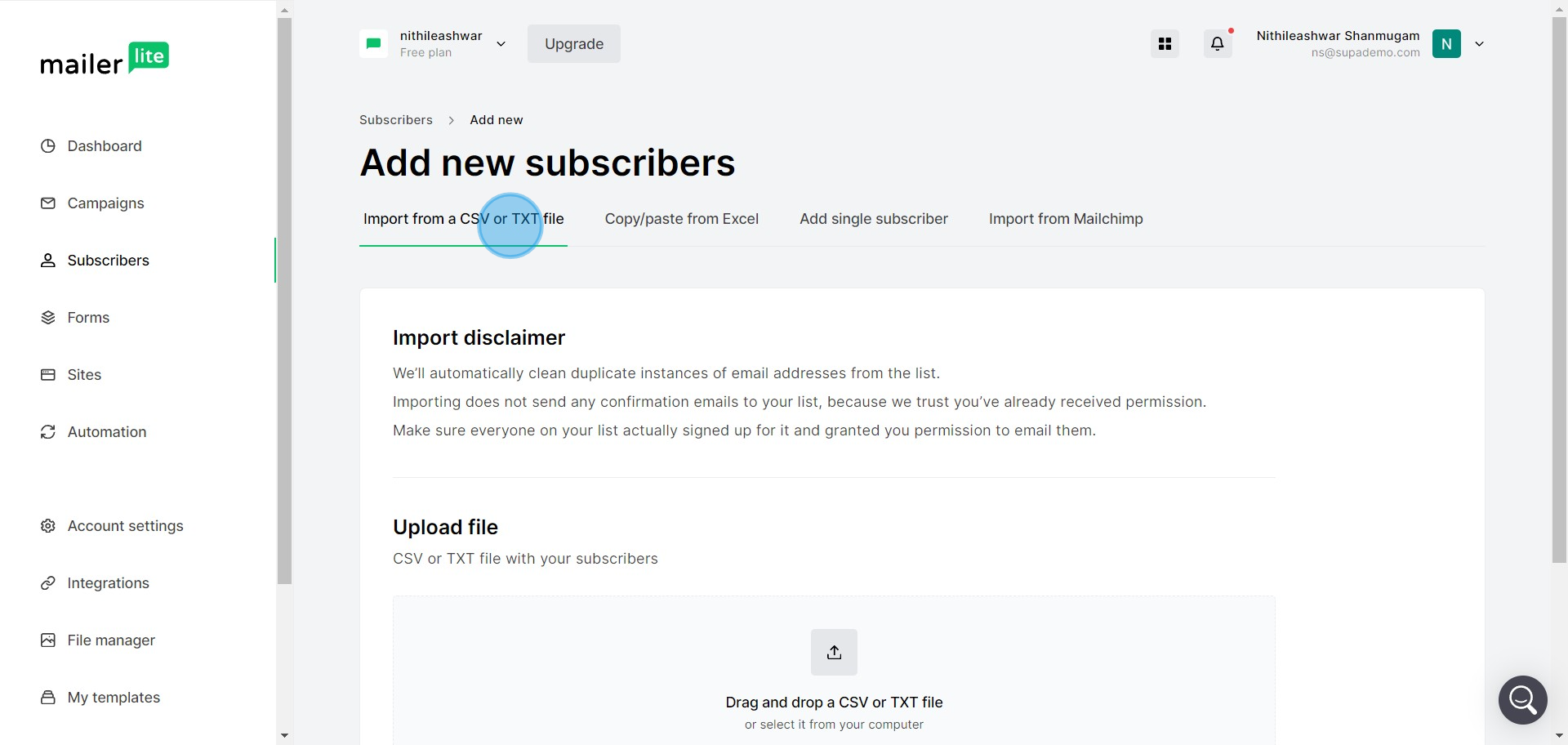
3 Click on "Import from a CSV or TXT file"

4. Alternatively, you can select Copy/Paste from Excel.
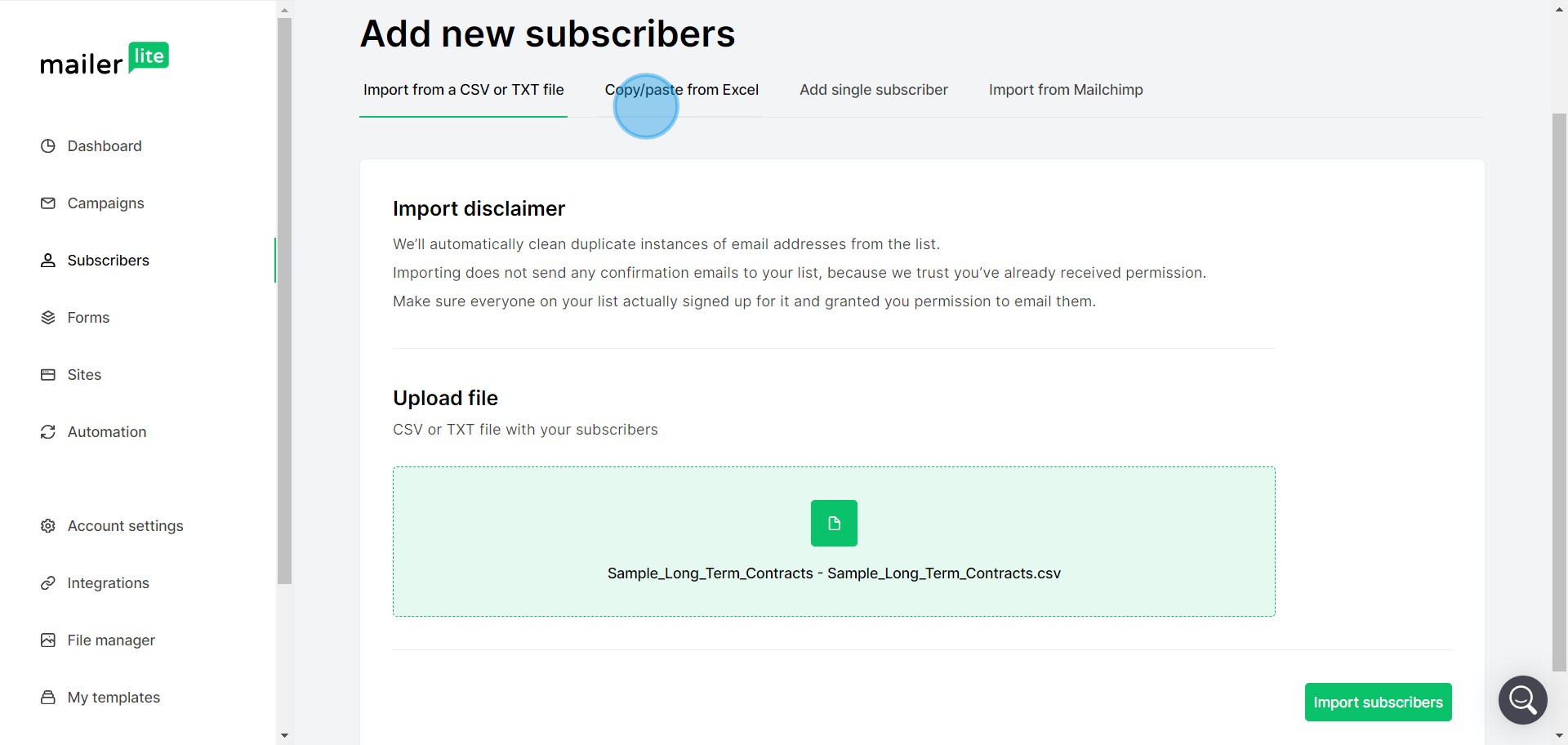
4 Click on "Copy/paste from Excel"

5. Or, add a single subscriber manually.
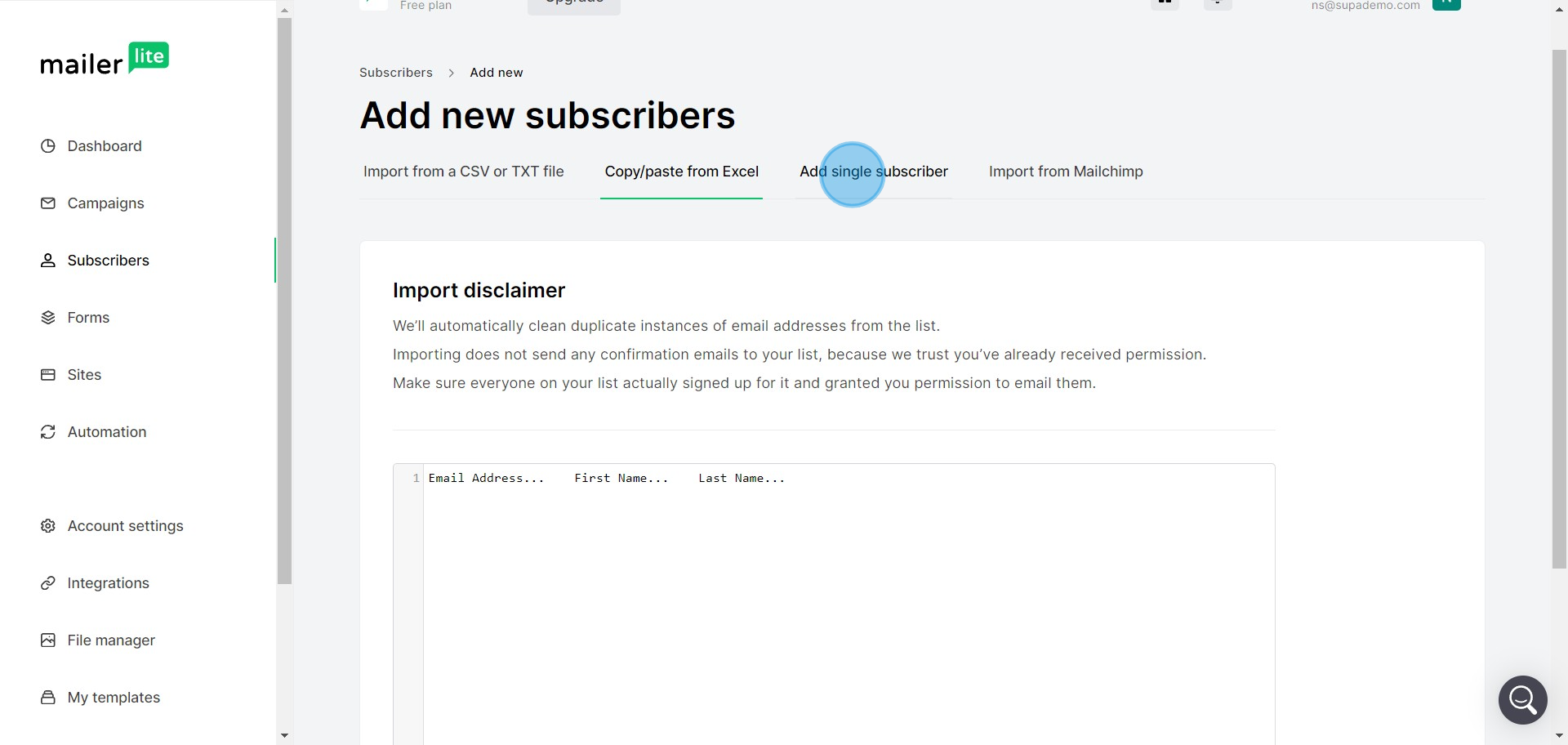
5 Click on "Add single subscriber"

6. If you selected the manual method, hit the Add Subscriber option.
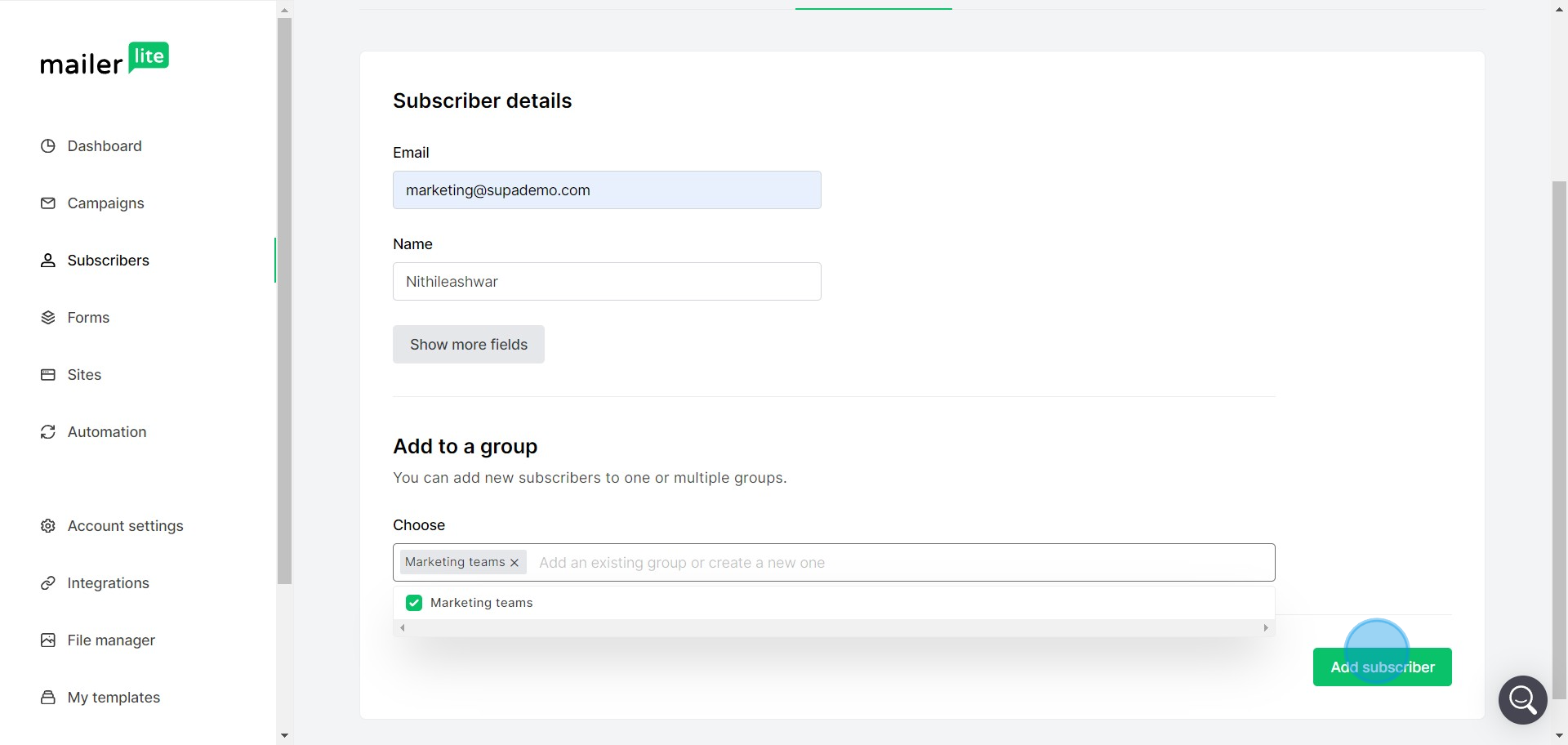
6 Click on "Add to a group
..."

7. Another method is to use the Import from Mailchimp feature.
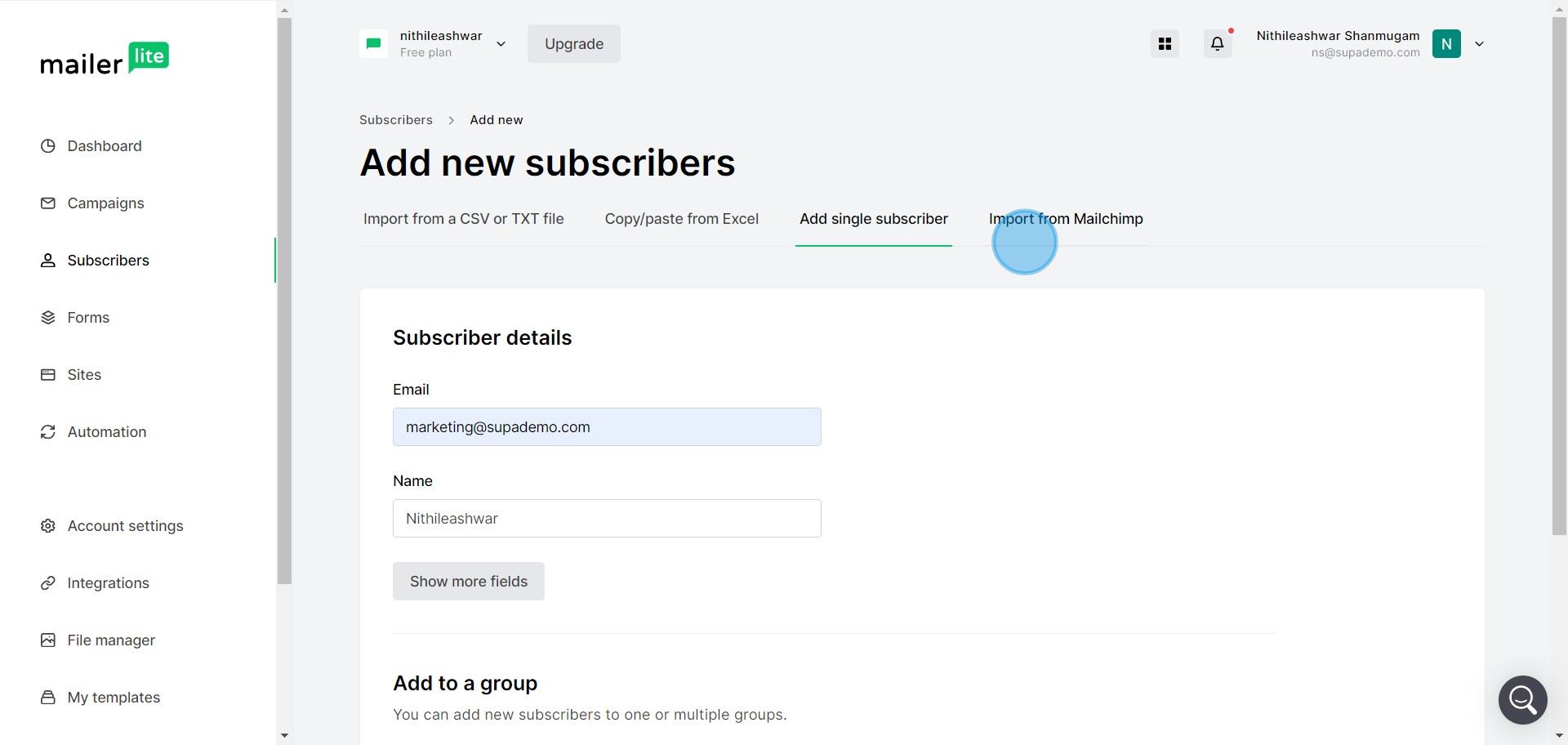
7 Click on "Import from Mailchimp"

8. Now, upload the subscriber file you've prepared.
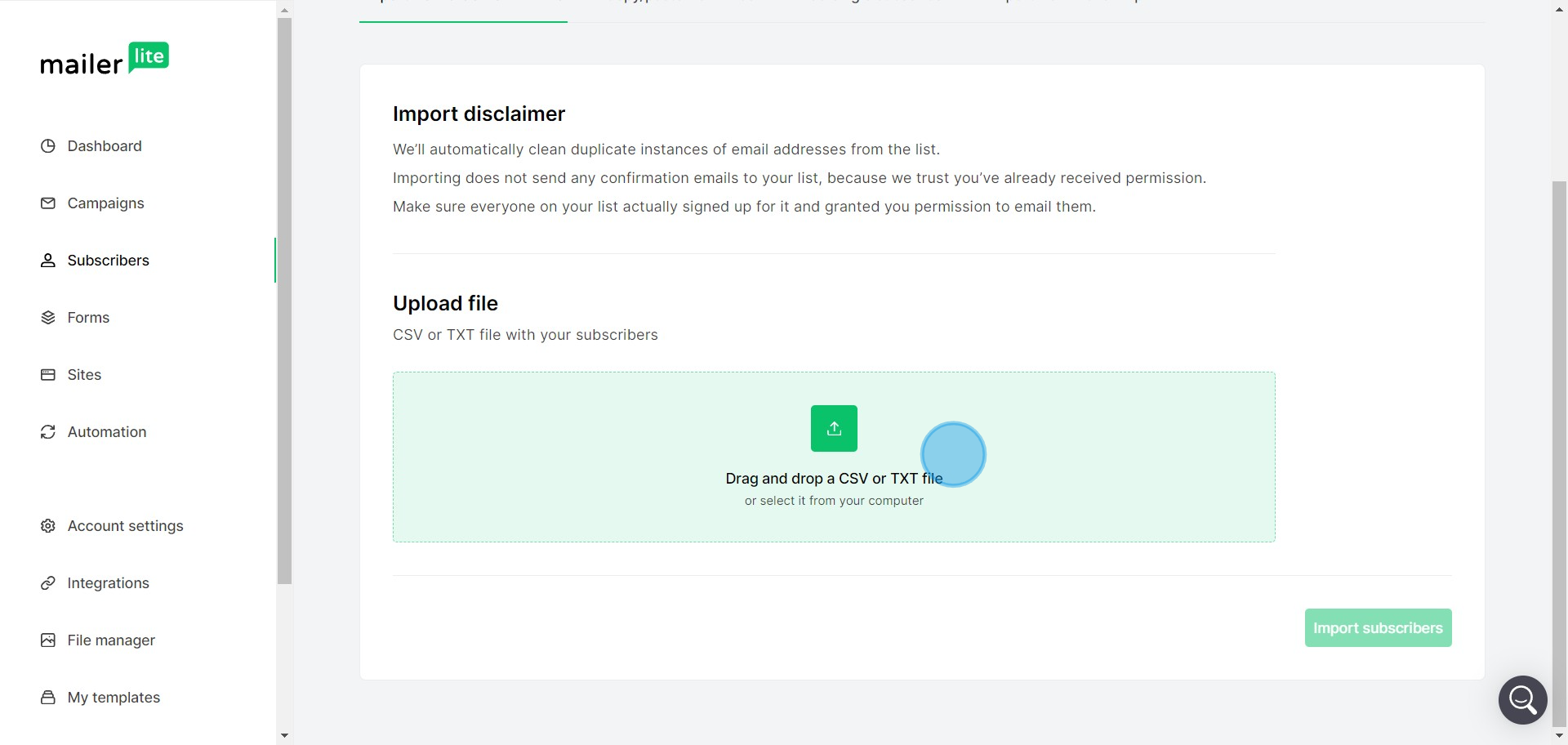
8 Click here

9. After you've selected your file, click on Import Subscribers.
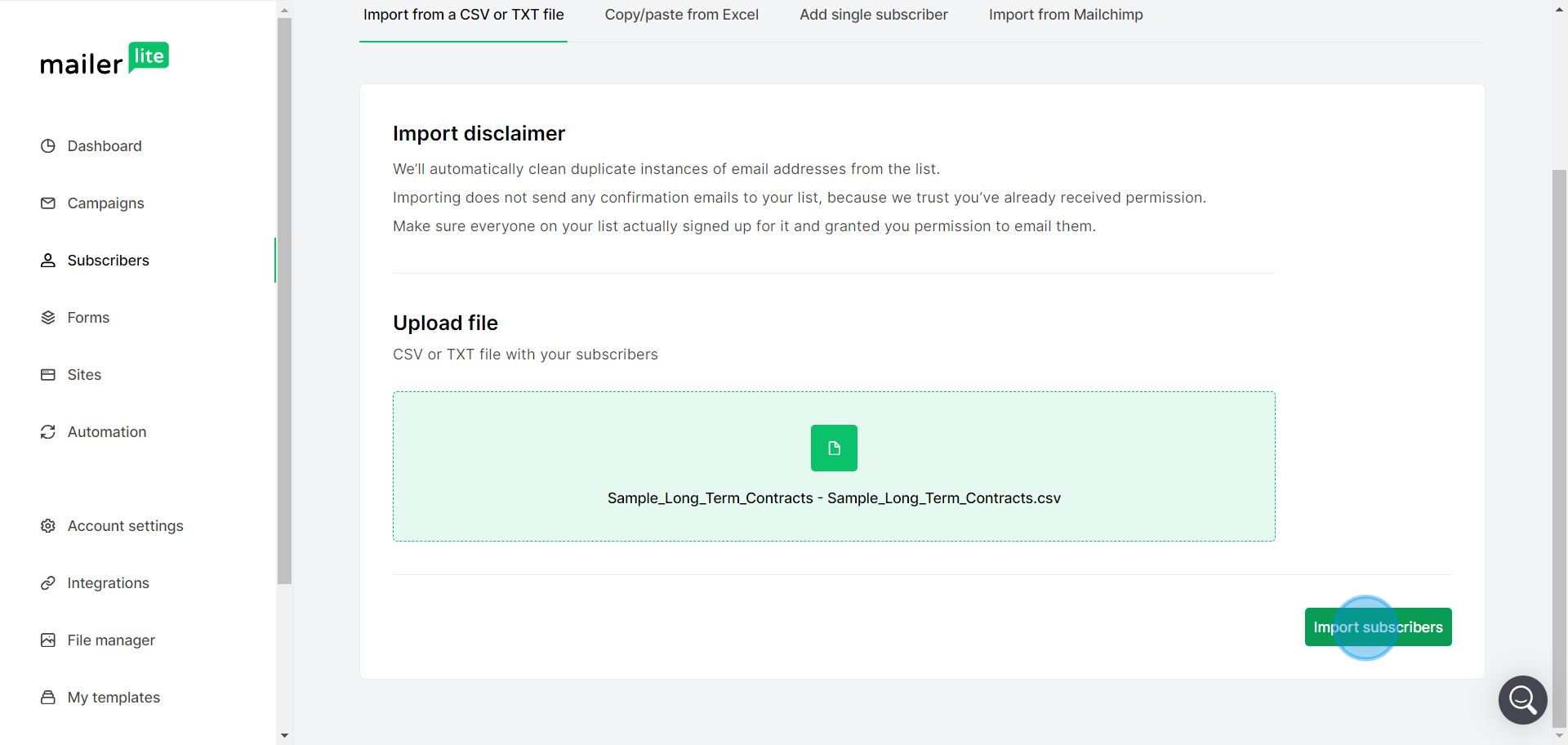
9 Click on "Import subscribers"

10. Ensure all necessary fields match with your file records.
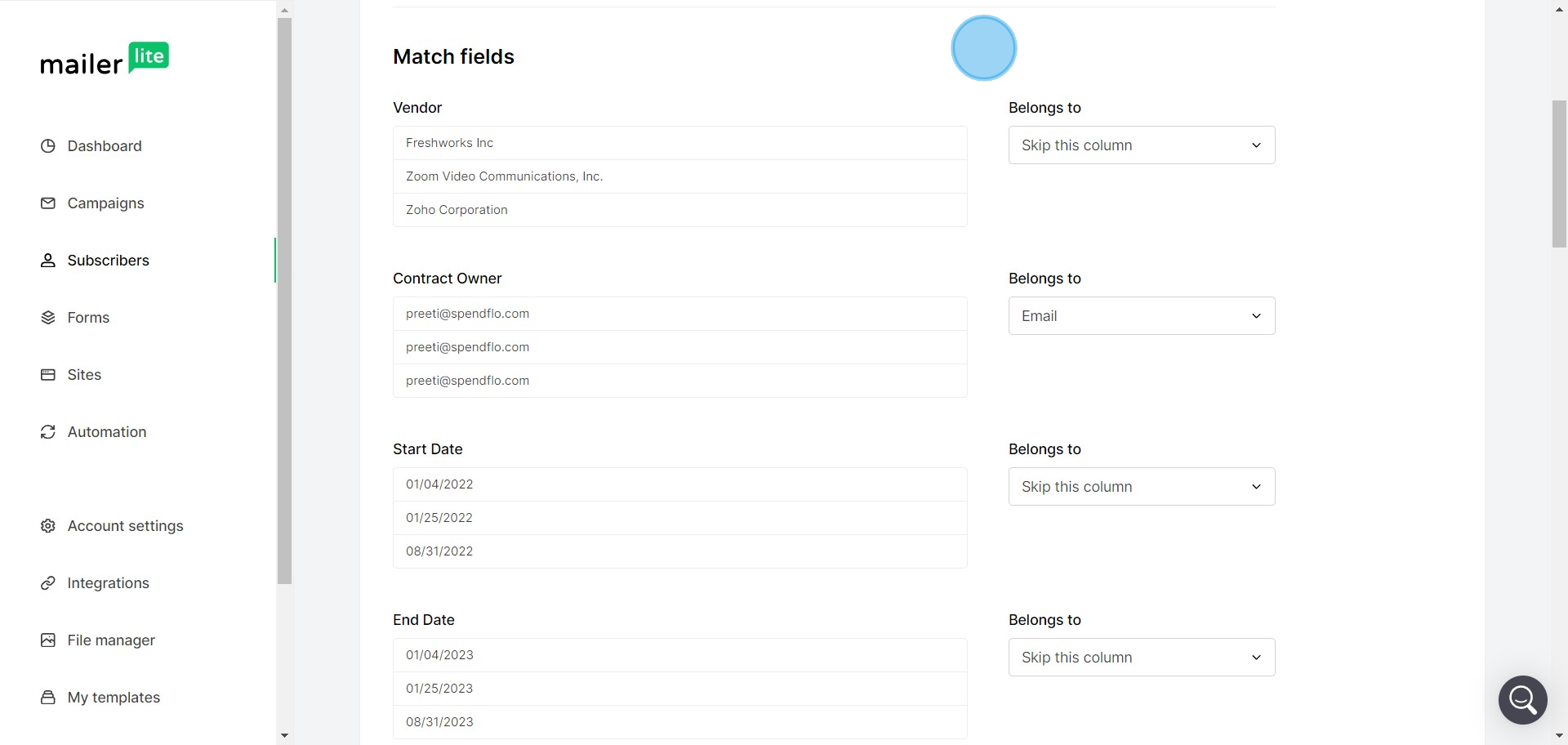
10 Click on "Match fields"

11. Finally, complete the process by clicking on Finish Import.
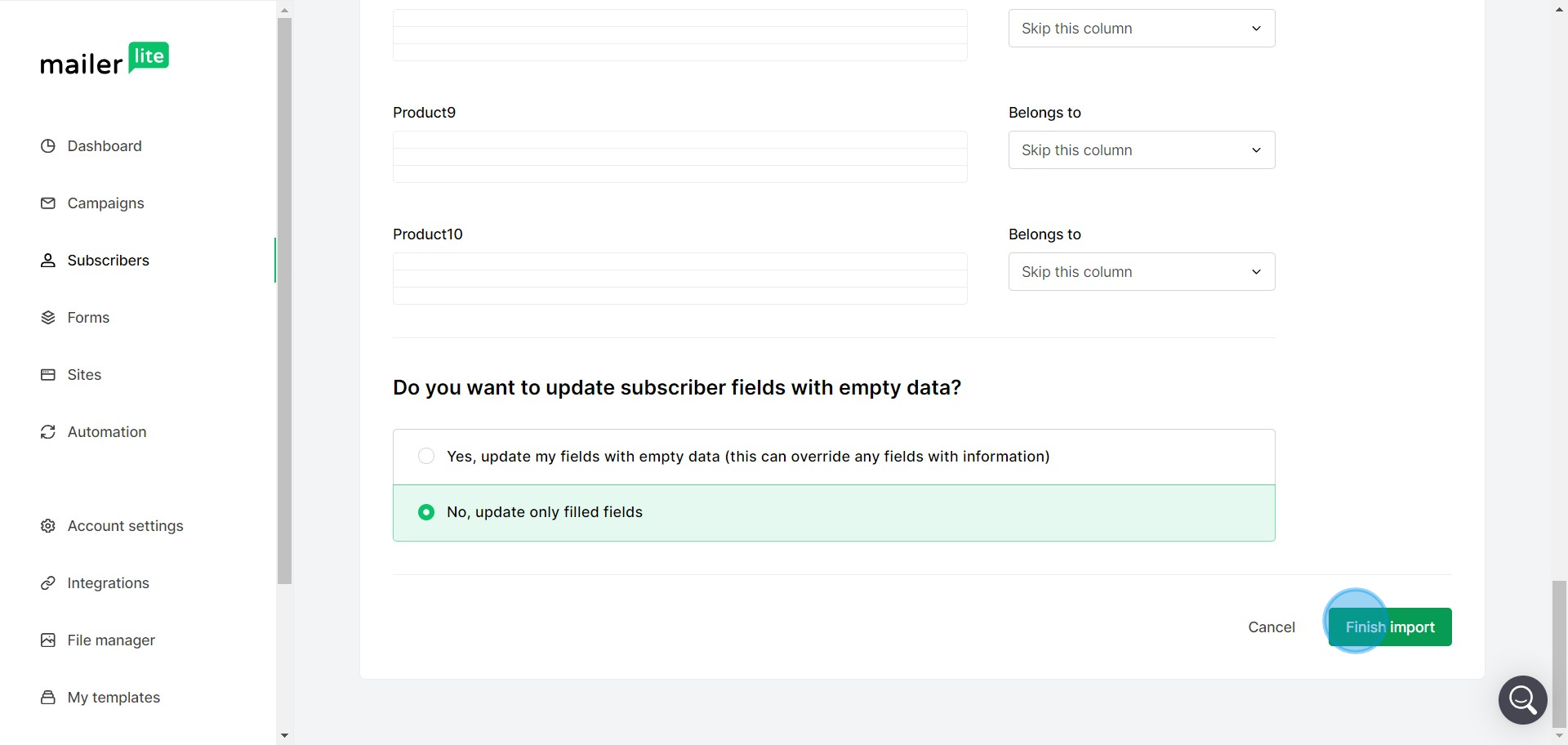
11 Click on "Finish import"

Create your own step-by-step demo

Scale up your training and product adoption with beautiful AI-powered interactive demos and guides. Create your first Supademo in seconds for free.

Frequently Asked Questions about how to import subscribers in mailerlite

Commonly asked questions about this topic.

What subscriber data formats does MailerLite accept during import?

MailerLite provides built-in subscribers capabilities including customizable templates, real-time collaboration, and integration with other productivity tools. The exact feature set depends on your plan tier — free plans typically cover basics while paid plans unlock automation, advanced views, and admin controls. Evaluate which features align with your team's actual workflow before committing. Notably, Rev.io now produces training materials in hours instead of weeks with a 50% smaller team.

How can I create a step-by-step guide for importing subscribers in MailerLite?

The most effective guides combine brief written instructions with visual walkthroughs showing each click. Screen recording tools and interactive demo platforms can capture your exact workflow in MailerLite, creating guides that viewers navigate at their own pace. This approach reduces follow-up questions compared to static screenshots or long text documents. In practice, Rev.io now produces training materials in hours instead of weeks with a 50% smaller team.

How do I prepare a CSV file with subscriber information for MailerLite?

Use a consistent layout with clear headings, logical groupings, and visual hierarchy. Keep individual items concise — if a subscribers element needs a paragraph of explanation, it probably should be broken into smaller pieces. Color-coding or tagging by category helps teams scan quickly without reading every detail. Learn more about Supademo's features. 76% of teams rate internal enablement impact from interactive demos as high or very high.

Can I map custom fields when importing subscribers into MailerLite?

Most modern platforms like MailerLite include starter templates for common use cases-vs-storylane-vs-supademo), including subscribers. Templates save setup time but should be customized to match your team's specific needs — default configurations rarely fit every workflow. Check MailerLite's template gallery or community library for options relevant to your industry. 54% of top-completing demos use AI voiceover to improve the guided experience.

What integrations does MailerLite support for importing subscribers?

MailerLite typically integrates with popular tools like Slack, Google Workspace, Microsoft 365, and Zapier for cross-platform automation. These integrations help connect importing subscribers workflows with your existing tech stack. Check MailerLite's integration marketplace for specific connectors relevant to your use case. Interactive demos see 7x higher conversion rates compared to traditional demo videos. 54% of top-completing demos use AI voiceover to improve the guided experience.

What should I do if my subscriber import fails in MailerLite?

At minimum, review weekly with your team to flag outdated items and reprioritize as needed. For fast-moving projects, daily check-ins on critical subscribers elements prevent misalignment. Build the review cadence into your regular team rituals — standalone review meetings rarely get prioritized. Learn more about Scribe alternative for demos. Supademo holds a 4.7/5 rating on G2 based on verified user reviews. Companies using arcade alternatives to explores report an average 28% reduction in customer acquisition cost.

What's the best way to onboard new team members to importing subscribers in MailerLite?

Combine a brief overview document with a hands-on walkthrough they can follow independently. Interactive walkthroughs are more effective than recorded videos because new hires can proceed step-by-step at their own pace and revisit specific sections. Pair the walkthrough with a simple checklist of tasks to complete during their first week. This is backed by data — the State of Interactive Demos 2026 report found 54% of top-completing demos use AI voiceover.
Nithil Shanmugam

Nithil Shanmugam

Nithil is a startup-obsessed operator focused on growth, sales and marketing. He's passionate about wearing different hats across startups to deliver real value.

More from the blog

How to Remove 'Powered by Shopify'

How to Remove 'Powered by Shopify'

Learn how to easily remove the 'Powered by Shopify' text from your online store with step-by-step instructions and tips to customize your Shopify storefront.

Vimal Kumar
Vimal KumarJan 3, 2026
How to Add Products to Shopify

How to Add Products to Shopify

Learn step-by-step how to add products to your Shopify store effortlessly, including tips on product details, images, pricing, and inventory management to boost your online sales.

Vimal Kumar
Vimal KumarDec 17, 2025
How to Deactivate Your Shopify Store

How to Deactivate Your Shopify Store

Learn step-by-step how to deactivate your Shopify store easily, including important considerations and tips to pause or close your shop without losing data.

Vimal Kumar
Vimal KumarDec 17, 2025
How to Remove 'Powered by Shopify'

How to Remove 'Powered by Shopify'

Learn how to easily remove the 'Powered by Shopify' text from your online store with step-by-step instructions and tips to customize your Shopify storefront.

Vimal Kumar
Vimal KumarDec 17, 2025
How to Create a Shopify Account

How to Create a Shopify Account

Learn step-by-step how to create a Shopify account quickly and easily, set up your online store, and start selling your products in no time.

Vimal Kumar
Vimal KumarDec 17, 2025
How to Create a Stripe Account

How to Create a Stripe Account

Learn how to create a Stripe account quickly and easily with our step-by-step guide, perfect for beginners looking to start accepting online payments.

Vimal Kumar
Vimal KumarDec 17, 2025