How to Delete ChatGPT Conversation History

Vimal Kumar
Vimal Kumar·
How to Delete ChatGPT Conversation History
Interactive demo powered by Supademo

1. First, click on "Click to edit the hotspot".

2. Click on "Click to edit the hotspot".

3. Now, hover over the conversation you want to delete and click on the More icon.

4. Following that, click on "Delete".

5. Finally, click again on "Delete" to confirm.

6. Create a Supademo in seconds

This interactive demo/guided walkthrough on How to Delete ChatGPT Conversation History was created using Supademo.


How to Delete ChatGPT Conversation History : Step-by-Step Guide

Begin by locating the hotspot area you want to customize. Click on the text labeled "Click to edit the hotspot" to open the editing options and start personalizing your hotspot.
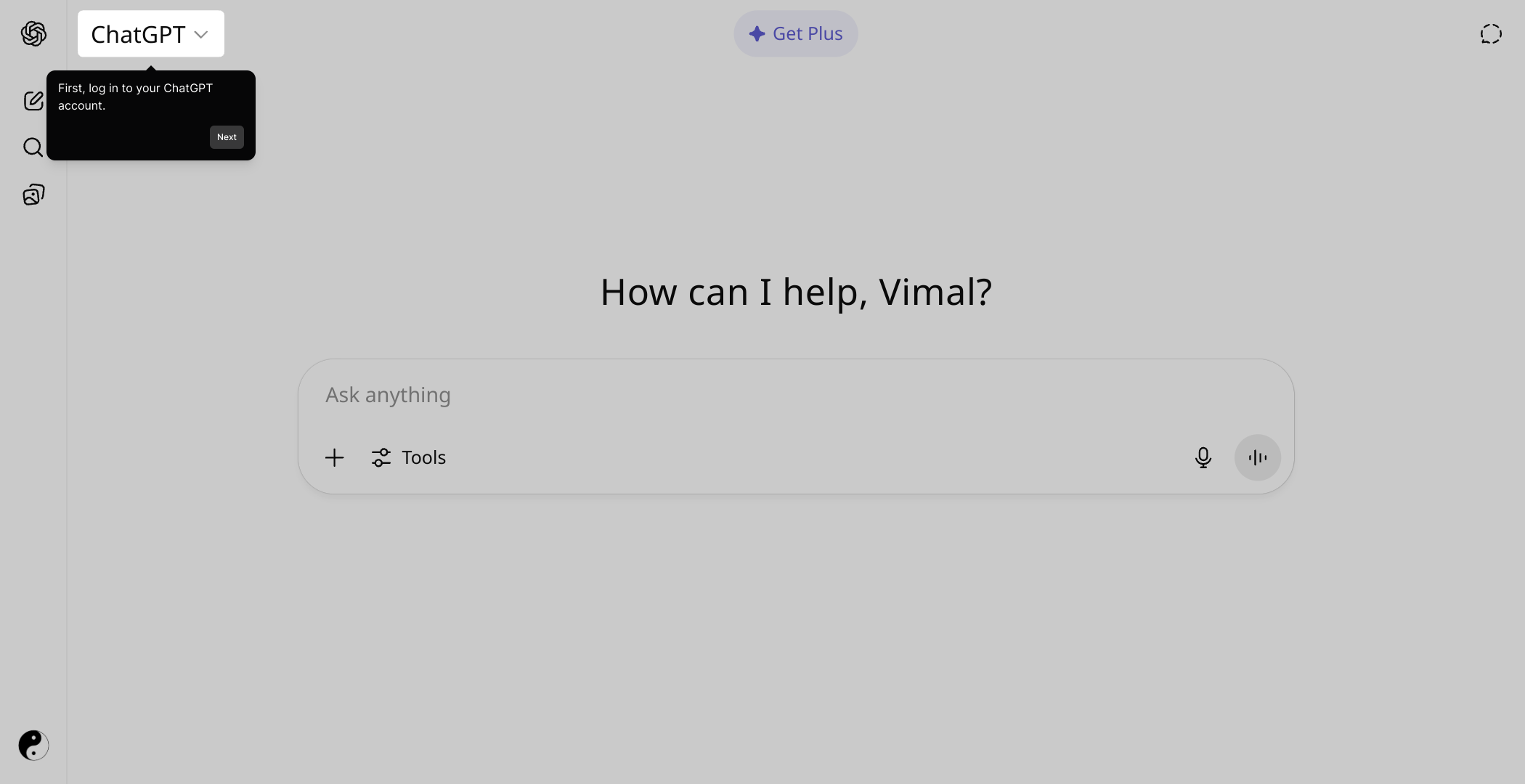
1

Next, select the "Click to edit the hotspot" link again within the editing panel. This allows you to refine the hotspot’s content and appearance to better suit your needs.
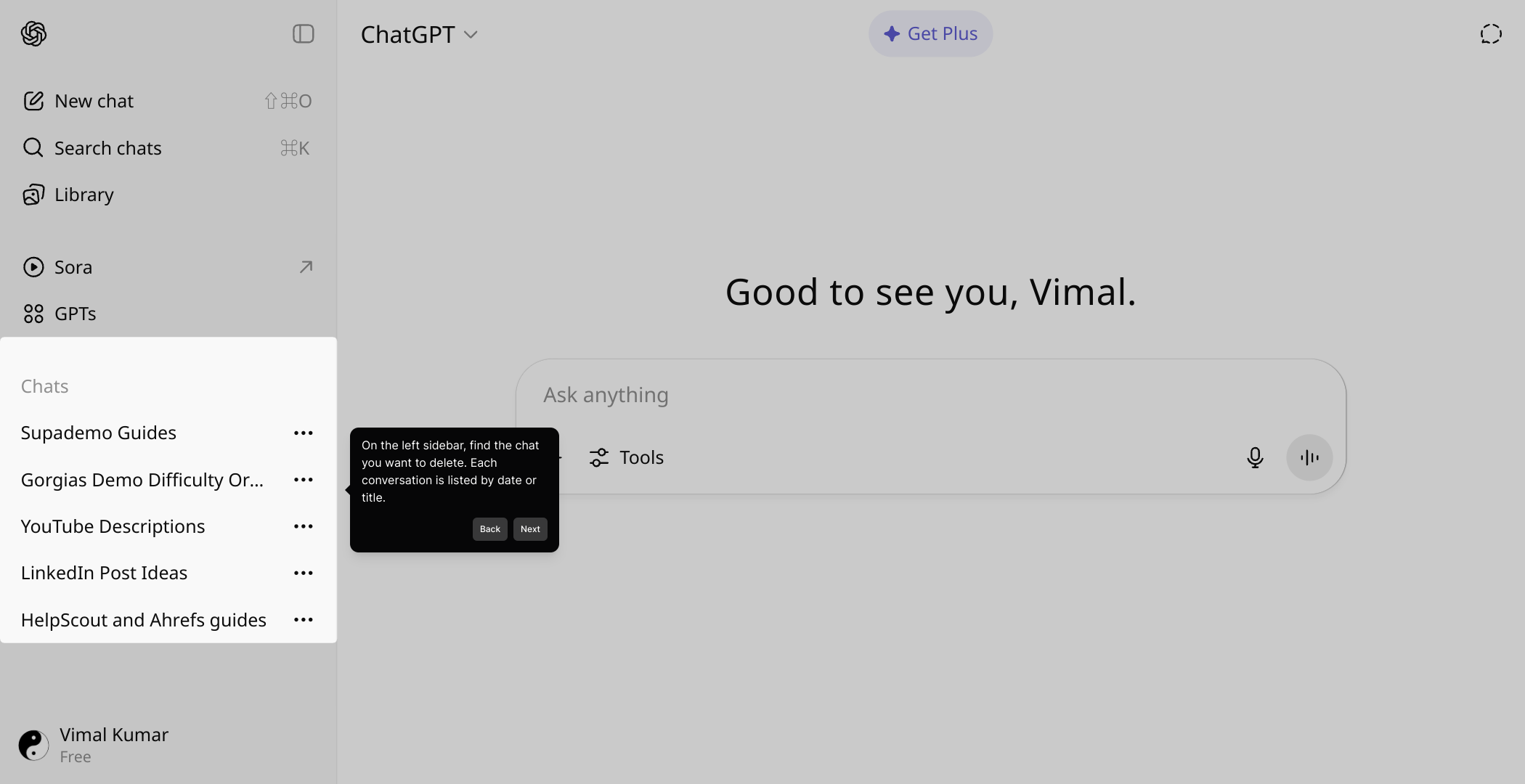
2

To manage your conversations, hover over the specific conversation you wish to remove. When the options appear, click on the More icon to reveal additional actions available for that conversation.
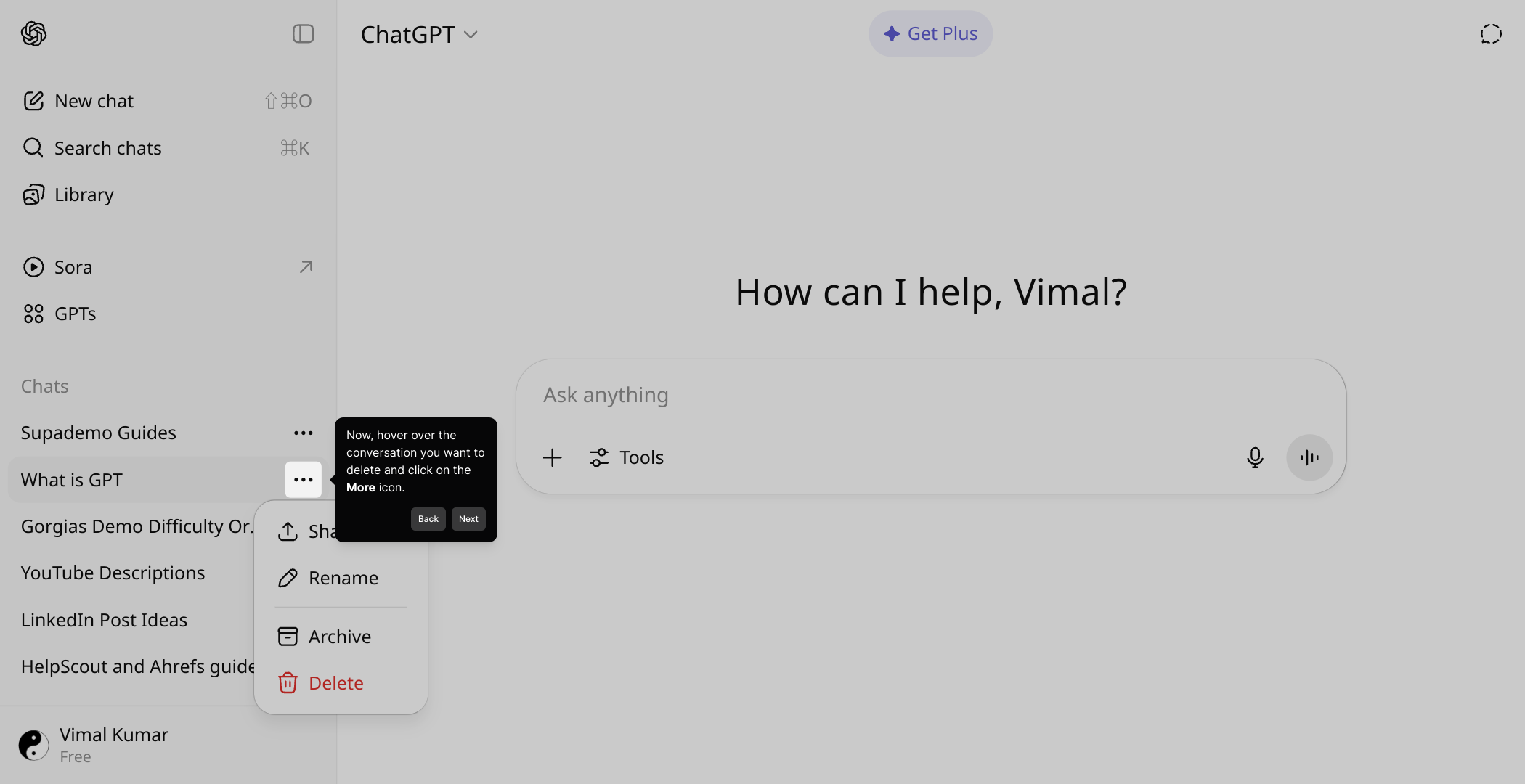
3

From the menu that appears after clicking More, choose the "Delete" option. This initiates the process to remove the selected conversation from your list.
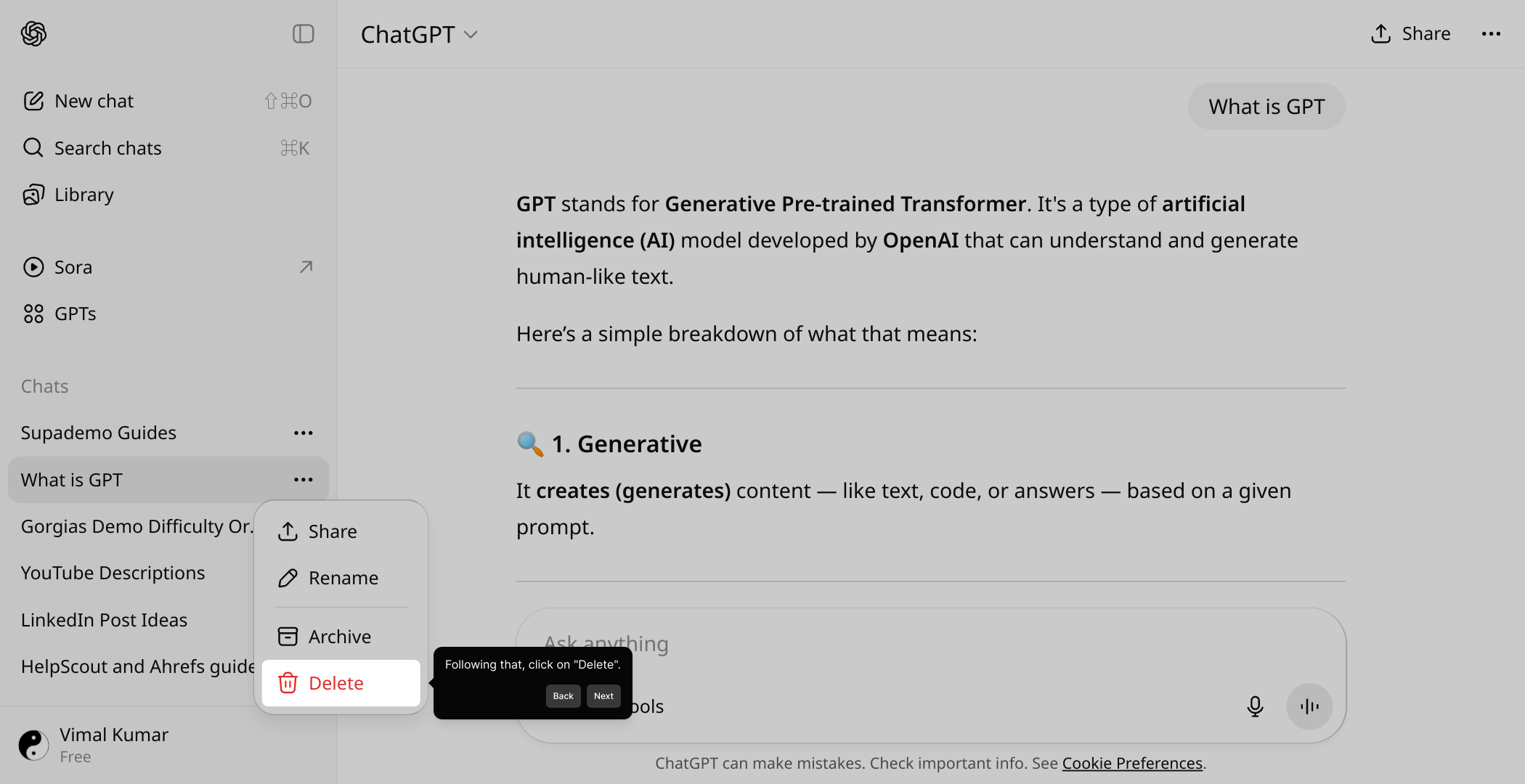
4

To finalize the deletion, confirm your choice by clicking "Delete" once more. This extra step helps prevent accidental removal of conversations.
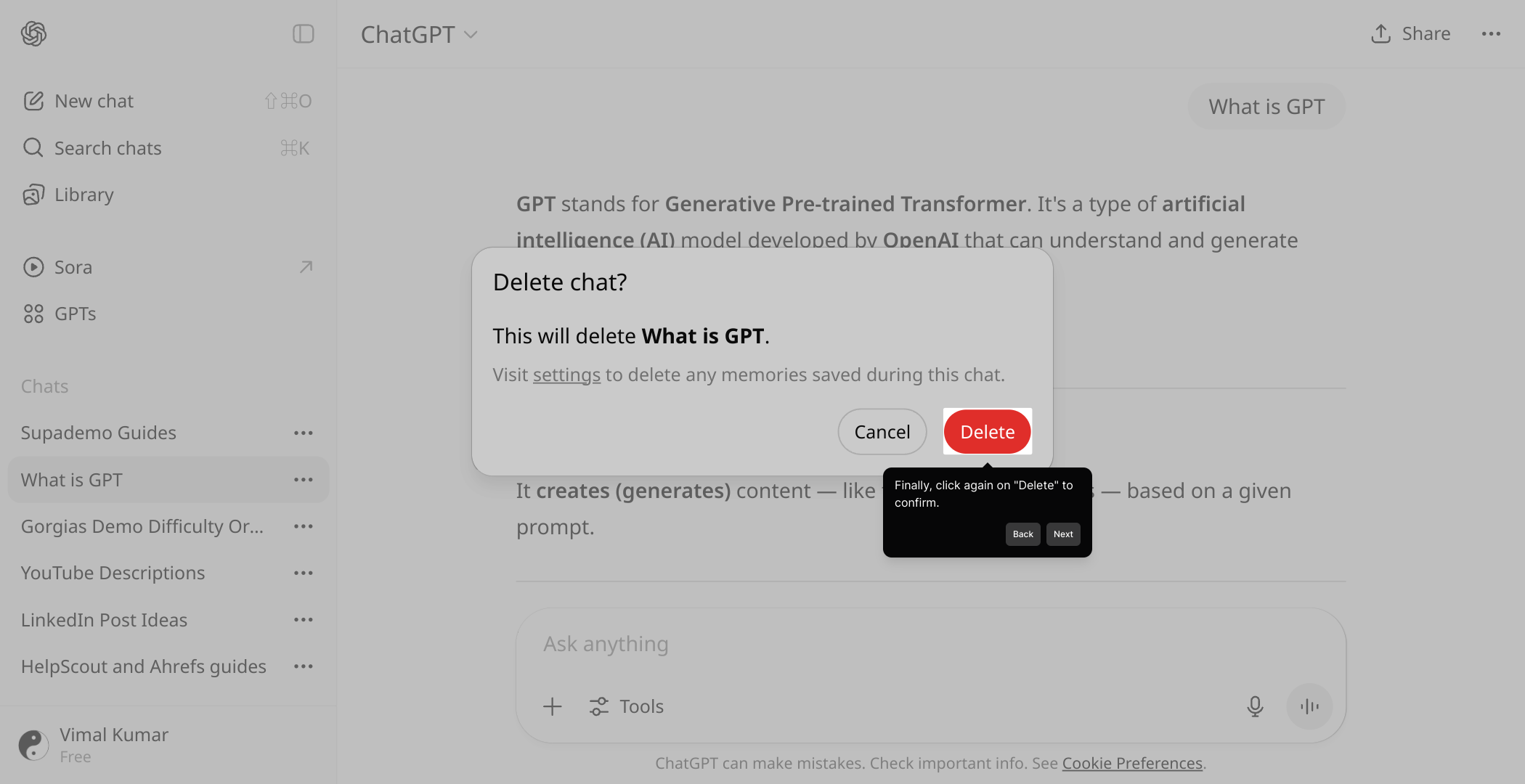
5

With these steps complete, you’re all set to create your own Supademo quickly and easily. Enjoy showcasing your product through engaging, interactive demos!
6

Create your own interactive demos in < 5 mins with Supademo

You can create your own interactive product demo in minutes using Supademo. Drive growth, scale enablement, and supercharge product-led onboarding with Supademo. Sign up for free here with no credit card required.


FAQs

Commonly asked questions about this topic.

How do I delete a single ChatGPT conversation?

You can delete a single ChatGPT conversation by hovering over the conversation in your chat list, clicking the More icon, selecting "Delete," and confirming your choice. This removes only the selected conversation from your history.

Is it possible to delete all conversations at once?

Currently, ChatGPT does not offer a built-in feature to bulk delete all conversations at once. You need to delete conversations individually as the options only support per-conversation deletion.

Will deleting a conversation delete it from OpenAI’s servers immediately?

Deleting a conversation removes it from your account’s visible history, but it may still be retained on OpenAI’s servers for a period as stated in their privacy policy. Check OpenAI’s data retention terms for more details.

Can I recover a deleted ChatGPT conversation?

Once a conversation is deleted, it cannot be recovered through the ChatGPT interface. Make sure you export or save important chats before deleting them.

How do I access the “More” icon to delete a chat?

The More icon appears as three dots or a similar menu icon when you hover over a specific conversation in the sidebar. Clicking it will show options including "Delete."

Can I automate deleting ChatGPT conversations regularly?

No official automation tools exist to delete ChatGPT conversations automatically. Manual deletion through the interface is currently the only method.

Does deleting conversations affect my ChatGPT account usage?

Deleting conversations only removes chat history. It does not affect your ChatGPT account status, usage limits, or subscription details.

Are deleted conversations removed from all my devices?

Yes, deleting a conversation removes it from your ChatGPT account, so it no longer appears on any device where you access ChatGPT with that account.

Why can’t I find the delete option for some conversations?

If you don’t see the delete option, it might be due to a temporary interface change or browser glitch. Try refreshing the page or updating your browser to resolve this issue.

Is it safe to delete my ChatGPT conversations?

Yes, deleting conversations is safe and intended to help you manage your data privacy and history. Always confirm deletion to avoid accidentally removing important chats.

Vimal Kumar

Vimal Kumar

Product Operations Associate

Vimal Kumar helps build and grow Supademo’s team and GTM efforts, with a focus on figuring out growth levers and improving product traction.

More from the blog

How to Add Products to Shopify

How to Add Products to Shopify

Learn step-by-step how to add products to your Shopify store effortlessly, including tips on product details, images, pricing, and inventory management to boost your online sales.

Vimal Kumar
Vimal KumarDec 17, 2025
How to Deactivate Your Shopify Store

How to Deactivate Your Shopify Store

Learn step-by-step how to deactivate your Shopify store easily, including important considerations and tips to pause or close your shop without losing data.

Vimal Kumar
Vimal KumarDec 17, 2025
How to Remove 'Powered by Shopify'

How to Remove 'Powered by Shopify'

Learn how to easily remove the 'Powered by Shopify' text from your online store with step-by-step instructions and tips to customize your Shopify storefront.

Vimal Kumar
Vimal KumarDec 17, 2025
How to Create a Shopify Account

How to Create a Shopify Account

Learn step-by-step how to create a Shopify account quickly and easily, set up your online store, and start selling your products in no time.

Vimal Kumar
Vimal KumarDec 17, 2025
How to Create a Stripe Account

How to Create a Stripe Account

Learn how to create a Stripe account quickly and easily with our step-by-step guide, perfect for beginners looking to start accepting online payments.

Vimal Kumar
Vimal KumarDec 17, 2025
How to Contact Stripe Support

How to Contact Stripe Support

Learn the easiest ways to contact Stripe support for quick assistance with your payment processing, account issues, and technical questions.

Vimal Kumar
Vimal KumarDec 16, 2025