Comment utiliser l'outil magique de mots clés SEMRush

Vimal Kumar
Vimal Kumar·
Comment utiliser l'outil magique de mots clés SEMRush

Aperçu:

Rationalisez votre recherche de mots-clés avec le guide de l'outil SEMRush Keyword Magic. Optimisez votre stratégie SEO en organisant et en identifiant efficacement les mots-clés pertinents. Améliorez l'expérience utilisateur en rendant la navigation fluide et la recherche d'informations plus facile. Ce guide complet vous accompagne à travers le processus d'utilisation de l'outil SEMRush Keyword Magic, vous permettant d'améliorer l'efficacité et la clarté de la gestion des mots-clés pour une optimisation supérieure des moteurs de recherche dans vos efforts de marketing numérique.

Pour qui SEMrush est-il le mieux adapté ?

SEMrush est particulièrement adapté à un large éventail de professionnels, notamment les marketeurs numériques, les spécialistes SEO et les créateurs de contenu. Par exemple, les marketeurs numériques peuvent utiliser SEMrush pour la recherche de mots-clés et l'analyse concurrentielle, les spécialistes SEO peuvent l'utiliser pour les audits de sites et le suivi des backlinks, et les créateurs de contenu peuvent s'en servir pour optimiser leurs contenus et suivre leurs performances, profitant tous des outils SEO et marketing complets de SEMrush.

Comment utiliser l'outil Keyword Magic de SEMRush

Interactive demo powered by Supademo

1. Commençons par le SEO, veuillez cliquer ici.
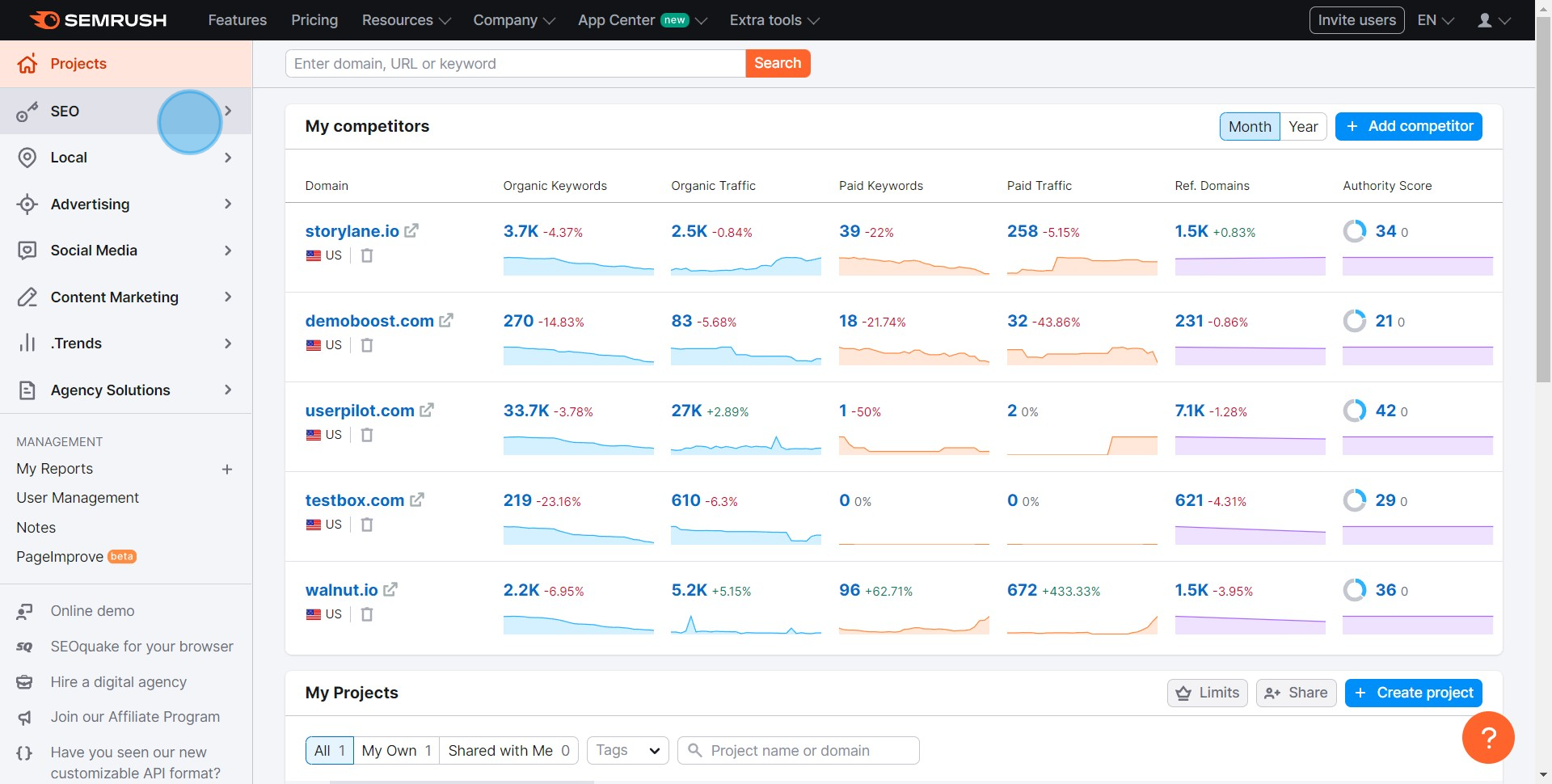
1 Click on "SEO"

2. Ensuite, naviguez vers l'outil Keyword Magic.
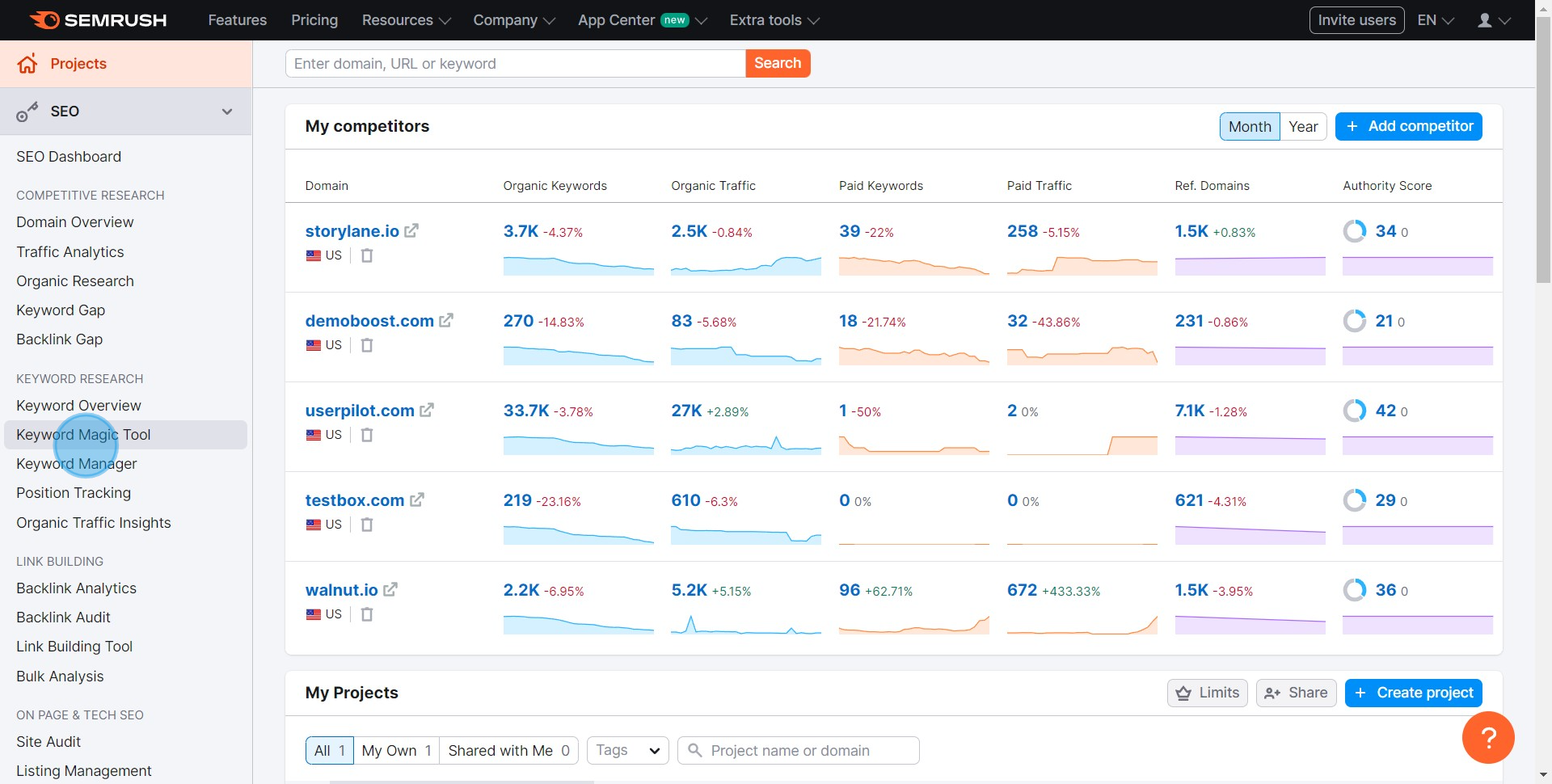
2 Click on "Keyword Magic Tool"

3. Il est temps de faire des recherches ! Veuillez entrer vos mots-clés.
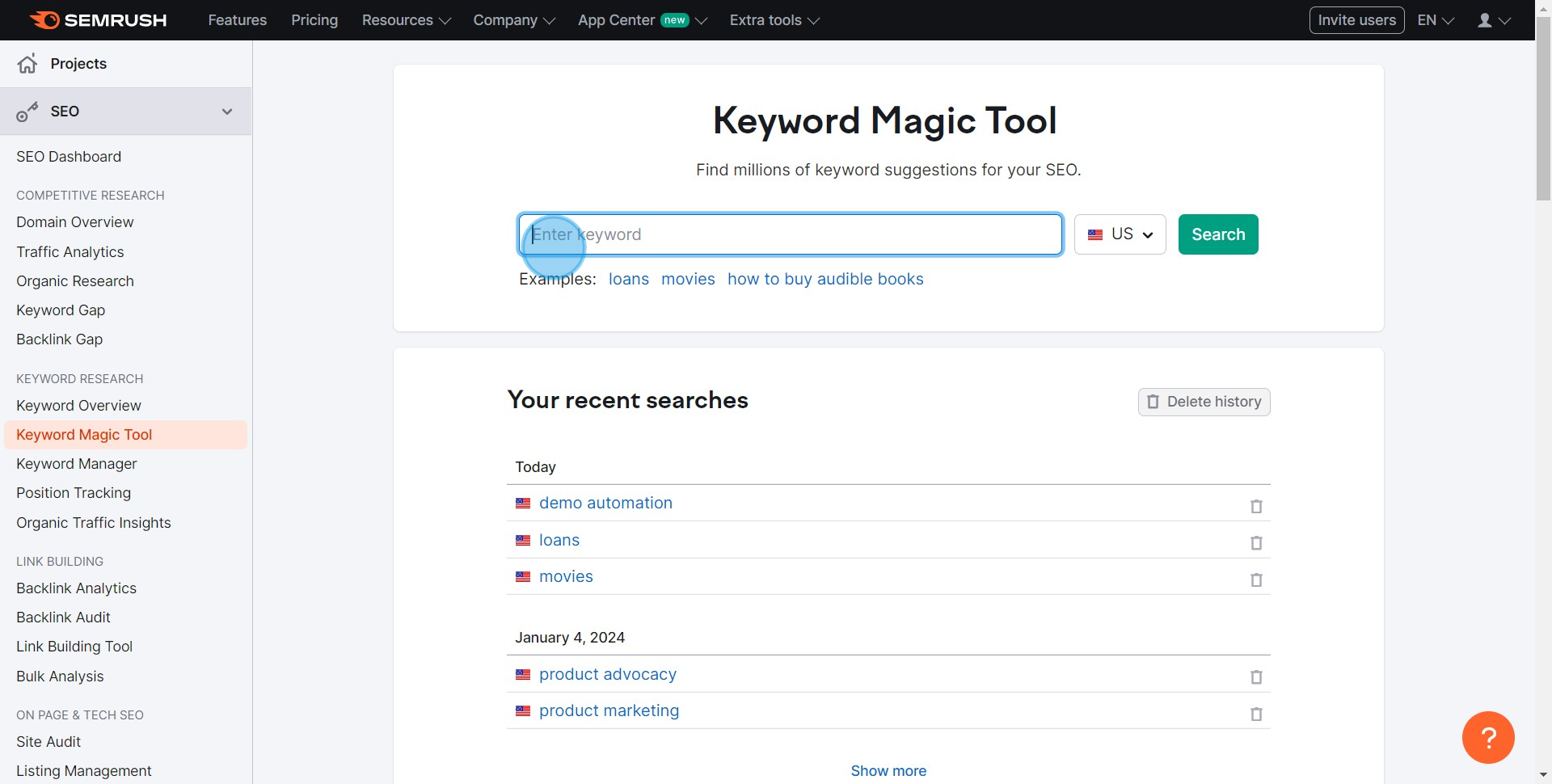
3 Click here

4. Prêt ? Cliquez ici pour lancer la recherche.
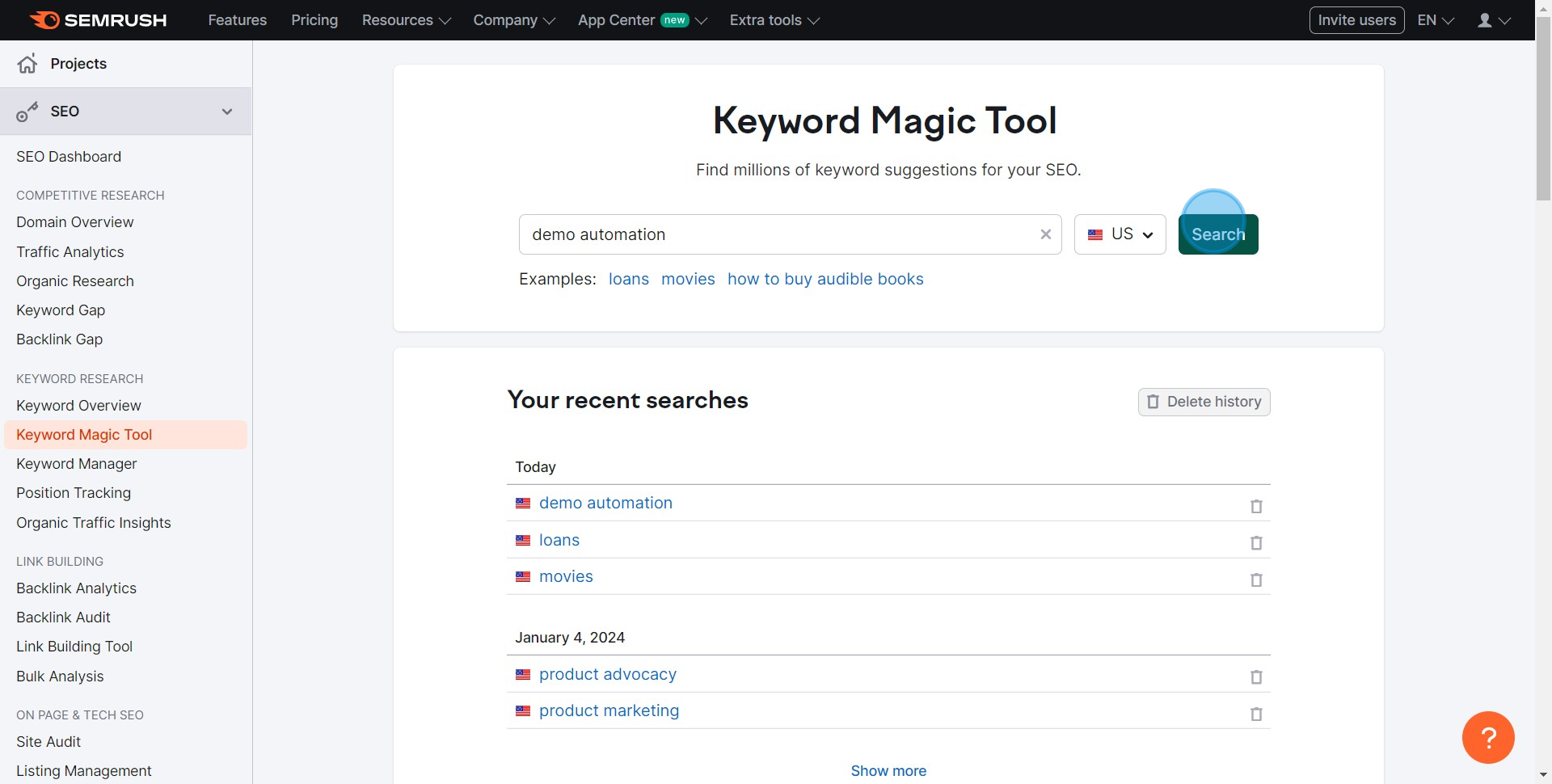
4 Click on "Search"

5. Filtrons ! Choisissez vos options préférées et sélectionnez vos mots-clés.
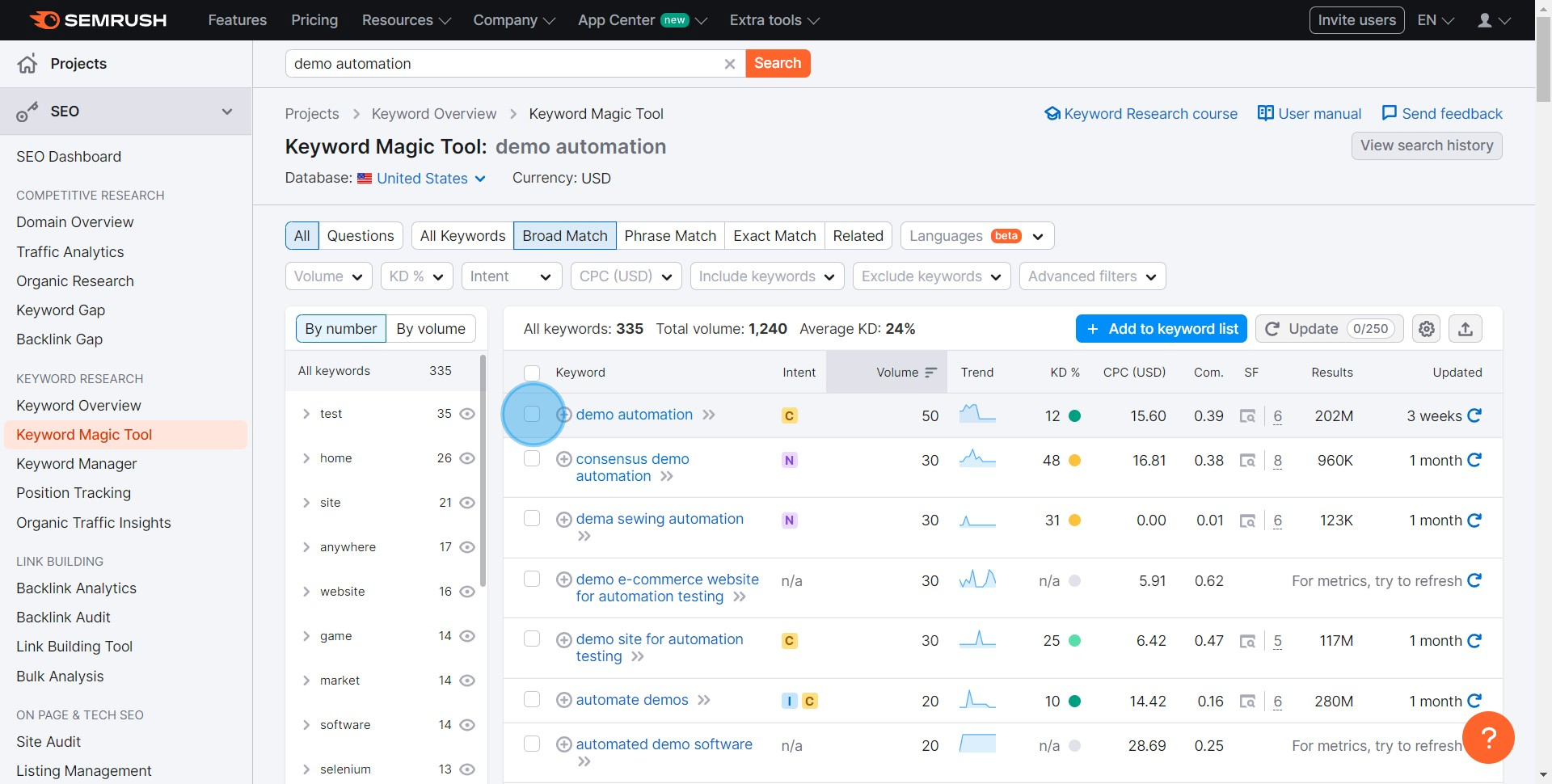
5 Click here

6. Vous avez vos mots-clés ? Ajoutez-les à votre liste.
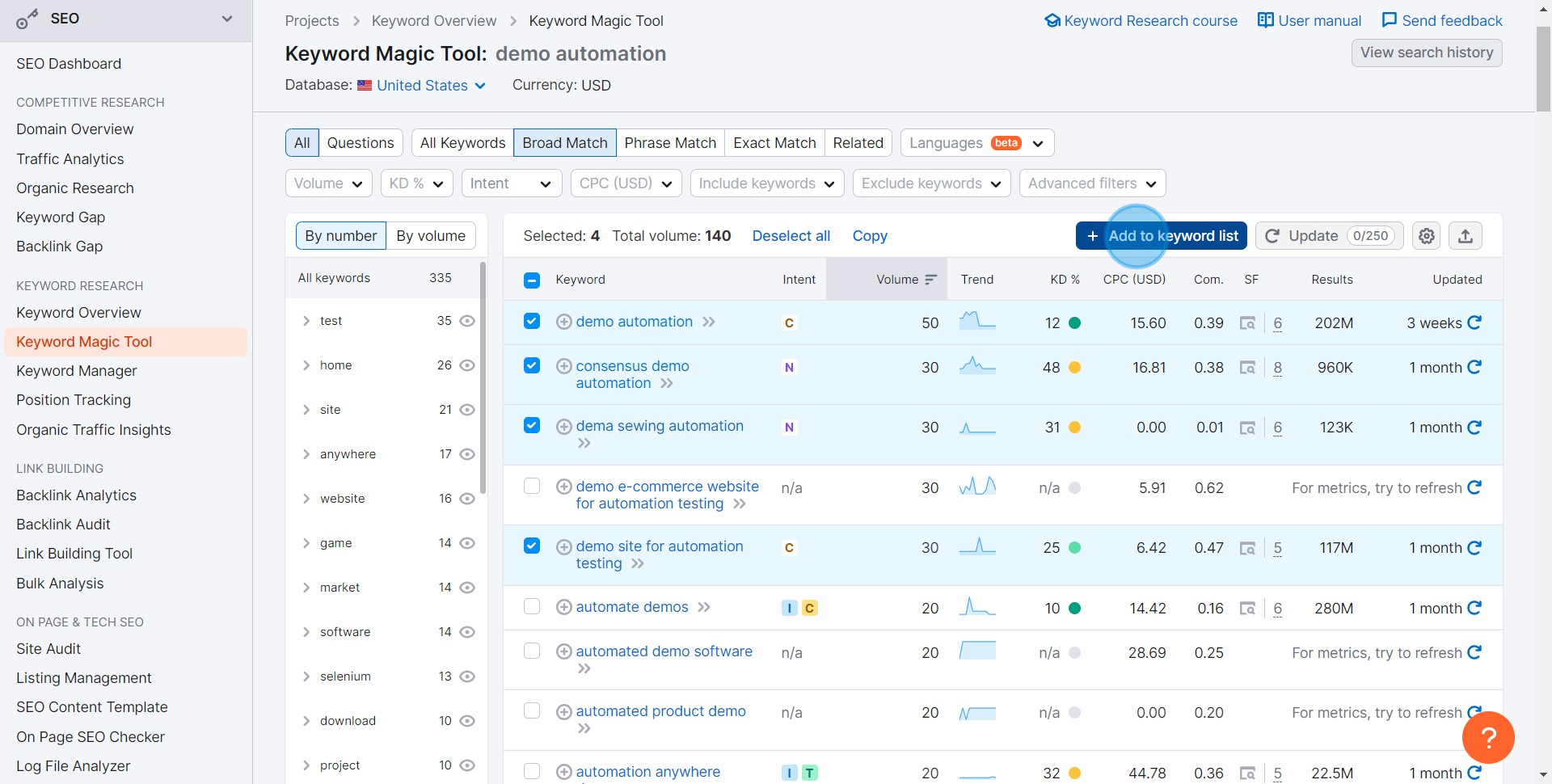
6 Click on "Add to keyword list"

7. Besoin d'une nouvelle liste ? Créez-en une ici.
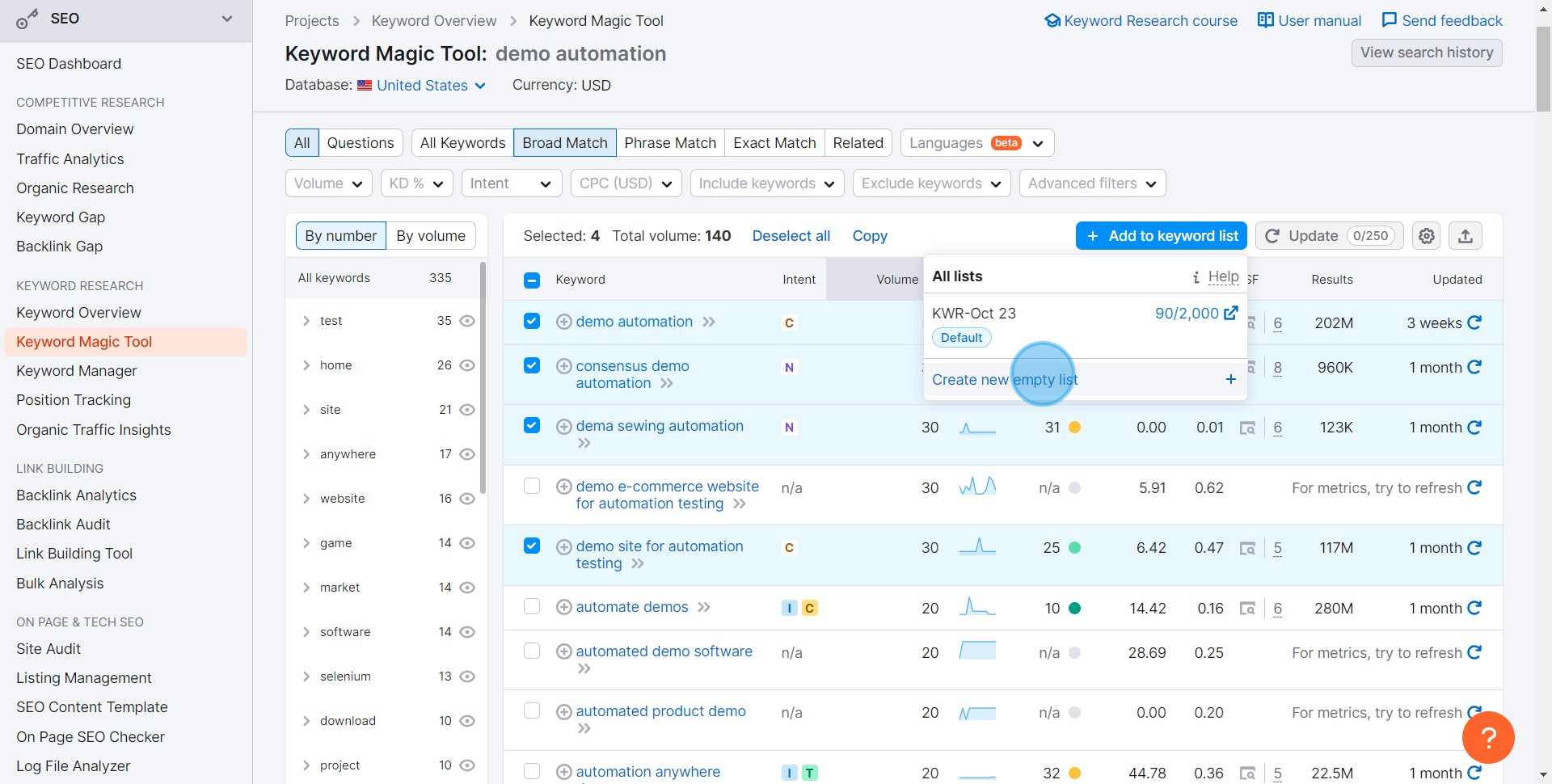
7 Click on "Create new empty list"

8. Prêt à sauvegarder votre travail ? Commencez le processus d'exportation ici.
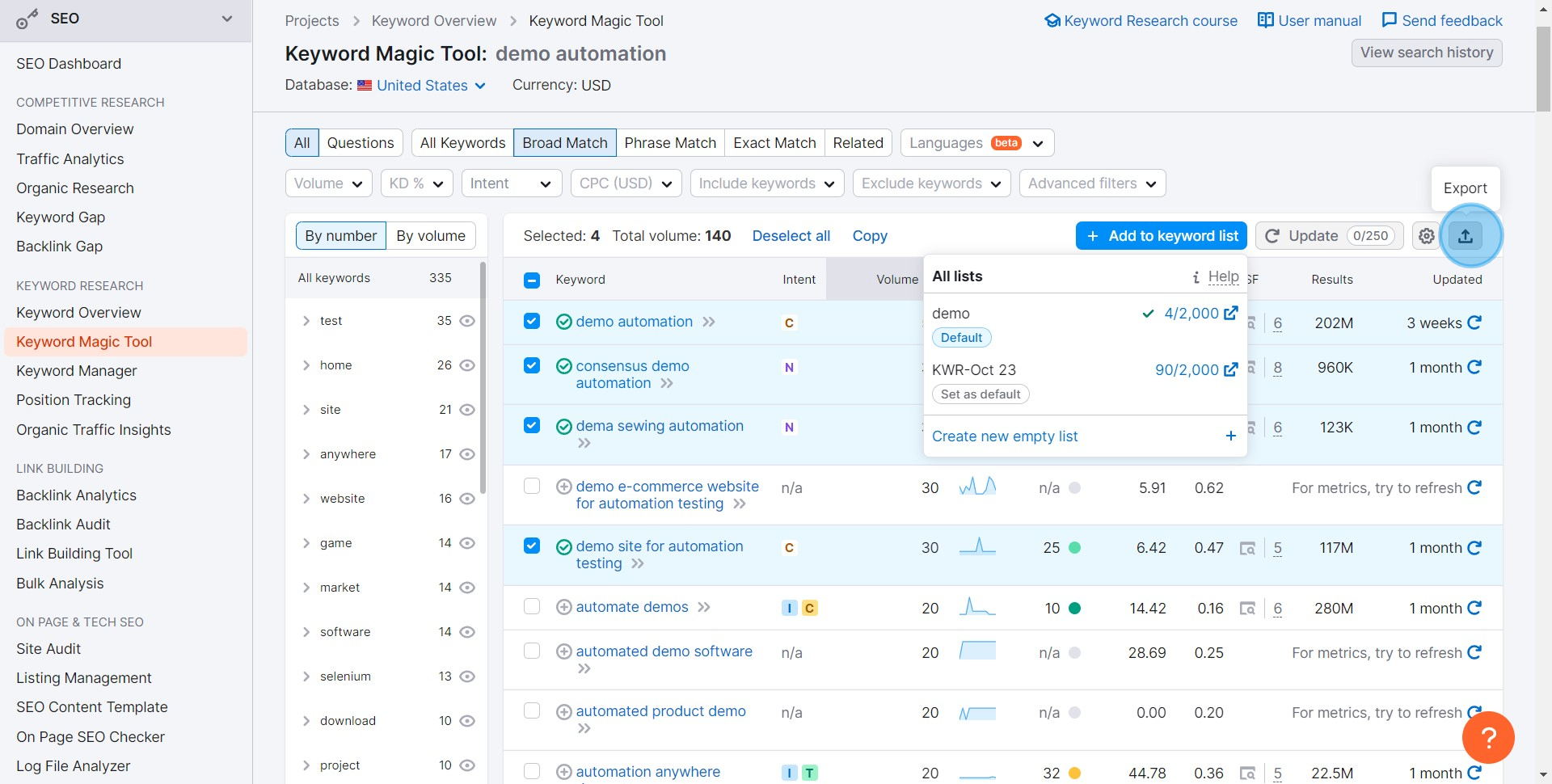
8 Click here

9. Choisissez XLSX si vous voulez un fichier Excel, il sera téléchargé.
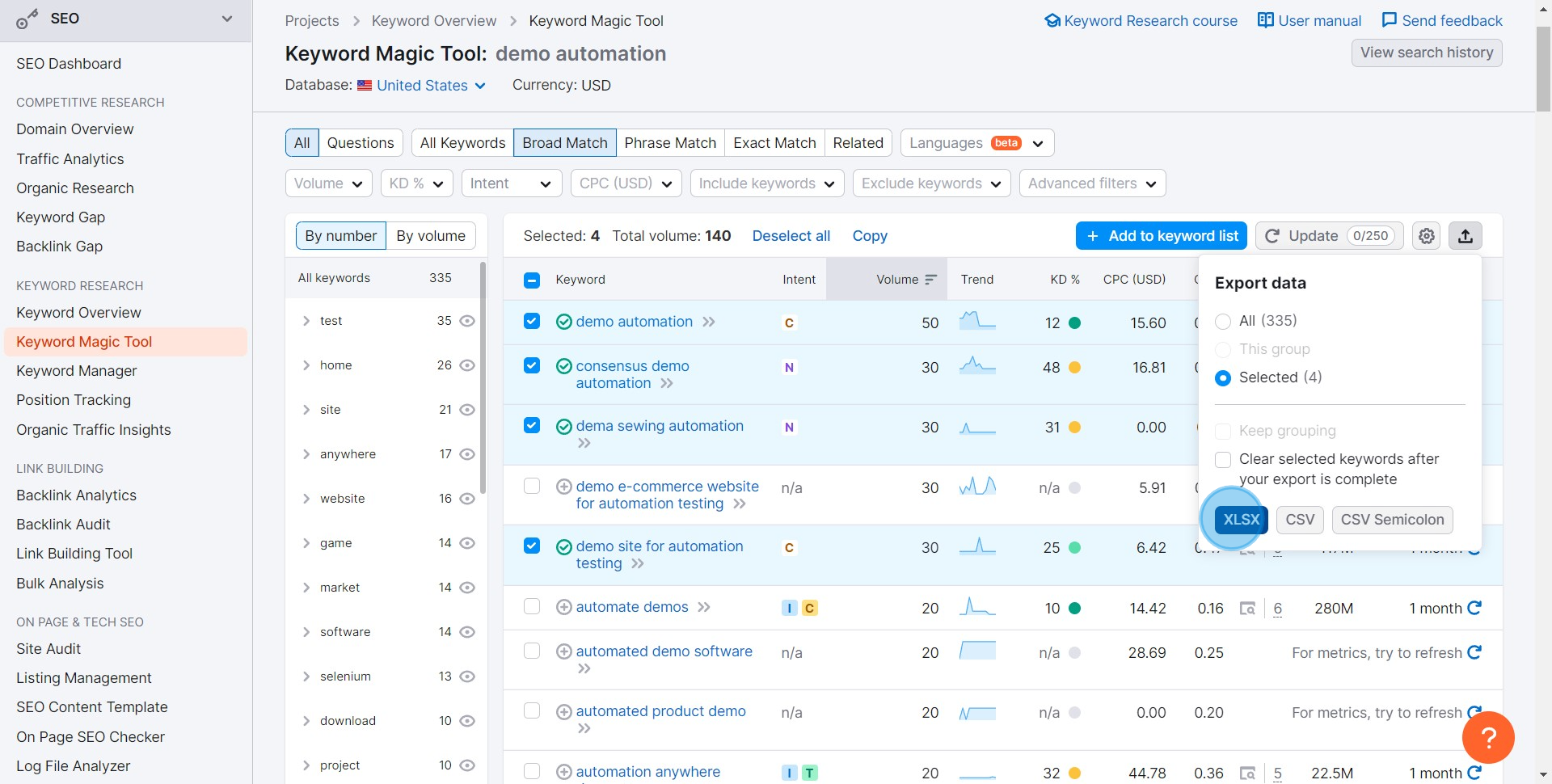
9 Click on "XLSX"

FAQs courantes sur SEMRush

Commonly asked questions about this topic.

Comment effectuer une recherche de mots-clés avec SEMRush ?

Pour effectuer une recherche de mots-clés, connectez-vous à votre compte SEMRush et allez dans l'outil "Aperçu des mots-clés". Entrez un mot-clé ou une expression que vous souhaitez rechercher. SEMRush fournira des indicateurs détaillés tels que le volume de recherche, la difficulté du mot-clé et la densité concurrentielle. Vous pouvez également explorer les mots-clés connexes, les correspondances de phrases et les questions liées à votre mot-clé pour élargir votre recherche.

Puis-je suivre le classement de mon site Web sur SEMRush ?

Oui, vous pouvez suivre le classement de votre site Web en utilisant l'outil "Suivi de position" sur SEMRush. Configurez un nouveau projet pour votre site Web, puis entrez le domaine et les mots-clés que vous souhaitez suivre. SEMRush vous fournira des mises à jour quotidiennes sur le classement de votre site Web pour ces mots-clés, ainsi que des informations sur les classements de vos concurrents et les changements au fil du temps.

Comment effectuer un audit de site avec SEMRush ?

Pour effectuer un audit de site, allez dans l'outil "Audit de site" de SEMRush et configurez un nouveau projet pour votre site Web. Entrez votre domaine et configurez les paramètres de l'audit selon vos besoins, comme la portée du crawl et les paramètres de l'agent utilisateur. SEMRush scannera votre site Web pour détecter les problèmes liés au SEO, tels que les liens brisés, le contenu dupliqué et les erreurs de crawl. Une fois l'audit terminé, vous recevrez un rapport détaillé avec des recommandations pour corriger les problèmes détectés.

Créez votre propre démo étape par étape

Augmentez votre formation et l'adoption de produits avec de magnifiques démos et guides interactifs alimentés par l'IA. Créez votre premier Supademo en quelques secondes gratuitement.

Frequently Asked Questions about comment utiliser l'outil magique de mots clés semrush

Commonly asked questions about this topic.

What tools and platforms support Semrush keyword magic tool?

The right tool depends on your team size, technical maturity, and integration requirements. Look for platforms that solve your specific bottleneck rather than all-in-one solutions that do everything adequately but nothing exceptionally. Interactive demo platforms can help standardize training and documentation across teams, reducing onboarding time and support burden. 76% of teams rate internal enablement impact from interactive demos as high or very high.

What key performance indicators should you track when using Semrush keyword magic tool?

Define 3-5 key metrics that directly tie to business outcomes — avoid vanity metrics that look good but don't drive decisions. Common approaches include time-to-value, adoption rates, cost savings, error reduction, and stakeholder satisfaction scores. Review metrics monthly and use trend data rather than individual data points to evaluate progress. Supademo is rated #1 for easiest setup and fastest implementation on G2. Supademo is rated #1 for easiest setup and fastest implementation on G2. Supademo supports AI voiceover in 15+ languages for global teams.

What are the core components of effective Semrush keyword magic tool?

Effective Semrush keyword magic tool typically involves clear strategy, the right tools, trained people, and measurable outcomes. The specific components vary by organization size and maturity — early-stage teams should focus on fundamentals before adding complexity. Regularly reassess which components deliver the most value and double down on those. Teams that update demos weekly or monthly see ~18% higher impact scores.

What are the best practices for learning Semrush keyword magic tool through interactive demonstrations?

Interactive demo platforms like Supademo let you create clickable, step-by-step guides that standardize training and reduce time-to-proficiency. Teams use them for onboarding, process documentation, and stakeholder presentations — anywhere static screenshots or long documents fall short. The visual format typically sees higher completion rates than traditional documentation. For example, VRIFY reduced enablement content production time by 75% using Supademo.

What common challenges affect Semrush keyword magic tool and how can you address them?

The most common challenges are stakeholder alignment, tool fragmentation, and inconsistent execution across teams. Address alignment by documenting shared goals and success metrics. Reduce tool fragmentation by standardizing on platforms that integrate well together. Improve execution consistency through clear playbooks, templates, and regular calibration sessions. 96.8% of top-performing demos use custom branding to maintain brand consistency.

How do you train a team on Semrush keyword magic tool?

Blend self-paced learning with hands-on practice — lecture-style training has low retention for practical skills. Interactive walkthroughs let team members learn by doing at their own pace, and they can revisit specific steps later as a reference. Follow up with regular coaching sessions and a shared knowledge base for ongoing support. Rev.io now creates training materials in hours instead of weeks, with a 50% smaller team.

Who benefits most from Semrush keyword magic tool?

Teams dealing with scale, complexity, or cross-functional coordination tend to see the biggest returns from Semrush keyword magic tool. SaaS companies, enterprises with distributed teams, and fast-growing organizations often have the most urgent need. The benefits compound over time — early investment in the right approach pays dividends as you scale. Learn more about Supademo's features. beehiiv saw 50% better conversion rates after implementing interactive product demos.
Vimal Kumar

Vimal Kumar

Product Operations Associate

Vimal Kumar helps build and grow Supademo’s team and GTM efforts, with a focus on figuring out growth levers and improving product traction.

More from the blog

How to Remove 'Powered by Shopify'

How to Remove 'Powered by Shopify'

Learn how to easily remove the 'Powered by Shopify' text from your online store with step-by-step instructions and tips to customize your Shopify storefront.

Vimal Kumar
Vimal KumarJan 3, 2026
How to Add Products to Shopify

How to Add Products to Shopify

Learn step-by-step how to add products to your Shopify store effortlessly, including tips on product details, images, pricing, and inventory management to boost your online sales.

Vimal Kumar
Vimal KumarDec 17, 2025
How to Deactivate Your Shopify Store

How to Deactivate Your Shopify Store

Learn step-by-step how to deactivate your Shopify store easily, including important considerations and tips to pause or close your shop without losing data.

Vimal Kumar
Vimal KumarDec 17, 2025
How to Remove 'Powered by Shopify'

How to Remove 'Powered by Shopify'

Learn how to easily remove the 'Powered by Shopify' text from your online store with step-by-step instructions and tips to customize your Shopify storefront.

Vimal Kumar
Vimal KumarDec 17, 2025
How to Create a Shopify Account

How to Create a Shopify Account

Learn step-by-step how to create a Shopify account quickly and easily, set up your online store, and start selling your products in no time.

Vimal Kumar
Vimal KumarDec 17, 2025
How to Create a Stripe Account

How to Create a Stripe Account

Learn how to create a Stripe account quickly and easily with our step-by-step guide, perfect for beginners looking to start accepting online payments.

Vimal Kumar
Vimal KumarDec 17, 2025