So verwenden Sie das SEMRush Keyword Magic Tool

Vimal Kumar
Vimal Kumar·
So verwenden Sie das SEMRush Keyword Magic Tool

Übersicht:

Vereinfachen Sie Ihre Keyword-Recherche mit dem SEMRush Keyword Magic Tool-Leitfaden. Optimieren Sie Ihre SEO-Strategie, indem Sie relevante Keywords effizient organisieren und identifizieren. Verbessern Sie die Benutzerfreundlichkeit, indem Sie die Navigation nahtlos und die Informationsbeschaffung mühelos gestalten. Dieser umfassende Leitfaden führt Sie durch den Prozess der Nutzung des SEMRush Keyword Magic Tools und hilft Ihnen, die Effizienz und Klarheit im Keyword-Management zu steigern, um Ihre Suchmaschinenoptimierung in Ihren digitalen Marketingbemühungen zu verbessern.

Für wen ist SEMrush am besten geeignet?

SEMrush ist am besten für eine breite Palette von Fachleuten geeignet, darunter digitale Vermarkter, SEO-Spezialisten und Content-Ersteller. Zum Beispiel können digitale Vermarkter SEMrush für die Keyword-Recherche und Wettbewerbsanalyse nutzen, SEO-Spezialisten können es für Site-Audits und Backlink-Tracking verwenden, und Content-Ersteller können es für die Optimierung von Inhalten und die Verfolgung ihrer Leistung einsetzen, wobei alle von den umfassenden SEO- und Marketing-Tools von SEMrush profitieren.

Wie benutzt man das SEMRush Keyword Magic Tool?

Interactive demo powered by Supademo

1. Beginnen wir mit SEO, bitte hier klicken.
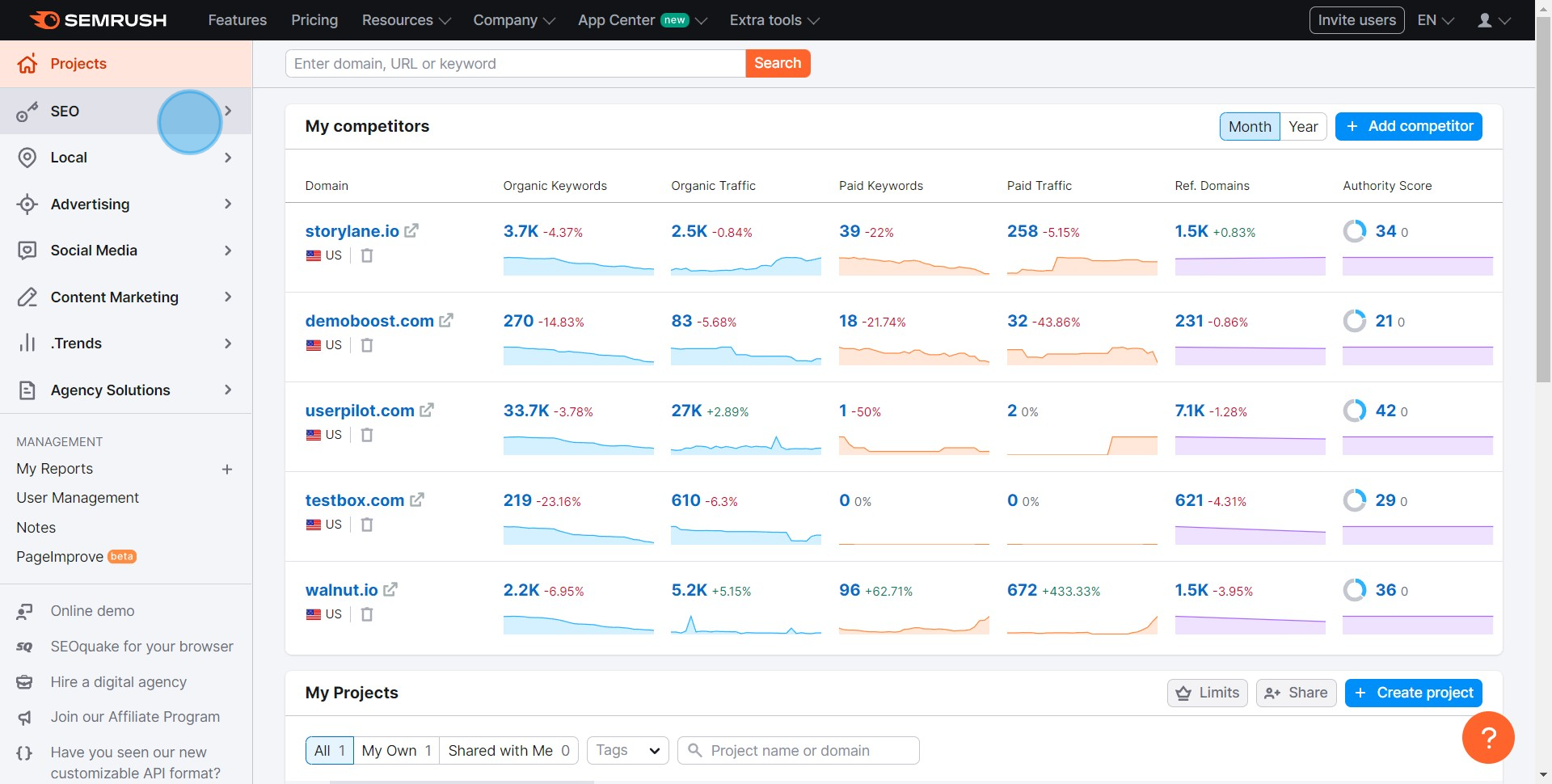
1 Click on "SEO"

2. Navigieren Sie jetzt zum Keyword Magic Tool.
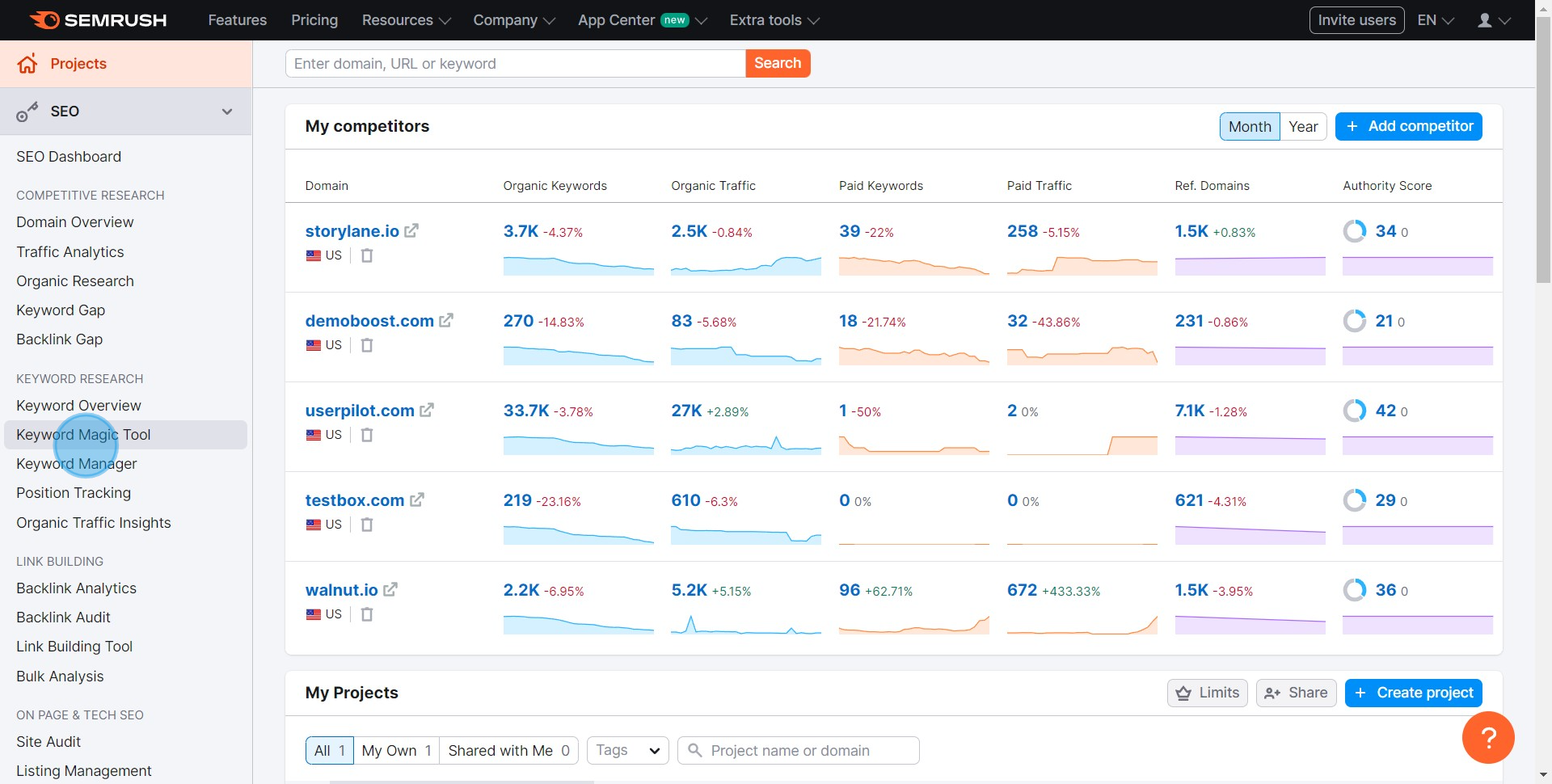
2 Click on "Keyword Magic Tool"

3. Zeit zu suchen! Bitte geben Sie Ihre Keywords ein.
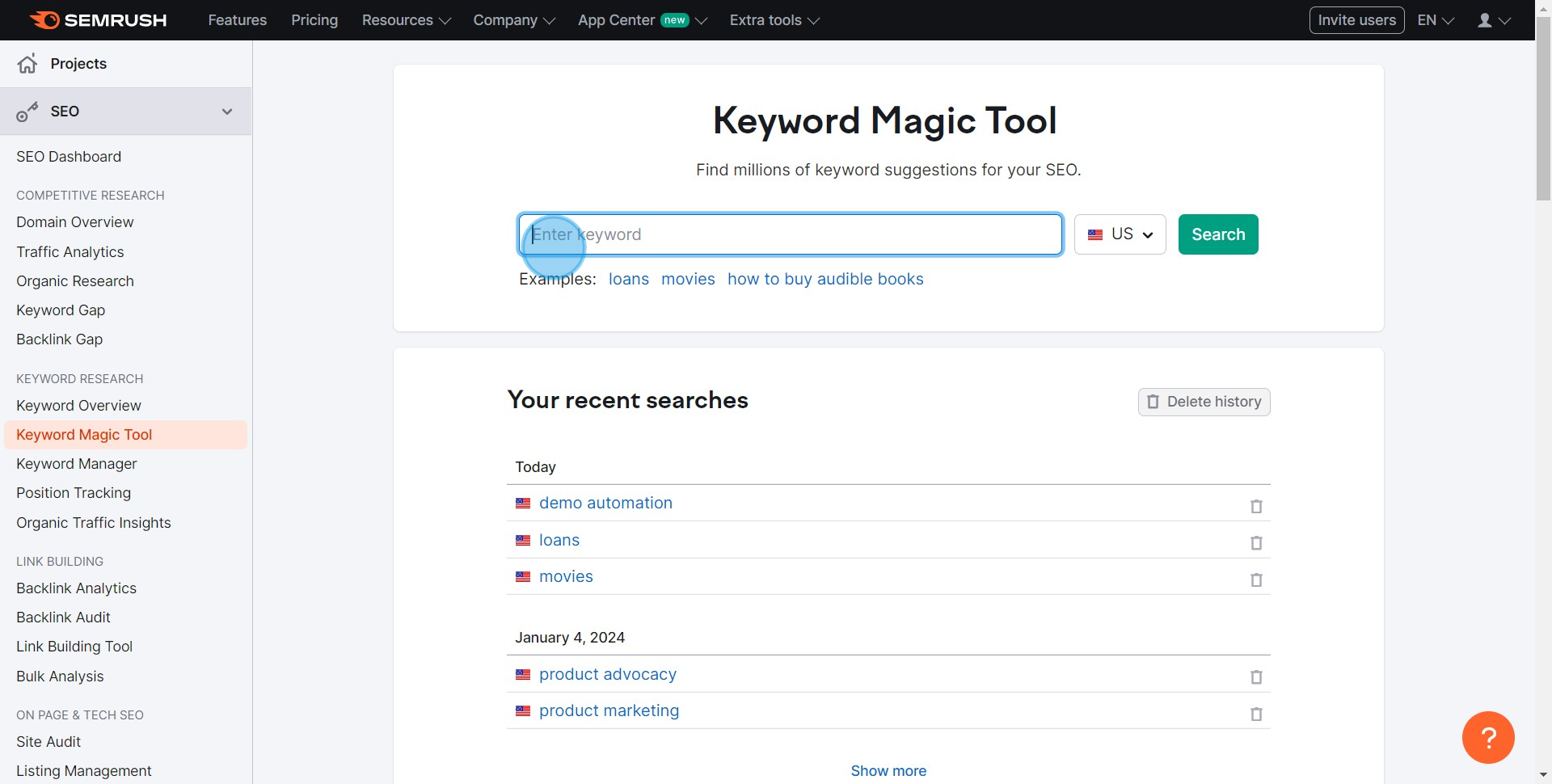
3 Click here

4. Bereit? Klicken Sie hier, um die Suche zu starten.
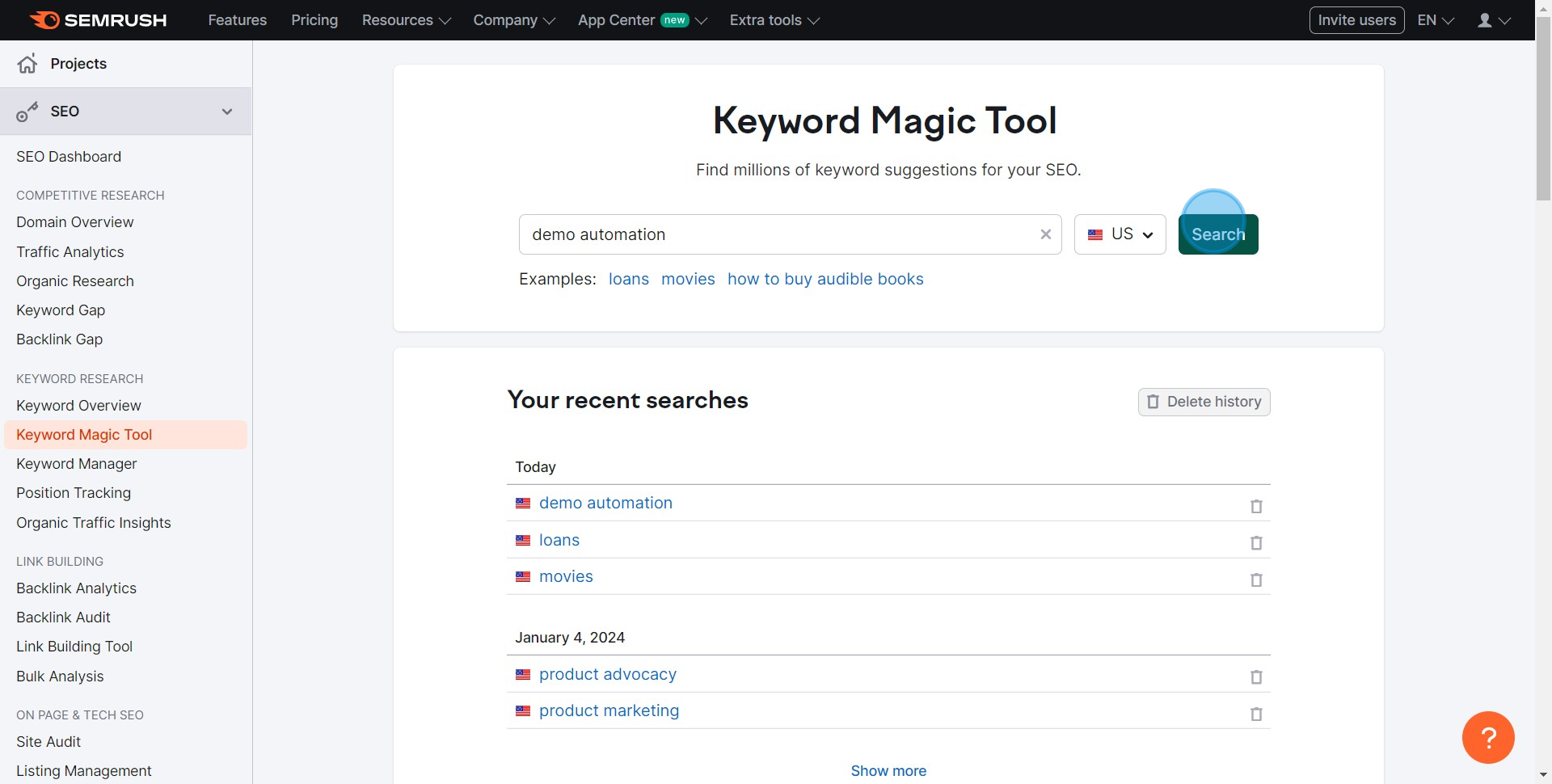
4 Click on "Search"

5. Lassen Sie uns filtern! Wählen Sie Ihre bevorzugten Optionen und wählen Sie Ihre Keywords aus.
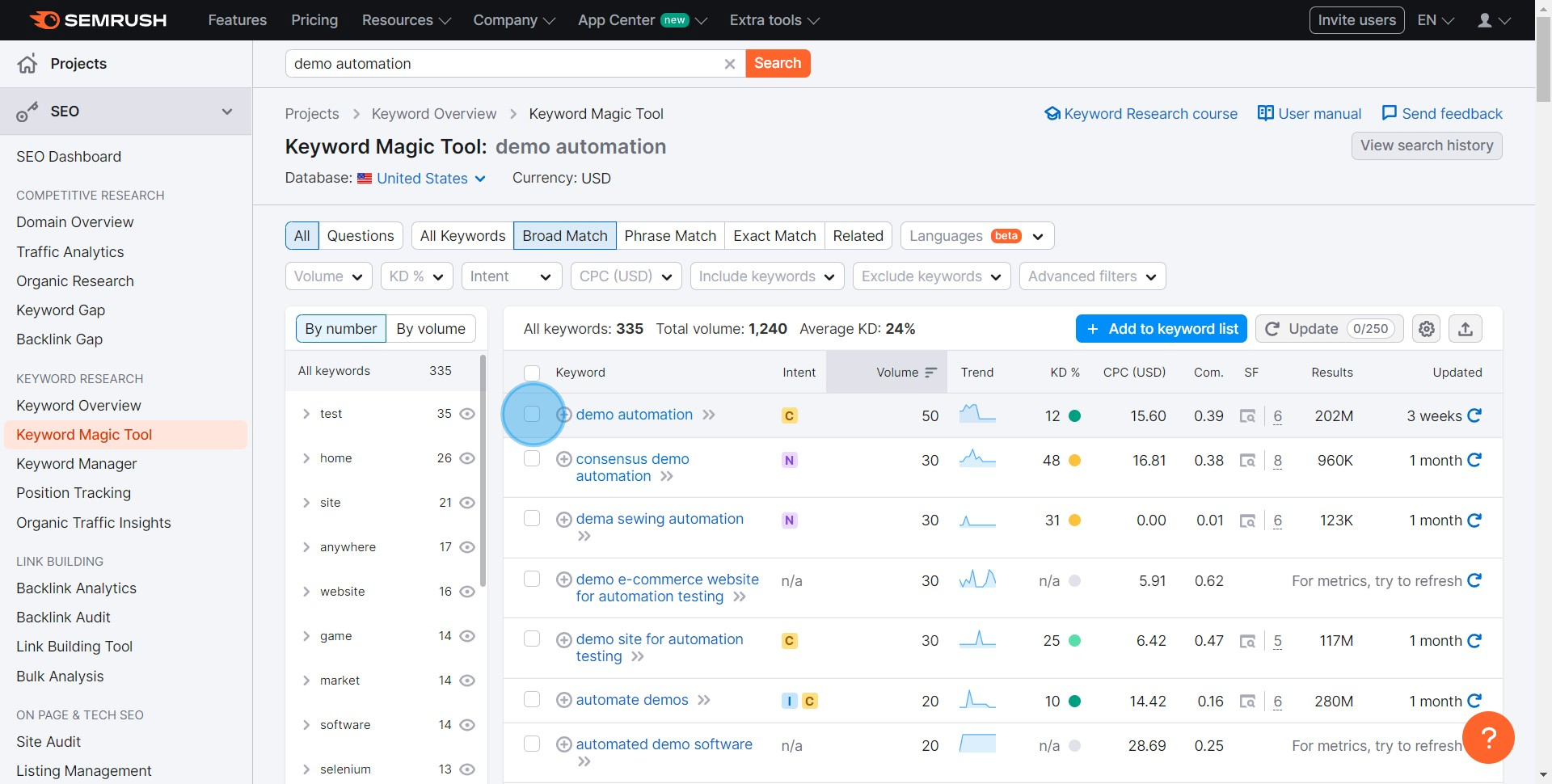
5 Click here

6. Haben Sie Ihre Keywords? Fügen Sie sie zu Ihrer Liste hinzu.
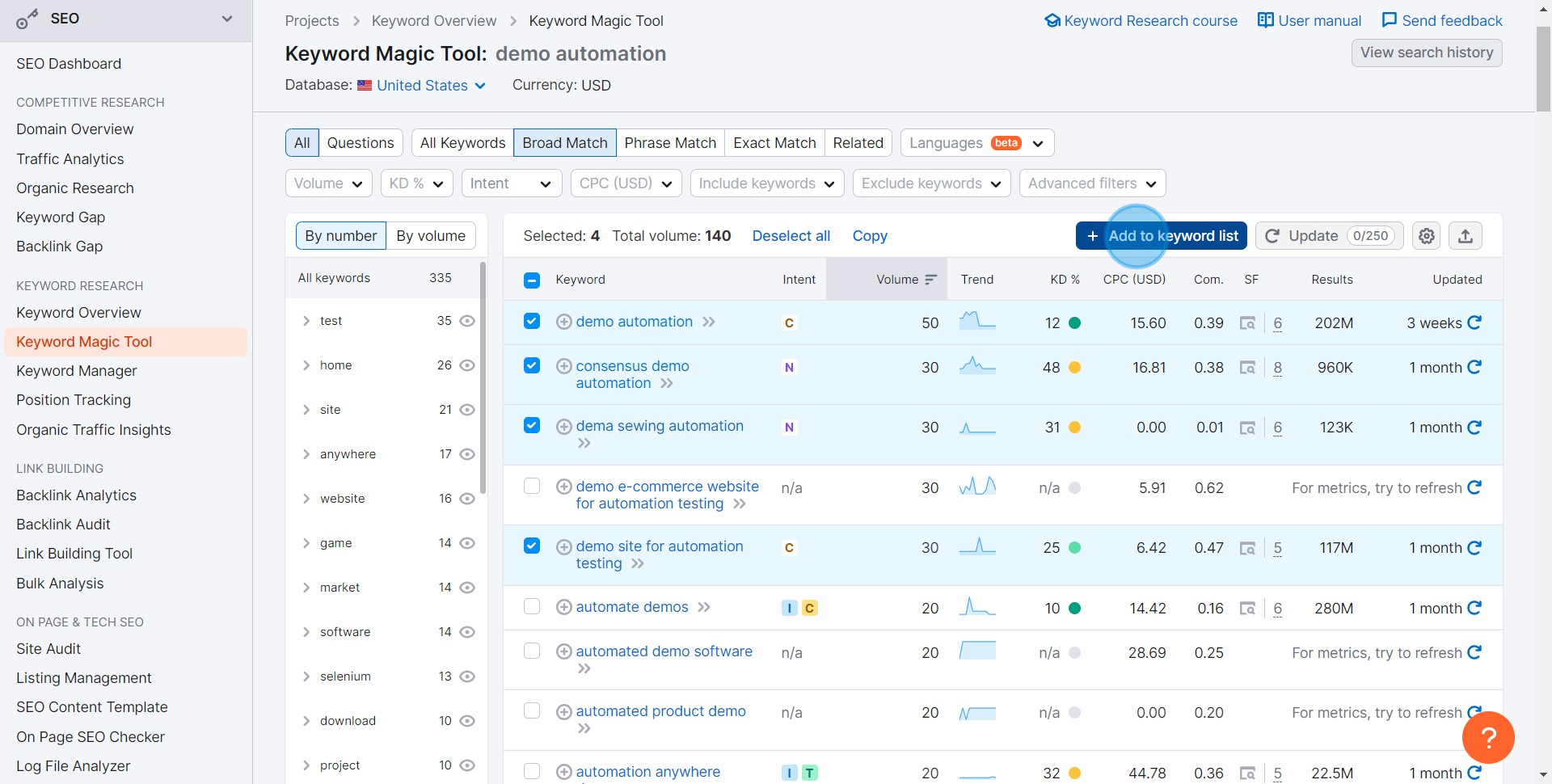
6 Click on "Add to keyword list"

7. Brauchen Sie eine neue Liste? Erstellen Sie hier eine.
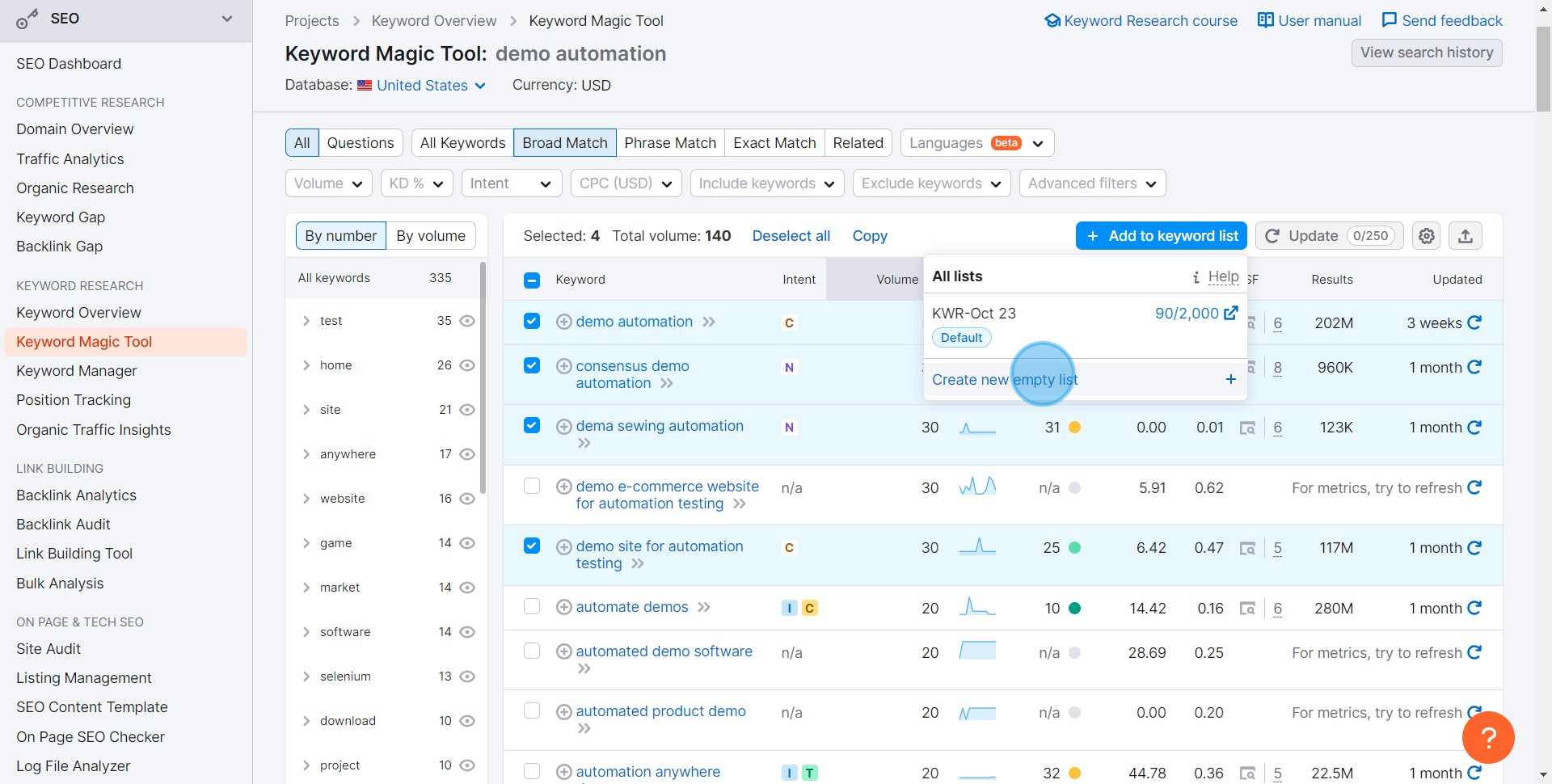
7 Click on "Create new empty list"

8. Bereit, Ihre Arbeit zu speichern? Starten Sie hier den Exportprozess.
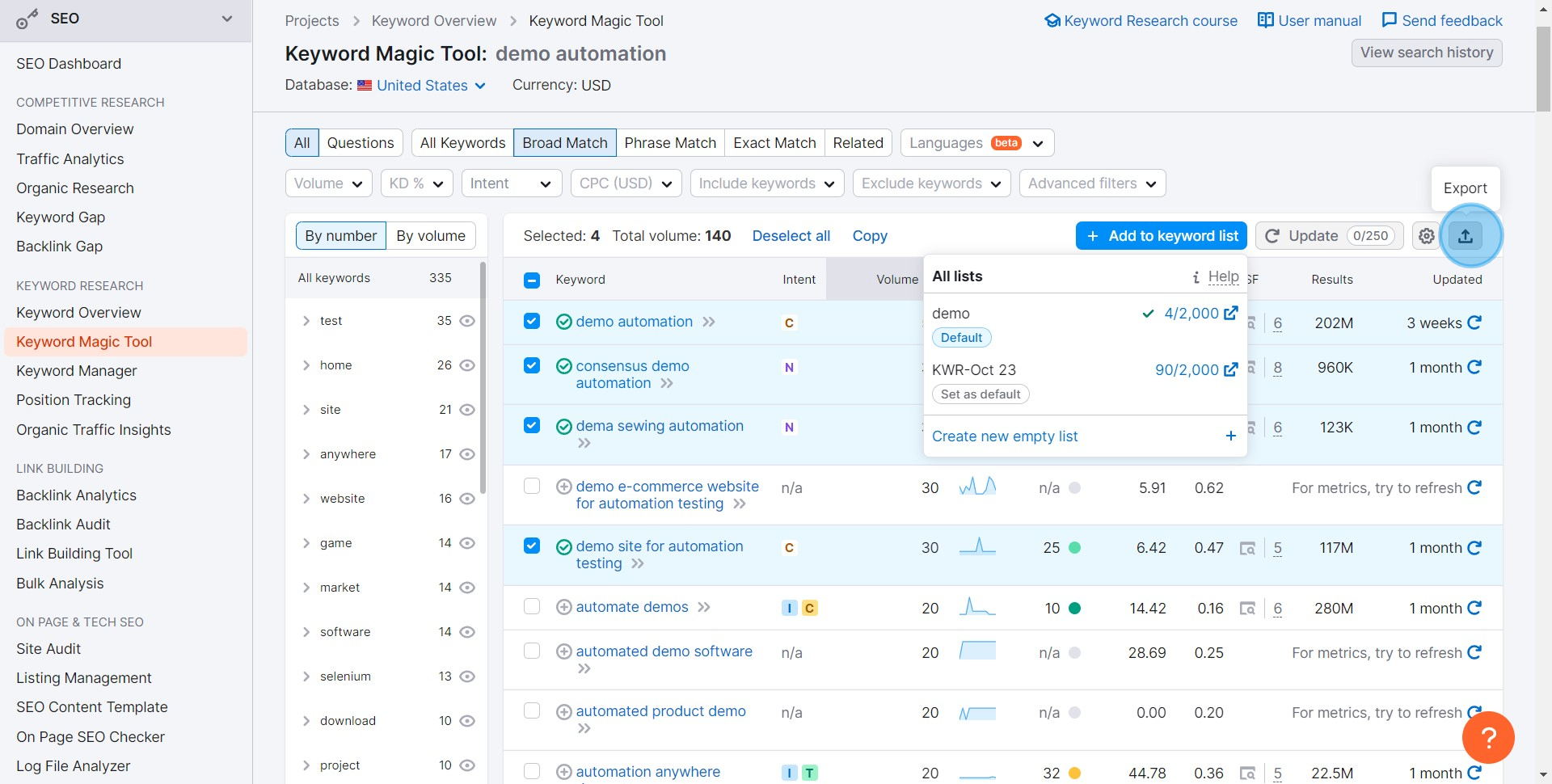
8 Click here

9. Wählen Sie XLSX, wenn Sie eine Excel-Datei wünschen, und sie wird heruntergeladen.
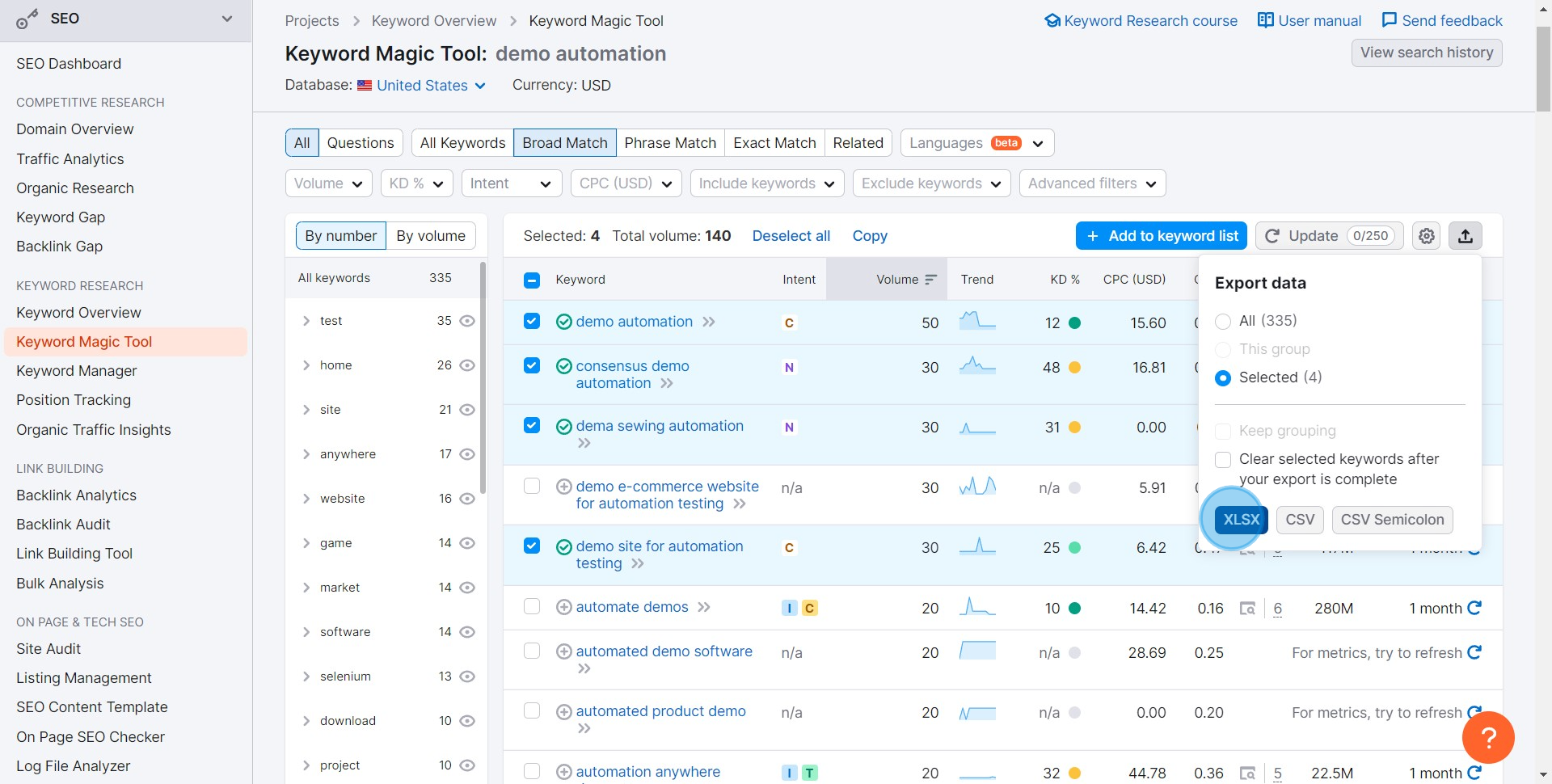
9 Click on "XLSX"

Häufig gestellte Fragen zu SEMRush

Wie führe ich eine Keyword-Recherche mit SEMRush durch?

Um eine Keyword-Recherche durchzuführen, loggen Sie sich in Ihr SEMRush-Konto ein und navigieren Sie zum „Keyword-Übersicht“-Tool. Geben Sie ein Keyword oder eine Phrase ein, die Sie untersuchen möchten. SEMRush liefert Ihnen detaillierte Metriken wie Suchvolumen, Keyword-Schwierigkeit und Wettbewerbsdichte. Sie können auch verwandte Keywords, Phrasen-Matches und Fragen zu Ihrem Keyword erkunden, um Ihre Recherche zu erweitern.

Kann ich das Ranking meiner Website auf SEMRush verfolgen?

Ja, Sie können das Ranking Ihrer Website mit dem „Position Tracking“-Tool in SEMRush verfolgen. Richten Sie ein neues Projekt für Ihre Website ein, geben Sie die Domain und die Keywords ein, die Sie verfolgen möchten. SEMRush bietet tägliche Updates zu den Rankings Ihrer Website für diese Keywords sowie Einblicke in die Rankings Ihrer Wettbewerber und Veränderungen im Laufe der Zeit.

Wie führe ich einen Website-Audit mit SEMRush durch?

Um einen Website-Audit durchzuführen, gehen Sie zum „Site Audit“-Tool in SEMRush und richten Sie ein neues Projekt für Ihre Website ein. Geben Sie Ihre Domain ein und konfigurieren Sie die Audit-Einstellungen nach Bedarf, z. B. Crawl-Umfang und User-Agent-Einstellungen. SEMRush scannt Ihre Website nach SEO-bezogenen Problemen wie defekten Links, doppeltem Inhalt und Crawl-Fehlern. Nach Abschluss des Audits erhalten Sie einen detaillierten Bericht mit Empfehlungen zur Behebung der festgestellten Probleme.

Erstellen Sie Ihr eigenes Schritt-für-Schritt-Demo

Erweitern Sie Ihre Schulung und Produktakzeptanz mit wunderschönen, KI-gestützten interaktiven Demos und Anleitungen. Erstellen Sie in wenigen Sekunden Ihr erstes Supademo kostenlos.

Frequently Asked Questions about so verwenden sie das semrush keyword magic tool

Commonly asked questions about this topic.

What is the Keyword Magic Tool and how do I access it in SEMRush?

Define 3-5 key metrics that directly tie to business outcomes — avoid vanity metrics that look good but don't drive decisions. Common approaches include time-to-value, adoption rates, cost savings, error reduction, and stakeholder satisfaction scores. Review metrics monthly and use trend data rather than individual data points to evaluate progress. 45% of teams adopted interactive demos specifically to solve onboarding friction.

How do I filter keyword results by search volume and difficulty?

Frame the business case around metrics executives care about — revenue impact, cost savings, or risk reduction. Start with a pilot that demonstrates measurable results within 30-60 days. Present data alongside competitive context: what peers and competitors are doing in this space and the cost of inaction. Bullhorn achieved 2x faster production and a 20% increase in demo engagement with Supademo.

What metrics should I analyze when researching keywords with Magic Tool?

Begin with an audit of your current state — identify gaps, redundancies, and quick wins. Select one or two focus areas rather than trying to improve everything simultaneously. Assigner-in-jira) clear ownership for each initiative and set 90-day milestones to maintain accountability without over-planning. Supademo integrates with 30+ tools including HubSpot, Salesforce, Slack, and more, helping teams report an average 85% time savings on demo creation.

How can I export keyword data from the Magic Tool for further analysis?

Effective so verwenden sie das semrush keyword magic tool typically involves clear strategy, the right tools, trained people, and measurable outcomes. The specific components vary by organization size and maturity — early-stage teams should focus on fundamentals before adding complexity. Regularly reassess which components deliver the most value and double down on those. For context, over 150,000 professionals use Supademo to create interactive demos. Supademo holds a 4.7/5 rating on G2 based on verified user reviews.

How do I use competitor keywords to find new keyword opportunities?

Map your current state, define your target state, and identify the gaps between them. Prioritize initiatives by impact and feasibility — quick wins build credibility for larger investments. Review the roadmap quarterly and adjust based on what's working, market changes, and shifting organizational priorities. Learn more about Supademo's features. 76% of teams rate internal enablement impact from best arcade alternatives for 2026s as high or very high.

What's the difference between exact match and broad match in Magic Tool?

AI-assisted automation, real-time analytics, and personalization at scale are reshaping so verwenden sie das semrush keyword magic tool in 2026. Organizations are moving from manual, one-size-fits-all approaches to adaptive systems that adjust based on user behavior and outcomes. The winners are teams that adopt new capabilities incrementally rather than attempting wholesale transformation. This is backed by data — the State of Interactive Demos 2026 report found 78% of teams now use interactive demos in 2 or more use cases.

How do I identify long-tail keywords using SEMRush's Magic Tool?

The right tool depends on your team size, technical maturity, and integration requirements. Look for platforms that solve your specific bottleneck rather than all-in-one solutions that do everything adequately but nothing exceptionally. Start with trials or free tiers to validate fit before committing budget — switching costs are high once data and workflows are embedded. Supademo holds a 4.7/5 rating on G2 based on verified user reviews. Supademo is rated #1 for easiest setup and fastest implementation on G2.
Vimal Kumar
Vimal Kumar

Product Operations Associate

Vimal Kumar helps build and grow Supademo’s team and GTM efforts, with a focus on figuring out growth levers and improving product traction.

More from the blog

How to Remove 'Powered by Shopify'

How to Remove 'Powered by Shopify'

Learn how to easily remove the 'Powered by Shopify' text from your online store with step-by-step instructions and tips to customize your Shopify storefront.

Vimal Kumar
Vimal KumarJan 3, 2026
How to Add Products to Shopify

How to Add Products to Shopify

Learn step-by-step how to add products to your Shopify store effortlessly, including tips on product details, images, pricing, and inventory management to boost your online sales.

Vimal Kumar
Vimal KumarDec 17, 2025
How to Deactivate Your Shopify Store

How to Deactivate Your Shopify Store

Learn step-by-step how to deactivate your Shopify store easily, including important considerations and tips to pause or close your shop without losing data.

Vimal Kumar
Vimal KumarDec 17, 2025
How to Remove 'Powered by Shopify'

How to Remove 'Powered by Shopify'

Learn how to easily remove the 'Powered by Shopify' text from your online store with step-by-step instructions and tips to customize your Shopify storefront.

Vimal Kumar
Vimal KumarDec 17, 2025
How to Create a Shopify Account

How to Create a Shopify Account

Learn step-by-step how to create a Shopify account quickly and easily, set up your online store, and start selling your products in no time.

Vimal Kumar
Vimal KumarDec 17, 2025
How to Create a Stripe Account

How to Create a Stripe Account

Learn how to create a Stripe account quickly and easily with our step-by-step guide, perfect for beginners looking to start accepting online payments.

Vimal Kumar
Vimal KumarDec 17, 2025